


Your email has been unreliable, and a notice arrives offering to recover the messages you missed. It sounds like the explanation you were waiting for.
The request feels routine enough to handle between meetings. Before you try it, take a closer look at what that recovery process actually asks you to trust.
Overview
A real disruption provides the cover story
In a campaign examined by Cofense, an outage notice sent recipients to a fake Microsoft sign-in. The page collected login details instead of recovering mail.
Microsoft is the impersonated service, not the operator of this message. An interruption to email delivery does not authenticate a separate request for your password.
The central question is simple: are you checking your account through its established route, or trusting a new route supplied by an unexpected message?
Lost access and lost messages are different problems
A service interruption can prevent normal email use. Quarantine, meanwhile, is a security feature that can hold particular messages for review under your organization’s policies.
Those situations can look similar when you are waiting for an important reply. They still need different checks, rather than one unfamiliar recovery button.
You should not have to guess which problem occurred. Your usual support team can check the account and the service without relying on the suspicious notice.
Your response depends on what you submitted
- Received the email only: report it without using its recovery link.
- Opened the page only: close it and preserve the message for investigation.
- Entered a password: treat that password as exposed, even after an error.
- Approved another request: tell your administrator exactly what appeared and what you accepted.
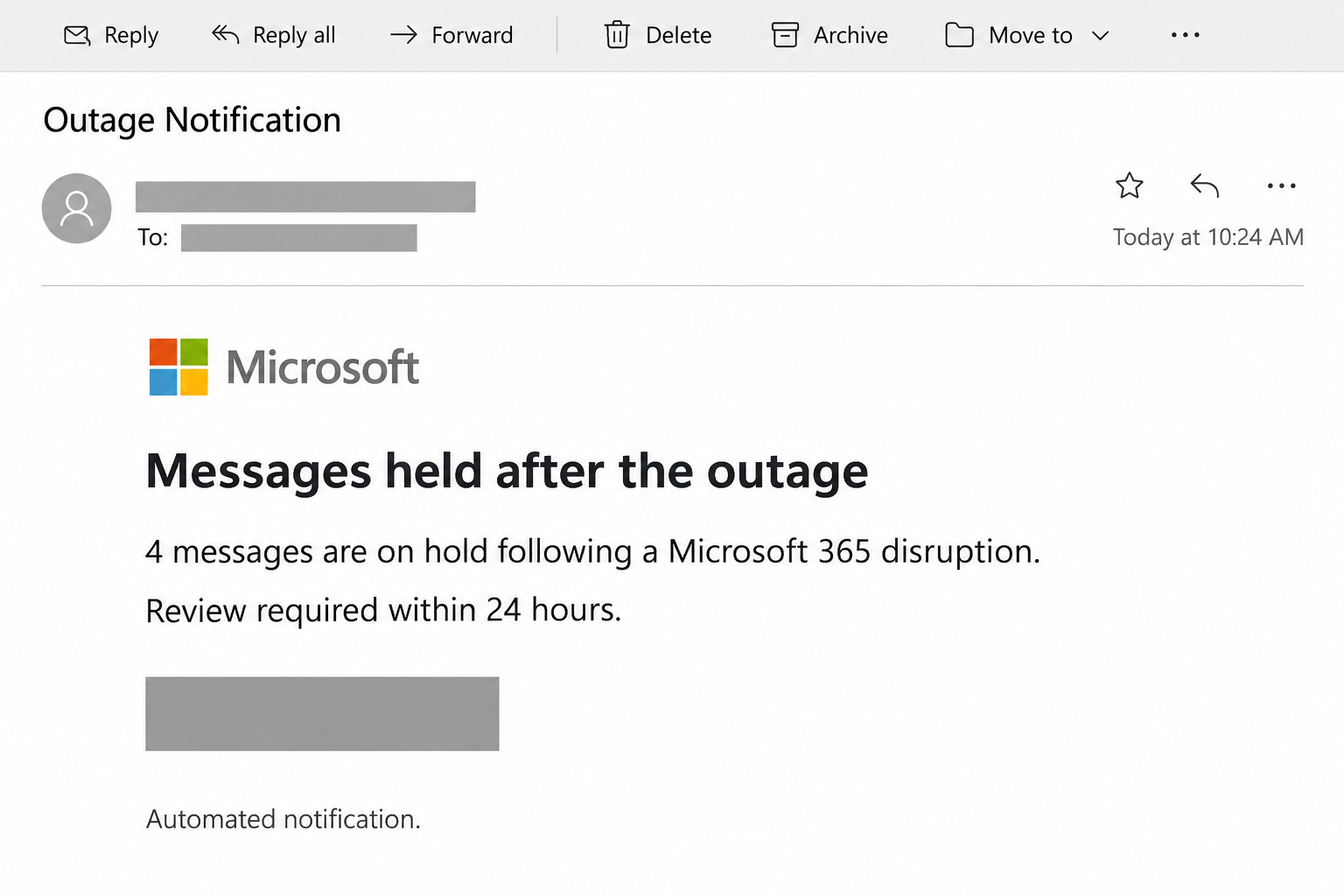
The image above reconstructs the email’s approach, with identifying information and its recovery control concealed. It illustrates the lure without reproducing an active recovery link.
How the Microsoft Outage Email Scam Works
Step 1: The notice turns a familiar problem into a deadline
The reported notice used the recipient’s organization in its presentation and claimed messages would disappear unless released within 24 hours.
That deadline changes the task from checking a problem to preventing an immediate loss. A busy reader may act before considering who sent the instruction.
An organization name in the subject can make the notice look internal. Check the actual sender and your normal support channel before acting on it.
Step 2: The recovery link introduces a different destination
The Restore Messages link led to an imitation Microsoft 365 sign-in, rather than the recipient’s ordinary mailbox or a verified quarantine entry.
At this point, the reader has left the email but may still be following its story. Familiar colors and logos make the transition feel continuous.
The page’s familiar logo does not identify who receives your password. Use your regular sign-in route before deciding whether your mail really needs recovery.
Step 3: A password error encourages another submission
Cofense observed the page reject initial credentials, encouraging another attempt. A visitor could interpret that response as a familiar login mistake.
An error message describes what the page chooses to display. It does not tell you whether the information already left your browser.
If you suspect the first password was wrong, do not try other passwords there. That can expose another secret while giving you no reliable answer.
Step 4: A genuine destination closes the deceptive journey
After the second submission, the page took the visitor to Microsoft. Reaching the genuine site later could hide what happened on the earlier page.
Think about each page separately, particularly the one where you typed. The final address cannot retroactively change who received an earlier submission.
Keep that sequence in your report if you remember it. Saying you eventually reached Microsoft leaves out the part your security team most needs to investigate.
Step 5: Familiar infrastructure makes the link harder to judge casually
Published indicators included a click-tracking route and a cloud-storage webpage. Recognizable infrastructure did not make the form an official Microsoft recovery tool.
A long link can contain several destinations, tracking parameters, or redirects. Reading the first recognizable name is not enough to establish who receives the password.
You do not need to unravel that chain yourself. Stop at the unexpected sign-in and let your support team inspect the saved message safely.
Check Missing Mail Without Following the Notice
Begin with your normal mailbox and help desk
Open Outlook using your existing application or established bookmark. Avoid using the message’s link as the starting point for deciding whether the message is trustworthy.
Look for the missing conversation through your normal mailbox search. Check whether the issue affects one message, one sender, or the ability to use email generally.
If you know the sender, ask through an existing contact method whether they sent the message. A delivery question should not require sharing your login.
These observations help support staff choose the right investigation. They do not require you to enter your password into a newly supplied website.
Contact the help desk through the company directory or another channel you already use. A support address inside the suspicious email belongs to the same unverified request.
If that help portal requires an account you cannot access, ask a colleague for the established alternative. Do not borrow their password to get through.
Let an administrator check service health
Microsoft provides an administrative Health dashboard for checking service conditions. Access depends on the person’s role, so an ordinary mailbox user may need their administrator’s help.
Ask whether there is an incident affecting your organization’s email and whether any user action is needed. Separate that answer from the notice’s own explanation.
If the service is disrupted, follow the instructions supplied through your established internal channel. Do not assume every message mentioning the same disruption is part of that response.
Check quarantine through its verified route
Microsoft’s quarantine guidance explains that users can manage some held messages in the Defender portal. Your organization’s policy determines which actions are available.
Use the portal address confirmed by your administrator or your existing company instructions. Find the actual message there before considering any release action.
Being unable to see or release an item can be expected under the policy. Ask the administrator instead of looking for a website that promises to override it.
A genuine quarantine process can include notifications and expiry dates. The safe distinction is the independently verified process, not a claim that all held-mail emails are fraudulent.
What to Do if You Have Fallen Victim to This Scam
-
Stop the sign-in attempt and record your exposure. Close the suspicious page without retrying, then write down whether you clicked, typed, submitted, or approved anything.
Remembering an approximate time is useful. If you tried more than one password, record which accounts use those passwords without putting the passwords in your report.
Do not feel obliged to recreate the journey to obtain better evidence. Existing email and browser records are safer than repeating the submission.
-
Explain any uncertainty about the form. Tell support whether a password manager filled it or you typed manually, and whether you remember submitting the information.
If you started typing but cannot remember what happened next, say that. Do not reopen the form to test whether it captures partial entries.
-
Reach your real IT team promptly. Use a known telephone number, internal reporting tool, or another established channel, especially if you entered work credentials.
Tell them the incident began with a missing-mail recovery notice. Mention the password rejection, any later approvals, and the eventual destination if you remember those details.
If email access is unreliable, use another verified communication method. Waiting for the same potentially compromised mailbox to work again can delay the response.
-
Replace an exposed password through the correct account system. Start from a trusted route on a device you have reason to trust, following your organization’s instructions.
A work account may use a company-managed password process. If you cannot reset it, ask the administrator to secure it rather than following another unsolicited recovery offer.
Change the password anywhere else you reused it. Use a different replacement for each account so one exposed password cannot unlock several unrelated services.
-
Ask for active access to be contained. Your administrator may need to restrict the account and revoke sessions while investigating, not merely arrange a password change.
Microsoft’s access-revocation guidance explains that applications and token types affect when access ends. Do not assume clicking one control instantly closes every connected session.
Follow the administrator’s instructions about signing back in. Repeatedly reconnecting before containment is complete can make it harder to understand which activity belongs to you.
-
Check for changes that outlast the first login. Ask your administrator to inspect authentication methods, registered devices, application permissions, and any unexpected access associated with the account.
Describe unfamiliar security prompts rather than simply dismissing them. Note whether you supplied a code, accepted an approval, or added something you did not understand.
Only remove entries that have been identified as unwanted. Legitimate company devices and security methods should not be deleted indiscriminately during an anxious cleanup.
-
Review the mailbox with your administrator. Microsoft’s compromised-account response guidance includes checking suspicious forwarding, inbox rules, and messages sent during the affected period.
Look for missing replies or messages you did not send, and tell the investigator what changed. Keep useful examples rather than clearing folders to make them look normal.
If customers received altered payment instructions, notify the relevant finance staff immediately. They should independently verify instructions and contact the financial institution if a transfer occurred.
-
Preserve and report the original email. Use your organization’s phishing-reporting feature where available, or ask the security team how they want the original message delivered.
A screenshot can explain the appearance, but the original message can preserve additional routing and header information. Share it privately through the approved process.
Do not paste passwords, recovery codes, or private business conversations into a public comment. Redact identifying information if a later public warning is appropriate.
-
Separate account response from device response. Tell support if you also downloaded software, opened an unexpected attachment, or permitted remote access during the incident.
Those actions need their own assessment. A password submitted to a website is an account exposure; a computer scan cannot withdraw the information already sent.
If you only received the notice and reported it, say so clearly. Your response should match what happened rather than assume every recipient has an infected device.
Details Worth Giving the Investigator
The time and the route matter more than a perfect recollection
Keep the email’s subject, sender address, received time, and the browser you used. Your administrator can compare these details with relevant account and mail records.
Do not treat a sign-in location alone as a complete explanation. Investigators need the surrounding time, application, device information, and whether the activity succeeded.
If you were already signed in elsewhere, distinguish that session from the new page. That can help explain why an unexpected sign-in seemed unnecessary or confusing.
A rejected password and a successful account change are separate events
Report a submission even when the page displayed an error. Separately report any password change you later completed through your actual company account system.
These are different events in the timeline. One may describe exposure, while the other describes part of the response to that exposure.
Ask your administrator when the account is ready for normal use again. Keep the incident reference so you can report anything returning after the initial response.
Notify people who may receive follow-up messages
If an investigation confirms that messages were sent from your account, coordinate a warning through a trusted channel. Tell recipients which request they should disregard.
A useful warning identifies the suspect conversation without forwarding a live attack link. Avoid a vague announcement that forces colleagues to guess which message was affected.
If someone offers to recover the account for a separate fee, return to your verified support contact. Do not add another untrusted helper to the incident.
Frequently Asked Questions
Does an actual Microsoft outage make this email genuine?
No, a real disruption cannot authenticate a separate sender. Check the account and service through your established company route instead of the email’s recovery link.
Was my password safe because the page rejected it?
A rejection does not undo a submission. If you entered a password on the suspicious form, tell your administrator and replace that password through the verified process.
Why did the link eventually open the real Microsoft website?
A later legitimate destination cannot vouch for an earlier page. The important question is where your information went when you submitted it.
Can a genuine quarantine message ask me to review held email?
Yes, organizations can use genuine quarantine notifications. Verify the actual item in the approved portal and follow the permissions set by your administrator.
Should I change a password after merely reading the notice?
Reading the notice alone does not establish password exposure. Report it, avoid its link, and explain separately if you typed information or approved another request.
Will deleting the email end an account compromise?
Deleting a message does not revoke account access. Preserve the original for your security team, then complete the account response they recommend.
The Bottom Line
Do not use this Restore Messages notice to recover email. Check your mailbox through its normal route and ask your real support team about the disruption.
If you entered a password, stop retrying and report it promptly. Replace the exposed password through a trusted process while your administrator investigates and contains account access.

Join the discussion
0 commentsShare your experience or ask a question about this article.
Community experiences
Did this happen to you?
Your experience could help someone recognize the same scam. Submit a private report for our team to review.
I experienced this tooReports are reviewed before publication. Sharing publicly is always your choice.
Discussion
Start the conversation
Have a question or something useful to share? Add the first comment.