


A Java4Shell headline can make an ordinary software update feel urgent. The harder question is whether the warning describes anything actually running on your machine.
For a business relying on Java applications, that question deserves a careful answer. Several details determine which systems need attention and where to start.
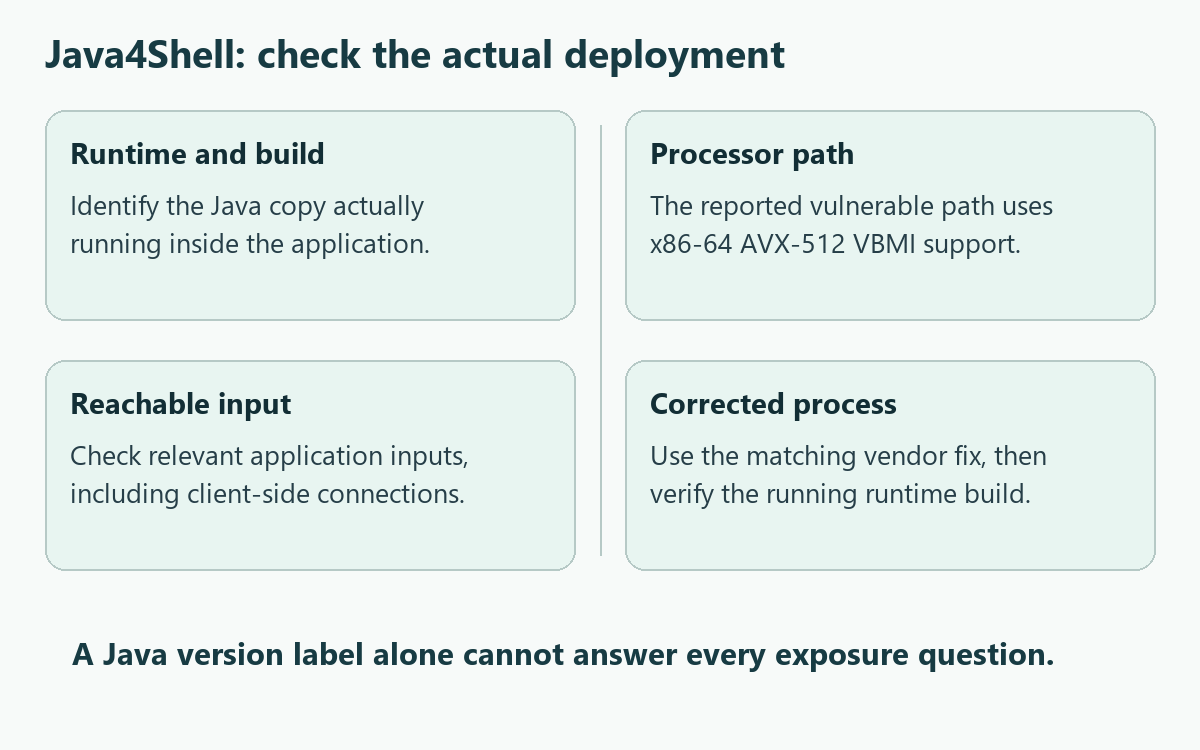
Overview
A vulnerability in Java, not a virus named Java4Shell
Java4Shell is the researchers’ name for CVE-2026-114938, a Java runtime vulnerability. It is not a malicious application you can identify in your installed-programs list.
The distinction changes what you should do next. Patching addresses the affected runtime; investigating a suspected intrusion is a separate task requiring evidence about that system.
The combination of software and hardware matters
Calif’s original research describes memory corruption in an optimized Base64 decoding path on certain x86-64 processors supporting AVX-512 VBMI instructions.
Its demonstrated attacks depend on the application and how attacker-controlled data reaches that path. Finding Java installed does not establish that the complete attack route exists.
- The exact runtime distribution and build need checking.
- The processor and active optimized path also matter.
- The application must expose a relevant input route.
- The running process must actually receive the fix.
The useful response is targeted patching
Oracle’s November security advisory lists the vulnerability and affected supported builds. Application vendors and operating-system distributors provide their own applicable fixes.
Administrators should inventory affected deployments and follow those instructions. Home users should update relevant applications, without treating the headline as proof that their accounts were stolen.
Why Java4Shell Is Not Simply Another Log4Shell
Similar names encourage a familiar mental picture: one dangerous string arrives from the internet, and every Java service becomes vulnerable in exactly the same way.
That shortcut overlooks several important technical differences. Java4Shell concerns a runtime implementation path, whereas Log4Shell concerned a different component. Their names are not interchangeable technical descriptions.
For this vulnerability, a service’s processor, runtime build, data handling, and reachable features can change the result. A different deployment may require a different assessment.
That does not make the demonstrated consequences minor. Remote code execution can give an attacker control within the affected process’s permissions and access to its resources.
It does mean that an organization needs an inventory rather than an assumption. Two servers bearing the same application name may run different bundled Java installations.
One could already contain a vendor-patched runtime while another still launches an older copy from an application directory. Checking only the operating system misses that difference.
How Java4Shell Can Become Reachable
Step 1: An application uses an affected runtime
A Java application runs inside a runtime, often called a JRE or JDK. Some applications supply their own copy instead of using the system’s default installation.
This is why a reassuring version displayed in one terminal cannot settle the entire investigation. The application service may launch a different executable at startup.
Identify the runtime attached to the actual running workload. Record its provider, complete build, deployment path, and application owner before deciding which advisory applies.
Step 2: The relevant processor path is available
Runtime implementations can select optimized routines according to processor capabilities. Here, the reported vulnerable Base64 path relies on a particular x86-64 instruction capability.
Base64 normally represents binary information as text. Its presence in an application is ordinary; the problem concerns how certain input is decoded by the affected implementation.
Do not equate every Intel or AMD processor with this exact condition. Likewise, Calif’s exclusion of this ARM64 path is not a general security clearance.
Step 3: Untrusted data reaches the vulnerable operation
An attacker still needs a route that makes the application process relevant data. A library existing on disk is different from a reachable operation using it.
Calif demonstrated application-specific attack routes, including server software and a Java client’s connection to a malicious TLS server. Exposure is not limited to listening web servers.
Assess both inbound services and software that connects outward to untrusted systems. An internal-only service may still process data supplied through other applications or workflows.
Step 4: Exploitation depends on the deployment
The research demonstrates serious results under specified conditions. It does not provide a universal conclusion that every application with a particular major Java version is exploitable.
Administrators should use supported inventory and vendor guidance, not run public exploit programs against production systems merely to determine whether patching is worthwhile.
A demonstration’s favorable timing or network conditions also should not become a homemade protection claim. A slower connection is not a substitute for the relevant fix.
Who Should Prioritize the Warning?
Organizations operating Java services
Start with application owners who can identify production runtimes. Include hosted collaboration tools, identity services, automation systems, and other Java workloads actually present in your environment.
Prioritize deployments with an affected build, relevant hardware, and reachable inputs. Where those facts remain unknown, establish an owner and a short deadline for resolving them.
Do not publish internal service addresses or diagnostic dumps in a public forum. Such material can disclose credentials, network structure, customer information, or operational details.
People using desktop Java software
If a desktop application bundles Java, use its legitimate update mechanism. Replacing files manually can break the application without replacing the runtime it actually launches.
Ask the application’s vendor whether CVE-2026-114938 affects that product and release. Include the application version, operating system, and runtime information when support requests it.
Never install a supposed Java4Shell cleaner promoted through an unexpected pop-up. A vulnerability name is not evidence that an unknown download can safely repair your computer.
People without an identified affected application
You do not need to assume an infection because a security article names Java. Keep normal software updates enabled and avoid replacing uncertainty with alarming guesses.
There is also no reason to reset every account solely because a vulnerability was disclosed. Account recovery becomes relevant when intrusion evidence or exposure justifies it.
Reading the Advisory Without Misreading the Version Numbers
The official CVE record and Oracle advisory identify affected products and supported builds. Those lists are not instructions to install the vulnerable versions.
A row labeled affected describes the vulnerable side of the comparison. The corrected package comes from the relevant provider’s patch notice or supported update channel.
A distributor may backport a fix without changing the major version. Compare the provider’s full package build rather than using its first version number alone.
Ubuntu’s vulnerability page, for example, distinguishes ordinary OpenJDK packages, release-specific fixed builds, and separately tracked variants. Consult the row matching your deployment.
Do not copy a fixed Ubuntu package number into an Oracle installation plan. Provider, operating-system release, package name, and architecture belong in the same decision.
For a managed appliance, the supported repair may arrive through a complete product update. An independently replaced runtime could fall outside the vendor’s tested configuration.
Different severity scores are not an exploitation count
Calif reports a 9.2 CVSS 4.0 assessment, while Oracle lists 8.1 under CVSS 3.1. The scoring versions and assumptions differ between those assessments.
Neither number estimates your personal probability of compromise. Use severity to understand potential consequences, then use deployment facts to establish priority and the necessary action.
What to Do About a Potentially Affected Deployment
-
Identify the application that needs assessment. List its owner, current release, hosting location, and whether it runs as a service, desktop program, or containerized workload.
For managed work systems, send the concern to the responsible administrator. Do not install an alternative runtime or restart a shared service without approval.
-
Locate the runtime actually in use. Check the service configuration or supported product diagnostics, rather than relying exclusively on the default Java available in a terminal.
Keep the complete provider and build information. An abbreviated label such as Java 17 does not distinguish an affected installation from a corrected package.
-
Compare the complete deployment with current guidance. Match the runtime to its provider’s CVE notice, then consult the application vendor about bundled copies and supported upgrades.
If the processor or input path cannot be established, record that uncertainty for the administrator. Do not silently convert an incomplete check into a safe result.
-
Prepare the supported update and a recovery plan. Preserve required configuration and backups, identify the maintenance impact, and obtain the fix from the legitimate vendor.
Test essential workflows where practical before the production change. Authentication, integrations, scheduled work, and application startup can reveal compatibility problems a successful installer does not show.
-
Confirm that the corrected runtime is running. Follow any vendor-required service restart, then check the active application again. A patched file awaiting restart is not the finish.
Record the completed version and the responsible owner. Repeat the check for other installations, including bundled runtimes and replacement containers that might restore an older image.
-
Escalate credible signs of an intrusion separately. Unexpected child processes, unauthorized configuration changes, suspicious account activity, or credible security alerts warrant incident response, not another routine update attempt.
Preserve relevant logs and avoid casual deletion. Your security team can decide whether containment, credential rotation, forensic review, or rebuilding is necessary for that particular system.
Common Checks That Give False Reassurance
Checking the browser instead of the application
Java and JavaScript are different technologies. A browser’s JavaScript setting does not establish whether a business application uses an affected Java runtime somewhere behind it.
Turning JavaScript off might disrupt websites while leaving the actual server unchanged. Keep the investigation attached to the identified application and its runtime, not similar terminology.
Assuming a reboot means the patch succeeded
A restart can relaunch precisely the same vulnerable files. Verify the active build afterward rather than treating a completed maintenance window as proof of remediation.
The reverse problem also occurs when an update installs correctly but a long-running service keeps its old process. Check the running service, not just installation history.
Substituting an antivirus scan for remediation
A scan looks for threats and suspicious behavior within its coverage. It does not replace the application’s affected Java implementation with the vendor’s corrected runtime.
Use endpoint tools where a suspected intrusion makes them relevant. Buying a security subscription is not a prerequisite for understanding or installing a legitimate vulnerability fix.
A Practical Handoff for a Small Business
Imagine a small company using a Java-based collaboration application. The owner receives a Java4Shell warning but does not manage the server or know its processor.
The useful next move is not to remove Java from everyone’s laptops. Ask the hosting provider to identify the application runtime and confirm the applicable fix.
A helpful request names the CVE, product version, and affected service. Ask whether the running instance has been updated and whether any restart or follow-up remains.
If the provider says the system is unaffected, request the relevant reason. A different processor path, a corrected build, and an absent application are different answers.
Keep that reply with the service records. It gives the business a defensible explanation without demanding that its owner reproduce a memory-corruption exploit.
Build an Inventory That Another Administrator Can Use
An inventory is most helpful when someone else can act on it. Keep the record tied to an application instance rather than a general computer name.
| Record | Why it helps |
|---|---|
| Application and responsible owner | Identifies who can approve the supported maintenance action. |
| Runtime provider and complete build | Connects the installation to the correct vendor advisory. |
| Runtime location and deployment source | Distinguishes a bundled copy from the default system installation. |
| Update and running-process confirmation | Separates files installed successfully from the active service. |
| Remaining uncertainty and next owner | Prevents an incomplete check from disappearing between teams. |
For example, a hosting team may maintain the operating system while an application supplier maintains its bundled runtime. Each needs the finding relevant to its responsibility.
Ask for confirmation covering the specific application instance, not merely a statement that updates are generally automatic. Keep any outstanding restart or compatibility issue visible.
This approach also helps during a later deployment. A replacement image or restored application directory should not quietly reintroduce a version already removed during maintenance.
Frequently Asked Questions
Is Java4Shell malware that I can uninstall?
Java4Shell names a vulnerability, not a standalone infection. Address an affected runtime through its supported patch; investigate malicious activity separately when evidence calls for it.
Does every Java application have the same exposure?
The relevant runtime, optimized processor path, application behavior, and reachable input all matter. Do not assume identical risk from a shared major Java version.
Are only internet-facing servers worth checking?
Server exposure matters, but the researchers also describe a Java client connecting to a malicious TLS server. Consider relevant outbound connections as well as incoming services.
Will updating my system Java fix bundled copies?
Not necessarily, because applications can launch their own runtime. Confirm which copy the application uses and obtain the appropriate product or runtime update.
Should I run a public exploit to test my server?
Do not use an unreviewed exploit against production. Supported inventory checks and vendor guidance can establish the necessary update without risking disruption or unauthorized testing.
Does installing a fix prove nobody accessed the system?
A fix addresses the vulnerability going forward, not the entire history of that machine. Credible intrusion indicators require their own investigation and response.
The Bottom Line
Take Java4Shell seriously without treating every Java installation as an infected computer. Identify the actual runtime, match the vendor’s guidance, and confirm the corrected process is running.
If suspicious activity has already appeared, preserve the evidence and involve the responsible security team. Patching and investigating a possible compromise solve different parts of the problem.

Join the discussion
0 commentsShare your experience or ask a question about this article.
Community experiences
Did this happen to you?
Your experience could help someone recognize the same scam. Submit a private report for our team to review.
I experienced this tooReports are reviewed before publication. Sharing publicly is always your choice.
Discussion
Start the conversation
Have a question or something useful to share? Add the first comment.