


When a token launches, it can be hard to remember which announcement you actually read. An eligibility page promising a quick answer can look useful amid all the updates.
This page called itself the Genesis VOOI airdrop. The interesting part is how much it asks you to take on trust before you even see a result.
Overview
A false Genesis claim with a precise-looking reward pool
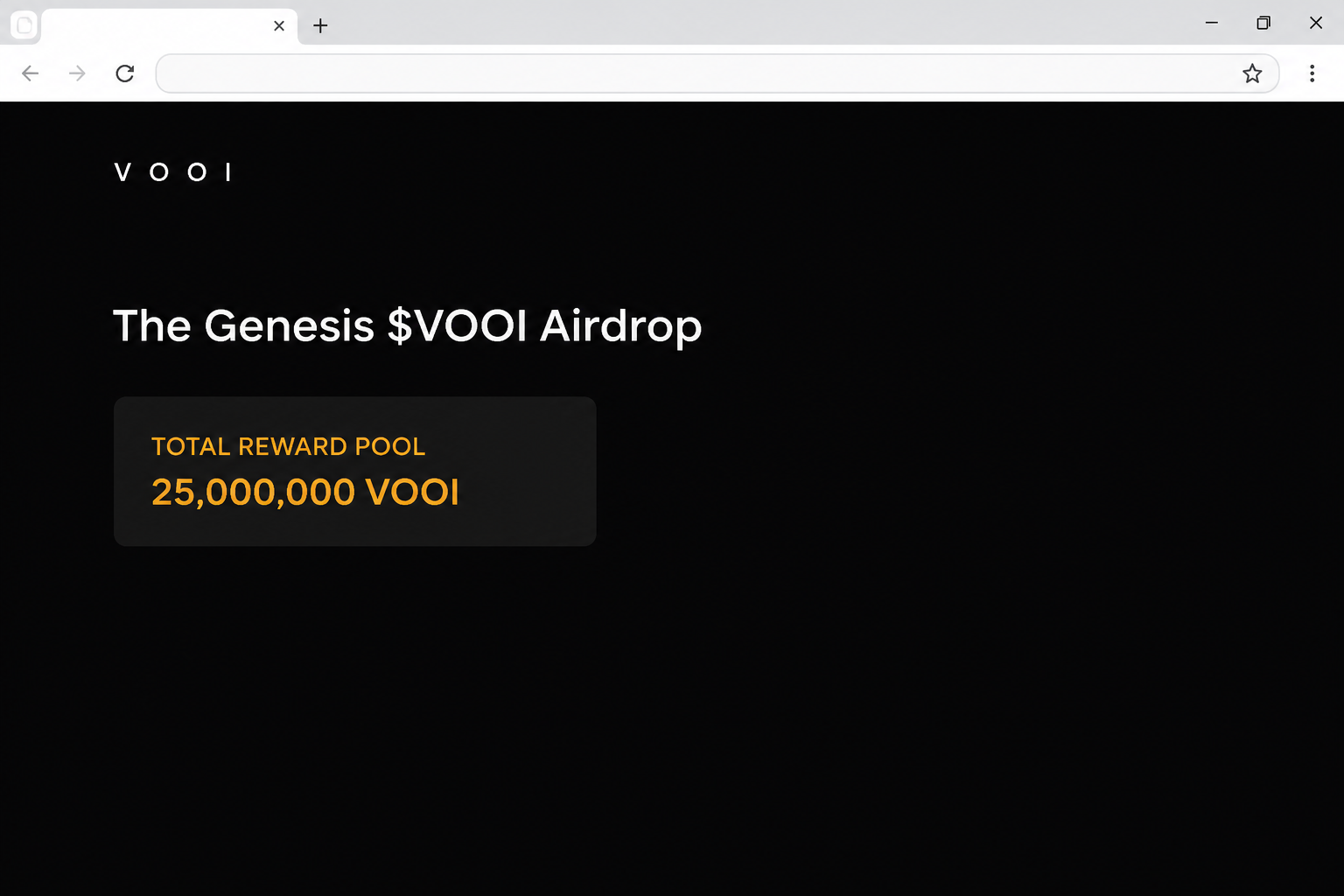
The fake VOOI airdrop appeared at airdrop.vooooi[.]xyz. The dark page offered early supporters a share of a pool it said held 25,000,000 VOOI.
It marked the offer as active, advertised several supported chains, and described claiming as gasless. Those statements were written on the page, not confirmed by the project.
In the recorded flow, the page displayed a wallet chooser when the visitor tried to claim. No eligibility determination, completed token distribution, or actual victim transfer appears in that capture.
The headline is useful for recognizing the lure. The important address, however, is the entire hostname including the extra letters and its separate .xyz ending.
Real VOOI launch information made the invitation sound plausible
VOOI is an actual platform that brings together access to several trading venues. The brand and token weren’t invented for this page.
VOOI’s official token page gives December 18, 2025 as the token generation date. It lists airdrops, a community sale, and early contributors together in an allocation category.
A published allocation category describes how a project planned to distribute supply. It’s not a receipt for an individual wallet and doesn’t make every page claiming those tokens authentic.
The imitation’s Genesis label and the real token launch can be true at different levels. The label describes what the impersonation said, while the date describes a real project event.
A gasless claim isn’t the same thing as a harmless signature
Gas is the network fee used to process blockchain activity. An offer that says you won’t pay that fee has not told you what a signature might authorize.
Some legitimate services cover or handle fees in the background. That is precisely why a reasonable-sounding gasless claim isn’t enough to identify who operates the website.
Use the original project to establish the correct site and event before touching a wallet request.
You do not need to connect to a suspected copy to decide whether it belongs there.
- A real ticker doesn’t prove who runs a particular claim page.
- The advertised pool total doesn’t measure how much you personally could receive.
- The network list describes the imitation’s pitch, not the network your wallet actually used.
- Check the actual effect of a request, not just the charge beside it.
How the Fake VOOI Genesis Airdrop Scam Works
Step 1: The page suggests you earned something earlier
The offer calls its visitors early supporters. That is a broad invitation if you have traded, explored an app, followed announcements, or merely watched a launch unfold.
The reader can fill in whatever qualification would make the offer seem plausible. The page doesn’t need to demonstrate that your exact wallet met an official condition.
Ask which activity and time period would qualify you. If you can’t match that answer to project terms, a prompt to connect is not a shortcut to the truth.
The available capture does not identify how a particular reader landed there. A forwarded link, sponsored result, or group post should not be treated as proof of authorship.
Step 2: The page turns an unsupported claim into apparent account information
The pool number uses the real token ticker, making a large figure look like a precise allocation. A status reading “Active” makes the opportunity look ready to claim.
The total and status are simply content displayed by the same site requesting access. They don’t show how the team decided who qualified or how much an individual should get.
If you compare a pool figure with the project tokenomics, match the specific category and date.
Different numbers can refer to total supply, one program, or one stage of a launch.
None of those comparisons requires a wallet signature. A page should not gain access because it was the first place to print a seemingly detailed account.
Step 3: A nearly familiar hostname presents an ordinary-looking chooser
The imitation adds letters to the name and uses a different domain ending.
You may notice “airdrop” and the shape of the name before you read the host all the way through.
The wallet chooser makes the transition feel familiar. An interface can show the names of wallet brands without those providers having any connection with the offer.
Do not use the size of the list as a reason to trust it. Providers listed on a screen cannot authenticate the company or community that placed the list there.
Start with VOOI’s documented domain instead. A previously opened app or saved bookmark is a better point of comparison than a link inside an unsolicited promotion.
Step 4: The promise of no gas fees distracts from what can be approved
A completed connection may give a site your public address and the ability to request a follow-up action. It does not on its own prove assets left the wallet.
If a separate authorization appears, check what it allows. Does it request a transfer, grant someone spending permission, or simply present a message you can read?
Do not approve an action you can’t trace to the promotion you intended to join.
A fee of zero says nothing about the total value your permission could put at risk.
That last distinction can matter after you leave. Disconnecting stops the connection, but it cannot undo an on-chain action or automatically revoke a separate allowance.
What to Do if You Have Fallen Victim to This Scam
-
End the interaction before checking eligibility elsewhere. Close the fake Genesis page and reject a wallet request that appears from it.
If you only saw the tab or wallet chooser, there’s no need to click it again. Keep the approximate time and the original link source if available.
-
Check the wallet and account you actually selected. Remove the site through the wallet’s app or connection controls if a session was established.
Review recent activity for activity you actually accepted. Some wallets show several accounts or networks, so check the account involved rather than your usual home screen alone.
If you only connected and rejected everything else, keep that distinction in mind when talking to support. It helps them work out what you need to review.
-
Look up any approved requests on the actual network. Write down the action identifier, time, asset, and any recipient or contract described in the wallet.
The network advertised on the site may not tell you which network processed your request. Use the record in the wallet before choosing a permission review tool.
Follow MetaMask’s guidance for unauthorized activity if that is your provider. Otherwise find the equivalent through the support site you already trust.
-
Protect the whole affected wallet if you shared a private secret. If you entered a key or recovery phrase, use official guidance to replace the exposed recovery information.
A new account derived from the same copied phrase doesn’t solve the exposure. Create a separate wallet on a trusted device and handle remaining recognized assets safely.
Tell your provider if you have an open position, a deposit awaiting settlement, or assets you can’t move normally. Each may need a separate recovery procedure.
-
Record what moved and report it promptly. Save the public transaction reference and relevant correspondence without posting your recovery phrase or private key.
If you funded a related transfer through an exchange, open a support case there using your established account. A confirmed blockchain transfer generally isn’t something a wallet app can undo.
See the FTC’s guidance on cryptocurrency scams for U.S. reporting. Don’t pay someone who promises to finish the claim or recover a transfer.
What to Compare With an Official VOOI Announcement
Start with the event and its dates
A token generation event describes a launch, not every future reward or distribution. Comparing a date to the origin of a link can help put the claim in context.
The project may describe separate seasons or phases.
A copy can keep calling itself Genesis long after the initial launch, so don’t use a name as proof an event is still open.
Check when a program was announced, which activity it describes, and how its official instructions can be reached. If those answers don’t line up, leave the link alone.
Keep platform access separate from token ownership
Trading through a product, receiving points, holding the token, and receiving a distribution aren’t the same. Each calls for a different piece of evidence from your own account.
If you used the platform earlier, look at the wallet or account you actually used. A result from an unrelated page doesn’t tell you how the project counted that activity.
An unfamiliar transfer request is not necessary to prove you used an app. If you’re unsure about an entitlement, use a verified support route before doing anything with funds.
Verify what a signature authorizes independently of the fee
A plain message and an approval allowing a third party to spend assets can both appear as wallet requests. The title “gasless” doesn’t distinguish them.
Read what the wallet is asking you to sign. If you can’t connect that action to the actual terms, decline it and go back to a verified source.
Give yourself permission to skip an offer that doesn’t explain itself. The potential benefit of a reward isn’t a reason to accept an action you can’t identify.
Don’t treat the chain list as a receipt
The imitation listed Arbitrum, Polygon, Mantle, and Base near the claim area. That list makes the offer look technically specific, but it doesn’t tell you where your account qualified.
In a real program, several networks may be involved for different reasons. The place you used a product is not necessarily where a token is issued, transferred, or recorded.
If you have a real receipt, identify what it documents before comparing it with any promotion.
A purchase record and a reward distribution can both mention a token without being connected.
A chain shown in a pop-up can make a request seem familiar if you already use that network. It still doesn’t establish that a given wallet action belongs to VOOI.
If a later message tells you to move funds to qualify, don’t follow it. Check the event through the project’s established channels first.
For a confusing past claim, look up the public transaction or confirm the status with the service you actually used.
Do not approve a new transfer just to explain an old one.
Frequently Asked Questions
Is the Genesis VOOI airdrop at airdrop.vooooi legitimate?
The .xyz address in this case was an imitation. It displayed a Genesis offer and a wallet chooser but was not the official VOOI domain.
Do not use it to see whether your account qualifies. Look for the actual offer and its exact address in material published by the project.
Was the 25,000,000 VOOI pool confirmed?
That was the amount displayed by the imitation. It is not a verified total for a program, nor does it establish a reward for your wallet.
The official token page describes broad categories and a launch date. Those details don’t authorize an unrelated site to collect signatures or distribute tokens.
What does gasless mean on a crypto claim?
It generally describes how network fees are handled. It does not mean that signing is harmless or that a request cannot grant access to funds.
Check what the wallet says the request can do. A website can promise zero fees and still present a request you don’t want to authorize.
Does seeing the chooser mean the scam succeeded?
No, that screen is not evidence of an approved action or loss. Review what happened inside your wallet, including whether you connected or accepted anything separately.
If you typed a recovery phrase or key, deal with that exposure independently. It doesn’t require a visible transfer to be serious.
Does a real VOOI airdrop elsewhere validate this link?
No, the existence of an official program doesn’t make another domain part of it. Match the event’s details, dates, and address to the actual project announcement.
If you have an old claim record, use that to understand your history. Don’t use a new page to settle what happened at a past event.
What if I signed a request but didn’t see a fee?
Look in the wallet for the action you approved and its status. The absence of a fee isn’t evidence you gave no permissions or that a transfer can’t happen later.
If the request is hard to interpret, consult official wallet support. Give them the transaction reference or request description, not the information that unlocks your wallet.
The Bottom Line
Don’t use the fake Genesis VOOI page. It used a real token launch as cover for an unverified claim on a separate domain.
If you acted on it, review the account’s connections and any request you approved. Start with VOOI’s own token information if you only wanted to check the original distribution.

Join the discussion
0 commentsShare your experience or ask a question about this article.
Community experiences
Did this happen to you?
Your experience could help someone recognize the same scam. Submit a private report for our team to review.
I experienced this tooReports are reviewed before publication. Sharing publicly is always your choice.
Discussion
Start the conversation
Have a question or something useful to share? Add the first comment.