


If you hold SKY, a reminder to vote may not sound strange. There really are proposals to follow, and the language on a project site starts to feel familiar.
The harder question is whether a page is taking you to one of those proposals. Start there before you worry about missing a reward.
Overview
The fake Sky page paired governance with the promise of rewards
The Sky Voting Rewards scam used pages on skyeco-vote[.]com and skyecosystem-vote[.]com to imitate the Sky protocol. The first of those addresses appears in the recorded wallet flow.
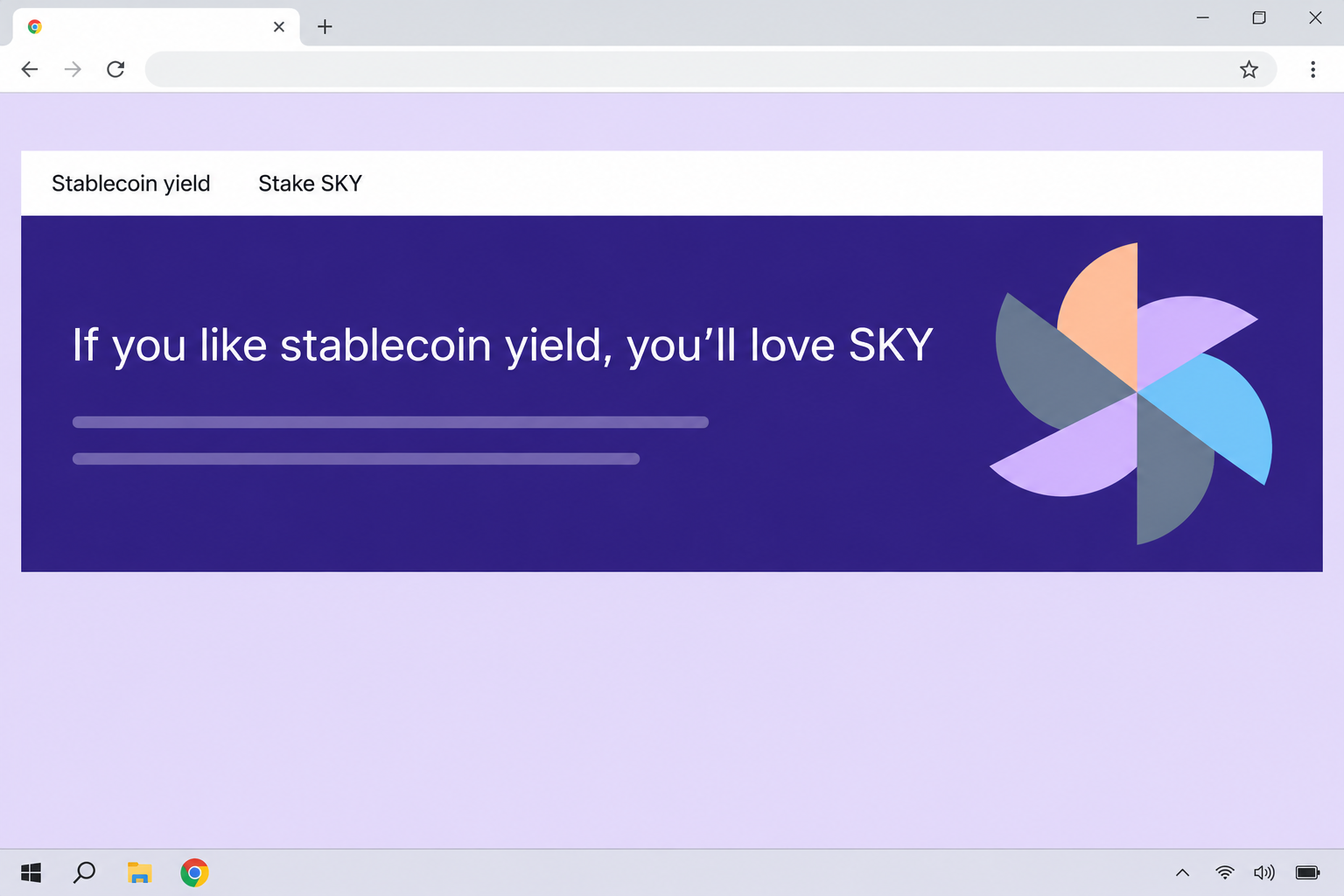
The page blended language about stablecoin yield with an invitation to vote.
It also showed a SKY price, a market cap, and a staking rate, as if they were live information.
That combination can make voting and earning rewards sound like one action.
A number beside a token graphic doesn’t explain what you are voting for or where rewards would come from.
The skyeco-vote[.]com recording shows a wallet chooser, not a completed vote or a specific wallet loss. The other address dressed the request differently.
At skyecosystem-vote[.]com, the page looked like a voting portal instead of a staking promotion. It displayed an executive proposal card with a date and a count of supporting SKY.
The card referred to a real April 9, 2026 proposal. The separate site displaying it was not the official portal.
Real Sky governance has a named proposal and a home
Sky’s official governance portal lists governance polls and executive votes. It describes voting with SKY and delegating voting power as options within the protocol.
An executive proposal concerns a change to the protocol.
The portal gives it a name and space for details, so people can find out what they are being asked to support.
Voting, delegation, and staking rewards are not interchangeable. Delegating voting power means choosing someone to vote with that power, not making them the owner of your tokens.
Sky publicly discusses staking and rewards, which is part of what makes the imitation believable. None of that gives a separate domain permission to act in Sky’s name.
What to compare before you connect anything
Start with the decision you expect to make. If you are supposedly voting, you should be able to identify the issue being voted on before the wallet comes into it.
If a page instead talks about a yield percentage or a claim, ask whether the official portal describes that same action. A market figure is not a proposal identifier.
The genuine voting address is part of sky.money.
The lookalikes end in separate .com domains and do not become part of Sky because they put its name near the front.
- Look for the proposal name and what it seeks to change.
- Check the full hostname through a saved bookmark or a known project page.
- Separate a governance vote from staking, claiming, borrowing, or transferring an asset.
- Do not take a displayed reward rate as proof that one of those actions is authorized.
How the Sky Voting Rewards Scam Works
Step 1: A page uses Sky’s real vocabulary to get your attention
The imitation talks about stablecoin yield, the SKY governance token, and rewards. Those aren’t random phrases if you already follow Sky, which makes the page feel like a normal update.
People arriving for different reasons can read their own intent into it. A voter might expect a proposal, while someone looking for yield might see a chance to earn more.
That ambiguity makes the invitation sound broader than it is.
The page should tell you what you are considering instead of letting a price and a logo stand in for the answer.
The capture does not show a specific email or social post sending people there.
If you received a link, keep the source of that link separate from the page it opened.
Step 2: Real-looking detail shifts attention away from the host
Market figures and a staking rate occupy valuable space on the imitation. They suggest a working interface, but you could see those figures without checking anything about the page’s publisher.
Someone who looks only at whether the numbers sound plausible may miss a simpler test. Even an accurate market cap would not make the website a part of the protocol.
On the first imitation, financial numbers make the offer look concrete while the governance decision stays vague.
The second copied the proposal details more closely, so a title match wasn’t enough to verify it. You still had to check who was hosting the page.
Try to look up the action on the real site by name. If the offer cannot tell you what you are voting on, you do not need the next screen.
Step 3: The apparent Vote action opens a wallet menu
The next visible screen offered a selection of wallets. This makes the imitation look as though it’s doing ordinary setup for a blockchain vote.
That is a believable place for the deception to change gears. A person ready to vote may see a familiar wallet logo and spend less time checking the requesting page.
The wallet brands on a screen are not the names of sponsors. Neither a large list of supported apps nor a standard-looking menu authorizes the promotion.
Reject any request that was triggered by an unfamiliar destination, then find the proposal through Sky if you still want to read it.
You do not lose a vote by checking first.
Step 4: The next wallet request must be judged on its own terms
A completed connection and the decision to authorize an action are separate.
A page that sees your public address can still need your approval before it does something with your assets.
An impersonator can present a request that spends funds or grants permissions while the page keeps calling it a vote. Inspect what your wallet actually says before confirming either.
If the request names an unexpected token, destination, or account, stop. Do not let the word “vote” on the page overrule the approval you are being asked to make.
The recorded imitation establishes a danger point, not the precise outcome for any given wallet. Your next action depends on whether you connected, agreed to anything, or exposed a secret.
What to Do if You Have Fallen Victim to This Scam
-
Close the imitation before resuming any governance activity. If you only saw the page or opened its wallet menu, leave it closed while you check what happened.
Keep the address and time from your existing browser or message record. You don’t need to load the page again to include it in a warning.
-
If you connected a wallet, remove the unfamiliar site from that wallet. Use the wallet’s own connected-app controls, and check that you are looking at the account you used.
Review recent activity for separately authorized actions. Do not mark the matter resolved solely because the website disappeared from the connected-app list.
Phantom’s wallet compromise guidance explains that disconnection and removal of previously granted spending permissions are separate steps.
-
If you signed anything, check which action and network the wallet recorded. Find the transaction identifier, the affected asset, and any account or contract named by the wallet.
If there is an unrecognized spending approval, follow the wallet provider’s directions to review and revoke it on the network involved. Do not take instructions from the impersonating page.
A completed transfer is different from a permission you can withdraw. Keep its details for official support or a report rather than approving a supposed reversal sent to you.
-
Replace the wallet if you disclosed a recovery phrase or private key. A fresh account within the same exposed wallet will not remove somebody else’s access to the underlying secret.
Use a trusted device and a new recovery phrase. Move remaining known assets if you can do so safely, and don’t interact with unfamiliar tokens that appeared after the incident.
Tell support if you have active positions, deposits, or delegated voting power. You may need separate guidance for each rather than assuming a normal transfer covers everything.
-
Check your real Sky activity on its own. If you already participated in governance, open the established portal from an independent bookmark and look at the affected account.
Compare the proposal and any legitimate staking or delegation with your records. The fake page’s message about a reward does not alter an actual vote you made elsewhere.
If money moved, notify any exchange involved and preserve the record. FTC guidance on cryptocurrency scams explains reporting options in the United States.
A Safer Way to Follow Sky Proposals
Read the decision before reading the promised return
A governance announcement is about something the protocol might do. You should be able to find the proposal title and understand the decision without relying on numbers in a banner.
A reminder from a chat may describe one part of a much bigger vote. Cross-check the complete proposal rather than treating a short message as its official terms.
Pay attention when the words change from an action you recognize to something else. A message saying you only need to verify holdings shouldn’t surprise you with an asset movement.
Use the rate and ticker for what they actually describe
A rate printed beside a token can describe a staking offer or merely imitate one.
It doesn’t describe what the current proposal would do or show that you’re owed a reward.
If the quoted rate is central to your decision, find it in official, dated material for that specific product. No copied screenshot can keep a rate current after it changes.
The same rule applies to a price display. Seeing the right price at one moment establishes neither the site’s identity nor your entitlement to any payout.
Treat delegated voting power and spending permissions separately
A delegate and a token spender do different jobs. Do not assume a wallet prompt is asking for the first just because the webpage talks about the benefits of delegation.
Read the request from your wallet’s own interface. If it doesn’t tell you enough to connect the action to a specific proposal, decline it and return to the official documentation.
You can follow proposals without signing whatever appears first. Keep your own history of decisions and accounts, so an unfamiliar prompt is easier to recognize later.
Understand which part of governance you are following
The official portal describes an off-chain discussion process as well as formal on-chain governance. Reading a discussion does not mean you have been asked to sign a vote.
If somebody posts a community debate and tells you to open a wallet immediately, find the formal proposal first. A vote needs something more specific than a thread title.
Look at whether the proposal is open, already passed, or waiting to be executed. A stale notice can point people at a decision that is not accepting votes anymore.
That date check also helps with an old screenshot of the portal. A real screenshot can show a genuine proposal without validating a new link somebody placed underneath it.
Finally, think about the account you normally use for decisions. If an unexpected site prompts you to switch to a wallet holding unrelated assets, find out why before approving anything.
If you help moderate a governance community, link to the proposal itself in warnings rather than posting the imitation’s active address. That gives members a useful comparison without another lure.
Frequently Asked Questions
Is skyeco-vote the official Sky governance site?
No, skyeco-vote[.]com is one of the lookalike addresses tied to the fake voting offer. Sky’s official governance portal is under sky.money.
Don’t try the lookalike to compare menus. Open the official address independently and look up the proposal there.
Can SKY holders vote through the genuine portal?
Yes, Sky documents on-chain voting and ways to delegate voting power. Those facts explain why the fake offer can sound plausible.
Confirm the exact proposal and route through the official portal. A real governance process doesn’t authenticate a separate site claiming to offer voting rewards.
Was the advertised staking rate a reward for voting?
The displayed rate was part of the imitation’s sales pitch, not proof of a payment for taking part in a vote. Price, staking, and proposal information serve different purposes.
Read any real reward terms in the relevant Sky documentation. Don’t combine numbers from an imitation with permissions from a different interface.
Did the wallet chooser record a vote for me?
A chooser is not a confirmation of a vote or transfer. Check whether you actually connected and whether you approved a subsequent wallet request.
Use the real governance portal and wallet history separately. A page saying your vote is pending does not make something happen on the official protocol.
What if the same link was shared by someone who normally votes?
Ask the person through an established channel whether they meant to send it. A regular contributor can forward a bad link or have their profile impersonated.
Compare the destination with the portal even if you know the sender. Familiar people can help you find a proposal, but the address still needs its own check.
Is revoking a token approval the same as getting my tokens back?
No, revoking a permission can prevent future use of that permission, but it does not undo a transfer already settled on the blockchain.
Write down the transaction details and ask support what can still be secured. Be wary of a stranger who offers to recover funds if you pay first.
The Bottom Line
Don’t use either Sky Voting Rewards lookalike. One paired yield figures with a vote prompt; the other copied an actual proposal onto an unrelated website.
Read votes and delegation details through Sky’s own portal.
If you already interacted with the imitation, check your connected apps, approved actions, and any exposed recovery information before doing anything else.

Join the discussion
0 commentsShare your experience or ask a question about this article.
Community experiences
Did this happen to you?
Your experience could help someone recognize the same scam. Submit a private report for our team to review.
I experienced this tooReports are reviewed before publication. Sharing publicly is always your choice.
Discussion
Start the conversation
Have a question or something useful to share? Add the first comment.