


HunnyTank promised a free $100 for signing up, then more for every friend you referred. On payday, members say their referrals were declared fake or their logins stopped working.
If a friend sent you a HunnyTank link, or you’re still waiting on a hunnytank.com payout, here’s what the site was and how it links to other Hunny sites.

Overview
What HunnyTank promised
HunnyTank.com called itself a referral network.
Its homepage offered a free $100 for creating an account and said earnings could be cashed out through PayPal, Cash App, Venmo or Zelle.
Members grew their balance mainly by getting other people to sign up through a personal referral link.
What members report
All 12 reviews on HunnyTank’s Trustpilot profile give one star.
Members describe reaching their payout date, then being told their referrals weren’t genuine or that they needed more.
Others say they could no longer log in when the payout was due.
Our verdict on HunnyTank
HunnyTank was a copy of a referral template used by a network of Hunny sites, with frozen member counters, invented testimonials and payouts that members say never arrived.
The warning signs at a glance:
- A $100 bonus just for signing up, with earnings coming only from recruiting.
- Member and payout counters identical to those on its sister sites.
- A footer claiming the site had run since 2016, on a domain registered in September 2025.
- Payday excuses that moved the target or blamed members’ referrals.
HunnyTank Reviews: What Members Report
HunnyTank’s Trustpilot profile has 12 reviews and a TrustScore of 1.9, and every one is a one-star review.
Trustpilot also shows a notice that the company may be associated with high-risk investments.
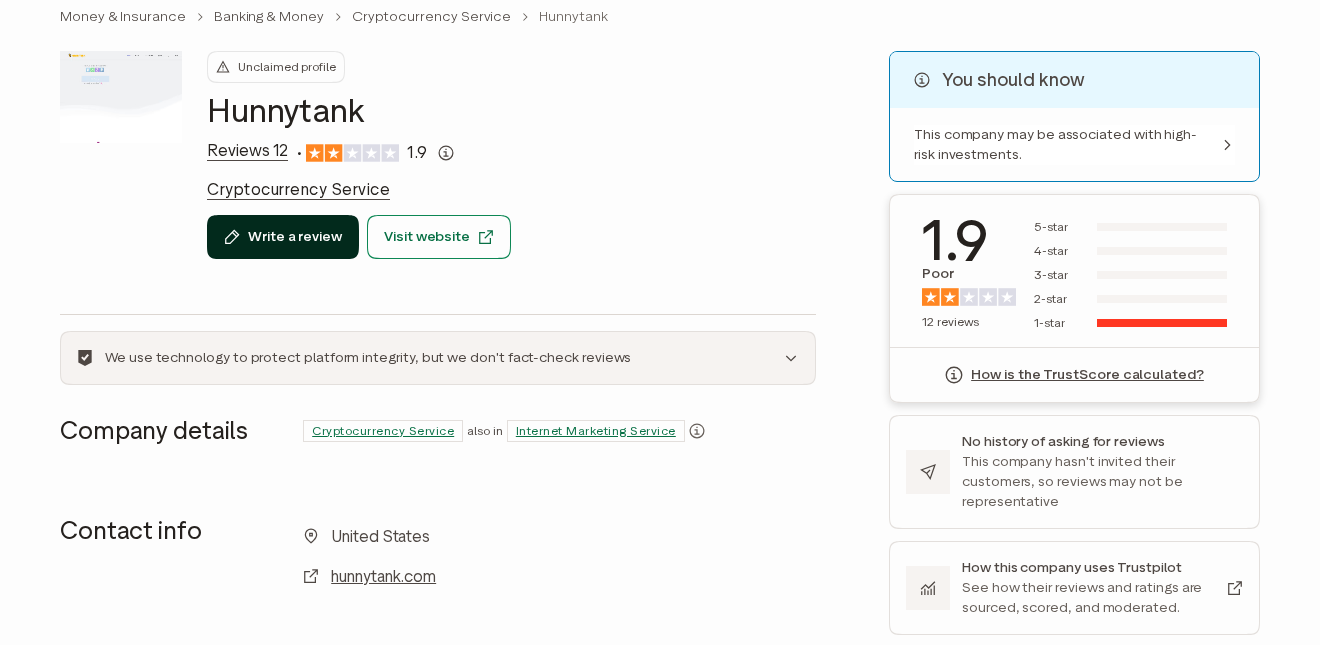
The earliest review, from late September 2025, warned that the site had been created only days earlier.
In early October, one member said they reached 11 referrals and were told instant withdrawal needed 16.
At 16, the target became 30, or a wait until November 1.
Several members describe the same payout day in late October. One expected payment on October 24 and was told the next day that their referrals weren’t genuine.
Another says they had earned close to $900 when the payout message appeared, saying some referrals weren’t real and 16 more were needed.
A member with 30 referrals and $3,000 in rewards says nothing was paid. Two others say they couldn’t log in at all once their payout date arrived.
One reviewer adds that the account couldn’t be deleted. None of the 12 reviews describes receiving a payment.
Trustpilot lists HunnyTank as a cryptocurrency service, although the site itself talked only about referral payouts through payment apps. Its profile remains unclaimed.
The last four reviews arrived between mid-November and early December 2025, weeks after the payout dates had passed.
Is HunnyTank Part of the HunnyVine and HunnyLink Network?
Yes, on the evidence of its own code. An archived copy of hunnytank.com from October 14, 2025 loads Google Analytics tag G-WC1FX41R9P.
The same tag runs on HunnyVine, HunnyLink and their clones. Sites sharing one tag send their visitor data to the same analytics account.
The same capture shows the network’s frozen stats panel: 300,543 members, $9,764,893 paid and 500,949 payments made.
HunnyLink and its sister site Hunny Stack showed exactly the same figures.
Real totals would change over time and differ from site to site. Identical numbers across domains registered months apart show they’re decoration.
HunnyTank’s domain was registered on September 18, 2025. HunnyVine followed eight days later, and HunnyLink on October 3.
Taken together, the shared analytics account, the identical counters and the timing place HunnyTank in the same network.
None of it names an operator, so who runs the network is still unknown.
What HunnyTank’s Page Actually Showed
The October 2025 capture shows a referral template with placeholder content still in place.
Under a heading about capturing leads, the page ran a paragraph of lorem ipsum filler text.
A line promising the fastest way to grow your business with the leader in technology sat above a button reading Get Started Now.
None of it described an actual service.
The page’s three steps read Easy Sign Up, Earn From Home and Get Paid and Cash Out.
The middle step promised expert guidance on making money online in your free time.
Five testimonials, each stamped 9h ago, praised the site.
One mentioned earning more than an engineer’s salary in five months, and another referred to stimulus checks and quarantine.
A five-month track record is impossible for a domain registered weeks earlier, and the same testimonials appear across the network’s clones.
The footer read HunnyTank.com, copyright 2016 to 2025. The domain was registered in September 2025.
How the HunnyTank Scam Works
Step 1: A free $100 bonus
The homepage promised a free $100 just for signing up. Money offered before you’ve done any work makes HunnyTank look generous and lowers your guard.
From there, every referral feels like progress toward cashing out that first $100.
Step 2: Earnings come from recruiting
Members grow their balance by sharing a referral link. Every new sign-up adds to the total on screen, and friends who join become recruiters too.
Because the links come from people you know, the offer spreads with built-in trust.
Step 3: Fake numbers keep people going
The global counters and testimonials make payouts look routine. They’re the same on every site in the network, so they say nothing about real members.
A member watching their own balance grow has little reason to doubt the figures around it.
Step 4: Payday moves out of reach
When the payout date arrives, members describe two outcomes. The referral target rises, or a message says some referrals weren’t genuine.
Either way, the member is pushed to recruit more people, which grows the network’s reach without any money being paid.
Step 5: Logins stop and the brand moves on
Some members say they lost access to their accounts on payout day.
The domain then stops serving the template, and a new Hunny name launches with the same pitch.
HunnyVine and HunnyLink appeared within weeks of HunnyTank, using the same code and counters.
Who Runs HunnyTank?
No company or contact details
HunnyTank named no company, address or advertiser paying for the referrals.
Its menu linked to Contact Us, Privacy Policy and Terms and Fraud Policy pages, but no business identity.
A real referral program would say who pays the rewards and why.
A domain registered weeks before payday
The domain was registered through Namecheap on September 18, 2025. Members’ payout dates in late October fell about five weeks later.
The registration now runs to September 2027, and its record was last changed on October 27, 2026.
An analytics account shared with sister sites
The Google Analytics tag in HunnyTank’s code is the same one carried by HunnyVine, HunnyLink and their live clones.
One account can see traffic across all of them.
A cloned page can keep another site’s tag, but together with the identical counters and timing, this tag is the strongest link between the sites.
Older Hunny names with the same complaints
Our HunnyVine report lists other Hunny names, including HunnyRich and KingHunny, among live sites carrying the same Google tag.
HunnyRich members describe being told to wait 30 days or recruit more, then being accused of fraudulent sign-ups, the same ending HunnyTank members report.
Is HunnyTank.com Still Online?
Not as a referral site. In late October 2026, hunnytank.com showed only a Cloudflare security check and then failed to load a page.
The domain is still registered, so the name could be used again. Treat any new site at that address as untrusted.
Old referral links may now lead somewhere else entirely. Don’t sign in or enter details on a page reached through an old HunnyTank link.
How to Spot the Next Hunny Clone
The names change, but the template gives itself away. These checks catch most copies.
- A bonus of $100 or more just for creating an account.
- Member and payout counters such as 300,543 members and $9,764,893 paid.
- A footer claiming the site has run since 2016 on a domain registered months ago.
- Earnings that come only from recruiting or completing offers.
- A payout day that brings a higher referral target or claims your referrals were fake.
If a friend sends you one of these links, they probably believed the offer. Sending them this page may stop them before they recruit anyone else.
What to Do If You Have Fallen Victim to This Scam
- Stop sharing your referral link. Delete posts that promote HunnyTank and tell friends who joined through you that the payout isn’t coming.
- Don’t pay anything to unlock a payout. A fee, tax or verification charge to release your balance would only add a real loss to a fake one.
- Paid a fee already? Call your bank or payment app today. Zelle, Cash App and Venmo transfers are rarely reversed; card disputes usually allow about 120 days.
- Retire the HunnyTank password. Anywhere you reused it, such as email, social media or payment apps, set a new one and add two-factor authentication.
- Ignore follow-up offers. Don’t answer messages about a new Hunny-style site, a fake payment notice or a paid service promising to recover your balance.
- Report the site. Tell the FTC at ReportFraud.ftc.gov, including hunnytank.com, when you joined, your promised payout date and dashboard screenshots.
If a referral offer led you to install an app, add a browser extension or allow notifications, the guide below shows how to undo each change.
How to Remove Anything a HunnyTank Offer Installed
Joining HunnyTank doesn’t put software on your device by itself. Each step below undoes one kind of change an offer can make, from notifications to installed apps.
Step 1: Revoke notification permission
Offer pages often ask to send notifications, then use them for prize and earnings alerts. Take that permission back first.
In Chrome, open Settings, Privacy and security, Site settings, Notifications, and remove unfamiliar sites. In Edge, search its Settings page for Notifications.
In Firefox, open Settings, Privacy & Security, then Notifications under Permissions. On a Mac, Safari keeps the list under Settings, Websites, Notifications.
On Android, open Chrome, tap More, then Settings, Site settings, Notifications. Also check each app’s own notification switch in the phone’s Settings.
Step 2: Remove browser extensions you don’t recognize
In Chrome or Edge, open the Extensions page and remove anything added around the time you joined. Firefox lists extensions under Add-ons and themes.
In Safari on a Mac, open Settings, Extensions, select the extension and click Uninstall. If Safari says it came with an app, remove that app in Step 3.
Step 3: Uninstall apps the offers asked you to add
On Windows 11, open Settings, Apps, Installed apps, and uninstall anything added when you started tasks. On a Mac, drag the app from Applications to the Trash.
On Android, open Settings, then Apps, select the app and tap Uninstall. On an iPhone, touch and hold the app icon, tap Remove App, then tap Delete App.
Step 4: Run an optional free Malwarebytes scan
If an offer installed something, a free on-demand scan can look for leftovers. It’s optional, and no scanner can promise a threat-free device.
- Windows: download the free Malwarebytes installer, run a scan and quarantine anything it flags.
- Mac: download the free Malwarebytes for Mac installer, open it and run a scan.
- Android: install Malwarebytes from Google Play or through our Malwarebytes for Android link, then run a scan.
Step 5: Add optional paid protection only if you want it
Paid real-time protection isn’t needed to recover from HunnyTank. If you want it anyway, Malwarebytes Premium is an optional paid product for Windows and Mac.
An ad blocker such as AdGuard can cut down on aggressive offer pages and pop-ups. Its apps are paid and optional, and they don’t remove anything already installed.
Step 6: Don’t reset a device because of a referral site
A factory reset erases your photos, files and settings, and joining a referral site doesn’t call for one. If a reset ever seems necessary, back up everything first.
If problems continue after these steps, ask for free help in our Windows, Mac or mobile malware removal forums.
Frequently Asked Questions
Is HunnyTank legit?
No. HunnyTank used a referral template with frozen counters and invented testimonials, and every Trustpilot review describes a payout that never arrived.
Is HunnyTank the same as HunnyVine and HunnyLink?
It belongs to the same network. Its code used the same Google Analytics account and showed the same frozen counters as HunnyVine, HunnyLink and their clones.
Why did HunnyTank say my referrals weren’t genuine?
Members describe this message appearing on payout day across the network. It pushes people to recruit more instead of paying them.
Can I withdraw my HunnyTank balance?
Members report no successful withdrawals. Don’t pay any fee to release a balance, because the money shown on the dashboard was never real.
Is hunnytank.com still working?
Not as a referral site. In October 2026 the address showed a Cloudflare check and no page, although the domain is still registered.
What should I do if I recruited friends to HunnyTank?
Tell them the payout isn’t coming, delete your referral posts and make sure nobody pays a release fee. Share this report so they can check the evidence.
The Bottom Line
Don’t sign up for HunnyTank or any Hunny-style site offering $100 to join plus referral rewards. The template’s numbers are frozen, and members say payday never comes.
If you joined, stop recruiting, never pay a release fee and change any reused password. Report the site so the next clone is easier to spot.

Join the discussion
0 commentsShare your experience or ask a question about this article.
Discussion
Start the conversation
Have a question or something useful to share? Add the first comment.