


A JACCS email says your points are about to expire. It’s the kind of small account chore you might squeeze in before closing your inbox.
Before you follow its instructions, pause for a moment. What looks like a quick balance check deserves a closer look, especially when the next page changes the conversation.
Overview
A points reminder can feel surprisingly ordinary
The JACCS points expiration email scam borrows a familiar reason to contact a cardholder. Nobody wants to lose a benefit they already earned.
That makes the message easy to underestimate. You aren’t expecting a major transaction, just a minute spent checking something you meant to check anyway.
The useful question isn’t whether points can expire. It’s whether this particular email deserves control over where you sign in.
The suspicious journey leads beyond a points balance
Proofpoint documented a JACCS-themed message leading through a human-check button, an imitation Intercom Club login, and a form requesting card number, expiry, and security code.
Those requests have different consequences. A password can expose your account; payment-card details create another exposure that changing the password alone cannot fix.
- Check points through a route you already trust, not the message’s button.
- Treat an unexpected request for payment information as a reason to stop.
- If you supplied information, respond to what you disclosed, not just what the page called the process.
JACCS is being impersonated, not offering this verification process
This warning concerns the fake message and website, not the legitimate card company. JACCS separately warns customers about sites copying its Intercom Club service.
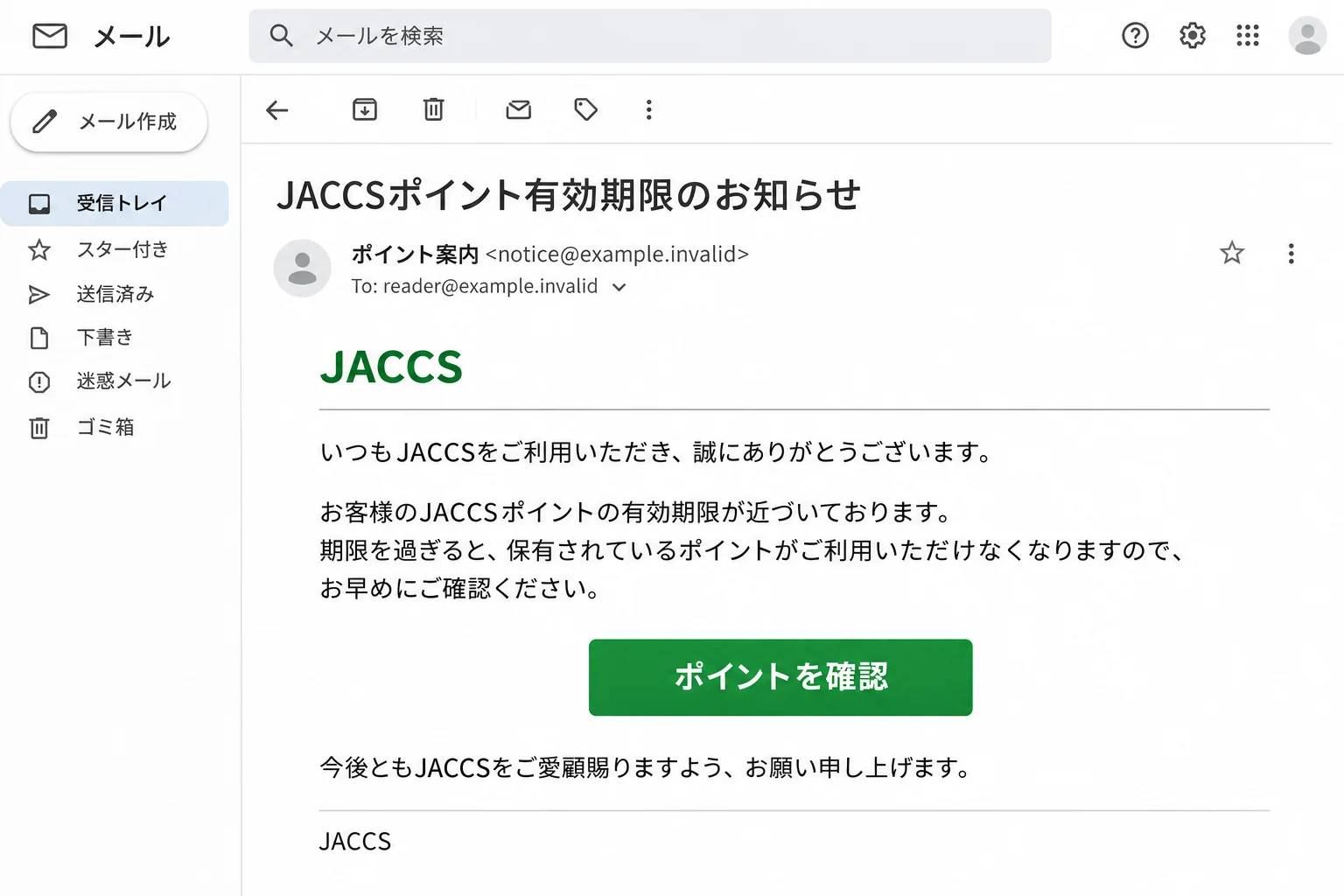
The opening illustration uses fictional email details to explain the lure. It isn’t a captured customer email or evidence of a particular sender’s activity.
You don’t need to identify the people behind the page before protecting yourself. You need a trustworthy way back to your actual account.
How the JACCS Points Expiration Email Scam Works
Step 1: The reminder gives you a small problem to solve
The message presents points expiry as a small, time-sensitive account chore, something you might handle between other tasks without expecting a transaction.
A threat to your entire account might make you suspicious. Losing points can feel less dramatic, which makes the request easier to accept without much thought.
Don’t let the size of the supposed benefit set the size of your precautions. A minor account notice can still send you somewhere important.
Step 2: A human-check button makes the detour feel routine
The example includes a button asking the visitor to confirm they are human.
A security-themed screen can make the next page feel more trustworthy, as though the website has already done something protective on your behalf.
That feeling is misplaced. A website can ask you to press a button without proving who operates it or where the information you enter will go.
Think of this as a pause point, not a certificate of authenticity. Before proceeding, ask why you trusted the original route in the first place.
Step 3: A copied sign-in page asks for something valuable
The next page imitates Intercom Club and requests a user ID and password.
A familiar design doesn’t identify the website’s operator. Seeing Intercom Club branding isn’t the same as communicating with the real service.
You can stop before completing the form. There’s no need to enter a deliberately wrong password, test another account, or investigate further from inside the suspicious page.
Trying extra credentials only gives you more information to worry about afterward. Verification should happen outside the page asking for your secrets.
Step 4: Card verification changes the stakes
The following form requests card details under an identity or payment-update explanation.
Notice the change in the task. You began with a points question, but you’re now being asked for information that belongs to your payment card.
Don’t smooth over that jump just because the pages share a design. Each new request needs its own reason, and the previous screen cannot supply one.
A reassuring message after submission wouldn’t settle the issue either. The practical concern is what you gave away, not whether the site displayed an error or confirmation.
Three Details to Check in a JACCS Points Email
The display name and sender address tell different stories
In the research example, the display name refers to JACCS points, but the sender address ends in ptkpw.cn.
JACCS’s own warning says its emails come from addresses ending in @jaccs.co.jp. The name before the address isn’t the detail to compare.
Expand the sender information in your email app and look for the complete address. Don’t stop at the contact name shown in the inbox list.
Read the part after the @ carefully. A familiar word elsewhere in a long address doesn’t make the ending match the issuer’s published domain.
For example, jaccs.co.jp.example.invalid ends in example.invalid, not jaccs.co.jp. This fictional example shows why recognizing a few familiar words isn’t enough.
In this example, the mismatch is a concrete warning sign. The domain suffix alone doesn’t establish the sender’s identity, nationality, or location.
A sender check is useful for spotting a problem, not certifying a message. You still shouldn’t provide private information just because one visible detail looks right.
A printed JACCS link is not a verified destination
The sample also prints an official-looking JACCS address in the message body. That is visible link text, not proof of the underlying destination.
Think of a link as having two parts: the words on the screen and the address attached to them. They can be different.
A screenshot shows the first part. Without the original link information, you cannot establish the second from the printed words alone.
If your email app provides a link preview without opening the page, it can reveal a mismatch. Don’t activate the link merely to inspect it.
Don’t paste the address into your browser to find out what happens either. That turns a check into a visit to the destination you’re questioning.
If you save evidence for support, distinguish the visible address from any destination your email app actually displayed. Don’t describe an untested destination as confirmed.
When the available evidence is only a picture, leave that question unresolved. The sender mismatch and request for sensitive information still deserve attention on their own.
Don’t reduce JACCS’s warning to a logo test
JACCS includes brand-mark and sender-address checks in its warning. It also says a logo may not display for every email or mail service.
So a missing logo isn’t enough to classify a message. Nor should a familiar mark in the body make you overlook an unrelated sender address.
Check what the message is asking you to supply, too. A points reminder and a request for card information are not interchangeable account tasks.
Someone helping you should compare those details, not simply tell you the email looks professional. Keep passwords and card numbers out of any screenshot you share.
If an account question remains, describe the subject of the notice to the issuer. You don’t need to forward private credentials to explain a points query.
What to Do if You Have Fallen Victim to This Scam
-
Work out what you actually did. Did you only read the email, open a page, enter a login, or supply card details?
Write that down before the screens blur together. Include when it happened and whether you tried more than one account or password.
Don’t reopen the site to reconstruct the experience. Use what you remember, your browser history, and any messages you already have.
This isn’t a test of your memory. It’s a short incident description that helps you ask the right person for the right action.
-
If you only opened the page, close it. Don’t continue with a form just to see what happens, and don’t reply to the sender.
Opening a suspicious page isn’t the same as supplying your password or card. Don’t cancel unrelated services based solely on the fact that you clicked.
The phishing sequence described here doesn’t involve installing software. Device-reset instructions would distract from the account and card checks that matter.
If you separately installed something or granted unusual permissions, describe that additional action when seeking help. It needs its own assessment.
-
If you entered Intercom Club credentials, change them through JACCS. Open your trusted account route, not the email, and follow the service’s recovery process.
JACCS’s official phishing guidance directs affected customers to change their ID and password and review their statements.
If you cannot sign in, use recovery or contact support from the official site. Don’t keep submitting the old password to the suspicious page.
Also consider where else you used that same password. Give each affected account a different replacement, starting with accounts containing sensitive information.
-
If you entered card details, contact the issuer promptly. Say that you submitted the card number, expiry, or security code to a suspected phishing website.
For a JACCS card, the company directs customers to stop and reissue the card. Its official card-stop contact page provides the appropriate route.
That service is available around the clock. If the exposed card belongs to another issuer, contact that issuer using the card or its established app.
Ask what happens next, including replacement arrangements and any legitimate recurring payments that need attention. Don’t assume a password change also protects the exposed card.
-
Review account activity and keep a short record. Note any unfamiliar transaction’s date, amount, merchant description, and whether it is pending or posted.
Give that information to the issuer and ask how to report a transaction you don’t recognize. Follow its process rather than relying on the suspicious website’s assurances.
Keep the original email and relevant screenshots privately until you’ve supplied any evidence requested. Avoid putting full card numbers or account details into public posts.
Make a note of your genuine support contact and any reference number. Reporting a problem doesn’t guarantee reimbursement, so ask about the next step and applicable deadlines.
-
Report the email and be selective about follow-up contact. Use your email service’s phishing-report option, then keep it out of your normal inbox.
If someone contacts you afterward offering to fix the incident, return to a support route you already verified instead of accepting their identity on the spot.
Don’t send a recovery payment or share new account secrets because someone says they can undo what happened. Ask your issuer what assistance is actually available.
Let anyone helping you know which actions are already complete. A simple checklist prevents repeated password changes while an exposed card is still waiting for attention.
What to Have Ready When You Contact JACCS
You can explain the problem clearly without knowing the phishing kit’s name or the website operator’s identity. Start with the action you took.
For example, say you followed a points email and entered your account login, or that a later page asked for card information.
Keep that description factual. You don’t need to claim money was stolen if you haven’t found an unfamiliar transaction.
- The approximate time you entered information.
- Whether the information was an account login, payment-card details, or both.
- Whether you can still access the legitimate account.
- Any unfamiliar statement entry and the details shown beside it.
- The protective actions you have already taken.
Don’t include your password in an ordinary support message. Use only the identification process supplied through the issuer’s genuine channel.
If you are calling from another country, use the issuer’s official overseas instructions. A domestic contact method may not work the same way from abroad.
Once the immediate issue is handled, record the next review date or follow-up the issuer requests. That is more useful than repeatedly checking the fake page.
Frequently Asked Questions
Does a points reminder mean my JACCS account is compromised?
No. Receiving an email doesn’t establish account access. The response depends on whether you supplied information and whether your genuine account shows unfamiliar activity.
Can I verify the email by using its login button?
No. That would use the disputed route to check itself. Open your usual app or independently obtained official website instead.
What if I typed my password but the page showed an error?
Change the exposed credentials through the legitimate service. An error message doesn’t tell you whether the information was received before the page displayed it.
Do I need to replace my card if I only entered a password?
Don’t treat every exposure as identical. Follow JACCS’s account guidance, review activity, and explain any suspicious charge or additional disclosure to the issuer.
Will changing my account password protect card details I entered?
No. Handle the card separately. Contact its issuer promptly and explain the disclosure, even if you already secured your account login.
Should I install software to recover my points?
No. Don’t install something offered by the suspicious message. Check the account through your trusted route and use genuine support if a question remains.
The Bottom Line
Don’t use the JACCS points expiration email’s link to sign in or verify a card. Check your account through a route you chose independently.
If you already responded, act on the information you supplied. Secure an exposed login through JACCS, and contact the card issuer promptly about disclosed payment details.
You haven’t missed your chance to do something useful. Close the suspicious page, take the matching protective action, and keep a record of what happens next.

Join the discussion
0 commentsShare your experience or ask a question about this article.
Discussion
Start the conversation
Have a question or something useful to share? Add the first comment.