


A page says your NEAR points are ready to check. It looks like a place to read a balance, not a place to make a decision about your wallet.
Before you go looking for a score, notice what the site needs from you. A number on a page can be easy to display and hard to verify.
Overview
A seasonal score gives the page a plausible purpose
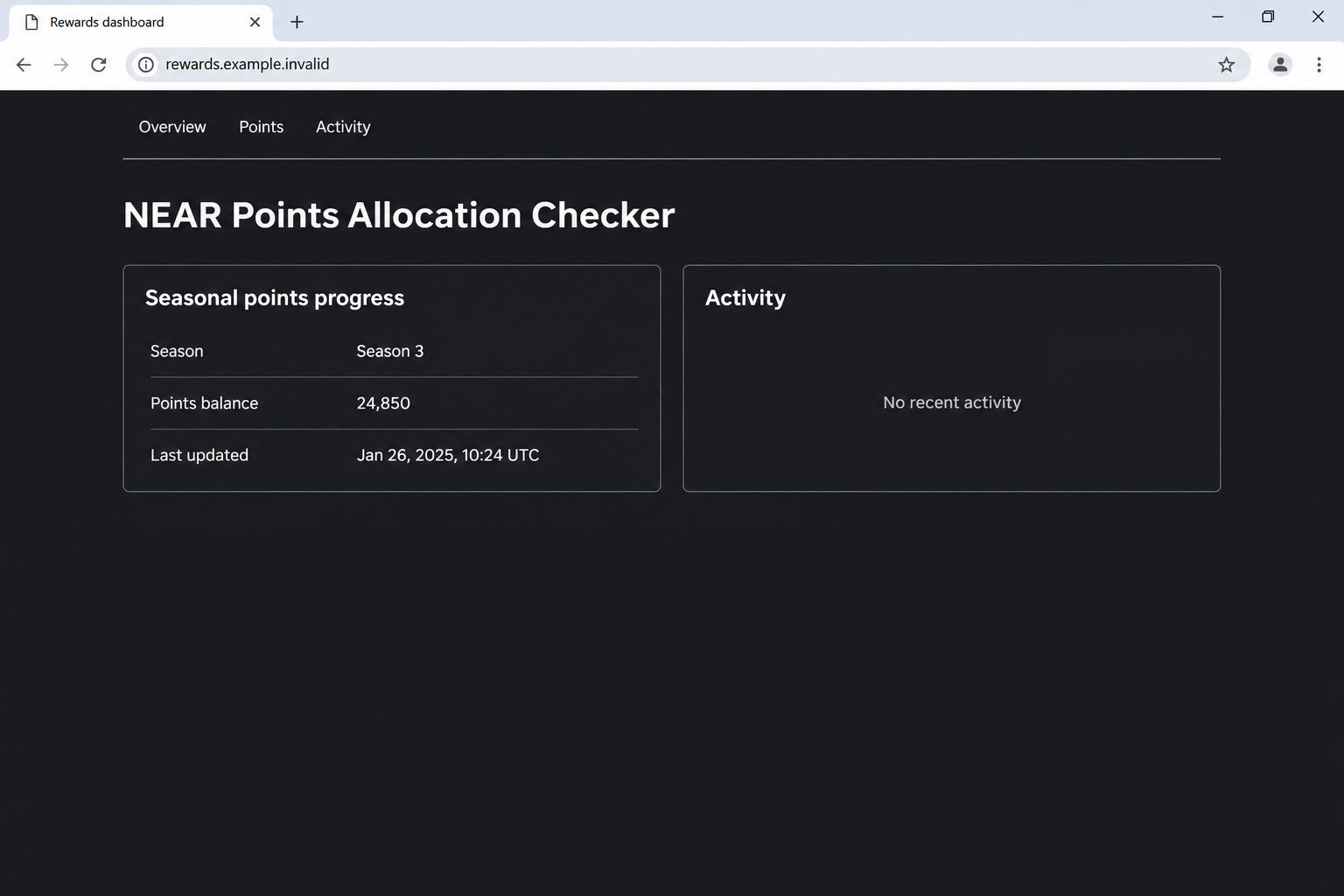
The NEAR Points Allocation Checker scam presents itself as a way to see progress for a rewards season. The displayed promise is a check, not an immediate purchase.
That is a meaningful difference in the pitch. People who would hesitate to pay a claim fee may be comfortable looking up a score they think they already earned.
The documented site was on a lookalike domain, not the official NEAR website. It copied NEAR branding and treated a wallet connection as the next step.
The supposed login opens a wallet chooser
The option to view progress did not simply show a number. It opened a wallet selector. The list included familiar names and wallets used across more than one network.
Those names belong to real products. Their presence is not proof that the product providers verified the page or that a NEAR reward program exists.
Here is what the documented page showed, and what it did not:
- A branded screen claimed seasonal points were available to view.
- The next screen asked the visitor to connect a wallet.
- The display did not establish a genuine allocation or entitlement.
- The documented evidence does not identify the exact transaction or permission requested from every supported wallet.
Exposure depends on what the wallet was asked to do
A wallet connection can let a site see an address and ask you to approve further actions. With many wallets, connecting alone is not permission to send assets.
Some login flows can also request permissions as part of the interaction. Read the wallet’s own confirmation, especially if it mentions keys, transactions, or authority that lasts beyond the visit.
The useful question isn’t just whether you clicked. It is whether the wallet connected, whether you approved anything, and whether activity appeared afterward.
How the NEAR Points Allocation Checker Scam Works
Step 1: The page promises information rather than asking for money
The word checker makes the interaction sound passive. You may expect to learn whether you have points and decide later whether to do anything with them.
Seasonal wording makes the claim sound like part of an ongoing program. It doesn’t tell you who runs that program, what the rules are, or where they were published.
If you recently used a NEAR app, that timing can feel convincing. It does not mean the page knows what you did or that the app awarded you anything.
Start with the app or project you actually used. A genuine program should be possible to identify without guessing which page in a search result belongs to it.
Step 2: The interface borrows the network’s identity
A public blockchain doesn’t operate every rewards page that uses its name. Third parties can build genuine apps, and outsiders can imitate them.
The fake checker relies on the reader carrying trust from the network’s name to a separate website. The resemblance isn’t evidence that the website is authorized.
A legitimate ecosystem may use many domains. That doesn’t validate an unsolicited link. Start with the project’s documentation or an app route you already know.
Don’t treat a sponsored search result as independent confirmation. Compare the operator and destination with announcements you reached without using the promotion.
Step 3: The page turns the lookup into a wallet interaction
In the documented example, the apparent login offered a choice of wallets. A reader could find a familiar option and assume it was safe to continue.
Even an authentic wallet window can display a request from an untrusted website. The window identifies the tool you use to authorize an action, not the person making the request.
If a panel asks to open a wallet, look for the requesting site and the selected network. A NEAR-themed page can invite actions that concern a different account or chain.
Refuse any request you don’t understand. You don’t need to connect an empty account or try another wallet to see whether the promise becomes real.
Step 4: The risk changes if you grant authority
An approval can authorize a transaction or grant some access. The actual consequence depends on the requested action, the network, and what permissions the wallet was willing to grant.
NEAR accounts can have different kinds of access keys. NEAR’s access-key documentation explains the distinction between broad account control and more limited function-call permissions.
That distinction is useful for a victim, not a verdict about the fake site. There is no basis here to claim that this sample always adds a particular key.
Check your own wallet and account history. If the approval is unclear, give the public transaction identifier to the wallet provider through its official support channel.
What a Real Points Program Should Let You Verify
Find the program before checking an allocation
Look for the organizer, season, announcement, and eligibility rules. An app may run the program rather than the network itself. Find out who actually made the promise.
You should be able to tell what activities count and when the season started. A page that only says users are eligible has not answered either question.
If the campaign refers to a specific application, start inside that application or use the address in its public documentation. Don’t switch over from the checker.
Compare the wording with other announcements from the same organizer. A reward can be discussed publicly even if some eligible balances are visible only in an account interface.
Separate a score, a token allocation, and a transfer
A points number may reflect activity in an app without giving you the right to withdraw tokens. A real allocation can have its own rules and distribution date.
A wallet transfer is different again. If a prompt shows that you are sending assets or granting permission, don’t treat the action as a harmless way to read a balance.
An allocation shown without a transaction history is only a claim. Verify any actual receipt from the wallet you trust or the chain’s established explorer.
Don’t use a screenshot of somebody else’s balance as proof. It may show a different program, different chain, or a number typed into an interface.
Use the account you actually exposed to guide the response
A wallet app can show several accounts. Note which one was selected when you interacted and which network the prompt named. Don’t guess based on your largest balance.
If you interacted on more than one network, review each relevant account. An address displayed by one app isn’t proof that the approval applied to every asset in it.
Find the provider’s guidance for that exact account type. Some products let you view connected sites and permissions in separate places. Others require different checks.
Don’t remove access keys at random. Deleting the only working key you control can lock you out. Ask official support before changing a permission you cannot identify.
What to Do if You Have Fallen Victim to This Scam
-
Leave the checker and decline anything that is still open.
If you only visited the page, close it. Don’t connect to confirm whether points exist and don’t revisit it to collect a cleaner screenshot.
-
Review the wallet you connected.
Use the wallet’s own interface to disconnect the site. Check activity independently and note the address, chain and approximate time before you forget.
If you didn’t approve anything, don’t assume a transfer occurred. Check whether any transaction, signing request, or permission was actually accepted.
-
If you approved a request, determine what it did.
Read the transaction details or ask the wallet provider to explain them. If the action granted continuing access, follow trusted wallet guidance to remove that specific permission.
Don’t use a service suggested by the fake checker. A page claiming to fix the original problem can ask for another harmful approval.
-
If your recovery phrase or private key was exposed, treat the wallet as compromised.
Get help from your wallet’s official support and use a clean setup with a new recovery phrase for any remaining assets. Never share the old or new phrase.
-
If assets moved, save the public evidence promptly.
Record the transaction identifier, the network, time, amount, and destination address. Keep an original message or screenshot if it doesn’t expose secrets.
Report it through your wallet provider and the relevant fraud reporting service. If a custodial service appears to be involved, contact its security team through a verified route.
-
Keep account security separate from device cleanup.
If the site also convinced you to run software, stop using that device for wallet access and get security help. The documented checker is not proof of a software installation.
How to Ask for Help Without Sharing the Keys
A support agent can often use your public account address and a transaction identifier. Those are different from a recovery phrase, private key or password.
Describe the prompt you saw and the action you took. If you don’t remember approving a transaction, say so. There is no reason to send another one for testing.
If the public account is tied to your identity, submit evidence privately to the right service. You don’t have to post the details on social media to ask for help.
Ignore people who offer to restore your points or retrieve tokens for a fee. Moving funds to a supposed verification wallet is not part of ordinary incident reporting.
Don’t let a fake score become a reason to deposit funds
An account screen may show points, a token amount, or an estimated value. Before those figures mean anything, you need to know which program assigned them.
An instruction to top up a wallet so the checker can display a score is not independent proof of a reward. Don’t add assets to an account you’re investigating.
If a friend sends a points screenshot, ask which app produced it. They may have used a real program with a similar name, or seen the same deceptive page.
When you can’t verify the organizer, stop there. You don’t need to prove that every number in the interface is wrong to avoid handing it permission.
Read your wallet’s wording before taking remedial action
Some wallet records describe signing a message, while others show a transaction that was sent. Check which term applies before telling support what happened.
If a permission appears under one account, don’t assume it was granted on the others. Inspect the account you used and keep notes if several addresses were involved.
A real support response may ask for screenshots of the prompt. Redact secret material and private identity details first. An account recovery conversation doesn’t require your keys.
If support asks you to check a transaction, get the identifier from your own wallet. Don’t rely on a transaction link provided by the checker or a stranger.
Keep your incident notes available after the connection is removed. They can help you identify a follow-up message that repeats the same points story under a different domain.
If you used a wallet on several devices, check where the connection was made. Another installation may show the same address without showing all the same locally saved sessions.
Don’t delete the wallet app while you’re trying to identify what happened. That won’t reverse a chain action and could make it harder to find your account history.
An account can be viewable even if you can’t safely use it. Ask official support how to review activity without importing your recovery phrase into another app.
Frequently Asked Questions
Is the NEAR Points Allocation Checker a real rewards page?
The documented checker was an unrelated site copying NEAR’s branding. Verify any genuine program with the project or application that actually operates it.
Does NEAR itself run the fake checker?
There is no evidence that the real NEAR project operated the documented lookalike. The warning applies to the fake page, not to the network itself.
Does a wallet connection automatically send my assets?
Not by itself in ordinary connection flows. What matters is whether you also signed a transaction, granted a permission, or disclosed a secret.
Why does it offer so many familiar wallets?
A familiar wallet name makes the choice feel ordinary. It does not prove that the wallet developer endorsed the site or that any reward exists.
Will disconnecting cancel everything I approved?
No. Ending a connection doesn’t reverse a completed transaction or necessarily remove ongoing permissions. Review those separately using official wallet guidance.
Can a support agent ask for my recovery phrase to check the points?
No legitimate support workflow should require that secret. Share public transaction information if needed, not words that grant control of the wallet.
The Bottom Line
Don’t use the NEAR Points Allocation Checker to verify rewards. The documented lookalike turns a supposed progress lookup into a wallet request without establishing a real program.
If you connected, review the selected account and any action you approved. Verify genuine rewards independently, and use the wallet provider’s trusted support if anything changed.

Join the discussion
0 commentsShare your experience or ask a question about this article.
Discussion
Start the conversation
Have a question or something useful to share? Add the first comment.