


A page says your wallet may qualify for a Unicorn Fart Dust allocation. The name is familiar, and checking eligibility appears to take only a moment.
Before letting that page open your wallet, look at what it promises, where it came from, and what the next approval would actually authorize.
Overview
A token allocation offered by an impostor
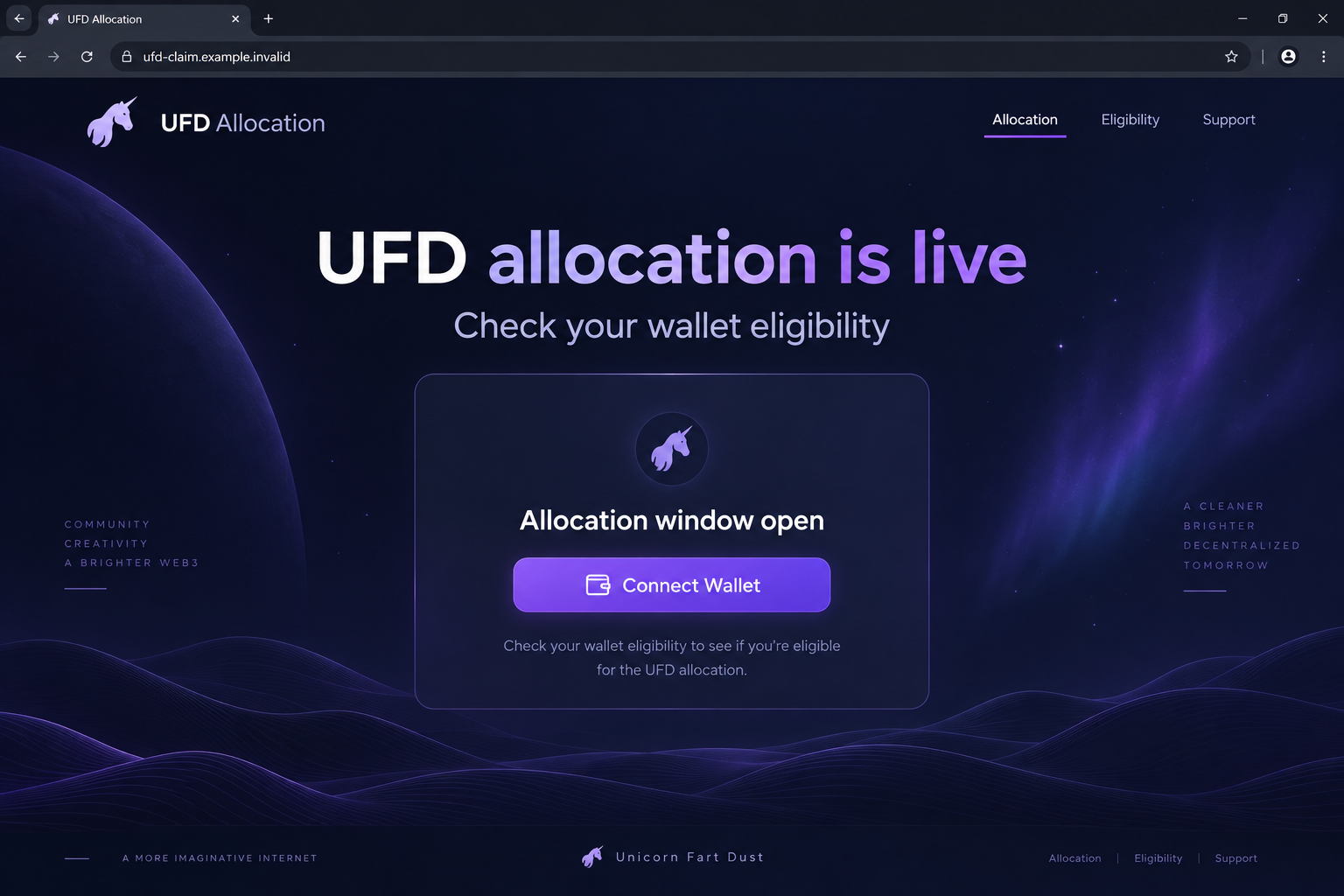
The Unicorn Fart Dust allocation scam uses the real project’s name to promote an unofficial token claim. The reported page at ufdlabs.com asks visitors to connect wallets.
That address has been identified as a cryptocurrency drainer impersonating UFD. Its allocation promise is the lure that brings a holder to the wallet interaction.
The reported address now returns a 404 page. That limits inspection of its current interface, while the underlying warning remains relevant to copies using the same story.
Unicorn Fart Dust itself is a real Solana token project. A warning about an impersonating claim page should not be confused with a verdict on the token’s investment value.
What the wallet interaction puts at risk
Connecting a wallet and approving a transaction are different actions. A connected site can request further actions, so the next popup needs its own review.
A drainer tries to turn the promised reward into permission to move assets. The button’s reassuring label does not describe everything a transaction may do.
No fixed loss or precise contract behavior can be established for every copy. Your wallet’s recorded actions determine what happened in your particular case.
- The real project’s name does not authenticate a separate allocation domain.
- A public wallet address is different from a private key or recovery phrase.
- A signed transaction can matter even when no password was shared.
- Disconnecting a site does not necessarily revoke permissions already granted.
The safest way to assess the claim
Leave the allocation page and start from the UFD project’s own website. Follow its established community links to check a purported announcement.
Do not treat an advertisement, reply, or unsolicited direct message as a substitute for that route. An impersonator can borrow the same logo and token name.
If you already interacted, stop further approvals and examine wallet history. The response should fit what you connected, signed, transferred, or disclosed.
Why an Allocation Offer Feels Plausible
Crypto communities talk about distributions, eligibility, and early access. A claim page can reuse that vocabulary without explaining who actually authorized its offer.
Someone who already holds the token has a reason to pay attention. The word allocation suggests they may have earned something through earlier participation.
That suggestion can make a wallet connection feel like a harmless check. The visitor is focused on finding out whether there is a reward.
Scammers benefit when the recipient’s existing interest does the persuasive work. They do not need to explain why someone would want the token.
A polished page can also reduce the feeling that a decision is being made. Connecting appears to be the first step in an ordinary application.
But a genuine project can be copied. Its name, mascot, and public token information are all available to someone building an impostor website.
Check the announcement and address together. Knowing the token exists answers only one question; it does not authenticate a particular claim window.
How the Fake UFD Allocation Scam Works
Step 1: The allocation story reaches a holder or interested buyer
A claim link can arrive through a promoted post, a community reply, a search result, or a private message. These are possible entry routes, not verified delivery for every victim.
The offer asks the reader to think about a missed opportunity: perhaps an allocation is waiting and someone else will claim it first.
Pause before following that logic. A reward announcement should be traceable through the project’s established channels, not depend on an anonymous person’s convenient link.
Be cautious about comments claiming they successfully collected tokens. A comment provides no reliable evidence about the contract your wallet would approve.
Step 2: The page borrows UFD’s identity
The reported ufdlabs.com page presented a live allocation event under the Unicorn Fart Dust name. That borrowed identity gave its wallet request a recognizable context.
Words such as labs, official, claim, and allocation can make an address sound relevant. They do not demonstrate control by the actual project.
Look at the full address rather than the browser tab title. A tab can say UFD while the page belongs to someone entirely different.
If an established account seems to recommend the link, check for a corroborating announcement elsewhere. Social accounts can be imitated or compromised.
Step 3: A wallet connection opens the next request
Pressing Connect Wallet ordinarily allows a site to identify the wallet and request actions. It does not turn the page into a trusted project interface.
Phantom’s connection guidance explains the difference between sharing a public address and approving subsequent actions.
Reject a website that asks you to type a recovery phrase to connect. A normal wallet connection happens through the wallet’s own interface.
Do not approve an unfamiliar request simply because connecting seemed uneventful. Each requested signature or transaction is a fresh decision.
Step 4: The supposed claim becomes a financial authorization
A fraudulent reward flow can describe the next request as eligibility verification while asking the wallet to approve something with financial consequences.
Read what the wallet displays. Unexpected transfers, unclear instructions, or warnings are a reason to reject the request and close the page.
On Solana, a transaction can contain multiple instructions. The network’s documentation explains that signatures authorize the transaction’s changes.
Do not judge safety by a website’s promise that an action is free. A fee display alone does not describe all asset movements or permissions.
The exact transaction used by the historical UFD page is not available here for verification. Avoid assumptions about a specific approval method across later copies.
Step 5: Assets leave, and the reward story offers another excuse
After a harmful approval, the victim may see a transfer or balance change. The original page can still show a waiting reward or an error.
Do not pay another amount to complete the claim or repair the withdrawal. A new payment request does not explain an unauthorized movement already visible in history.
If someone offers recovery through a private message, verify them independently. Losses create a fresh opportunity for people selling false tracing or unlocking services.
How to Verify a UFD Announcement Without Signing Anything
Begin from an established project address
Type the project’s known address yourself or use a bookmark created before the suspicious offer arrived. Avoid a replacement link supplied by the same sender.
Look for an announcement describing the event, eligibility rules, network, and destination. Vague enthusiasm is not the same as a documented claim process.
If the offer cannot be corroborated, leave it alone. Missing out on an unverified giveaway is a smaller problem than authorizing an unexplained transaction.
Check the asset, not just the ticker
A token ticker can be reused by unrelated assets. Compare the chain and token identifier with information from the project and a trusted explorer.
The official UFD site displays its Solana token information. A different asset using UFD in its name should not be assumed to represent that project.
A token appearing in your wallet is also not an invitation to visit the website written in its metadata. Unsolicited tokens can carry scam advertising.
Keep approval separate from curiosity
You can read an announcement and inspect public records without signing a wallet request. Verification should happen before a transaction needs your approval.
Ask for help through the provider’s official support pages if a transaction is unclear. Do not let a stranger interpret it while they guide your next click.
Do not share screen recordings that reveal your recovery phrase or private keys. A public transaction identifier is sufficient for many initial support questions.
What to Do if You Have Fallen Victim to This Scam
Take one action at a time. You do not need to return to the claim page to establish whether your wallet recorded a transaction.
-
End the allocation interaction. Close the impostor page and reject any open wallet request. Stop replying to the account that delivered the link.
Keep a copy of the URL and message first. Do not revisit the site to obtain a reward the sender says is still pending.
-
Identify what you approved. Review wallet activity and note the network, asset, destination, transaction identifier, and status.
A connection without a signed transaction differs from an executed transfer. Write down exactly what happened rather than assuming the worst from a page warning.
-
Disconnect suspicious applications. Open the wallet’s own connected-app settings and remove the allocation site and other entries you do not recognize.
Use the wallet provider’s instructions. Disconnecting limits further interaction, but already granted spending permissions may need a separate revocation.
-
Review permissions on the correct network. Follow the provider’s current guidance for removing approvals or delegated access relevant to your wallet.
Phantom’s scam recovery guide distinguishes Solana tools from Ethereum and other EVM options. Reach tools through that trusted route.
-
Replace a wallet whose secrets were exposed. If you entered a recovery phrase or private key, create a new wallet in a trusted environment.
Move remaining known assets carefully. Restoring the same phrase into a new app does not create new keys or exclude someone who copied that phrase.
-
Document and report any loss. Save messages, addresses, transaction records, and the time of the incident. Report the impersonation to the platform carrying the link.
Contact any involved exchange through its actual support channel. Submit the case to the appropriate fraud authority without expecting a guaranteed reversal.
-
Decline recovery fees and unsolicited support. A person promising access to frozen tokens may be continuing the deception under another name.
Do not provide your wallet phrase to prove ownership. Legitimate support should not require the secret that gives unrestricted control of your assets.
-
Check the remaining wallet activity. Review other assets, staked positions, and permissions before considering the incident closed.
If you are uncertain about an instruction or token, ask official support. Avoid moving unfamiliar tokens merely because a stranger says they must be cleaned out.
What a Wallet History Can Tell You
A webpage may display any balance its operator chooses. Your wallet history and the corresponding explorer record show actions actually submitted to the network.
Begin with the status. A rejected request, failed transaction, and confirmed transfer have different consequences and should be described accurately in a report.
Next identify the network. A tool designed for one chain may not show the permissions or transactions associated with another.
Record the asset identifier as well as its displayed name. Names and symbols can be copied, while the identifier ties the record to a specific token.
Compare destination addresses carefully. Do not confuse a wallet balance change with a guaranteed theft amount until you understand the transaction’s relevant movements.
Keep the transaction identifier in plain text. A cropped screenshot without it may prevent support from locating the record you are describing.
Do not sign a new message to let an unknown investigator inspect public history. Public chain records generally do not require control of your wallet to read.
Protecting the Community From the Same Link
If you shared the allocation link, tell those recipients promptly that it should not be used. Give a clear correction rather than quietly deleting your own post.
Report the original account or advertisement. Include the address and the impersonated project so moderators can see what behavior you are reporting.
When warning others, use a screenshot or a deliberately broken address. Posting a clickable scam URL can send curious people into the same trap.
Keep private balances and personal details out of public discussions. A useful warning does not need to advertise how much money is in your wallet.
Be cautious when a helpful reply immediately becomes a private conversation about recovery. The new speaker may have found you because you reported the first loss.
Review your own saved shortcuts afterward. A bookmark made during the fake claim should not become your starting point for future UFD activity.
If another domain repeats the allocation story, assess it from the established project channels again. A changed address does not validate the underlying offer.
Frequently Asked Questions
Is Unicorn Fart Dust itself the scam described here?
No. This warning concerns an impersonating allocation page. The real project’s existence does not authenticate a separate giveaway or determine whether buying the token suits you.
Was ufdlabs.com the official UFD website?
It was reported as a fraudulent allocation page impersonating the project. Begin verification at the project’s established website and community channels instead.
Did connecting my wallet automatically transfer everything?
A connection and transaction approval are different. Review what your wallet recorded and any permissions granted, rather than assuming a connection alone proves a loss.
Is disconnecting the page enough after I signed?
Not always. Some permissions can outlast a connection. Follow your wallet provider’s network-specific recovery instructions and review the signed transaction.
Should I pay a fee to release my allocation?
Do not pay this impostor to complete or unlock the claim. Stop the interaction and verify any legitimate program through established project channels.
Can Phantom or another wallet reverse a confirmed transfer?
Wallet providers generally cannot reverse confirmed blockchain transfers. They can explain protective steps, while exchanges and authorities may assess a report based on the circumstances.
The Bottom Line
Do not use the fake UFD allocation page or approve a replacement claim link because it repeats the project’s name. Verify announcements before opening wallet requests.
If you already signed or disclosed secrets, inspect the transaction, withdraw relevant permissions, and move to new keys when necessary. Keep the records and refuse recovery-payment demands.

Join the discussion
0 commentsShare your experience or ask a question about this article.
Discussion
Start the conversation
Have a question or something useful to share? Add the first comment.