


A contact lens price can look excellent until you’re ready to pay. The awkward question is whether you’ve compared the same total all along.
If you’re checking Lens.com after a surprisingly large charge, it helps to untangle the offer before deciding what to cancel, question, or dispute.
Overview
A real retailer is facing a pricing lawsuit
Lens.com sells prescription contact lenses online. The concern examined here is its pricing and subscription presentation, not evidence that every order is fictitious or every lens is counterfeit.
The FTC, Nevada, and Utah filed a civil lawsuit on October 2, 2026, alleging misleading prices, substantial fees, and inadequate AutoRefill disclosures.
The FTC’s case page lists the proceeding as pending. These are allegations awaiting resolution, not a criminal conviction or a court finding against the defendants.
The price on the product page is only one number
The complaint challenges what shoppers understood before committing to a purchase. An advertised box price, an amount charged immediately, and a later rebate can describe different costs.
The authentic site images in this article come from February 24, 2026 exhibits in the official complaint. They are historical evidence, not our own checkout test.
That distinction matters when comparing your order: use your actual receipt and terms, rather than assuming an old example matches today’s offer.
Five details are worth checking together
- Confirm the exact lens product and number of boxes for both eyes.
- Separate the amount payable immediately from any expected rebate.
- Find every mandatory charge before providing your payment information.
- Check whether you’re purchasing once or enrolling in recurring shipments.
- Keep cancellation, return, and rebate deadlines in separate records.
Why a Low Box Price Can Be Hard to Compare
Start with the quantity you actually need
A per-box figure is useful only alongside the box size and quantity. Four boxes for each eye means eight boxes in the order, not four.
A price comparison also needs the same lens product and prescription. Comparing a smaller pack or a different lens can create savings that aren’t actually available to you.
Write down the product, pack size, and combined quantity before comparing retailers. That gives you a consistent starting point when their promotional displays look different.
Don’t let a larger advertised discount choose your prescription. The FDA recommends a current prescription and the exact prescribed lenses; substitutions need your eye care professional’s approval.
A rebate is different from a lower card charge
A mail-in rebate may reduce an eventual net cost, but it does not necessarily reduce the amount charged when you place the order.
For your budget, record both figures. You need to know what leaves your account now, as well as what you might receive after completing the rebate requirements.
Check eligibility, submission instructions, deadlines, and the form of payment. An advertised rebate should not be treated as money already returned to your bank.
Keep the supporting paperwork until the rebate is resolved. A product-page screenshot alone may not show the conditions that apply to your particular purchase.
A combined fee label still needs an explanation
The FTC alleges that Lens.com’s combined tax-and-fee wording misrepresented the nature of its charge. Its announcement explains the pricing allegations and the pending court process.
For a shopper, the practical question is straightforward: how much is the complete order, and which parts are product cost, shipping, taxes, or merchant-imposed fees?
A familiar label is not an itemized explanation. Ask for that breakdown before authorizing payment, especially when the total is materially higher than expected.
How the Lens.com Pricing and AutoRefill Offer Works
Step 1: An attractive search price sets the comparison
The complaint describes sponsored search results directing shoppers to Lens.com product pages. A prominently displayed box price gives the visitor an immediate reference point.
That first number can shape which retailers remain on your shortlist. Before proceeding, identify whether it assumes a rebate, a minimum quantity, or another condition.
A sponsored position does not verify the final price. Compare the complete transaction rather than treating the search listing as a finished quotation.
Step 2: Product choices introduce quantity and subscription decisions
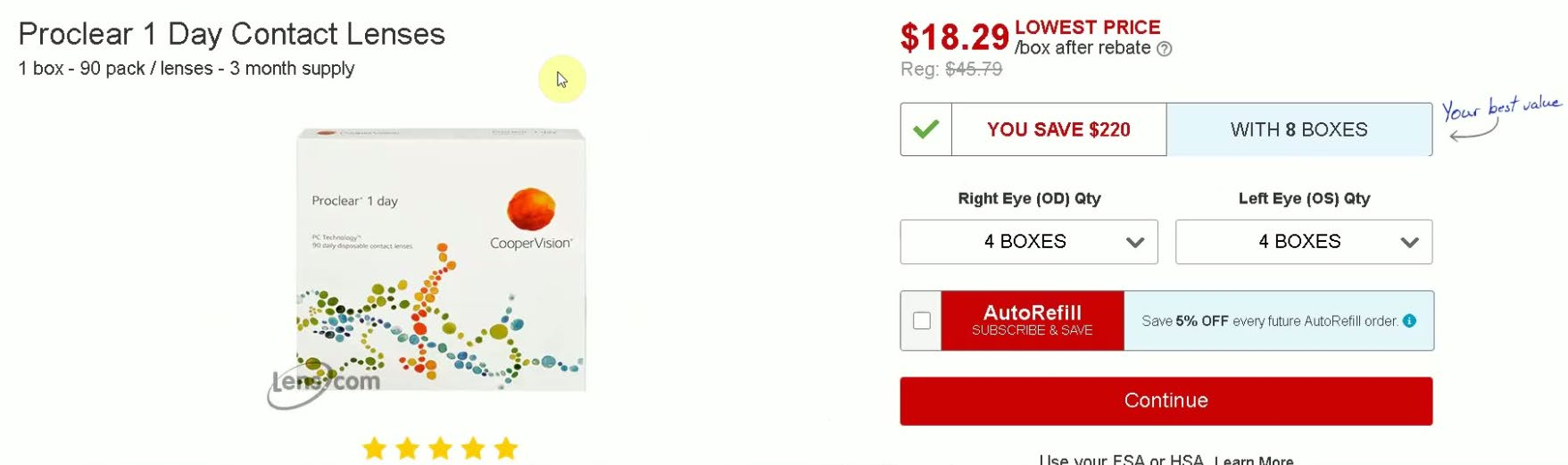
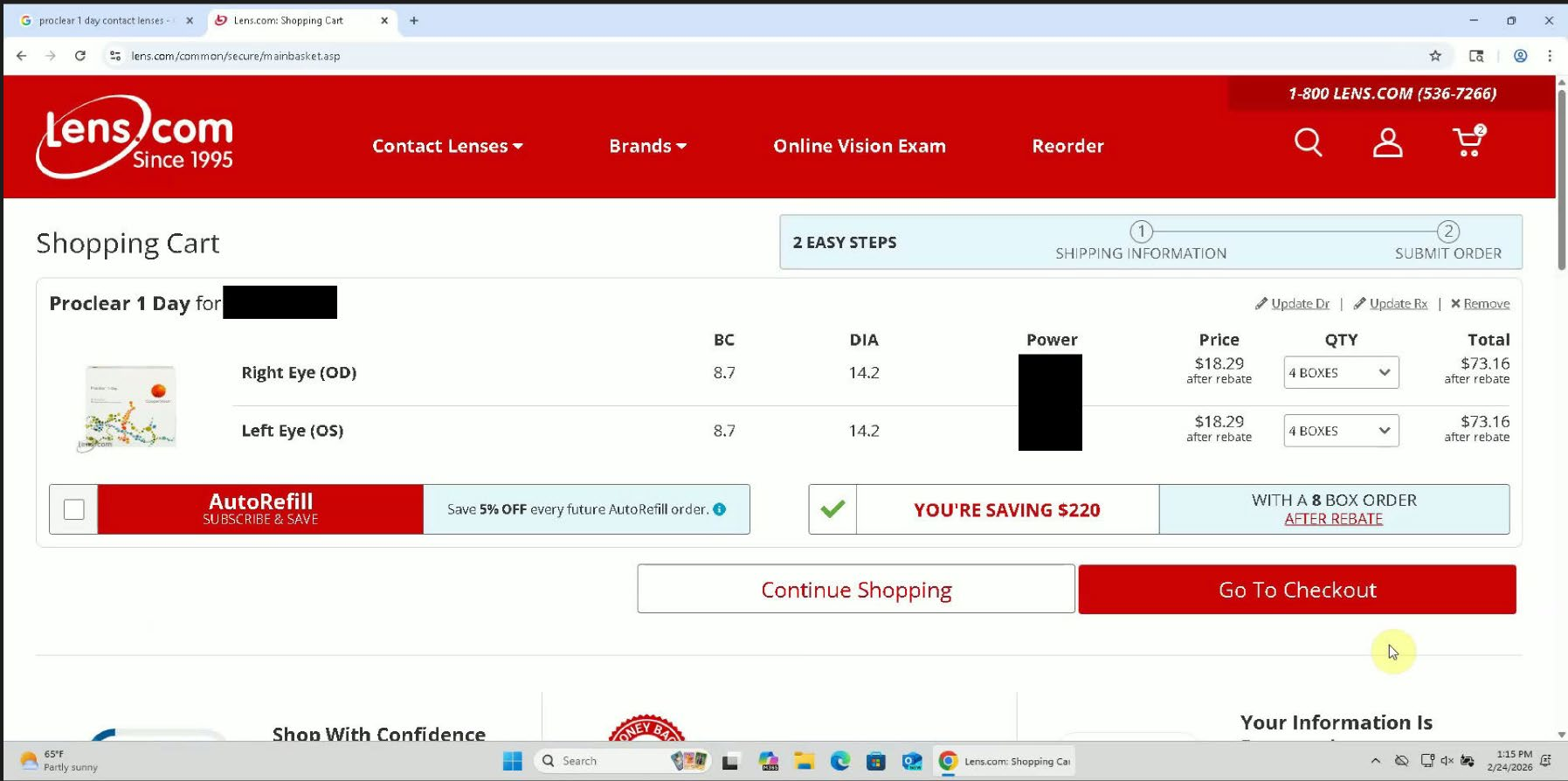
The historical Proclear example displays $18.29 per box after rebate, alongside quantity selectors. It also presents an AutoRefill option offering 5% off future orders.
The checkbox in that exhibit is not selected. Its presence does not prove every shopper was automatically enrolled or that you personally joined the program.
Check the selection in your own order. A discount for recurring purchases creates a separate decision from buying the lenses you need today.
Step 3: Prescription details move the purchase forward
The documented sequence then asks for prescription and provider information before displaying the cart. Those requests are part of buying prescription lenses, not inherently evidence of phishing.
However, completing several screens can make starting again feel inconvenient. If the price becomes unclear, the information you’ve already entered is not a reason to continue paying.
Pause before submitting financial details, even after choosing quantities and entering a prescription. You can still compare another supplier without accepting an unexplained total.
Step 4: Additional charges change the example’s economics
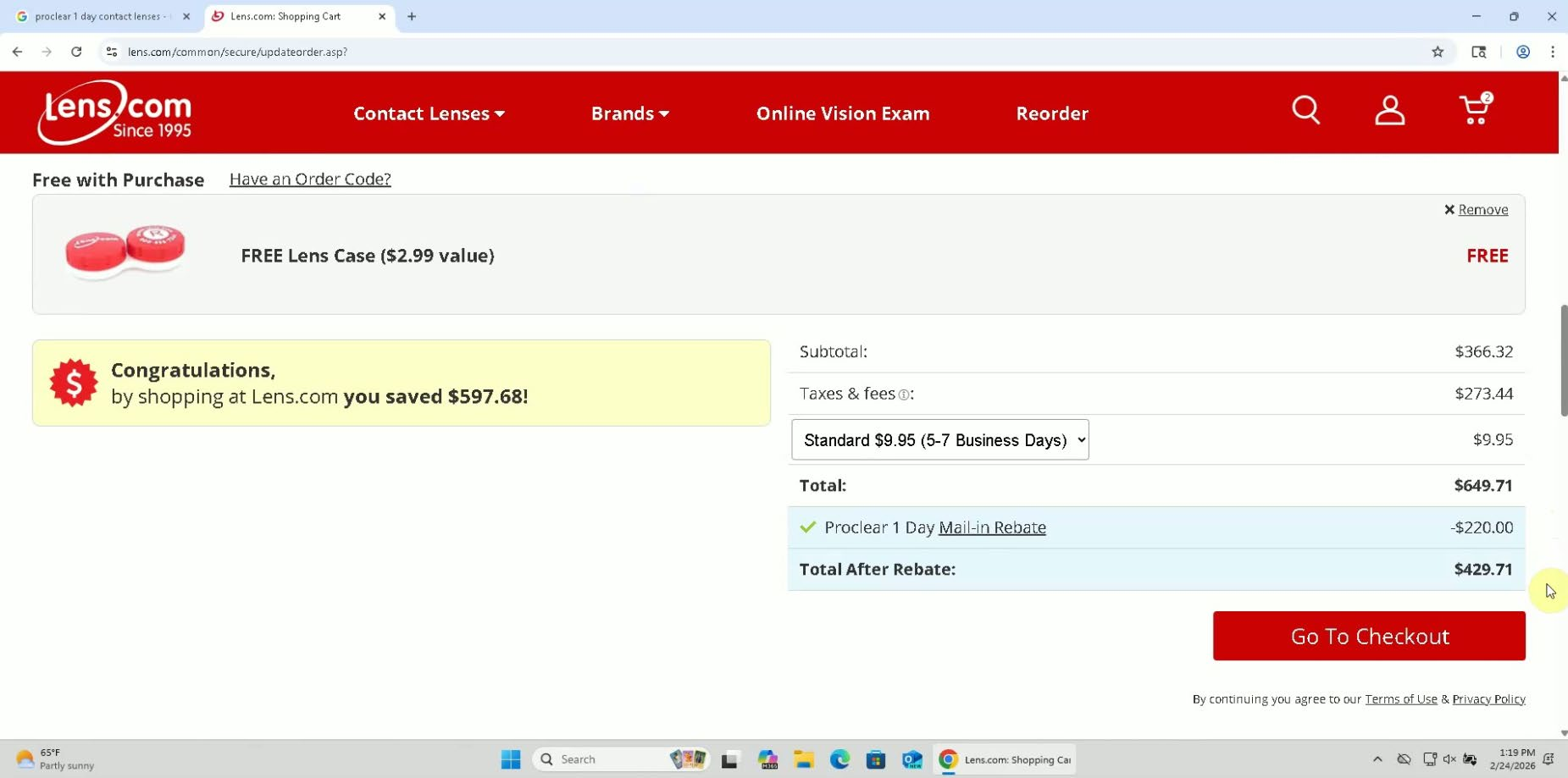
The February exhibits show a $366.32 subtotal, $273.44 in combined taxes and fees, and $9.95 shipping. Together, these produce a $649.71 charge.
A separate $220 rebate brings the illustrated net figure to $429.71. That is different from both the immediate payment and the $146.32 suggested by eight advertised box prices.
The complaint alleges shoppers could advance past the shipping screen without seeing the detailed fee line below its continuation button.
For your transaction, find the itemization before continuing. Record the total and its components together, rather than saving only the smallest number on the page.
Step 5: The final total needs another deliberate check
A checkout summary can display a total without making each component equally noticeable. Knowing the amount and understanding how it was assembled are separate checks.
Before submitting, compare the payment total with your own calculation. If it differs, ask for an explanation or leave the purchase unfinished.
You do not need to complete an order to investigate its price. Avoid sharing additional financial information merely to discover whether a confusing offer improves later.
Step 6: AutoRefill can turn one purchase into future charges
Lens.com’s current public AutoRefill information describes recurring orders at the selected frequency. It also explains that future prices can change.
The page directs subscribers to their account’s AutoRefill Center for cancellation. Its shipment notice and change window mean the expected delivery date isn’t your only relevant deadline.
The website promises an email 30 days before shipment. It also mentions seven days to change an order before placement, so check the actual processing cutoff.
If you don’t want recurring deliveries, check the subscription status separately from the order status. Cancelling an ongoing plan and stopping an already processed order are different tasks.
Who Handles the Purchase and Any Refund Request?
Keep the retailer and its named defendants straight
The lawsuit names Lens.com, Inc., Speed Commerce, LLC, and Cary Samourkachian. Those identities establish the parties accused in this case, not liability already decided by a judge.
For an individual purchase, start with the merchant and order details on your receipt. Preserve the billing description too, particularly if it differs from the familiar website name.
Use the subscription controls for the subscription
Open your account through the retailer’s independently located website, then review AutoRefill status and upcoming orders. Don’t rely on deleting an email or closing a browser tab.
Save the cancellation confirmation and any next-order information. We did not enter a customer account, so this review does not certify how your account’s controls currently behave.
A return request needs its own written answer
Ask whether your order can still be stopped, whether a return requires authorization, and which amounts would be refunded. Request answers that refer to your actual order.
Before opening boxes, check the applicable return conditions. Product acceptance, shipping costs, processing fees, and rebate eligibility can affect different parts of the transaction.
Do not assume that returning lenses cancels future shipments. Equally, stopping future deliveries does not establish that a previous payment has been refunded.
Track the requested remedy rather than the conversation alone
A useful response should identify the order, the requested change, and what happens next. Ask for written confirmation of any promised cancellation or credit.
Keep a short timeline of requests and replies. If you later contact your card issuer, that record is more useful than repeatedly explaining the problem from memory.
What to Do if You Already Ordered or Were Charged
-
Reconstruct what you agreed to purchase. Gather the product listing, order confirmation, receipt, payment statement, and any AutoRefill or rebate messages before requesting a specific correction.
Distinguish a pending card authorization from a posted charge. Note quantities, the complete amount, and whether a rebate was represented as a separate later payment.
If you lack a screenshot, keep what remains available. Do not place another order or re-enter payment details to recreate the original experience.
-
Ask the merchant for an itemized resolution. Explain which displayed price or subscription term you understood differently, and request the action you want in writing.
Specify whether you’re asking to stop an unshipped order, cancel recurring deliveries, return eligible products, or correct a disputed amount. These requests can require separate handling.
Ask which charges would remain after a return. An offer to refund a product amount may not answer your question about the rest of the payment.
-
Review future shipments before their processing date. Check the AutoRefill Center and retain the result if you cancel. Verify whether an upcoming order is already in progress.
Do not interpret a changed delivery date as cancellation. Read the confirmation carefully enough to establish whether the plan ended or only one shipment moved.
If cancellation fails, preserve the error and contact the retailer promptly. A dated record helps explain why a later charge may be disputed.
-
Contact your card issuer without missing applicable deadlines. Describe the transaction accurately, including any purchase you authorized and the particular amount or recurring charge you contest.
For applicable U.S. credit-card billing errors, the CFPB explains the written-notice process, including a 60-day deadline measured from when the relevant statement was sent.
Ask your issuer which process and evidence apply. Debit cards, payment services, defective-product claims, and transactions outside the U.S. can involve different rules.
A dispute is not a guaranteed refund. Keep paying undisputed amounts as required, and ask how a recurring-payment block would affect future charges.
-
Handle the physical lenses without compromising your care. Keep packaging, delivery records, and return instructions together. Use tracked shipping if you return products under the merchant’s instructions.
Check that the received lenses match your prescription. If they don’t, contact your eye care professional rather than accepting a different product merely to avoid inconvenience.
Address your next supply separately from the billing dispute. Choose an appropriate supplier without changing prescribed lenses or stretching their wear schedule to recover a financial loss.
-
Report unresolved conduct and watch subsequent statements. Send accurate supporting information to ReportFraud.ftc.gov where appropriate, and retain any reference provided.
A regulatory report does not replace a cancellation request or your card issuer’s dispute process. Continue those steps while observing their separate deadlines.
Check later statements for promised credits and unexpected repeat payments. Someone offering a guaranteed lawsuit refund for an upfront fee should not receive your money or banking codes.
Frequently Asked Questions
Does the FTC case mean Lens.com is a fake store?
No, the pending case concerns alleged pricing and AutoRefill practices at a real retailer. It does not establish that every delivery is fake or the lenses are counterfeit.
Can I still use the historical $18.29 price?
That figure belongs to a February 2026 exhibit and includes an after-rebate qualification. Check your actual offer’s quantity, total payment, and rebate requirements instead.
Why are the payment total and after-rebate total different?
A later rebate is separate from the original charge. Compare the amount payable now and the potential net cost without treating the rebate as already received.
Does the AutoRefill discount lock in my original price?
The public program information says pricing can change, and earlier special pricing may not apply. Review the upcoming order rather than assuming your first promotion repeats.
Will cancelling AutoRefill automatically refund an earlier order?
Don’t assume those actions are linked. Confirm both the subscription’s status and the handling of the particular order or charge you want stopped or refunded.
Does the lawsuit guarantee compensation for my purchase?
The case page lists a pending proceeding, not an automatic refund program. Pursue your own order resolution and payment dispute without waiting for a promised court payout.
The Bottom Line
Do not choose Lens.com solely because a box-price headline looks cheapest. Require a complete, understandable payable total and clear recurring-order terms before buying; walk away if either remains unclear.
The case concerns how costs and recurring commitments reached shoppers. It does not establish counterfeit lenses or guarantee a refund for every customer.
If you’ve already paid, preserve the receipt, check AutoRefill, and request a precise remedy. Contact your payment provider promptly if the amount or subsequent billing remains disputed.

Reviews & discussion
0 commentsShare a firsthand experience, or ask a question.
Community reviews
lens.com
Moderated reader experiences, not an editorial verdict.
Start the conversation
Have a question or something useful to share? Add the first comment.