


An email arrives with the subject McAfee Support wants to pay you using BILL, and its very first line announces that a $499 plan renewal has already gone through.
That mix of a payment platform and a security brand makes the McAfee BILL email hard to dismiss, so we checked the sender, the price and the number first.
Overview
What the email asks you to do
The message opens with the single word Hi, names no plan, shows no order number and announces that a renewal for 499 USD is done.
It then tells you to call a Michigan area code number to stop an auto-debit, while the rest of the email invites you to open a BILL account.
The two halves contradict each other, since one tells you money has left your account while the other offers to send you money, a sign of bolted-on text.
Who actually sent it
The sender address is account-services@inform.bill.com and the display name reads McAfee Support via BILL, so the only McAfee anywhere in the sender line is a label someone typed.
When we looked up the published records for inform.bill.com on November 12, they named BILL’s own mail servers and a policy to quarantine anything else using that name.
We found nothing that connects McAfee to the message, and none of the 18 sender addresses on McAfee’s own list ends in bill.com.
What we could not see
We worked from one copy of the email and never saw its raw headers, so we cannot tell which BILL account made the invitation or who typed the wording.
We did not call the number or open the Accept Invite button, so we cannot tell what the caller asks for or what the sign-up page collects.
- Verified by us: the sender domain’s published records, McAfee’s sender list, McAfee’s prices and refund terms, BILL’s invitation process and the number’s block assignment.
- Not found: any McAfee address, plan name, order number or account detail in the message that you could check against your own subscription.
- Not verified: who owns the phone line, who typed the wording, and what the person who answers would ask for.
Do not call the number, and check any McAfee renewal by logging in to your own account.
How the McAfee BILL Email Scam Works
Step 1: A real payment platform delivers the message
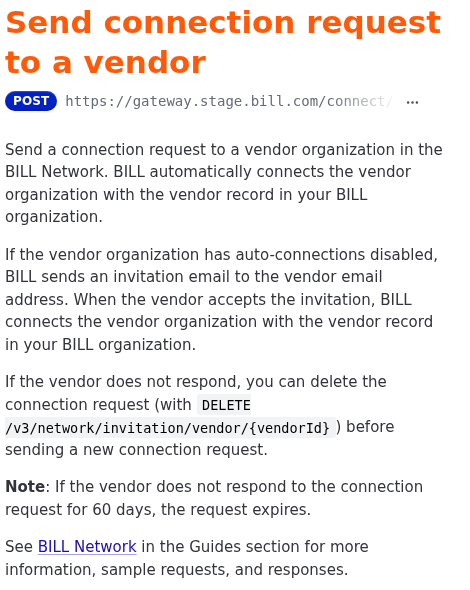
BILL is a genuine business payments company, and its developer documentation explains that it sends an invitation email to the address stored on a vendor record in the inviting account.
That matters because whoever creates the invitation picks the name and the address it goes to, so BILL’s servers deliver the message even for a stranger.
We read that page directly, and it also tells us an unanswered invitation expires after 60 days, which gives anyone who sends one a long window to catch a reply.
The scam therefore does not need a forged address, a hacked mailbox or a lookalike domain, because the invitation feature already produces an email that carries a trusted domain.
Step 2: The renewal story sits where a name belongs
The wording we examined begins Hi, continues straight into your plan renewal for 499 USD is done, and ends with a comma after the words to stop auto-debit.
A trailing comma is how a greeting normally closes, so the renewal text looks as if it was typed into the field that holds the recipient’s name.
That is our inference from the punctuation and the missing name, not something the headers prove, but it fits a template that expected a person’s name and received a paragraph.
The sentence about McAfee Support partnering with BILL probably follows the same pattern, with the sender’s chosen account name dropped into invitation text, though BILL’s template wording is unconfirmed.
Step 3: The charge cannot be checked and does not add up
A real renewal notice normally gives you something to compare with your account, such as a plan name, date, card ending or order number, and this message gives none.
It names only an amount, 499 USD, and an urgent instruction, which leaves the reader with nothing to check except the single thing the sender wants them to do.
The wording also contradicts itself, because a renewal that is done has already been charged, yet the same sentence offers a call to stop the debit.
The invitation underneath adds a second contradiction, since the subject line offers you money from McAfee while the first sentence announces that McAfee took yours.
Step 4: The phone number is the only exit
There is no link in the renewal sentence, which is deliberate, because the only action the sender offers for the supposed charge is to call.
The number is a Michigan area code line, 810 627 5355, and the section below shows what the numbering records reveal about it.
A call suits the sender because it moves the conversation out of the inbox, where filters and your doubts operate, and into a live exchange the other person paces.
Our other callback articles show the same design, including the BTC Trade Desk PayPal email and the workstation Trojan alert.
Step 5: The call turns into access and payment
We did not call, so we cannot tell what this particular operator asks, but McAfee’s own guidance on tech support imposters lays out the usual path in some detail.
McAfee’s imposter guidance lists a request to connect remotely, a statement that the card failed, and a push to buy software through a link the caller supplies.
For a fake renewal the likely script is a refund: install a remote tool, watch a bank page you never opened, and return an overpayment.
That refund story is an inference from the pattern, which our articles on a fake Norton renewal invoice and an earlier McAfee cancellation request follow in the same callback format.
Step 6: The Accept Invite button is a second hook
The email also carries an Accept Invite button and promises that signing up is free, so a reader who ignores the number is still pushed toward a payment account.
We did not open the button, so we cannot tell where it leads, although a genuine BILL invitation would lead to BILL’s own sign-up.
For that reason the button should not be used to test the message either, because a sign-up page asks for a business name, an email address and later bank details.
If you never expected a payment, there is no reason to create an account to receive one, and the message offers no way to ask who the payer is.
Why the Sender Address Passes and Still Proves Nothing
We queried the mail records for inform.bill.com, and the sender policy lists four server addresses plus four services, ending in a rule that rejects every other sender.
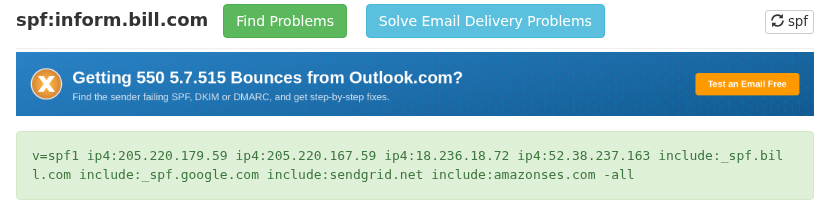
That record authorizes mail sent through BILL’s systems, so a recipient who checks only that the address looks right, or that the message passed authentication, will see nothing wrong.
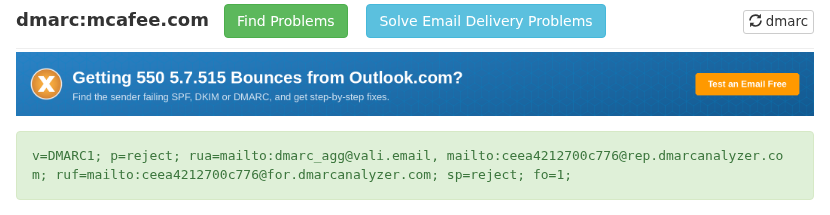
The same domain publishes its own DMARC policy of quarantine, a little softer than the reject policy on bill.com, and both target forgery, not misuse of a real account.
McAfee’s domain sits at the other end, with reject for the domain and its subdomains, the setting that makes a straight spoof of mcafee.com fail at receiving servers.
The contrast suggests why a sender would pick BILL: a forged mcafee.com message gets rejected by well-configured receivers, while a real BILL invitation is built to pass them.
We cannot see who holds the BILL account, and a compromised customer account would produce the same email, so the lesson concerns the check, not blame.
An authenticated sender tells you which company’s servers carried the mail, not whether the words inside are true or that company approved them.
What McAfee’s Own Pages Show About a Real Renewal
McAfee publishes a list of valid sender addresses on its scam awareness page, and we counted 18, all at McAfee domains or at the mail services that send for it.
The list includes addresses such as consumersupport@mcafee.com and donotreply@mcafee.com, and no address at bill.com or at any payment platform appears anywhere on it.
The same scam awareness page spells out that McAfee will never require you to call a number in an email or text.
It also lists the signs of fake content: spelling mistakes, suspicious links or attachments, and requests for personal or financial information.
The timing does not match McAfee’s own terms either, because the common questions page explains that an enrolled subscriber’s card is billed 30 days before the subscription ends.
That schedule leaves no role for a call within hours, and the same page offers a full refund within 60 days of an automatic renewal through My Account.
A genuine charge can therefore be undone by logging in and choosing Cancel or Refund, which removes the one thing the email offers, a phone call that stops the money.
The refund terms we read are on McAfee’s UK support site, and the pricing we compare below comes from the US store page.
The $499 Charge Against McAfee’s Price List
We opened McAfee’s US antivirus page on November 12 and read the three plans it lists, with first-year prices of $39.99, $49.99 and $89.99.
The same plans carry full prices of $119.99, $149.99 and $199.99, so the most expensive one-year plan on that page costs $199.99 before any discount.
Divide 499 USD by those first-year prices and the charge is about 12.5 times the cheapest, 10 times the middle plan and 5.5 times the dearest.
Even set against the highest full price on the page, $199.99, the figure is roughly 2.5 times larger, which leaves $299.01 that no listed plan can explain.
We did not browse McAfee’s other pages for larger bundles, so a plan above $199.99 may exist somewhere, but the email names no plan that would let you test it.
A round, high figure with no product attached is typical of this type of lure, because the aim is a shock large enough to override the instinct to check.
The Phone Number We Checked
We did not call 810 627 5355, but numbering records are public, so we looked up the block it belongs to in the Local Calling Guide, which republishes assignment data.
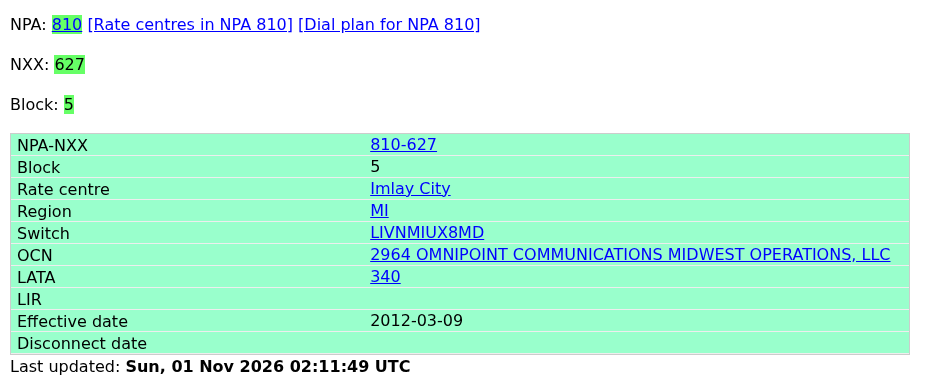
The 810-627 prefix belongs to Imlay City, Michigan, and block 5, which contains this number, is assigned to Omnipoint Communications Midwest Operations, LLC, effective March 9, 2012.
That is a carrier block in a Michigan town, not a toll-free prefix, whereas McAfee’s own page gives 1-866-622-3911 for reporting fraud.
McAfee’s footer places its headquarters at 6220 America Center Drive in San Jose, California, which is a long way from the rate centre that this number is registered to.
This is a weaker clue than the sender records, because numbers can be ported and rented, so the block shows where a number started, not who uses it.
We also found nothing on a public caller reputation page for this number on November 12, which is not evidence either way for a number used in a fresh campaign.
The practical point is that nothing about the number links it to McAfee, and the email gives you no way to confirm it other than calling it.
What to Do If You Responded
-
Stop contact. Do not call or text the number again, and do not click Accept Invite, because every response confirms that your address and line are active.
-
Check your real account. Type mcafee.com into your browser, log in and open your subscriptions to see whether any renewal exists and what it cost.
-
Check your card. Open your bank or card app and look for a $499 charge, since a message cannot move money by announcing that it did.
-
If you let someone connect. Disconnect the session, uninstall the remote tool, restart the device and change your email, bank and card passwords from a different, clean device.
-
If you gave card details. Call the number on the back of the card, cancel it, get a new one and dispute unapproved charges in writing.
-
If you sent money. Contact your bank immediately and ask whether the transfer or gift card payment can be recalled, then keep a record of the time, amount and recipient.
-
Forward the message. Send it to phishreport@hq.bill.com as BILL’s security page asks, and send a copy to scam@mcafee.com.
-
File with the FTC. Use ReportFraud.ftc.gov and include the number, the sender address and the amount, so the case can be matched with others.
Frequently Asked Questions
Is the McAfee BILL email real?
The sender domain is BILL’s own, but we could not tie the renewal story to McAfee, whose own pages rule out calling numbers found in emails.
Did McAfee really partner with BILL?
We found no McAfee page that mentions BILL, and the partnership sentence reads like invitation text with a name the sender chose, so we treat it as unproven.
Is it safe to click Accept Invite?
We did not click it and would not, because you never asked to be paid by this sender and the sign-up page asks for business and later bank details.
Why does the sender address look genuine?
The address belongs to BILL’s own notification domain, whose published records authorize BILL’s mail servers, so the domain checks out even though the message wording is not trustworthy.
Was I charged $499 by McAfee?
Only your own McAfee account and card statement can answer that, and McAfee’s listed plans cost between $39.99 and $199.99 for a year, well below the figure in the email.
What if I already called the number?
Work through the response steps above, starting with any remote access, card details or payment you gave, and treat later refund calls as part of the same attempt.
The Bottom Line
Do not call the number in the McAfee BILL email or accept the invitation, because the renewal story has no plan, no order and no McAfee address behind it.
To find out whether a McAfee renewal exists, log in to your own account, and ask your card issuer about any charge you cannot place.
If you already called, allowed remote access or paid, disconnect the device, call your bank and change passwords from a clean device, then alert BILL, McAfee and the FTC.

Join the discussion
0 commentsShare your experience or ask a question about this article.
Discussion
Start the conversation
Have a question or something useful to share? Add the first comment.