


An email arrives under the name Airtable Automations, but its subject concerns a subscription or account somewhere else. The delivery looks ordinary enough to deserve attention.
Before following its instructions, pause over one question: who actually wrote this message, and why should they be handling the account mentioned inside it?
Overview
A genuine delivery service can carry somebody else’s message
The Airtable Automations email scam exploits a distinction that is easy to miss. A legitimate service can deliver content created by one of its users.
Airtable is a real platform for organizing information and automating work. Receiving an automated message does not mean that Airtable employees personally wrote or endorsed it.
In a phishing attempt, the sender uses that delivery context to support a false request. The important question is what the message asks you to do.
The request matters more than the display name
A message might claim that a payment failed, a subscription will stop, or an account needs verification. Those claims deserve checking through the named service itself.
The FTC’s phishing guidance describes these familiar account and billing stories. Scammers use a supposed problem to make an unnecessary request feel urgent.
Watch particularly for a message that combines an unfamiliar relationship with a sensitive next step. A recognizable sender label cannot supply the missing relationship.
- An unrelated billing warning asks you to provide payment information.
- A supposed account review redirects you toward an unfamiliar sign-in page.
- A wallet message asks for secrets that control your funds.
- A recruiter requests sensitive information before you can verify the opportunity.
Receiving the message does not mean your account was breached
An unsolicited automation email is not, by itself, evidence that someone entered your Airtable account. You might not have an Airtable account at all.
The immediate issue is an unverified instruction arriving in your inbox. Your response should depend on whether you only read it, entered information, or made a payment.
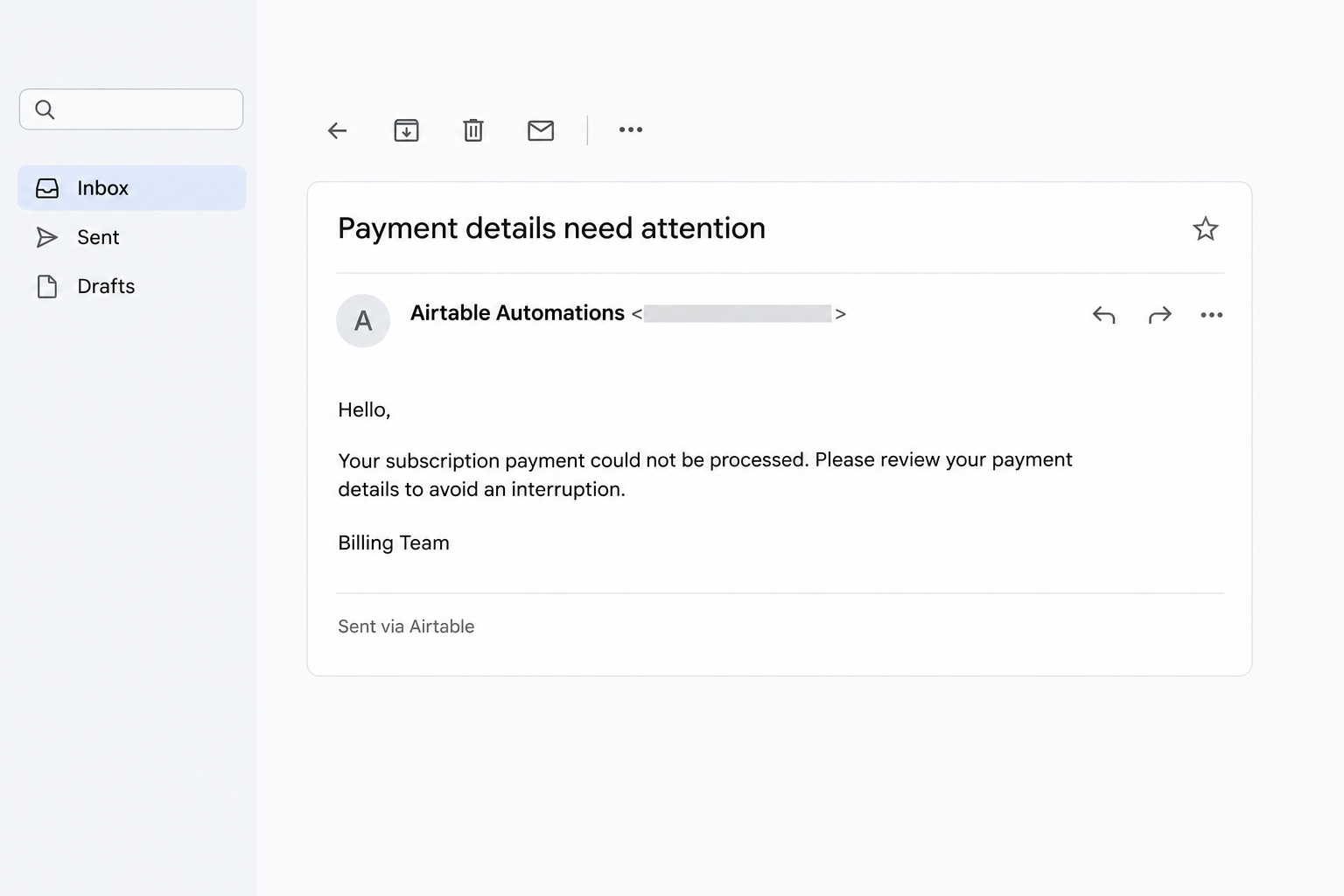
The image illustrates a simplified billing lure rather than a recovered message. Its wording should not be mistaken for an official Airtable notice or a documented victim’s email.
What the Airtable Sender Can Actually Tell You
Native automation mail has a specific sender
Airtable’s Send email documentation identifies its native automation sender as noreply+automations@airtableemail.com. The visible sender name and reply address can be customized.
That helps explain why a message can contain another organization’s wording while still mentioning Airtable. It does not establish whether the outside organization authorized the request.
Connected Gmail and Outlook actions are different delivery routes. Do not assume that every automation uses the same visible sender or the same unsubscribe behavior.
Authentication is not an endorsement of the offer
Google explains email authentication as a way to check sending infrastructure and signatures. Its guidance also notes that spammers can authenticate mail.
For the recipient, this means a passing technical check cannot answer a different question: did your bank, wallet provider, or subscription service authorize this instruction?
Equally, a missing authentication signal does not automatically prove fraud. Read the request in context and verify the relationship instead of treating one indicator as a verdict.
Service abuse is different from a platform breach
Sublime’s email-threat research identifies collaborative platforms, including Airtable, within the broader abuse of trusted online services. Recognizable hosting is not the same as trustworthy content.
Airtable’s acceptable-use policy prohibits phishing, deceptive activity, spam, and impersonation. Abusive customer content is not permission or endorsement from Airtable.
How the Airtable Automations Email Scam Works
Step 1: An unexpected message borrows a familiar delivery context
The email may look less suspicious than a message from an obviously unrelated sender. Its automation label suggests a routine business process rather than a personal approach.
That impression can matter even when you have never used Airtable. You may reasonably assume a company uses software you do not recognize behind the scenes.
The delivery service cannot establish the sender’s authority. That authority must come from the organization handling your subscription or wallet, not from familiar email branding.
Step 2: The message introduces an account problem
A supposed payment error gives you a reason to act. A verification warning suggests that delaying could interrupt something you already use or depend on.
The sender wants you to accept that problem before checking it. Once you believe an account needs fixing, the proposed next step can feel like assistance.
Do not start by debating the email’s grammar. Start by checking whether the claimed problem exists in the real account, opened independently of the message.
Step 3: The requested action moves beyond the delivery service
A phishing message can direct you elsewhere to complete its supposed review. The destination may imitate a familiar account page or request information through a form.
The shift matters because the original delivery context no longer answers who receives your information. Each destination needs its own connection to the service you intended to use.
A normal-looking intermediary also does not make the final page safe. Avoid following the chain just to find out how convincing the last page looks.
Step 4: The false story supplies a reason for sensitive information
An attacker may ask for credentials under the pretext of restoring access. A billing story can instead make a card form seem relevant to the alleged problem.
Consider a simple comparison: your subscription works when you open its genuine app, but the email insists that payment must be repaired somewhere else.
That contradiction gives you a useful stopping point. You do not need to complete the outside form to investigate the account you already control.
Step 5: The consequences depend on what you provided
A submitted password creates an account-security problem. A disclosed card number creates a payment-security problem. A shared recovery phrase can expose control of cryptocurrency funds.
These are different outcomes, not interchangeable reasons to buy a security product. Blocking the sender will not reverse a payment or invalidate credentials already disclosed.
The safest response begins with an honest inventory of what happened. Include codes you approved and permissions you granted, not just fields you remember typing.
Step 6: A fresh message can restart the same pressure
After an initial approach, another message may claim that the issue remains unresolved. Do not interpret repetition as confirmation that the underlying account problem is genuine.
Compare follow-ups with the original verified account state. If a real support team confirms there is no issue, an outside sender’s deadline should not change that finding.
Keep the original message when reporting abuse. Repeated contact can be useful evidence without becoming a reason to re-engage with the sender.
A Practical Way to Check an Unexpected Automation Email
Find the actual account before deciding whether anything needs fixing
Open the named service using its installed app, a saved bookmark, or an address you independently know. Do not use the message’s verification route.
Look for the claimed billing problem, security warning, or requested action inside that account. If you need assistance, start a new conversation through its genuine support options.
You can describe the email without supplying passwords or complete card details. A legitimate support check should not require reproducing the suspicious request.
Keep ordinary automation separate from phishing
Your employer, a volunteer group, or a business you contacted may use Airtable legitimately. Unexpected software branding does not automatically turn their message into a scam.
Check with a contact you already know, using a route established before the email arrived. Ask whether they sent this particular request, not whether they generally use Airtable.
A forwarded screenshot can omit the sender address, destination, and message headers. Preserve the original when your organization or the platform needs to investigate.
Do not use an unsubscribe link as an authentication test
Airtable documents unsubscribe controls for its native email action, with geographic and delivery-route qualifications. Their presence does not authenticate the business claim in the message.
For a suspicious email, use your inbox’s reporting controls and the platform’s independent support route. You do not need to interact with an unverified footer.
What to Do If You Have Fallen Victim
-
Stop interacting with the suspicious message and close any page it opened. Record which service it claimed to represent and what you actually submitted.
Save the original email privately before deleting it. Avoid forwarding live links to colleagues as though they were normal account instructions.
-
If you only viewed the email, report it as phishing and verify the claimed account issue separately. Reading a message alone does not establish account compromise.
If you opened a link, note whether you downloaded anything, entered information, or approved a prompt. Those details determine the next steps.
-
For an exposed password, visit the genuine account directly and change it. Replace reused passwords elsewhere, starting with the email account that controls password resets.
Review active sessions and recovery methods through that service’s security settings. End unfamiliar access and enable stronger authentication where the provider offers it.
-
If card details or a payment were involved, contact your card issuer, bank, or payment service immediately. Explain whether information was disclosed or money actually moved.
Ask what restrictions, replacement, or dispute options fit the transaction. Keep receipts and references, but do not assume that reporting guarantees reimbursement.
-
For a wallet-related message, never provide a recovery phrase to anyone offering assistance. Use the wallet provider’s independently verified compromised-wallet guidance if secrets were exposed.
Changing an email password does not replace a wallet recovery phrase. Do not pay an unsolicited recovery agent to retrieve supposedly frozen funds.
-
If you installed software or allowed remote access, stop using that environment for sensitive activity. On work equipment, notify the responsible security team promptly.
Have trusted support assess the actual installation and exposure. A scan result alone cannot reverse a transaction or prove every disclosed credential is safe.
-
If you use Airtable, report suspected abuse through its official support route, reached independently. Include the original email and relevant headers when requested.
Airtable currently requires an account to contact Support. If you prefer not to register, use your email provider’s phishing report and notify the impersonated business.
-
Follow the FTC’s recovery guidance for the information or payment method involved. Continue checking the affected account after the first response.
Warn anyone you forwarded the lure to, using a plain explanation without its live link. A brief correction can prevent another person following the same instruction.
What to Include in an Abuse Report
Preserve the message, not a public copy of your private information
Keep the subject, sending time, full sender details, and the account the message claimed to concern. Your email provider can help preserve the original headers.
If you made a payment, retain the receipt and transaction reference for the appropriate financial provider. Those records serve a different purpose from the phishing report.
Do not publish complete email headers, identity documents, or financial statements in comments. They can contain information unrelated people should not receive.
Explain which part of the request was false
State whether the genuine service confirmed there was no billing problem or whether the sender asked for credentials through an unrelated route. Those details make the report more useful.
An observation such as receiving an unwanted automation email is useful, but narrower than proving account theft. Report both what happened and what remains unknown.
Frequently Asked Questions
Is Airtable Automations itself a scam?
Airtable Automations is a legitimate feature used for ordinary work. A deceptive message sent using a service does not make every customer or automation fraudulent.
Judge the particular instruction and its authorization. A real delivery platform should not persuade you to trust an unrelated request for sensitive information.
Does a genuine sender address make the contents safe?
A genuine platform address can identify the delivery route without identifying the customer who supplied the content. Those are different pieces of information.
Verify account requests through the organization supposedly making them. Do not treat delivery through a recognized service as approval of the message’s claims.
Must I create an Airtable account to stop the emails?
You do not need to create an account just to investigate an unsolicited request about another service. Start with that service and your inbox’s phishing controls.
Airtable’s current help page says an account is required to contact Support. You can still use your inbox’s phishing controls without joining Airtable.
Are all automated billing messages fraudulent?
Businesses send legitimate automated account and payment notifications. The useful distinction is whether the named business confirms this request through a trusted account or contact route.
Check the actual billing state before entering information elsewhere. A sender’s urgency cannot substitute for confirmation from the account the message claims needs attention.
Why might the email arrive in my normal inbox?
Email filtering uses multiple signals and cannot catch every deceptive message. Familiar infrastructure can be part of an attack without being fraudulent infrastructure itself.
Inbox placement is therefore not a safety certificate. You can report a message that passed filtering without assuming your mailbox provider endorsed its contents.
Should I reply to ask whether the warning is genuine?
A reply goes to the address supplied for that message, which may not resolve your concern. It also keeps you inside the sender’s chosen conversation.
Contact the affected company independently instead. You can verify a real account problem without giving the unverified sender another opportunity to direct your actions.
The Bottom Line
Do not repair an account or provide sensitive information through an unverified Airtable automation message. Check the named service directly, regardless of how familiar the delivery looks.
If you already responded, secure the information or payment actually exposed and report the original email. Recognizing the delivery service is only the beginning of verification.

Join the discussion
0 commentsShare your experience or ask a question about this article.
Community experiences
Did this happen to you?
Your experience could help someone recognize the same scam. Submit a private report for our team to review.
I experienced this tooReports are reviewed before publication. Sharing publicly is always your choice.
Discussion
Start the conversation
Have a question or something useful to share? Add the first comment.