


A small dependency update appears in your project, carrying a familiar package name and an ordinary version number. Nothing about the change initially looks remarkable.
Then a security warning mentions that same library. Before deleting anything, you need to establish which version reached your environment and what happened next.
Overview
The package name can be genuine
JavaScript library scams include attacks that turn trusted software distribution into a delivery route for malicious code. A poisoned update can arrive through a genuine package.
That differs from downloading a lookalike library after misspelling its name. Here, developers may select the intended dependency, yet receive a release published through compromised access.
A maintainer is someone authorized to manage a software package. Stealing that person’s publishing access gives an attacker a route toward everyone relying on future releases.
npm’s threat guidance explicitly distinguishes misleading package names from malicious changes to existing packages. Both deserve attention, but they require different checks.
Different campaigns expose different information
Some malicious code targets the developer’s workstation or automated build environment. Other code reaches the browser inside an application, where it can interfere with user activity.
A build environment is the system that assembles an application for release. It may hold credentials for publishing packages, deploying software, or accessing cloud services.
Those credentials are valuable even when the developer keeps no cryptocurrency. The consequences depend on the code’s behavior and the permissions available where it ran.
- A stolen publishing token can authorize unwanted package releases.
- An exposed cloud credential can grant access beyond the affected project.
- A browser payload can interfere with information presented during transactions.
- A compromised build can distribute altered software to downstream users.
A package alert is not a complete exposure assessment
The useful starting point is an exact package name, affected version, installation time, and execution history. A library’s popularity cannot answer those questions.
Merely reading about an incident does not mean your computer is infected. Equally, an application that still works normally has not necessarily escaped the attack.
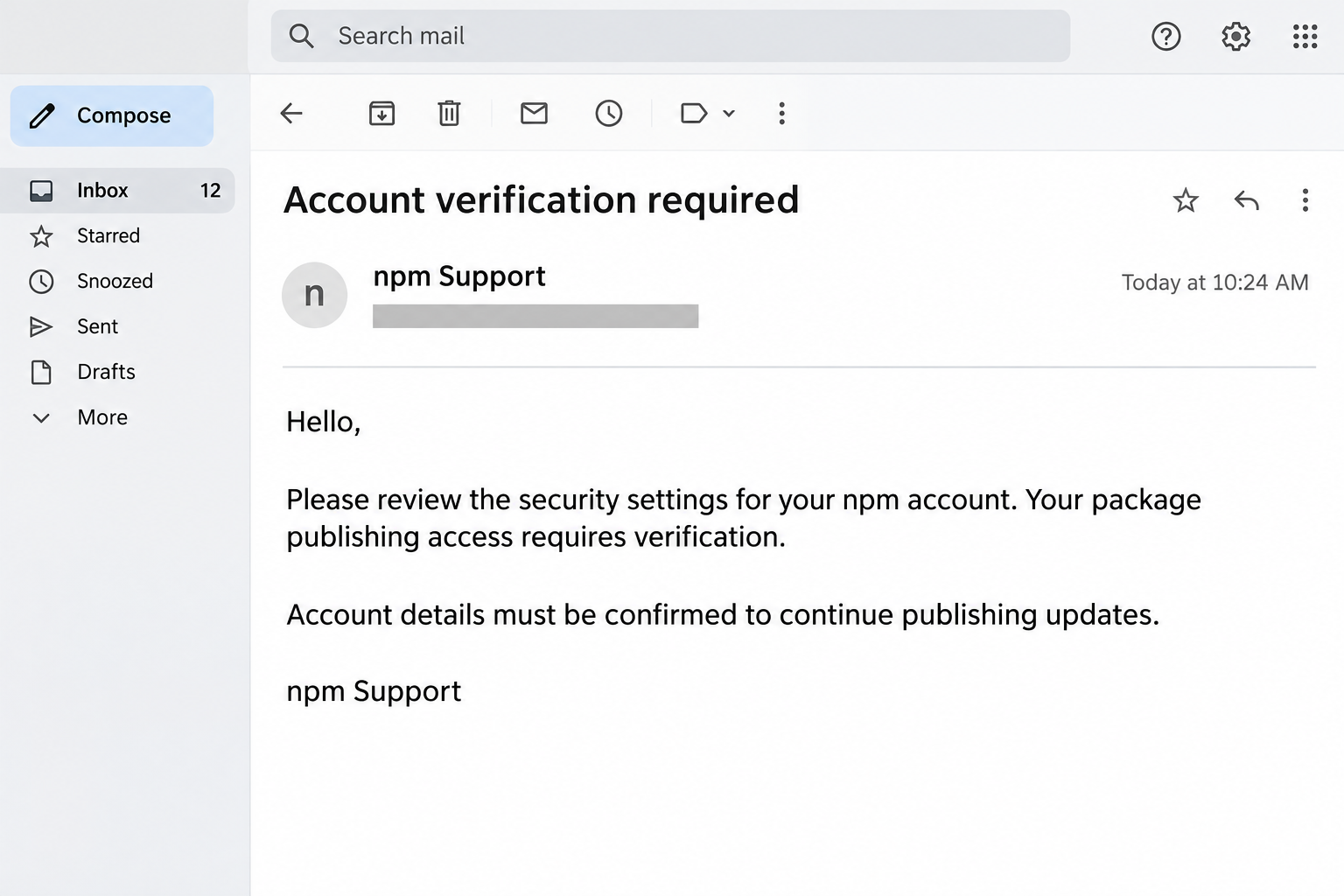
The message image above is a simplified reconstruction of a maintainer-account lure. It is not a recovered email or evidence of a newly observed campaign.
What Confirmed npm Attacks Actually Show
The chalk and debug incident involved trusted names
GitHub’s account of poisoned dependency releases describes a September 2025 attack that began with phishing against one npm maintainer.
Attackers published altered versions of chalk, debug, and other packages. The injected browser code substituted cryptocurrency wallet addresses, redirecting the intended destination of transactions.
The affected package collection had enormous download traffic. That measures distribution activity, not a verified count of people who lost money or suffered account compromise.
These are documented historical examples, not a claim that every current release of those libraries is malicious. An incident advisory must identify the relevant versions.
Credential theft creates a second problem
GitHub’s Shai-Hulud analysis describes install-time code collecting credentials and using compromised package access to continue spreading.
For anyone affected, cleanup involves more than removing files. Removing the first dependency cannot invalidate a secret that an attacker has already copied and can use elsewhere.
The two examples are not interchangeable descriptions of one payload. One illustrates browser transaction interference; the other demonstrates credential theft and propagation through development environments.
How the Scam Works
Step 1: A maintainer receives a believable account request
The opening approach can resemble routine package-registry administration. An attacker impersonates support, seeking the access needed to publish under a trusted maintainer’s identity.
For someone responsible for keeping packages available, a warning about account access has a practical consequence. The request arrives wrapped around an existing responsibility.
The warning sign is not simply polished wording. A request becomes dangerous when it redirects authentication or account approval away from a separately verified service.
Maintainers should open their registry account through a known route and check the issue there. An email’s display name is not authentication evidence.
Step 2: Compromised access produces an unauthorized release
Once publishing access is compromised, a malicious release can appear under the package’s existing name. Users do not necessarily need to select a new author.
GitHub’s supply-chain attack breakdown also identifies compromised project workflows as an entry point. Not every incident begins with the same email.
A workflow is an automated job used for tasks such as testing or publishing. If its permissions are excessive, a compromise can reach more valuable credentials.
For investigators, the practical question becomes who or what authorized the release. A familiar package description does not explain an unexpected publishing event.
Step 3: Normal dependency handling brings the release downstream
Projects rarely contain only the libraries their developers consciously selected. Dependencies can require additional dependencies, creating an indirect route for an affected package to arrive.
This explains why a developer might not recognize a name in an alert. The project may use it through another component rather than a direct selection.
An automated update proposal can also make a release look routine. The proposal still needs review, especially when installation behavior changes alongside the version.
The right response is to inspect the recorded dependency tree. Guessing from the application’s visible features can miss software used only during building or testing.
Step 4: Execution exposes the permissions available at that stage
Some packages run installation scripts, which means malicious behavior can begin before someone opens the finished application. Other payloads depend on later execution.
Those stages matter because they expose different systems. A developer workstation, temporary build runner, production server, and visitor’s browser do not share identical access.
Consider a build runner holding a deployment credential. If malicious code can read that credential, replacing the application bundle alone leaves another access route unresolved.
This is an exposure example, not proof that every poisoned library reads every secret. Investigators must match the observed payload to the environment involved.
Step 5: The attacker uses or reuses what became accessible
With publishing credentials, the attacker may reach additional packages. With a browser payload, the objective may instead involve modifying a transaction’s destination.
The absence of an immediate financial loss does not settle a credential incident. Access can remain useful after the original package has disappeared from the registry.
A password change addresses that password. It should not be assumed to revoke unrelated service tokens, application authorizations, or cloud keys issued through other systems.
This is where recovery often becomes broader than the dependency list. Teams must examine what the affected environment could authorize, not merely which files changed.
Step 6: A removed package can survive in an earlier build
Registry removal interrupts new distribution, but it does not reach into every previously generated application, cached build, or deployment and replace its contents automatically.
A team should connect affected installation times with the builds produced afterward. That establishes which releases need investigation rather than condemning every historical deployment.
The resulting timeline supports a concrete decision: which jobs to pause, which artifacts to replace, and which users or project owners need a warning.
Warning Signs Worth Investigating
Compare the release with the work it claims to perform
A routine formatting or logging update deserves scrutiny if it introduces unexpected installation behavior. The concern is the mismatch, not a rule against legitimate scripts.
Similarly, a new network destination during an installation can justify investigation. Its appearance alone does not prove maliciousness because legitimate build tools also download resources.
Useful evidence connects the package change with the process, destination, credential access, or unauthorized publication. Preserve that connection rather than relying on one suspicious filename.
Keep these details together when reporting a concern
- Record the exact package name and version from the affected environment.
- Keep the lockfile and the relevant installation or build logs.
- Identify the machine or runner and the approximate execution time.
- Note unexpected account changes without posting credentials or sensitive logs publicly.
A concise report helps a maintainer distinguish a real distribution problem from an unrelated application error. Screenshots alone may omit the version needed for confirmation.
What to Do If You Have Fallen Victim
-
Pause affected installations, builds, and releases before investigating further. Do not repeatedly reinstall the suspect dependency just to see whether the warning returns.
On managed equipment, contact your security team immediately. Preserve its investigation options before restarting, wiping a workspace, or installing unrelated cleanup utilities.
Microsoft’s incident guidance specifically recommends isolating affected build agents or workspaces and rapidly revoking exposed credentials.
-
Establish whether the affected version was actually present and whether its malicious code could execute. Distinguish an email received from credentials entered or software installed.
Preserve package records, relevant logs, and build identifiers through your incident process. Do not upload private source code, tokens, or full environment dumps to public comments.
-
Revoke exposed credentials through the services that issued them, using trusted equipment. Prioritize publishing, deployment, repository, and cloud access available during the affected execution.
For npm, open your profile’s Access Tokens page, identify affected tokens, delete them, and confirm the deletion. Follow the official token revocation instructions.
Replace required credentials with appropriately limited alternatives after containment. Updating a secret inside a local configuration file does not revoke the old credential at its issuer.
-
Secure accounts involved in the initial lure. If you submitted a password, change it through the genuine service and change any account reusing it.
Review account sessions and recovery settings. On GitHub, inspect Settings, Applications, and Authorized GitHub Apps, following its authorization review guidance.
Revoke unwanted authorizations and involve organization administrators where necessary. App authorization and organization installation are different controls, so check the access actually involved.
-
Have the responsible administrator clean or rebuild the affected development environment using the identified incident’s guidance. A disposable runner may need replacement from trusted inputs.
Review dependencies and preserved build artifacts before resuming jobs. Otherwise, a clean replacement can download the same poisoned release through unchanged project configuration.
For persistent workstations or servers, investigate execution and additional changes before declaring recovery. A generic browser reset is not a substitute for that assessment.
-
Inspect releases produced during the exposure window. Determine whether malicious code reached an application bundle or whether stolen access enabled unauthorized changes elsewhere.
Coordinate replacement builds and notifications with the affected project owners. Describe confirmed versions and dates accurately rather than announcing that an entire library is permanently unsafe.
-
Handle financial exposure separately if a transaction was altered. Preserve the transaction record and compare its destination with the recipient through an independent channel.
Contact the relevant payment provider or platform through its genuine support route. Do not trust unsolicited recovery offers or send another payment to reverse the first.
For ordinary website visitors, ask the affected service what exposure it confirmed. You do not need to run developer cleanup commands on speculation.
-
Report the malicious release and retain the incident timeline. Use the registry’s official reporting process and the platform’s support route for compromised accounts.
Continue reviewing relevant account activity after service restoration. Keep incident records available so a later suspicious release can be compared with the original exposure.
How to Reduce the Risk Without Abandoning Updates
Review the dependency record before accepting changes
npm’s lockfile documentation explains how the file records an exact dependency tree. Reviewing its changes helps identify what an update actually introduces.
A lockfile supports consistency; it does not certify that the selected version is harmless. Consistently installing a poisoned release simply reproduces the wrong result.
Ask whether changed packages match the intended maintenance task. Unexpected dependency additions deserve an explanation before approval, particularly when they introduce executable installation steps.
Separate package retrieval from powerful credentials
Give development and build jobs only the access needed for their task. A dependency inspection job should not automatically inherit permission to publish a release.
Where supported, npm’s trusted publishing reduces dependence on long-lived publishing tokens through workflow-based authentication. Configure the authorized workflow carefully rather than assuming setup alone makes it safe.
Private dependency installation can still require separate credentials. npm recommends read-only granular tokens for that role, rather than giving installation jobs unnecessary publishing authority.
Treat release delays as one safeguard
GitHub describes a default three-day delay for ordinary Dependabot version-update proposals. Its security-update proposals remain immediate, so known vulnerability fixes are not deliberately held back.
The distinction matters: refusing all updates can leave a project exposed to established flaws. The goal is reviewed maintenance, not permanent dependence on obsolete software.
A delay cannot rule out dormant malicious behavior. Combine suitable release policies with restricted permissions, reviewed installation scripts, and checks appropriate to your actual build process.
Understand what an audit result does and does not establish
npm’s security-audit documentation describes checks against known vulnerabilities. That information is useful, but it is not a promise that every possible malicious behavior has been identified.
Keep security alerts connected to actual package records and execution evidence. Neither a reassuring summary nor one frightening social post should replace a version-specific investigation.
Frequently Asked Questions
Are JavaScript and npm themselves scams?
JavaScript is a programming language, and npm is a legitimate package ecosystem. The abuse discussed here involves attackers exploiting trusted software distribution and compromised access.
Avoid turning a warning about particular releases into a blanket accusation against maintainers. Check the exact incident, package, version, and affected execution stage instead.
Is a genuine package name enough to trust an update?
A genuine name identifies the package, not the safety of every release. Compromised publishing access can place unauthorized code under a name developers already recognize.
Review the specific change and current advisory information. A high download count describes use; it does not show that the latest contents received independent review.
Can installation cause harm before I run my application?
Some malicious packages use installation-time execution, as documented in the Shai-Hulud campaigns. Other attacks rely on code executing later, including inside a browser application.
Identify which behavior applies before assessing exposure. Simply finding a package name in a search result is different from installing its affected version with relevant execution permitted.
Does deleting the dependency resolve a stolen-token incident?
Deleting the dependency does not revoke a token already copied elsewhere. Recovery must address the issuing service and any activity that occurred through that credential.
Preserve evidence first, then correct the dependency and investigate affected environments. Treat restored project files and restored control of accounts as separate recovery requirements.
Should website visitors disable JavaScript to solve this problem?
Disabling JavaScript can break legitimate site functions and does not repair a compromised software release. Visitors usually cannot inspect the publisher’s dependency history themselves.
Stop sensitive activity on a service reporting an incident and follow its verified instructions. Developers must investigate and replace affected application artifacts at their own end.
Can one clean scan prove that every credential is safe?
A scan cannot retrieve secrets already exposed or invalidate credentials held by an attacker. It also cannot establish that every downstream build used reviewed inputs.
Use the incident’s evidence to decide which access requires revocation and which systems need investigation. Do not substitute a generic cleanup promise for those decisions.
The Bottom Line
Do not approve a suspicious publishing request or keep using a confirmed malicious release. Verify the account issue independently and identify the exact affected dependency.
If the code ran, pause affected work, preserve evidence, and revoke exposed access from trusted equipment. Resume builds only after the environment and inputs have been reviewed.

Join the discussion
0 commentsShare your experience or ask a question about this article.
Community experiences
Did this happen to you?
Your experience could help someone recognize the same scam. Submit a private report for our team to review.
I experienced this tooReports are reviewed before publication. Sharing publicly is always your choice.
Discussion
Start the conversation
Have a question or something useful to share? Add the first comment.