


An email you were waiting to send seems to have hit a delivery problem. A technical-looking notice mentions traffic limits and offers a way to restore normal service.
If work depends on that message arriving, the interruption feels important. Before treating the suggested fix as routine maintenance, it helps to understand what this particular notice says.
Overview
A failed-message notice with an unusual explanation
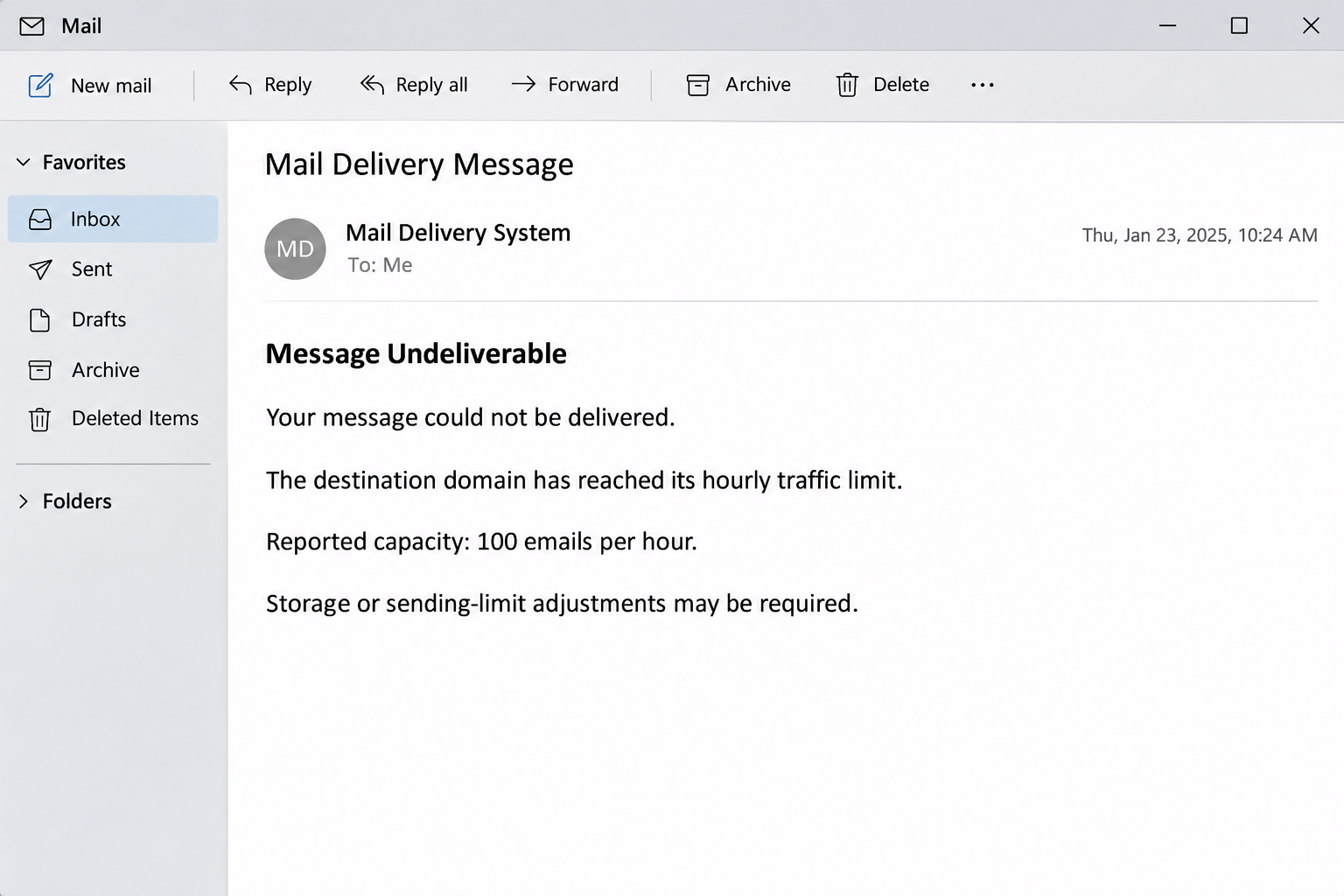
The Message Undeliverable email scam impersonates an automated mail-delivery notice. The documented version says a destination domain has exceeded an allowance of 100 emails per hour.
It then links the supposed delivery failure to storage upgrades or sending-limit adjustments. The proposed fix takes the recipient toward a counterfeit email-account sign-in page.
The key problem is not that email limits are imaginary. Providers genuinely restrict sending activity, and receiving servers can temporarily defer messages when they become overloaded.
The problem is the instruction to resolve an unverified delivery condition through the sender’s chosen login page. A plausible technical explanation does not authorize that destination.
Storage, sending limits, and receiving capacity are different
Mailbox storage describes how much saved mail an account can hold. A sending limit controls outgoing activity, while a destination server’s traffic restrictions concern the receiving side.
These can all affect email, but they are not interchangeable. Paying for extra storage would not necessarily change a remote organization’s hourly receiving policy or clear its congestion.
The notice blurs these distinctions into one convenient repair request. That makes the solution sound broad enough to work without establishing which system supposedly needs changing.
Look for the parts of the story that require independent checking:
- A specific hourly limit presented without confirmation inside your provider’s account tools.
- A receiving-side problem answered with an instruction to upgrade your own storage.
- A repair link that asks for your mailbox credentials before explaining anything further.
- A delivery warning that cannot be matched to a message you actually sent.
The repair route is a credential-collection route
The reported campaign’s destination includes verify.globalreserch[.]info. The address is shown here in defanged form for recognition, not as a page to visit or test.
The login experience can imitate a familiar email provider. The purpose is to collect an email address and password, rather than increase any legitimate message allowance.
Do not assume that receiving this email means your mailbox has already been accessed. The immediate concern becomes account exposure if you submit credentials through the deceptive route.
You can investigate a genuine delivery problem without using the message’s repair link. Start with the original sent email, your provider’s interface, and an independently contacted administrator.
What a Genuine Delivery Problem Can Tell You
A real non-delivery report usually relates to a particular message. Useful details can include its recipient, delivery time, status code, and the server’s explanation for rejecting or delaying it.
Those details are clues, not authentication by themselves. An attacker can copy technical language or insert a recipient address, just as they can copy a provider’s logo.
The practical question is whether the report fits something you did. Check your Sent folder for the original message and compare its time and destination with the notice.
If you did not send anything similar, you have no reason to accept a paid upgrade or provide credentials as the first response to that unexpected alert.
There are also innocent reasons for receiving an unexplained bounce, including forged sender addresses used elsewhere. A mysterious report is therefore not automatic proof of a compromised account.
Still, unexplained messages in your own Sent folder deserve attention. That is account activity you can investigate through the real provider, separate from whatever the email tells you.
For work accounts, your administrator may have message-tracing tools that show whether delivery was attempted. That provides a better answer than relying on the notice’s apparent confidence.
Avoid repeatedly resending a large attachment while checking the issue. You could create duplicate correspondence or further delivery trouble without learning whether the original notification is genuine.
How the Scam Works
Step 1: An automated-looking notice interrupts ordinary email work
The message uses the appearance of mail-system feedback rather than a personal request. Its subject and delivery-error wording suggest that the recipient is dealing with an infrastructure problem.
That framing can lower suspicion because delivery notices often arrive unexpectedly. You may be thinking about the message that failed, not the identity of the person providing the repair.
Someone waiting for a customer, school, or business response may supply the missing context themselves. The notice does not need to identify a genuinely important conversation accurately.
The opening move is therefore a problem you feel obliged to solve. The sender’s authority is implied by its technical role, rather than independently established through your account.
Step 2: A precise hourly allowance makes the explanation sound measured
The reported email gives a limit of 100 emails per hour. A precise figure can resemble a real configuration value, even when it has no connection to your account.
Readers may assume that such a number came from an actual server check. However, an amount printed in an email is not access to the provider’s configuration or logs.
The receiving-domain explanation is especially useful camouflage because many people cannot change another organization’s mail server. That uncertainty makes an offered fix feel helpful rather than questionable.
Do not compare the figure with a search result and decide the message must be genuine if the number exists somewhere. Different providers and account types use different restrictions.
Step 3: The notice turns a delivery issue into an account-repair task
The email suggests adjusting limits or upgrading storage to restore mail flow. This changes the requested action from checking a failed message to entering an account-management process.
A legitimate problem has not yet been established, but the recipient is already being directed toward its solution. The next click can feel like troubleshooting rather than a security decision.
That is where the storage mismatch becomes useful to notice. If the alleged blockage belongs to a destination server, ask why your own mailbox password would change that server’s capacity.
Some real delivery issues do require administrative action. The way to confirm that need is through your existing provider or company support team, not an unsolicited repair portal.
Step 4: The repair link introduces a counterfeit provider login
The destination is designed to resemble an email sign-in experience. Familiar branding encourages the recipient to treat the password request as a normal prerequisite for fixing the issue.
An account identifier may also make a form feel relevant. An email address shown on a page can come from the link or information already known to the sender.
It does not demonstrate that the page belongs to your provider. Recognizing your address is different from having legitimate authority to receive the secret that protects it.
Leave the page if you are asked to sign in through this route. You do not need to prove the trap works by entering a test password or visiting again.
Step 5: A stolen login becomes a separate account-security problem
Submitted credentials can be tried against the genuine email service. Reused passwords can also expose other accounts, although successful access depends on each service’s protections and authentication requirements.
Once someone reaches a mailbox, the risk extends beyond reading new messages. Existing correspondence can reveal business relationships, reset options, documents, and information useful for impersonating you.
For example, a criminal could continue a real conversation using the account owner’s name. The original delivery-error email may be less convincing than the messages sent afterward.
Recovery should therefore focus on the mailbox itself. Restoring a password without checking ongoing sessions, forwarding, and unauthorized permissions can leave important parts of the incident unresolved.
How to Check the Claimed Limit Without Taking the Bait
Start by opening your normal mail application or bookmarked provider page. Do not use a number, login link, or support address supplied by the suspicious notice to investigate it.
Check whether the original outgoing message is present and whether your provider shows any account restriction. If the account is managed, ask the mail administrator to examine its delivery record.
Keep the question concrete when requesting help. Provide the original recipient, approximate send time, and the fact that a notice proposed a storage or sending-limit repair through another page.
For a time-sensitive conversation, contact the intended recipient through an established channel. Confirm whether the message arrived before sending sensitive documents repeatedly or accepting changed instructions by email.
If a provider limit applies, use its published guidance for your account type. Limits may depend on activity, recipients, account age, or administrative settings rather than one universal hourly allowance.
Google’s email sender guidelines illustrate that delivery also depends on authentication, message formatting, and sending reputation. A storage purchase is not a universal deliverability repair.
If an administrator confirms a genuine receiving-side restriction, follow their explanation. They may recommend waiting, contacting the destination, or adjusting legitimate sending practices rather than changing your mailbox plan.
Nothing about this independent check requires entering credentials into the email’s proposed fix. You retain control over the investigation instead of letting the notification choose the next destination.
What To Do If You Fell Victim
-
End the repair attempt and identify what information left your control.
Close the linked page and stop retrying the form. Note whether you entered an address, password, verification code, payment details, or anything else requested during the interaction.
If you only received the email, reporting it as phishing is usually the relevant response. Receiving a false bounce alone does not establish malware infection or account access.
-
Secure the mailbox through its real sign-in route.
Use a trusted device and navigate independently to your provider. Replace any disclosed password with a unique one, then address any reused passwords on other important services.
If the service refuses access, use its official recovery process. Avoid search advertisements or unsolicited recovery offers promising special access to your missing mailbox.
-
Review the account for access that should not remain.
Look at recent security events, signed-in devices, recovery details, and authorized applications. Sign out unfamiliar sessions and remove unauthorized access using the provider’s supported controls.
Enable stronger authentication when available, preferably phishing-resistant options. Do not approve unexpected sign-in requests or provide fresh codes to anyone claiming to complete the mail repair.
-
Examine the settings that affect incoming and outgoing mail.
Check forwarding addresses, inbox rules, sent messages, and deleted items. A rule hiding alerts or diverting correspondence matters even when the mailbox otherwise appears to work normally.
Ask your administrator to help with a business account. Preserve evidence of suspicious settings before removing them through the legitimate interface, following your organization’s incident procedures.
-
Warn people who may receive impersonated messages.
If unauthorized mail was sent, contact affected people through an independent route. Tell them to question payment changes, attachments, and account requests sent during the suspected compromise.
Review current business transactions before authorizing anything further. Confirm bank details with an established contact, not with whoever now answers within a potentially compromised email thread.
-
Respond separately to financial or device exposure when it occurred.
Contact your bank immediately if the supposed upgrade collected payment information or caused a charge. Keep the transaction details and ask what blocking or dispute options apply.
If you also installed untrusted software, use a suitable removal procedure. A password change and a malware scan solve different problems, so neither should substitute for the other.
-
Save the report and verify the original delivery issue independently.
Keep the original email, full headers, relevant destinations, and event times. Report it through your provider’s phishing controls or your employer’s approved security-reporting process.
Then return to the actual message you needed to send. Confirm its delivery through legitimate account tools, without resuming the suspicious repair workflow that caused the exposure.
What Makes the Reported Domain a Useful Clue
The host verify.globalreserch[.]info is useful for recognizing this particular report. It is not necessary to visit it, and the warning does not depend on that address remaining active.
Phishing destinations can disappear or move while the same hourly-limit story continues elsewhere. A dead page does not reverse information previously submitted while the destination was working.
Equally, a new destination is not automatically the same operator. Focus on the observed request for credentials and the independent account check, rather than guessing ownership from similar wording.
The familiar provider design on a page is only presentation. Your account service’s actual domain and an independently initiated login matter more than the colors surrounding a password box.
For a business, this makes the report actionable without overclaiming attribution. Security staff can search for the known subject, destination, and timing while investigating related messages in their environment.
For an individual, the immediate decision is simpler: leave the repair page alone. If a mail limit is real, your provider can explain it without relying on that page.
Frequently Asked Questions
Is the Message Undeliverable email a real delivery failure?
The documented campaign is phishing, not an authorized account-repair notice. Check any actual failed message through your provider instead of assuming its stated hourly limit applies to you.
Can an email domain really have traffic limits?
Mail systems can restrict activity or defer delivery. That real possibility does not validate this email’s specific number, login destination, or proposed storage upgrade as the appropriate remedy.
Will buying more mailbox storage fix the receiving server?
Not necessarily, because your storage and a remote server’s traffic policy are different. Ask the actual provider which restriction applies before purchasing anything or changing an account plan.
What if I clicked without entering my password?
Close the page and avoid further interaction. Check for any downloaded file or newly granted permission, but do not assume a credential submission occurred merely because the page loaded.
Is verify.globalreserch.info part of my email provider?
That domain was reported as a phishing destination in this campaign. Do not visit it to investigate; reach your own provider through a bookmark or address you independently trust.
What should I do after submitting my mailbox password?
Change it through the legitimate service and review access, recovery settings, and mail rules. Notify your administrator for a work account and address reused passwords on other services.
The Bottom Line
Do not use this email’s repair link to raise a limit or restore delivery. Check the original message and any account restriction through your actual mail provider or administrator.
If you entered credentials, treat the mailbox as the priority. Secure access, examine persistent settings, and warn affected contacts instead of continuing the supposed delivery fix.

Join the discussion
0 commentsShare your experience or ask a question about this article.
Community experiences
Did this happen to you?
Your experience could help someone recognize the same scam. Submit a private report for our team to review.
I experienced this tooReports are reviewed before publication. Sharing publicly is always your choice.
Discussion
Start the conversation
Have a question or something useful to share? Add the first comment.