


Dependencies are easy to skim when you just want a project to build. One familiar-looking name in the terminal rarely gets the attention you would give a standalone Mac installer.
If someone flagged a package you recognize, resist the urge to run the setup again. The dependency record you already have is a better place to start.
Overview
A Mac threat that arrived as a developer dependency
MiniRAT is a remote access Trojan for macOS. Researchers at Iru traced an infection chain to an npm package named velora-dex-sdk, which resembled the name of a legitimate project.
A remote access Trojan gives someone outside the machine a way to direct activity on it. The researched MiniRAT could run instructions, download files, and send files from the Mac.
The finding concerns the lookalike package in that investigation. It does not accuse the original Velora team or mean that the genuine scoped package contained MiniRAT.
The case matters even if you never build crypto software professionally. A demo project copied to try a new tool can bring in a dependency you didn’t choose yourself.
How to tell whether the concern applies to your project
A package’s full name matters, including its scope. The name written in a tutorial, the dependency actually resolved, and the software a registry search displays are separate pieces of information.
Start with project records you can inspect without running the build. A manifest is the project’s requested dependency list, while a lockfile records what a particular resolution pulled in.
Look across your own projects and any managed build jobs involved. Don’t assume a laptop is the only affected place just because that’s where you read the warning.
- Read the manifest and lockfile as text rather than importing them into a running project.
- Ask whether the name appeared only in a search, or was actually downloaded and installed.
- Check existing local or build logs for times and the package that was resolved.
- Identify which user, device, and work environment ran the installation.
- Tell your administrator about shared build caches or artifacts from that installation.
What MiniRAT can put at risk
The affected Mac can contain source files, developer tokens, database settings, or keys that grant access to another system. The right inventory depends on what was reachable from that Mac.
If the Mac only held a throwaway example and never had production access, say so. If it handled signing or published builds, make that part of the first report.
Iru observed a macOS mechanism that can relaunch the program after sign-in. A reboot is therefore not a useful test of whether the system is clean.
The name MiniRAT does not identify everything that happened after it ran. Account records and device investigation have to fill in that part of the story.
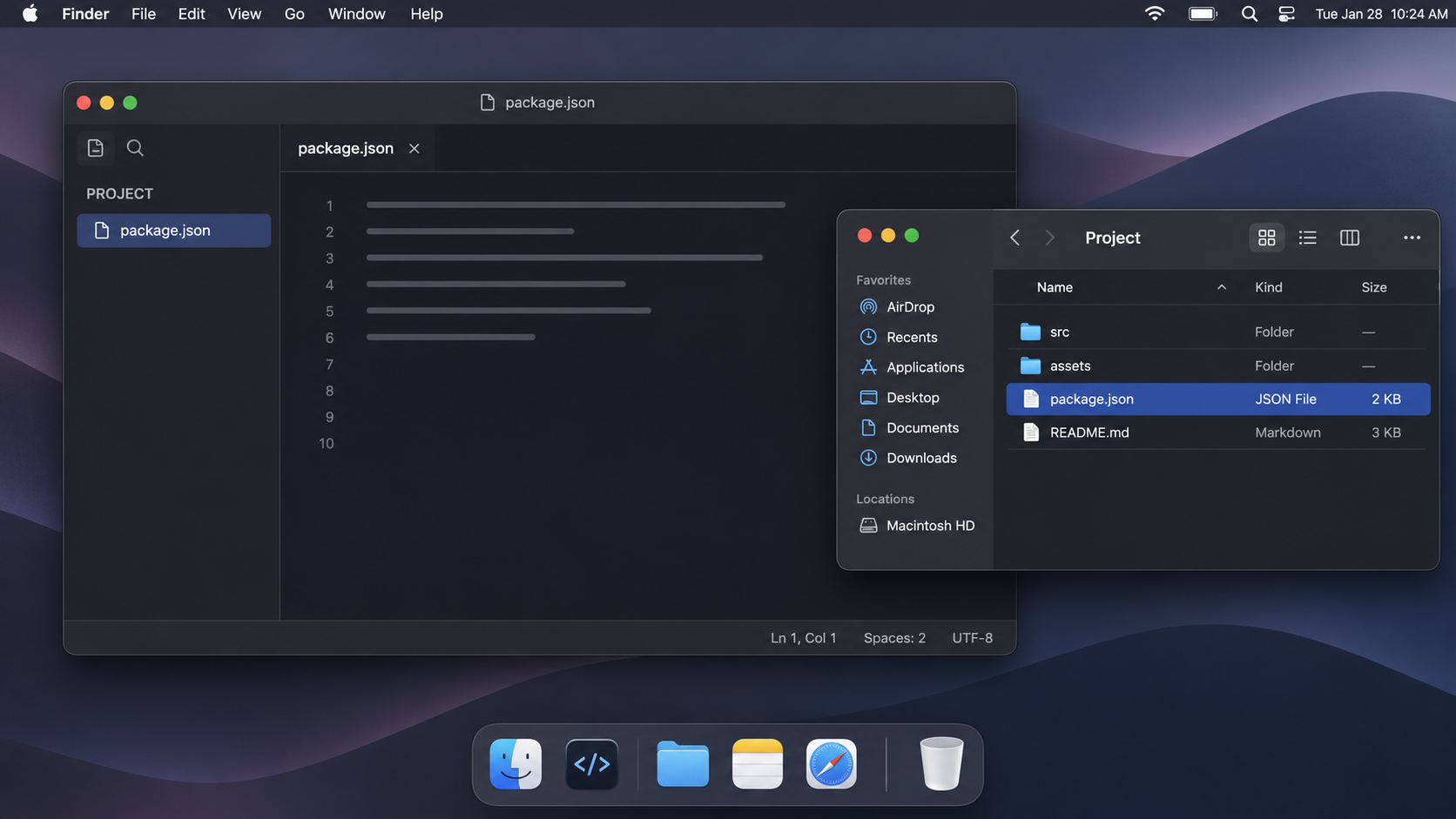
The editor window shown here is a recreation of a dependency review. It doesn’t depict a specific project or a verified instance of MiniRAT.
How the MiniRAT Infection Happens
Step 1: The package name resembles one a developer expected
The lookalike removes a distinction that can be easy to miss while reading a setup note. Similar words don’t make two registry packages interchangeable.
Use the package name given by the real project documentation. A popular search result can have the expected words even when its publisher and scope are different.
If someone handed you a starter repository, verify its origin too. The dependency could have arrived inside a project rather than in a command you typed yourself.
Step 2: An install gives the package an opportunity to run
Merely reading an npm page isn’t the same as resolving and installing a dependency. Iru’s case involved malicious behavior associated with the installation of the lookalike.
If you saw the name while browsing but never brought it into any development environment, there may be nothing to remove. Check the logs if the package was listed indirectly.
If the install ran, identify the working directory and note which developer or build account owned it. Avoid retrying it on a cleaner test machine.
Step 3: The Mac can retain the unwanted program
The researchers found a launch mechanism that allowed the unwanted code to return after sign-in. Removing the original project folder does not necessarily remove what ran from it.
The same principle applies to uninstalling a dependency. Taking a name out of the next package resolution prevents reuse, but doesn’t undo everything that took place earlier.
If you find an unfamiliar background entry, note its actual name and path. Don’t assume the first unknown item is malicious or disable a work management tool.
Step 4: Files and trusted identities can leave the original project
MiniRAT was capable of handling files and receiving instructions. That’s why the plausible impact isn’t limited to what an editor happened to display while the setup ran.
A developer token saved outside the project can still be relevant based on where the install ran. Ownership checks and exchange of credentials belong in an administrator’s incident process.
If the package reached a build worker, review releases produced after the earliest plausible execution. The device and the people receiving its builds are different parts of the response.
What to Do if You Installed the Suspect MiniRAT Package
-
Put the affected Mac aside for investigation. Disconnect the network if you suspect the code ran and can safely isolate the device. Stop edits, builds, and publishing there.
Don’t run the project again to test the symptoms. If an organization owns the Mac, ask its incident team to tell you whether it wants the machine left powered on.
-
Preserve the existing records of the install. Save the project name, time, exact dependency spelling, revision, lockfile, and build-log locations through your approved process.
Don’t copy a suspicious package or whole home directory into team chat. An ordinary screenshot of the manifest can also expose project names or private URLs, so check before sharing.
-
Identify every system that actually resolved the dependency. Tell your team whether the install ran on a Mac, a container, a CI runner, or several environments.
An install error’s last line won’t necessarily explain what ran earlier. Give responders the full existing log through an approved route and avoid triggering a new job.
-
Protect development credentials from a known-clean device. Ask the administrator to review active access for repositories, package publishing, deployments, and cloud services the Mac could reach.
Revoke exposed or unneeded credentials at the issuing service. Issue replacements only once you have a trusted place to put them, rather than dropping them back into the same workspace.
-
Check builds and releases independently of the computer. Ask the release owner to identify artifacts made while the suspect Mac or runner had access.
A clean checkout on a trusted machine provides a useful reference. It doesn’t prove that users who downloaded an earlier artifact have the same version.
-
Handle any wallet or financial exposure as a separate problem. If a key, wallet secret, or finance account was accessible, use another device to contact its verified owner or provider.
Describe what was accessible without sending the secret itself. Removing a dependency doesn’t revoke a wallet key or cancel account activity that already happened.
How to Remove MiniRAT From macOS
Step 1: Decide who can safely handle the Mac
These steps apply to a personal Mac you control. If the device reached company infrastructure or signed releases, follow your security team’s containment directions before removing anything.
Preserve what the team asks for before restarting. You don’t want a cleanup attempt to erase the evidence needed to find other affected devices or build jobs.
Step 2: Review known startup changes without guessing
Open System Settings > General > Login Items & Extensions. Check the Open at Login list and background items, comparing unfamiliar entries with the approximate time of the installation.
Apple’s guide to login items explains those controls. Some launch entries won’t appear in the normal graphical list, so a blank screen doesn’t rule out a background item.
If an item is confirmed unwanted and appears in Open at Login, select it and use the remove control. Preserve the details first if support needs them.
Leave managed or unidentified entries intact until a technician has checked them. Avoid deleting every file in a LaunchAgents folder or using a script found on a message board.
Step 3: Obtain and open the trusted Mac installer
Use the Malwarebytes installer for Mac. If you need to keep the Mac isolated, download it through a clean device and use an approved transfer method.
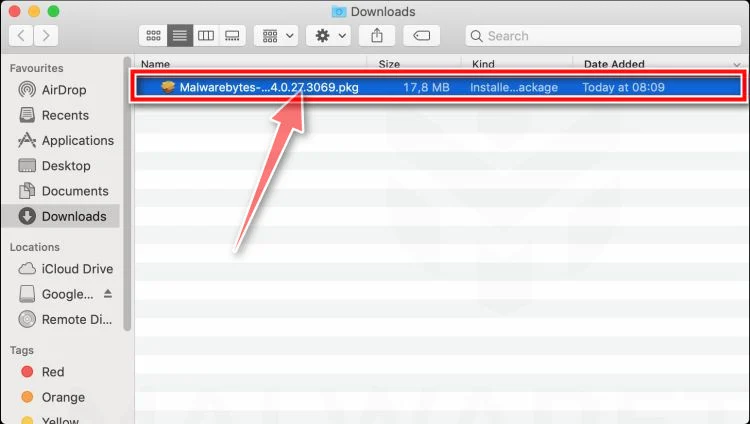
Open the verified package in Finder and follow the usual installer prompts.
The Mac walkthrough images show an earlier Malwarebytes release; the exact file name and interface can look different now.
If macOS presents an unexpected warning, stop to verify the package rather than removing system protections. Don’t use an installer found in the same project that triggered the investigation.
Step 4: Use the scanner and check the actual result
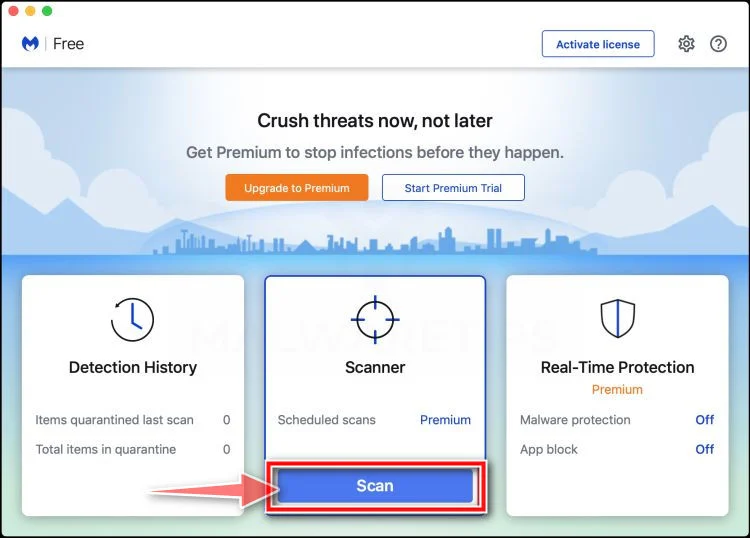
Open Malwarebytes from Applications and start a scan from its dashboard. Leave it running until the results are available rather than treating a progress message as a verdict.
Read each finding before confirming quarantine. Record the detection names and locations, then quarantine confirmed threats using the scanner’s controls.
Restart if prompted, then open the scan history or recheck the device as directed. A detection that returns after cleanup warrants support, especially after a development dependency ran.
The Malwarebytes Mac Premium option is an optional affiliate link. Buying continuing protection doesn’t replace investigation of the affected Mac or connected accounts.
Step 5: Rebuild the working environment from trusted records
Use a clean device and a known-good revision to rebuild the project. Verify the expected registry and exact package names against trusted project documentation before restoring dependencies.
Review lockfile changes with a teammate if the project is shared. Deleting the lockfile without reviewing the differences can replace one unexpected package change with several others.
Do not blindly restore the old installed dependency directory or shared cache. A clean notebook with an unreviewed package set can recreate the problem you just removed.
Review the project’s registry configuration too. If it points to a work mirror, ask which package metadata and copies the mirror held when the affected installation happened.
If your team pins dependencies, compare the chosen revision against the last trusted build. Have the release owner record the exact version they decide is safe to resume.
Record which secrets have actually been replaced
A token that accesses one repository isn’t interchangeable with a signing identity. Make a simple list of what each credential can reach before deciding who needs to revoke it.
The issuing service should show whether a token remains active after revocation. Store a note that it was revoked, not a copy of the token or its replacement.
Give anyone consuming the affected builds clear version information if your team finds a problem. Don’t tell all users to reinstall unless the responsible release owner has established what shipped.
Keep the project’s new credentials off the Mac until the machine is trusted again. A freshly issued token isn’t safer if it becomes reachable in the same compromised environment.
Step 6: Escalate when the evidence cannot support trusted reuse
Consult a technician when the launch item returns, the installer won’t run, or the Mac handled sensitive systems and you cannot determine the extent of exposure.
The MalwareTips support area has a Mac help forum. A public help thread should not contain signing keys, proprietary source, or unredacted build logs.
If rebuilding the Mac is advised, verify your backups and what they contain before erasing anything. Restore known personal or work files selectively instead of reintroducing the old setup.
Frequently Asked Questions
Is the official Velora package the thing to remove?
This case concerns a separately named package imitating the legitimate SDK. Compare the full name and publisher with the developer’s current official documentation rather than removing legitimate code by resemblance.
Can the problem come from a starter project?
A project can list dependencies that a user didn’t pick by hand. Read its manifest and lockfile, then check whether any developer or automated job installed the suspect package.
Is MiniRAT limited to crypto developers?
The reported disguise referenced a crypto development project. A compromised Mac may also contain unrelated source files or account credentials, which is why the device’s actual role matters.
Does removing the npm dependency clean the Mac?
That change prevents the project from requesting the package again. It doesn’t establish that a previously installed program, background item, or account session has been removed.
Can I use the same release keys after a scan?
Ask the key owner or administrator to check that decision. If signing material was reachable from an affected environment, review and possible revocation are separate from endpoint scanning.
What if my project only works with the suspicious dependency?
Leave the install stopped until you can confirm a legitimate dependency and revision. A working build is not worth running an unverified package again to recover your environment.
The Bottom Line
Don’t install the lookalike package to see whether it works. Compare the exact dependency in your records with the official project name instead.
If it ran, quarantine the affected Mac from normal work and investigate wherever its credentials or builds went. Then rebuild from a verified project revision and a trusted device.

Join the discussion
0 commentsShare your experience or ask a question about this article.
Community experiences
Did this happen to you?
Your experience could help someone recognize the same scam. Submit a private report for our team to review.
I experienced this tooReports are reviewed before publication. Sharing publicly is always your choice.
Discussion
Start the conversation
Have a question or something useful to share? Add the first comment.