


You open NIKKE for a quick session, not a security emergency. Now there is a warning about the PC launcher, and plenty of conflicting advice.
If the NIKKE launcher malware warning has left you wondering where to begin, start with your own computer, not a stranger’s cleanup command.
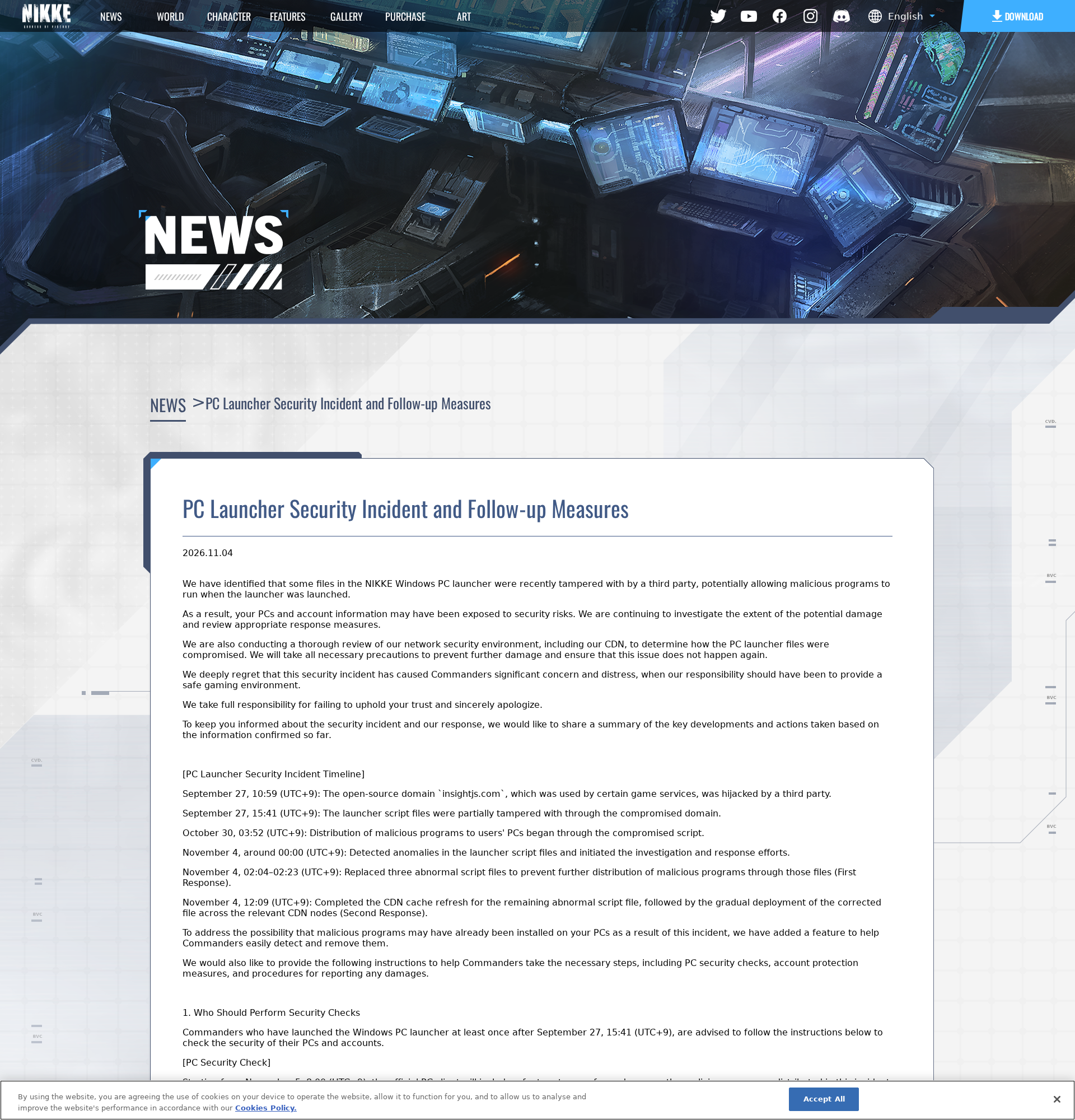
Overview
The problem involved the genuine PC launcher
This was not simply a fake NIKKE download advertised to players. Attackers tampered with resources used by the legitimate launcher, according to Level Infinite.
That distinction matters. Having downloaded the game from its real website does not, by itself, rule out exposure to this particular incident.
Independent researcher MotherSphere described a remote-control agent capable of accessing files, taking screenshots, and collecting credentials. The total number of affected computers remains unknown.
Who should check their computer
Level Infinite asks anyone who launched the Windows PC client after September 27, 2026, at 15:41 UTC+9 to perform security checks.
The publisher says mobile-only players were not affected. This Windows guide is not a reason to reset an iPhone or Android phone.
People using the PC launcher through Proton need a different operating-system response. Closing a Wine prefix does not automatically protect files accessible to its user.
- Check every Windows account used to launch the game.
- Keep launcher logs before allowing cleanup to erase them.
- Protect accounts from a separate, trusted device.
- Do not assume a working game means an unaffected computer.
The publisher’s fix and your recovery are separate
Level Infinite replaced affected scripts, refreshed its delivery cache, and added a client security check. Those measures address distribution and known incident files.
They cannot pull back information already copied. A password change also cannot remove a malicious DLL that remains on the computer.
Think of the response as two jobs: regain control of Windows, then regain control of accounts and secrets that were accessible there.
How to Remove NIKKE Launcher Malware from Windows
Using a work or school computer? Disconnect it and contact your IT team before deleting files, restarting, or running cleanup tools. Evidence may be needed.
For a personal PC, use the following sequence. You do not need to buy several security products or reset every browser to follow it.
Step 1: Stop the launcher and preserve the useful records
Disconnect Wi-Fi or unplug Ethernet. Close NIKKE, its launcher, and Chrome. Check the notification area beside the clock for a launcher still running.
Before relaunching or uninstalling the game, copy its Launcher\intl_service\debug.log file and Launcher\log folder to a separate evidence folder.
Also preserve the launcher’s tbs_cache folder if available. Keep these copies offline and do not open executable files found inside them.
Logs can contain account identifiers, cookies, or tokens. Do not upload them publicly or paste their full contents into a social-media reply.
Open a copy of debug.log in Notepad and search for k2f_chan registered. Record any matching lines and their timestamps.
A match needs attention. No match is not an all-clear, especially if the launcher was reinstalled, its cache was cleared, or logs were removed.
Step 2: Follow the incident-specific removal instructions carefully
The publisher’s manual instructions identify a specific registry entry, DLL location, download artifact, and cache. They do not authorize deleting everything with a similar name.
If you are uncomfortable using Registry Editor, stop here and request guided help. Guessing at Windows entries is not a safer alternative.
-
Press Windows + R, enter regedit, and open Registry Editor. Navigate to
HKEY_CURRENT_USER\Software\Classes\CLSID.Locate
{E77CC89B-7401-4C04-8CED-149DB35ADD04}. Before changing it, right-click that exact key and export a backup.Delete only that identified key under HKEY_CURRENT_USER. Do not delete an identically named key under another registry branch.
-
Restart Windows. Then open
%LOCALAPPDATA%\Google\Chrome\User Data\PlatformExperienceHelperthrough the Run dialog.Remove only a subfolder named with exactly 64 hexadecimal characters that contains
platform_experience_helper.dll. Both conditions must match.Keep the parent
PlatformExperienceHelperfolder and its legitimate Chrome files. If the identified subfolder is absent, do not invent a replacement target. -
In the game’s
Launcher\log\tinygetfolder, remove atinyget.<date>-<time>.logfile only when its size is exactly 205,135 bytes, as the publisher specifies.The research documents different payload builds, so the publisher’s 205,135-byte example is not a universal detection rule. Continue with the scans below.
-
After preserving evidence, remove only the launcher’s
tbs_cachedirectory. The standard location is%APPDATA%\nikke_launcher\tbs_cache.Other PC builds may use
nikke_launcher_hmtornikke_launcher_google. Check the matching launcher folder rather than clearing all application data.
If a target is locked, the path differs, or the registry entry returns, keep the PC offline and seek help instead of forcing deletions.
Step 3: Install Malwarebytes and configure a free Custom Scan
Use Malwarebytes to look for recognized threats after the incident-specific cleanup. Choose Custom Scan so these instructions also work without a paid plan.
The current Malwarebytes feature table lists Custom Scan as free and Threat Scan as paid. Do not purchase a plan merely to follow these instructions.
Use a clean computer to obtain the installer when possible. Transfer it using clean removable storage, without copying unknown programs from the affected PC.
Manual scanning and quarantine, with optional paid protection.
-
Open Downloads and double-click the MBSetup installer. Approve the Windows permission prompt only after checking that you opened the intended installer.
-
Follow the setup screens and choose the appropriate personal-device option. Skip optional offers you do not want, then open Malwarebytes.
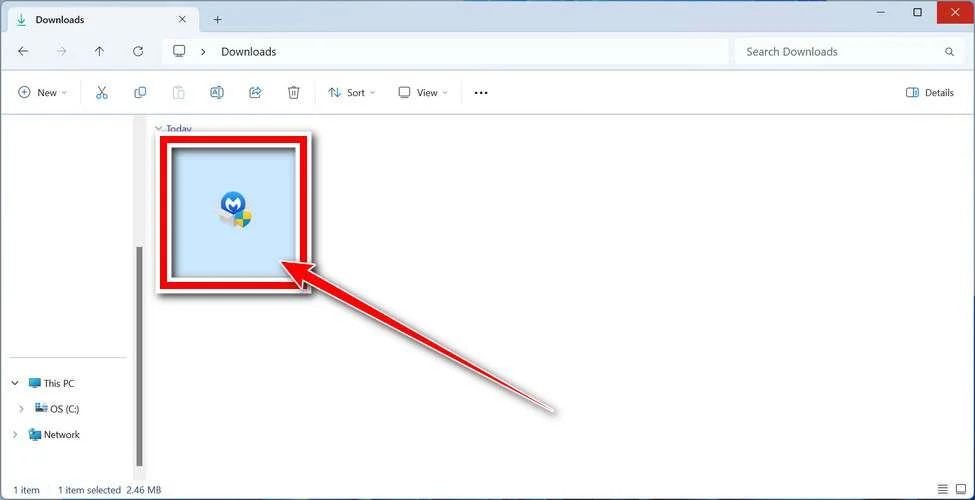
Keep the game and browsers closed during cleanup. If the scanner needs internet access for updates, reconnect only for that task and avoid signing in elsewhere.
On the Scanner tile, open the three-dot menu and select Advanced Scan, then Custom Scan.
Choose the Windows system drive and any separate drive containing NIKKE. Include memory, registry, and startup-item checks where available in your installed version.
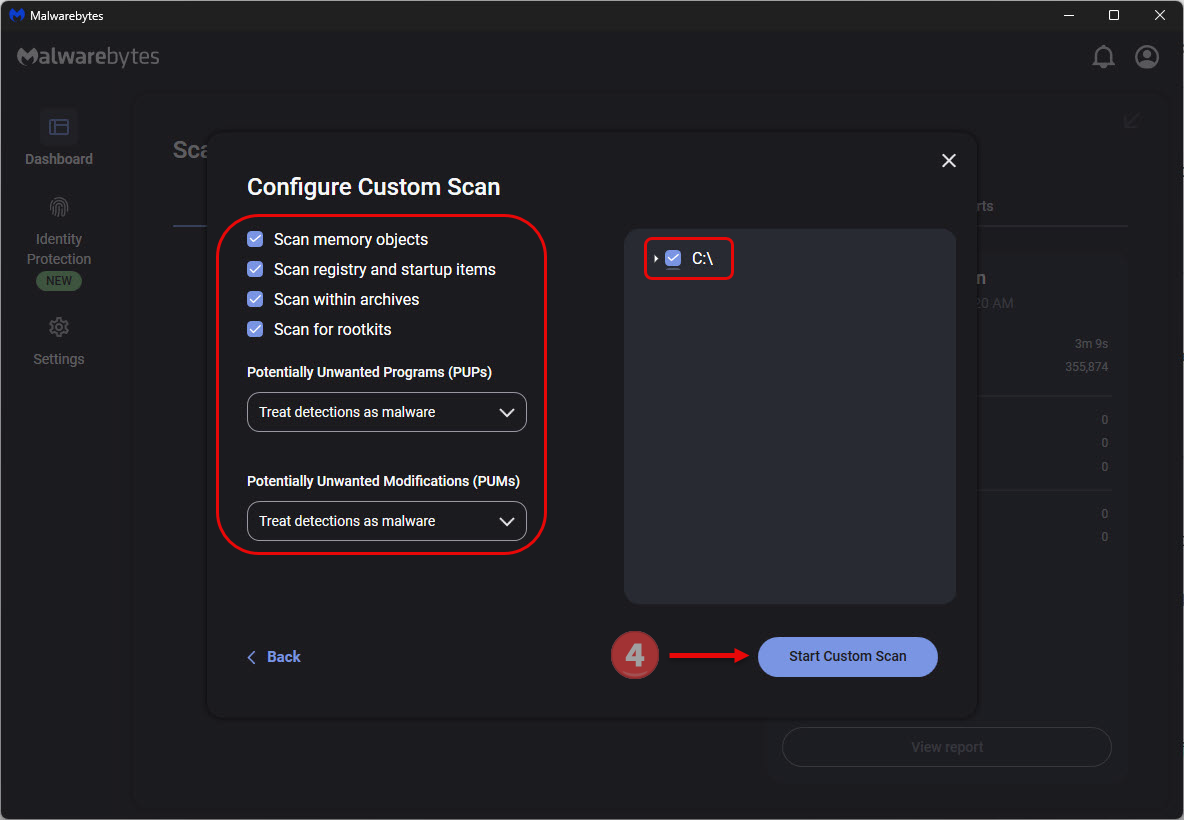
Review the available settings before starting. Treat potentially unwanted programs and modifications as malware unless a knowledgeable administrator has a specific reason otherwise.
Rootkit scanning is optional, not proof this incident installed a rootkit. That setting is available only in Custom Scan and is unavailable on Windows ARM devices.
Click Start Custom Scan and let it finish. Do not stop after the first few files or interpret a cancelled scan as a completed check.
-
Review the detection list. Select the identified threats and click Quarantine. Save the report before closing the results.
If a detection is unclear, ask for help rather than adding an exclusion simply to make the warning disappear.
-
Restart if requested. Open Malwarebytes again, check the report, and confirm that the listed actions completed instead of assuming the restart handled everything.
A scan can remove what it recognizes. It cannot prove that an attacker never copied a password, used a session, or installed something else.
Step 4: Add a second-opinion check when needed
HitmanPro provides another Windows scan. It is optional, but useful when detections remain unresolved or you want a separate assessment after the first cleanup.
Its scan is free. Removal requires an eligible one-time 30-day trial or a license. An already-used trial does not become free again.
-
Download the Windows version from the linked route. Open hitmanpro_x64.exe on a supported 64-bit system and approve its permission prompt.
-
Read the setup choices. You can run a one-time check rather than keeping a local copy; optional marketing preferences are separate from scanning.
-
Choose Next to begin. The cloud-assisted analysis needs an internet connection, so keep other applications closed while it runs.
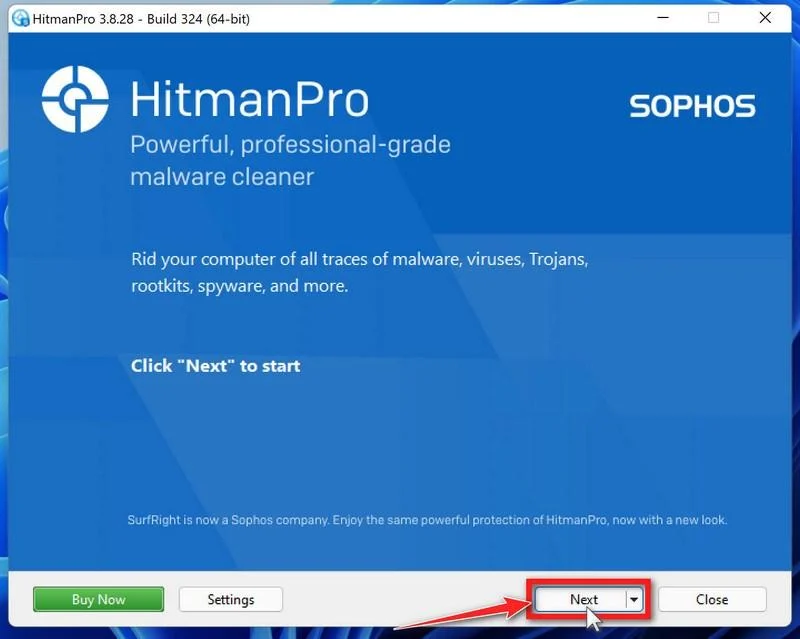
Let the analysis finish before judging the result. Read the action proposed for each finding, not just the number displayed at the top.
Keep a copy of the report if removal cannot complete. It is useful when asking a specialist which remaining item needs attention.
Choose Next to proceed with selected detections. Do not restore a quarantined file because an unknown forum account tells you the game needs it.
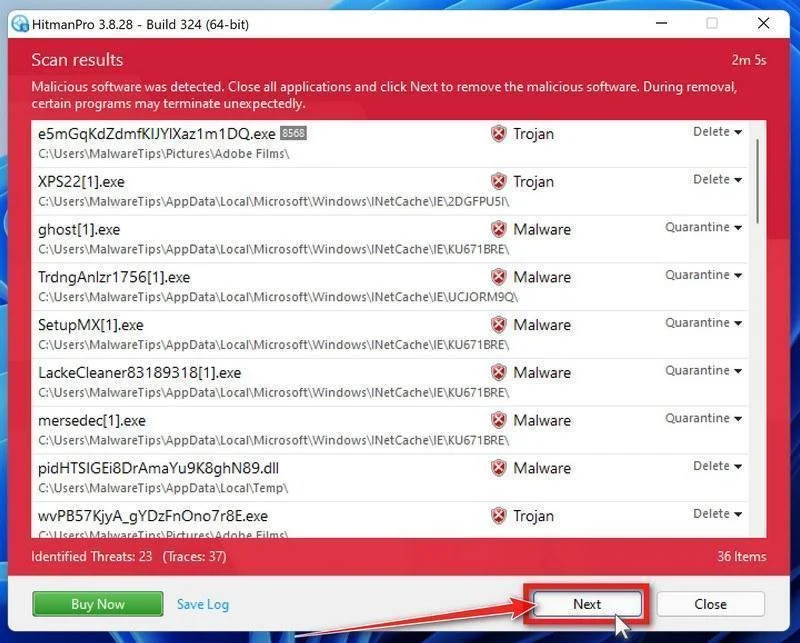
If offered, activate the eligible free license and complete the removal prompts. Otherwise, keep the report and use another verified remedy or guided assistance.
Follow a requested reboot, then reopen the report. A successful second scan is useful, but not a guarantee that every consequence has been reversed.
Step 5: Run Microsoft Defender Offline and check the outcome
The publisher also recommends an offline Windows Security scan. Save your work first because this check restarts the computer.
Open Windows Security, choose Virus & threat protection, then Scan options. Select Microsoft Defender Antivirus (offline scan) and Scan now.
Windows restarts into its recovery environment for the check, then returns to Windows. Open Protection history afterward to review any actions.
If that option is unavailable, contact the device administrator or follow Microsoft’s support guidance. Do not disable another security product just to reveal a button.
Persistent warnings, returning files, or unexplained activity call for expert assistance. Do not keep repeating the same scan while continuing to use sensitive accounts.
Step 6: Decide whether to rebuild before trusting the PC again
A remote-control infection is different from one unwanted toolbar. The operator may have been able to run additional commands that the launcher logs do not describe.
For a confirmed compromise, a clean Windows installation is the strongest way to regain confidence. Plan it with a trusted technician if needed.
Preserve important documents and evidence first. Follow Microsoft’s recovery guidance for installation media, and expect applications and local settings to need rebuilding.
Do not restore the old launcher cache, unknown executables, or an unexamined full-system image from the exposure period. Scan restored personal files before using them.
If you keep the existing installation, complete the incident-specific checks and review unresolved findings with the MalwareTips removal-help forum.
How the NIKKE Launcher Attack Reached Players
Step 1: Trusted resources were changed
The launcher loaded external resources as part of its normal operation. Four official JavaScript files carried added code, according to MotherSphere’s technical report.
The player did not need to install a suspicious mod for that route to matter. The trust placed in the existing launcher became the entry point.
Step 2: The launcher could fetch a remote-control agent
The altered resources led to attacker-controlled infrastructure. The research describes a downloaded agent running through the launcher’s own capabilities.
Its documented commands could reach much more than game settings. Browser credentials, developer secrets, files, and wallet-related information were among the potential targets.
Step 3: Access could outlast the obvious launcher session
The investigation identified a Chrome-related persistence component. Closing the visible launcher was therefore not a complete removal procedure.
Fixing the publisher’s resources stops one delivery route. Dealing with an already affected computer still requires cleanup and separate account recovery.
What the Timeline Does and Does Not Tell You
Level Infinite dates script tampering to September 27 and malicious-program distribution to October 30, using UTC+9 in its incident timeline.
MotherSphere reports earlier agent activity in player records, including October 23. Those reported observations should not be silently replaced with the narrower distribution date.
For a practical decision, follow the publisher’s broader September 27 checking threshold. Do not dismiss your PC simply because you last played before October 30.
Neither account establishes how much information left every affected machine. A log marker identifies exposure evidence, not a complete inventory of stolen material.
What to Do About Accounts Used on the Affected PC
Start these actions from another device you trust. You can protect accounts while the Windows investigation is still underway.
-
Secure your main email first. Change its password, inspect recovery addresses and forwarding rules, and remove unfamiliar sessions or connected applications.
Email often controls password resets elsewhere. An attacker retaining that access can undo repairs to other accounts.
-
Replace exposed passwords. Prioritize NIKKE, financial services, social accounts, and credentials saved or entered on the affected computer. Use unique replacements.
-
End existing sessions. Use each service’s security page to sign out other devices. Changing a password does not always invalidate every previously issued session.
-
Review multifactor authentication. Remove unknown authenticators, recovery methods, and backup codes. Add a phishing-resistant sign-in method where supported.
-
Revoke developer secrets. Replace API tokens, SSH keys, and cloud credentials stored on the PC. Check the relevant service’s access and billing records.
-
Handle wallet exposure separately. Follow the genuine wallet provider’s instructions from a clean device. An exposed recovery phrase requires a new wallet, not another password.
Never enter that phrase into a cleanup website or give it to someone offering to investigate the incident.
-
Report actual losses promptly. Notify the relevant bank, payment service, or exchange. Keep transaction references and submit an incident report through genuine NIKKE support.
-
Reject unsolicited fixes. Do not paste commands, install remote-support software, or pay a recovery fee supplied by a stranger responding to this incident.
Frequently Asked Questions
Is NIKKE itself a fake game or scam?
No. This concerns malicious changes to resources used by a genuine PC launcher. The documented attack is not evidence that the game itself was invented to defraud players.
Do mobile-only players need this Windows removal guide?
No. The publisher says the mobile version was unaffected. These incident-specific Windows steps are for the PC launcher, not ordinary mobile gameplay.
Does the new launcher security check make everything safe?
It targets known incident files. It cannot revoke stolen sessions, replace exposed secrets, or prove no additional attacker command ran before cleanup.
What if I cannot find k2f_chan registered?
Continue the recommended checks. A missing marker can reflect missing or cleared records; the publisher explicitly says its absence does not completely exclude risk.
Should I delete the entire PlatformExperienceHelper folder?
No. It can contain legitimate Chrome files. The publisher identifies a specific 64-character subfolder containing a named DLL, not the whole parent directory.
Can a Malwarebytes scan recover my accounts or stolen money?
No. Scanning addresses detectable malware. Account access, session revocation, wallet exposure, and payment reports require their own actions through the genuine services involved.
The Bottom Line
Take the NIKKE launcher malware warning seriously if you used the PC client during the publisher’s checking period. Preserve evidence before letting cleanup erase it.
Remove the identified components, complete Windows security checks, and secure exposed accounts from a clean device. For a confirmed remote-control compromise, consider a properly planned rebuild.
Do not resume sensitive work merely because the game launches normally. Unresolved detections or returning artifacts need expert help, not another download from a comment thread.

Join the discussion
0 commentsShare your experience or ask a question about this article.
Your progress
Did these steps help?
Let us know how the guide worked for you.
Describe what you see and the step you reached. Keep passwords and other private information out.
Discussion
Start the conversation
Have a question or something useful to share? Add the first comment.