


An official-looking attachment can arrive in the middle of an ordinary workday, with a subject that seems relevant and a request that sounds routine.
If a security alert later mentions BeautyStealer, the next few decisions matter. Start with what happened, not with whether the computer still seems to work.
Overview
A suspicious attachment is not the same as confirmed execution
BeautyStealer is Windows information-stealing malware linked by ESET to Gorbag’s targeted attacks against Ukrainian organizations. This is not evidence of a mass infection affecting every Windows user.
Before doing anything drastic, establish which situation applies:
- You received a message but did not open or extract its attachment.
- You opened a document and allowed active content to run.
- You processed an archive using an application that may have been vulnerable.
- Your security software or incident-response team identified malicious execution.
Tell the person helping you which of those happened. A blocked delivery and malware that actually ran should not be handled as though they were identical.
Removing the program does not retrieve stolen information
The reported collection includes browser data, selected files, and VPN configurations. That creates two jobs: investigate the computer and protect access outside it.
A scan can address detected threats on disk. It cannot make someone surrender a copied document or invalidate every session associated with an exposed account.
Keep those jobs moving separately. Otherwise, a computer that appears normal again can distract you from an account or credential that still needs attention.
Workplace response comes before a do-it-yourself cleanup
ESET presented this research at the October 2026 Virus Bulletin conference, before its November follow-up. The targeting described warrants a coordinated response, not improvised file deletion.
If this is a government, defense, legal, or other managed device, contact its security team through a trusted channel before running the consumer procedure below.
They may need evidence, network records, and coordinated account restrictions. Do not wipe the machine, restart it repeatedly, or forward the attachment around to demonstrate the problem.
How to Remove BeautyStealer From Windows
Contain the device and preserve the useful details first
Stop using the affected computer for email, password resets, document signing, banking, or VPN access. Use another device you have reason to trust for sensitive recovery work.
Disconnect its network connection and leave shared folders and backup storage disconnected. On a managed device, follow your responder’s isolation instructions rather than changing network controls yourself.
Record the alert, approximate time, attachment name, and the application used to open it. Say explicitly if you enabled macros, extracted an archive, or restarted afterward.
Keep the original message in place for responders. Do not reopen a suspected attachment, run a command copied from a report, or upload confidential files to public scanners.
The scanner below needs an internet connection to update. For a managed or sensitive system, let responders arrange that connection instead of reconnecting an isolated machine yourself.
For a personal PC, obtain help if you cannot safely arrange an updated scan without exposing shared storage or resuming sensitive sign-ins.
Run the full illustrated ESET Online Scanner procedure
Use this procedure after required evidence has been preserved and you are authorized to clean the computer. Do not stack several cleaners or disable existing security protection.
ESET Online Scanner is a free second-opinion scanner for Windows. It offers a thorough check for threats other scans may have missed.
Let it update before scanning, and use the final report to see what it found and whether cleanup succeeded.
A clean result is useful evidence, not a guarantee that no malware remains. Buying ongoing protection is not required to run this free scan.
-
Download ESET Online Scanner
Click the button below to download ESET Online Scanner.
ESET Online ScannerFree one-time malware scan from ESETDownload ESET Online ScannerOpens the official download page in a new tab.
On the vendor page, choose the free Online Scanner download, not the separate HOME Security trial. Check the product name before opening an installer.
-
Run the Installer
When the download finishes, open your Downloads folder and double-click “esetonlinescanner.exe“.
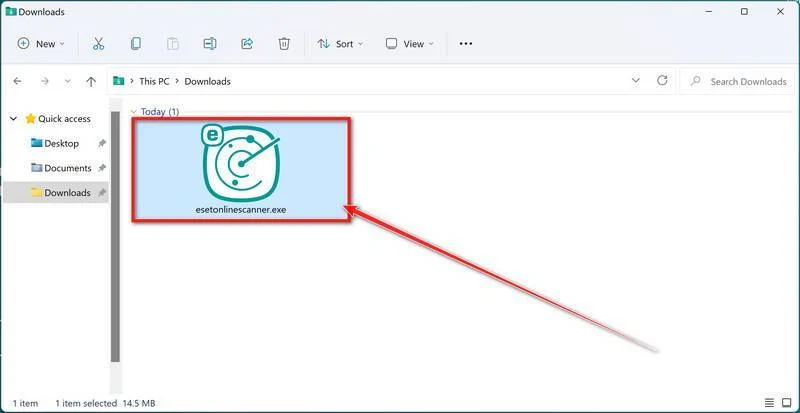
Confirm the Windows permission prompt only if it belongs to the expected ESET application you deliberately obtained. Stop if the program or source is unfamiliar.
-
Install ESET Online Scanner
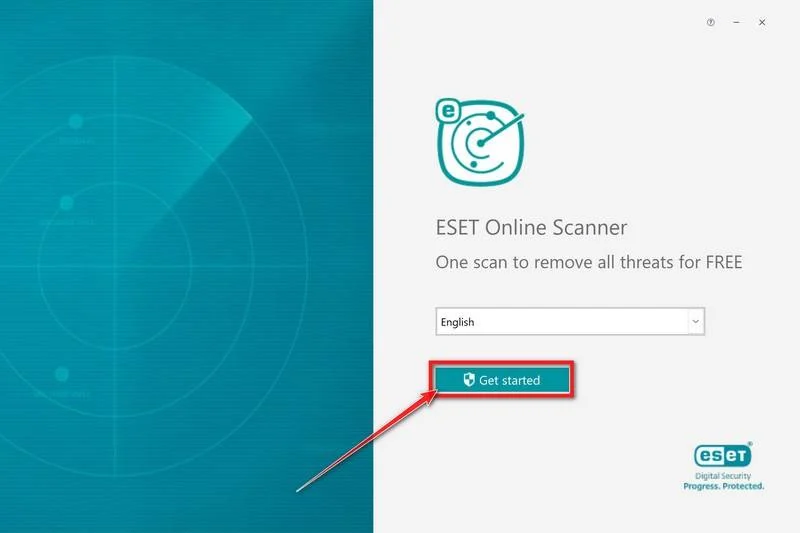
On the start screen, select your language from the drop-down menu and click Get started.
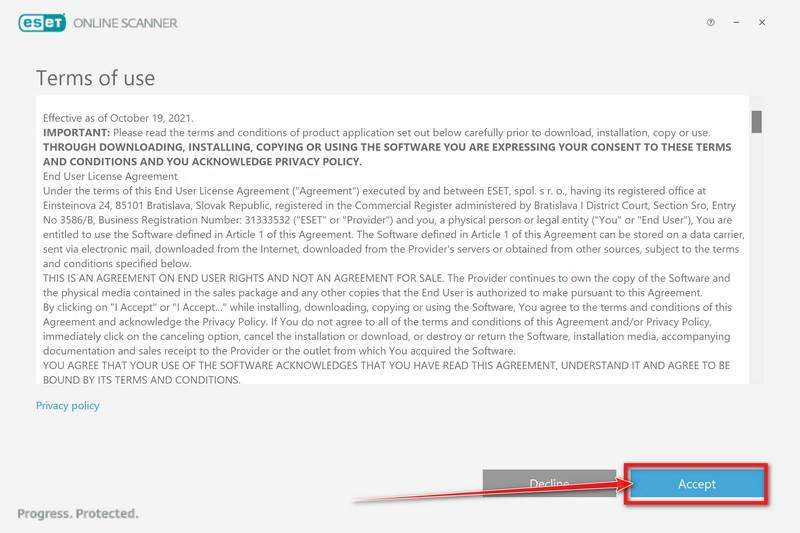
On the Terms of use screen, click Accept if you agree.
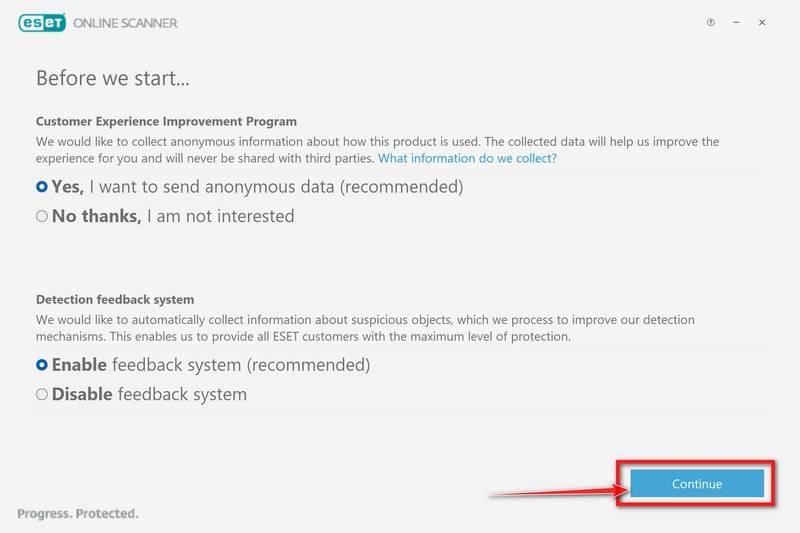
Choose your preferences for the Customer Experience Improvement Program and the Detection feedback system (either choice is fine), then click Continue.
-
Start a Full Scan
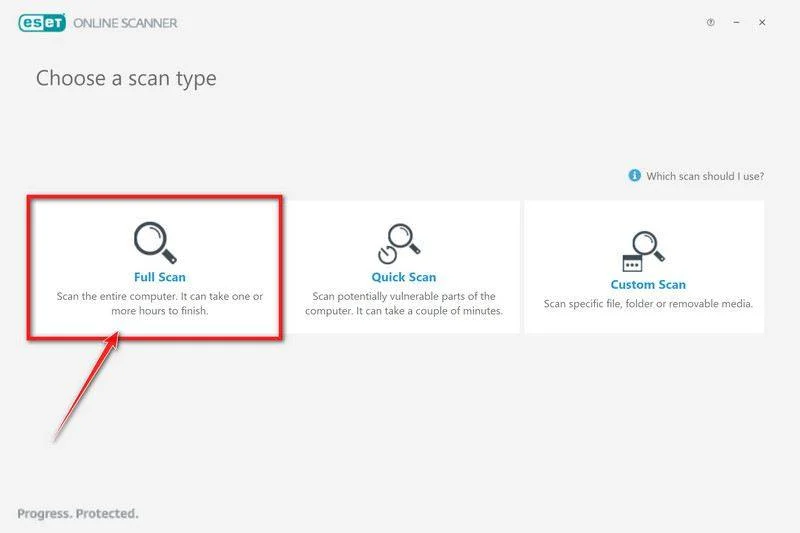
Click Full Scan. This performs an in-depth inspection rather than limiting the check to the locations used by a quick scan.
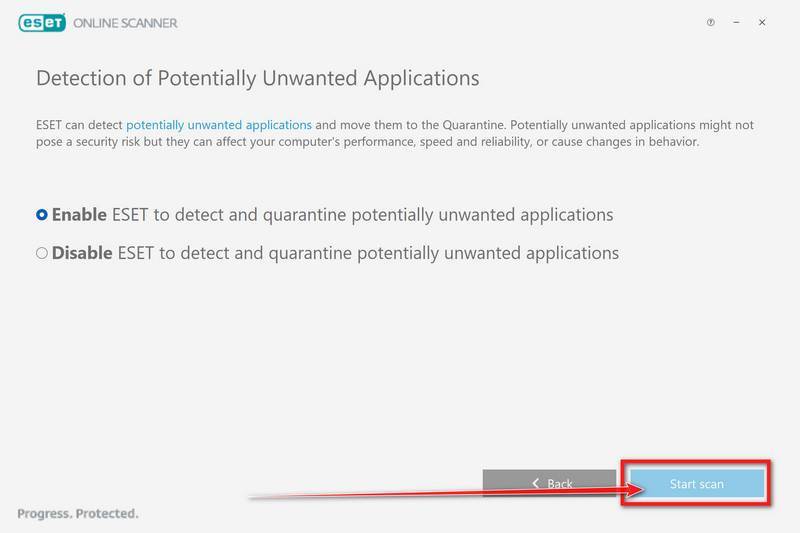
Select Enable for Detection of Potentially Unwanted Applications if you want that category included. Then click Start scan.
-
Wait for the Scan to Finish
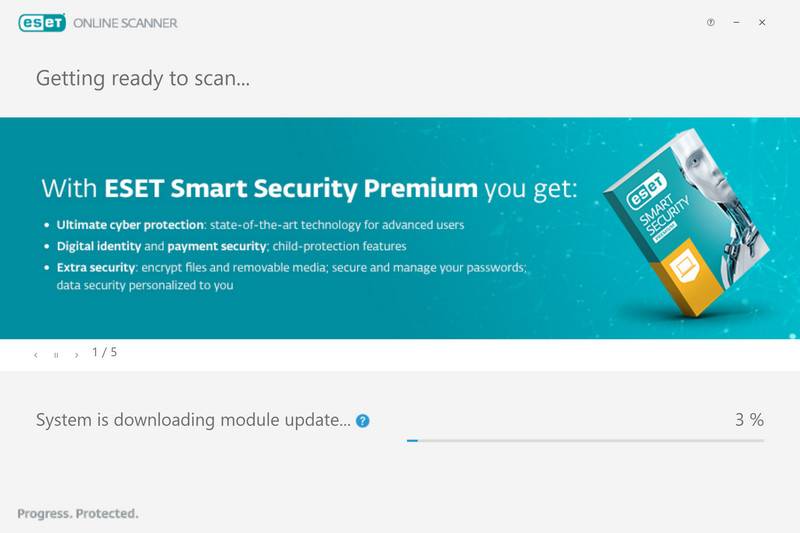
The scanner downloads detection-module updates before scanning. The time needed depends on the amount of data and the selected scan.
Any promotion for a paid protection product is separate from this free procedure. Keep sensitive work off the affected PC while the investigation continues.
-
Review the Results
When the scan finishes, open View detailed results when available and check the action recorded for each detection.
ESET attempts to clean detected threats, but unresolved items still need attention. Use Save scan log to keep a report before closing the application.
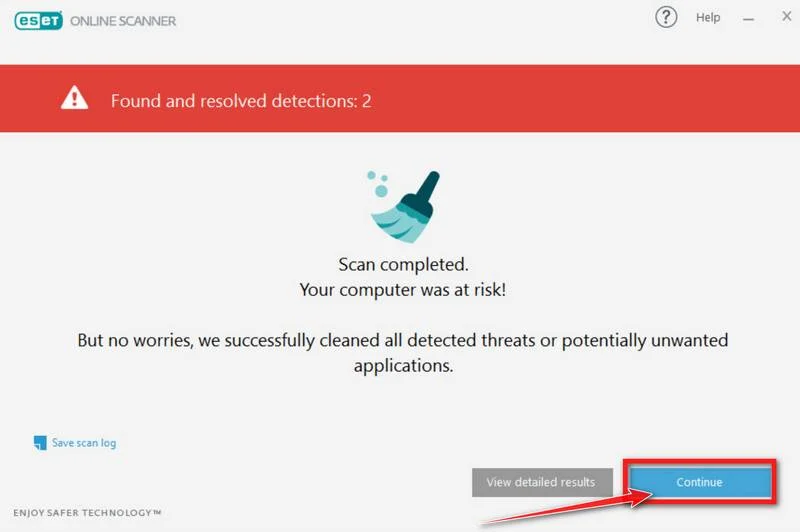
Review the recorded cleanup or quarantine action. Do not restore a suspicious item simply because it appears in quarantine or was attached to an important message.
Keep the report for your responder. A detection left unresolved requires further help, not another attempt to open the original file.
-
Close the application after saving your findings
Follow the completion prompts. Periodic scanning and feedback are optional; neither is needed to report what this scan found.
If you remove the scanner’s application data, preserve the report first. Do not discard your only record while an incident is still being investigated.
Finish the cleanup without assuming a clean report settles everything
If cleanup requests a restart, follow the scanner’s instructions after preserving its results. Restarting is not a substitute for reviewing a detection that was left unresolved.
A returning alert, unexplained startup action, or failed cleanup needs further investigation. Keep the computer out of sensitive use and seek qualified help.
Ask your responder whether a clean Windows installation is preferable to repairing the existing system. Preserve evidence and required recovery information before any erase or rebuild.
Restore personal documents from a verified source only after the system is trusted. Do not bring back the suspicious attachment or an unexplained startup file with your backup.
How the BeautyStealer Attack Works
Step 1: A work-related message encourages attachment handling
The documented lures use administrative themes, including fines and taxes, and can arrive through compromised legitimate email accounts.
A familiar sender address can therefore make a dangerous request feel ordinary. It tells you where the message came from, not who was controlling the account.
The request may fit your responsibilities closely enough that you open it before questioning the workflow. Relevance is useful camouflage when people are busy.
Step 2: The attachment creates an execution opportunity
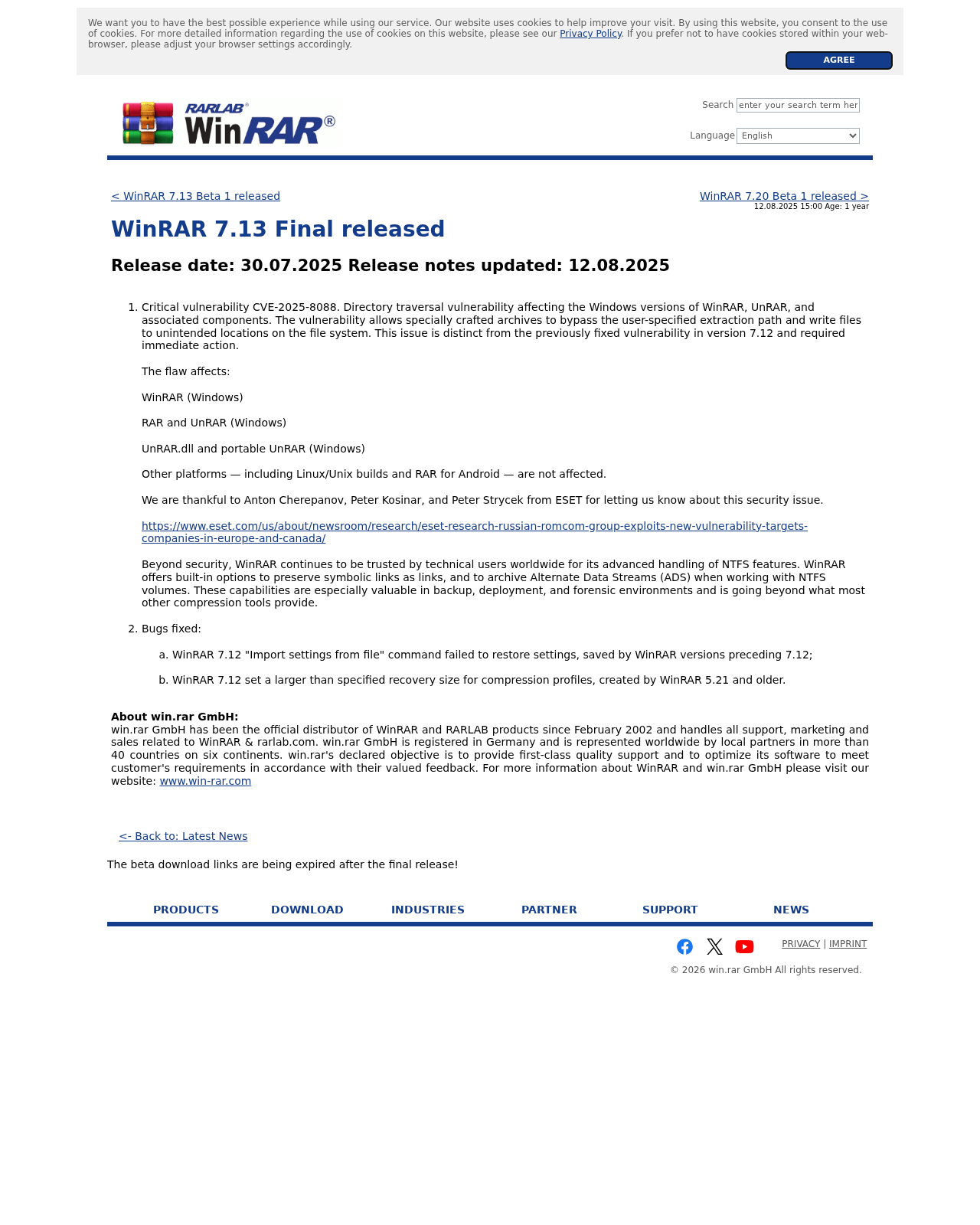
One route uses Excel macros. Another exploits CVE-2025-8088 in vulnerable WinRAR, placing a shortcut in Startup alongside a loader and encrypted payload.
These are different exposure paths. Not enabling a macro does not answer whether an archive was processed by vulnerable software.
Conversely, receiving an archive does not establish that it was extracted or that anything ran. Reconstruct the actual sequence instead of assuming from the file extension.
Step 3: Collection and self-deletion obscure the aftermath
BeautyStealer collects and sends data, then attempts to delete itself. That behavior does not prove every dropped loader or startup mechanism is gone.
The absence of an obvious program is therefore a poor basis for deciding the incident is over. Account and file exposure can outlast the executable.
You may have no visible ransom demand or broken files. An information-theft incident can require urgent action without looking like a dramatic computer failure.
Close the WinRAR Exposure Without Confusing Patching With Removal
Use the official RARLAB downloads page to obtain the current stable Windows release, or ask IT to update its managed deployment.
The WinRAR security advisory identifies 7.13 as the historical fix for CVE-2025-8088. It is not a recommendation to install an old version today.
Patching addresses the vulnerable extraction behavior. It does not remove files that were previously dropped or tell you whether a past attachment caused a compromise.
Give responders the installed version and the approximate extraction time if you know them. Do not test the attachment again after updating to see what happens.
If your organization distributes an archive component inside another application, ask its administrator to assess that component too. Updating one desktop shortcut is not an inventory.
What to Do After a BeautyStealer Detection
-
Give IT a timeline they can investigate.
Record the message, attachment, opening or extraction time, alerts, and any subsequent restarts. Separate actions you remember from details you are uncertain about.
Include whether shared drives or removable storage were connected. That helps the team decide which locations and records need attention without assuming every file was stolen.
Use established incident-reporting channels. Do not send the suspected file to colleagues or ask them to open it on another machine.
-
Secure important accounts from a trusted device.
Prioritize email and accounts that can reset other services. Replace exposed passwords with unique ones, and address reuse rather than changing only the account named in an alert.
If you use Google, its compromised-account guidance covers security events, unfamiliar devices, recovery information, and connected applications.
Review unexpected mail forwarding, filters, and sharing changes too. A recovered login should not leave an unfamiliar route for access or messages in place.
For work accounts, ask administrators to coordinate recovery. Do not change organizational account settings at random while another team is managing the incident.
-
End exposed sessions, not just saved passwords.
Use each service’s security controls to review active sessions and sign out unfamiliar access. Deleting cookies locally is not the same as invalidating a session elsewhere.
Microsoft offers a Sign out everywhere option for personal accounts. Allow up to 24 hours for it to complete, as its support page explains.
Xbox consoles are excluded, so review those separately if relevant. Do not interpret the control’s name as a promise that every session ends instantly.
Do not assume every service behaves identically. Ask the relevant provider or administrator which tokens, devices, application permissions, and recovery methods still require attention.
-
Have the VPN administrator assess exposed profiles and keys.
Tell IT which VPN you used and where its configuration was stored. Do not paste the configuration into a support chat or send private keys with screenshots.
OpenVPN documents certificate revocation for compromised or stolen private keys. The administrator must apply the appropriate server-side response.
Removing a profile from the affected PC does not invalidate a copy elsewhere. Ask about revocation, replacement credentials, and any active VPN connection requiring termination.
Follow the administrator’s replacement procedure before reconnecting. A new VPN password alone may not address a separately exposed client certificate.
-
Assess password databases without assuming encryption failed.
An encrypted password database being copied is not proof that its entries were decrypted. Protection depends on the database and its actual master-key components.
KeePass explains its master-key requirements. Tell your responder whether a key file, master password, or other unlocking material might also have been exposed.
If credentials may have been obtained, rotate the affected service passwords from a trusted environment. Changing the database’s current master key cannot alter a copy already taken.
Do not share a database or its keys publicly to ask whether it is safe. Preserve required evidence through your organization’s approved process.
-
Contact the issuer about potentially exposed signing credentials.
A document-signing key needs its own response. Tell the responsible administrator or issuer that its file may have been exposed, without sending the private key.
Ask which certificate or key needs suspension, revocation, or replacement and how to review recent use. Follow that issuer’s process rather than inventing a universal remedy.
Keep authorization separate from computer cleanup. Removing malware does not change whether a credential remains accepted by another system.
-
Investigate the information, not only the accounts.
Identify sensitive documents that were accessible during the incident. Give responders the locations and business context, not an unsupported claim that every document was copied.
They may need to review confidential correspondence, personal information, contracts, or operational records. Coordinate any notification with the responsible organization rather than contacting people speculatively.
Preserve the findings and decisions. If someone later asks what was exposed, a documented assessment is more useful than an assumption based on a clean scan.
-
Return the computer to use only after the remaining issues are addressed.
Check that detections were resolved, the archive software was updated, and account recovery actions were completed. Keep those checks separate so one does not substitute for another.
If security alerts return or the investigation remains unclear, keep sensitive work on another trusted system. Ask your responder about rebuilding rather than repeating random cleanup commands.
Do not purchase a stranger’s guaranteed recovery or removal service through an unsolicited message. Use verified support channels and retain your existing case reference.
Why Browser Resets and File Deletion Are Not a Complete Response
A browser reset changes local settings. It does not retrieve exported documents, revoke VPN credentials, or explain the scope of a stolen session.
Likewise, a filename is not a safe deletion rule. Legitimate software can share generic names with malicious files, and removing the wrong item can create another problem.
Let a security product or responder assess the actual file, location, and behavior. Do not delete whole browser profiles or system folders because a report mentions them.
If a browser has additional unwanted extensions or settings, investigate those specific changes. Do not reset every installed browser automatically when the issue is information theft.
For unresolved personal-PC cleanup, use the MalwareTips Windows removal-help forum. Describe the alert and completed actions without posting private keys or confidential documents.
Frequently Asked Questions
Does receiving the email mean BeautyStealer infected my PC?
No. Report whether you opened or extracted anything, allowed active content, or received an execution-related detection. Receiving a message alone does not establish infection.
Should I run the suspicious archive again after updating WinRAR?
No. Preserve the evidence for authorized investigation. Updating software is not permission to retest a dangerous attachment on a working computer.
Can ESET Online Scanner recover stolen files?
No. It scans for threats on the computer. Removing a detected threat does not retrieve a copy of information already sent elsewhere.
Is changing my email password enough?
Also review sessions, recovery details, and unfamiliar access through the provider’s security controls. Follow your administrator’s instructions for a managed account.
Does a copied KeePass database mean every password is exposed?
Not automatically. Assess its encryption and whether unlocking material was also exposed, then address any service credentials that may have been obtained.
Should a workplace computer follow only this guide?
No. Contact the security team first. Evidence preservation, shared systems, account restrictions, and organizational information require a coordinated response.
The Bottom Line
Treat a credible BeautyStealer detection as an information-theft incident. Stop sensitive use, preserve evidence, and arrange cleanup through the appropriate response process.
Use the illustrated Windows procedure when authorized, update the vulnerable software, and secure exposed accounts, sessions, and keys separately. A normal-looking desktop is not the finish line.

Join the discussion
0 commentsShare your experience or ask a question about this article.
Your progress
Did these steps help?
Let us know how the guide worked for you.
Describe what you see and the step you reached. Keep passwords and other private information out.
Discussion
Start the conversation
Have a question or something useful to share? Add the first comment.