

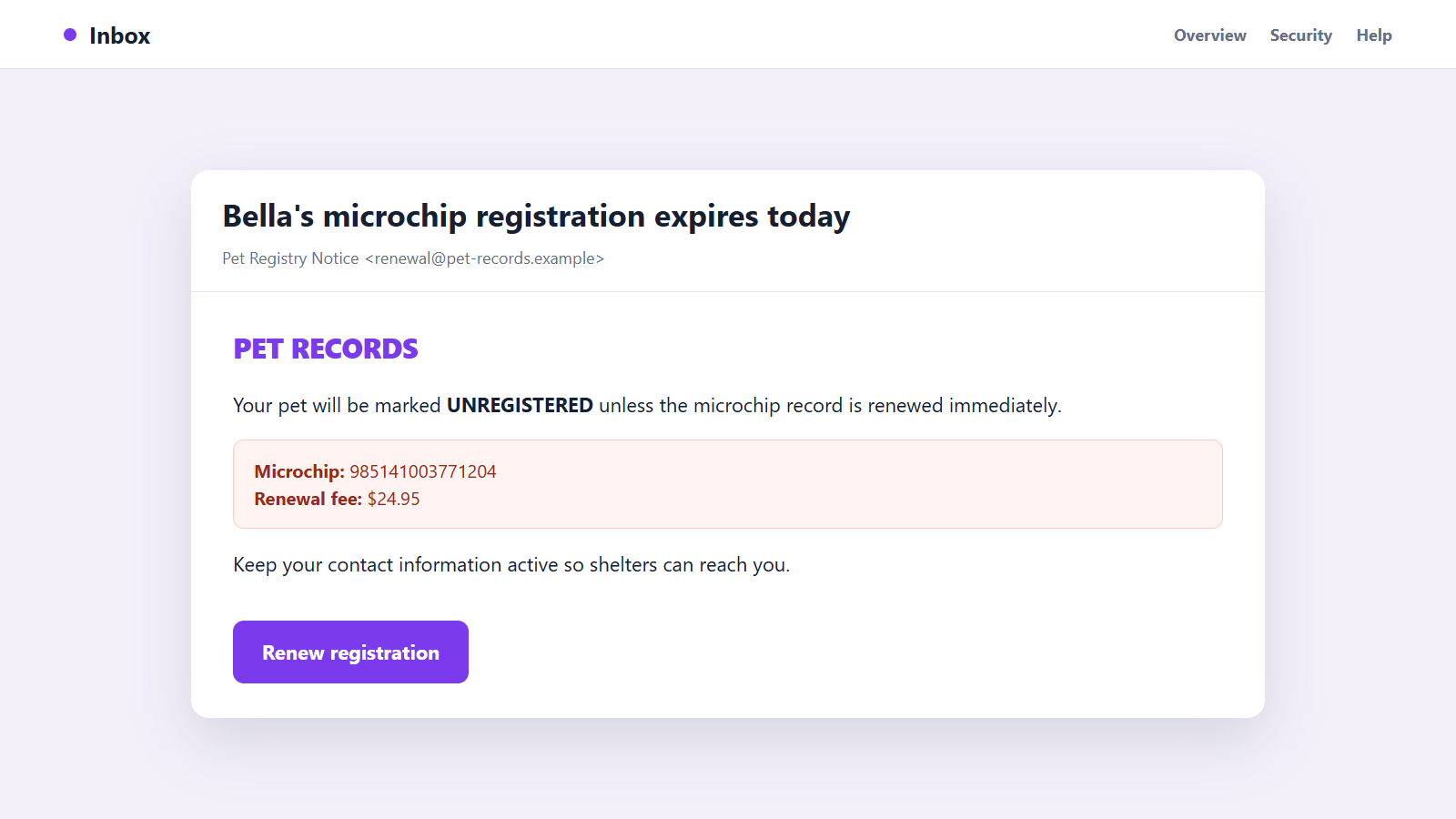
The email knows your pet’s name and may quote a long microchip number. It says the registration is about to expire, so one quick payment is needed to keep shelters able to contact you.
A pet microchip expiration scam feels personal because it attaches a routine-looking notice to a responsibility owners take seriously. Before paying, there are several quiet details that tell a very different story.
Overview
The message invents an expiration that may not exist
Pet microchip expiration scam emails claim that a pet’s chip, registration, or recovery protection has lapsed. The owner is warned that the animal will appear unregistered unless a fee is paid immediately.
The physical microchip is a passive identifier and does not suddenly stop working on an email deadline. Registry rules and optional services vary, but a stranger cannot create a legitimate renewal simply by knowing the chip number.
Real pet details make the fake notice persuasive
The email may include the animal’s name, breed, old address, photograph, or microchip number. Those details can come from public lost-pet posts, breached data, marketing lists, previous forms, or a misused registry record.
Correct information proves that the sender obtained data. It does not prove that the sender manages the official record or can change the pet’s recovery status.
The payment page collects more than a renewal fee
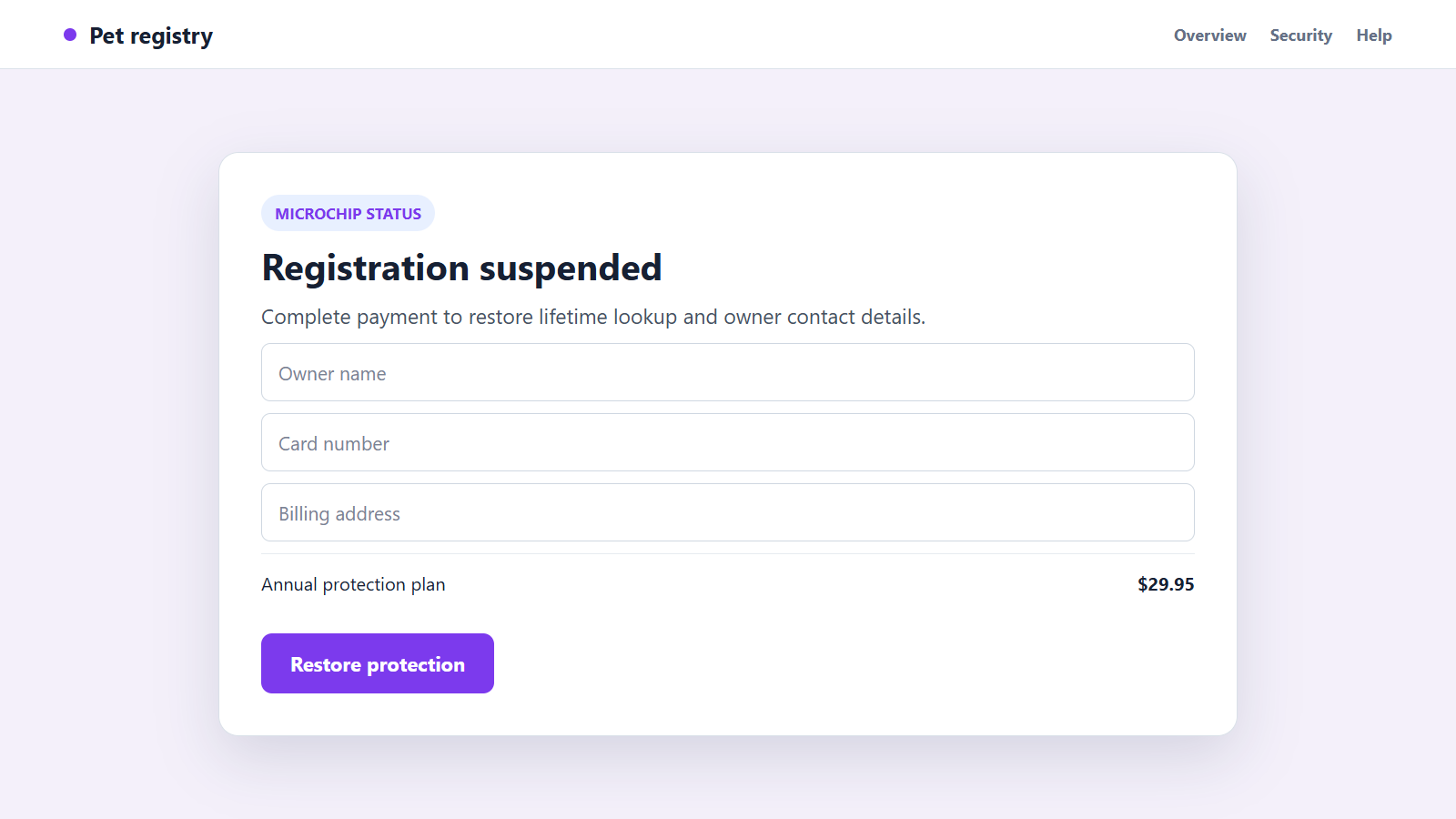
A button leads to a polished portal requesting the owner’s name, address, telephone number, card details, and sometimes an account password. The displayed charge may be only $19.95 or $29.95.
Watch for these warning signs:
- The sender is not the registry named in your original paperwork.
- The subject says the microchip itself has expired.
- A short deadline threatens to remove or suspend the pet’s record.
- The link uses an unfamiliar domain with pet, chip, registry, or recovery in it.
- The message asks you to create a new registration instead of checking the existing one.
- The fee becomes a recurring protection plan at checkout.
- The sender discourages contact with your veterinarian, council, shelter, or registry.
- Payment is requested before the company explains which official database it updates.
A genuine status question can be resolved by identifying the real registry first. The email should never be the only route to that answer.
A Microchip, a Registry Record, and a Subscription Are Different Things
The chip implanted under the animal’s skin usually stores a unique number. A scanner reads that number, but it does not display the owner’s address or automatically contact anyone.
A registry connects the number to contact details. When a shelter or veterinarian scans a pet, staff use an appropriate lookup process to identify which registry may hold the owner record.
Some providers sell optional services such as alerts, expanded recovery support, identification tags, or insurance. Those extras can renew even when the core microchip record remains in place.
Local rules also differ. A city or council may require an annual animal licence, while the microchip registration is a separate record. Scammers blur those systems so a vague renewal sounds legally urgent.
In the UK, the official microchipping guidance lists approved databases and warns that an email from another database asking for registration money could be a scam. Owners are responsible for keeping contact details current.
In the United States, the AAHA lookup tool can help identify registries associated with a chip number. It does not reveal private owner data, but it gives the owner a safer starting point.
The important question is not simply whether any fee could exist. It is whether the company contacting you is the real keeper of your pet’s record and whether the stated service actually needs renewal.
Owners should also distinguish an expired payment card from an expired record. A real provider may ask a member to update billing for optional services, while the underlying chip identifier remains readable.
Another legitimate notice may concern outdated contact details rather than expiration. Open the known registry directly and make the correction there instead of following an embedded button.
When the language remains vague, ask support to name the exact record, plan, renewal date, and consequence. A trustworthy provider should answer without demanding payment first.
How the Pet Microchip Expiration Scam Works
Step 1: Pet and owner information is collected
Criminals gather names, email addresses, photographs, and animal details from social posts, classifieds, lost-pet notices, breached databases, or data sold by questionable websites.
A microchip number makes the message especially convincing, but even a pet’s name can be enough. Many owners assume such details could only come from an official source.
Step 2: A registry-sounding identity is created
The sender uses a name containing words such as pet, chip, register, recovery, protection, or national database. A simple logo and professional email template give the notice an administrative appearance.
The name may resemble a real provider without matching it. Small differences in the sender domain are easy to miss when the subject line creates worry.
Step 3: The email announces an urgent expiration
The pet is supposedly about to become unregistered, invisible to shelters, or noncompliant with the law. A deadline of 24 or 48 hours makes checking the claim feel risky.
Townsville City Council issued a warning about fraudulent expiration emails and stated that pet microchips do not expire. It advised residents to verify council notices directly.
Step 4: Personal details are used as borrowed proof
The email repeats the pet’s name, owner address, chip number, or a photograph. These details lower suspicion because the message seems tied to a real record.
The scammer wants the owner to confuse data possession with authority. Someone can know a record exists without having any right to maintain it.
Step 5: The owner is sent to a lookalike portal
The linked page shows a suspended status, countdown, or warning banner. It asks the owner to confirm details before the record can be restored.
The domain may have been registered recently or may route through several addresses. A padlock in the browser only means the connection is encrypted, not that a government or registry approved the site.
Step 6: A small fee captures card and identity data
The visible charge is designed to feel easier than researching the issue. The checkout collects enough information for unauthorized purchases, recurring billing, targeted phishing, or identity fraud.
Some pages hide a subscription in the terms. Others display an error after submission even though the card details have already reached the operator.
Step 7: The fake service supplies an empty confirmation
The owner may receive a certificate, membership number, or receipt. It can look official while failing to update the legitimate database that a shelter would actually consult.
A decorative certificate does not prove fulfillment. The real registry should show the correct owner information when contacted through its official channel.
Step 8: The information supports repeat fraud
Victims may receive new invoices, lost-pet alerts, insurance offers, or calls claiming another registration problem. The detailed pet information gives future messages a personal tone.
If the card was stored or the checkout created recurring billing, additional charges can appear under unfamiliar names. The owner may not connect them to the original renewal.
How to Check Your Pet’s Real Microchip Status
Find the original implantation or adoption paperwork. It may identify the chip manufacturer, registration company, chip number, and date the record was created.
Ask your veterinarian or shelter to scan the pet if the number is uncertain. A scanner reading is stronger than a number copied from an unexpected email.
Use an official registry lookup recognized in your country. If the lookup lists more than one company, contact them in the order recommended by the service.
Type the registry address yourself or use the contact information printed on trusted paperwork. Do not sign in through the renewal email, even if the page resembles the provider.
Confirm the owner’s name, telephone number, email address, and home address. Updating stale contact details is important, but it should happen inside the real registry account.
Ask exactly what any payment covers. A company should distinguish the core record from optional alerts, tags, membership plans, or recovery assistance.
If local pet licensing is due, handle it through the council or municipality. Do not assume that paying a third-party microchip site renews a legal licence.
Keep the result with the pet’s veterinary records. That makes the next unexpected notice much easier to compare with a known provider and account.
Company, Address, and Fulfillment Checks
The company must be connected to the existing chip
Ask your veterinarian, shelter, manufacturer, or recognized lookup service which registry holds the record. A company that merely offers to create another record may not maintain the one already used.
Do not accept a registry-sounding name as proof. Verify the legal entity, official domain, support number, and relationship to the chip.
The address and jurisdiction must make sense
Check where the business operates and whether it is recognized by the relevant government or veterinary system. Rules in one country may not apply to an owner somewhere else.
A mailbox, virtual office, hidden operator, or unrelated overseas address gives little confidence that a shelter can reach support when the pet is missing.
The account must show the record without the email link
Open the known registry directly and sign in through its normal page. The chip status, owner details, and service level should be visible without a special renewal URL.
If support cannot locate the pet using the chip number, ask the veterinarian or shelter what legitimate registration step is required.
The promised update must be independently visible
After any legitimate change, the actual registry should display the new contact information and provide a traceable receipt. A PDF certificate from an unrelated site is not enough.
Optional products should be described separately and priced clearly. The checkout should not turn a status check into hidden recurring billing.
Warning Signs in the Email and Payment Page
- The email says the physical chip will stop working.
- The supposed registry does not match your records.
- The sender uses fear about a lost pet to force same-day payment.
- A private pet detail is presented as the only proof of legitimacy.
- The domain is slightly different from the known provider.
- The checkout requests more identity data than the service needs.
- The amount changes or a subscription appears near the final button.
- Support refuses to explain which recognized database will be updated.
Do not resolve uncertainty by paying first. A real registry can confirm the record before it processes a legitimate service change.
What to Do if You Have Fallen Victim to This Scam
- Stop using the email and fake portal. Close the page, do not submit the form again, and do not call a support number supplied by the sender.
- Contact the card issuer. Report the payment as fraudulent or misleading, block the card if details were exposed, and ask whether recurring charges or digital-wallet additions can be stopped.
- Find the real registry. Use original paperwork, your veterinarian, a shelter, or a recognized lookup tool. Confirm that the pet’s owner record remains accurate.
- Change any reused password. If the fake site collected a login, replace it everywhere it was reused. Start with email because it can reset other accounts.
- Review saved account data. Check the legitimate registry for unknown contact changes, transfer requests, extra users, or unfamiliar service plans.
- Preserve evidence. Save the email headers, sender address, domain, screenshots, receipt, card descriptor, and any messages from supposed support.
- Report the site and message. Notify the real registry, your local consumer-protection authority, the email provider, and the national phishing or fraud-reporting service.
- Protect identity information. If the form collected a licence, birth date, or financial record, monitor for misuse and follow the recovery steps offered by your national identity-fraud service.
- Scan the device if anything was installed. Run a full Malwarebytes scan after opening a downloaded file, browser extension, or unusual application from the message.
- Reduce future exposure. AdGuard can help block known phishing sites, malicious advertisements, and trackers. It cannot decide which registry holds your pet’s record.
- Watch for follow-up pet scams. Treat new lost-pet, insurance, vet, or recovery messages cautiously because the original operator now knows the subject gets your attention.
- Do not pay a recovery service. No stranger can guarantee a chargeback or repair a registry entry for an advance fee. Work directly with the card issuer and verified provider.
Frequently Asked Questions
Can a pet microchip physically expire?
The implanted identifier does not expire on a date announced by email. A registry account or optional service can have terms, so verify those directly with the known provider.
How did the sender know my pet’s name and chip number?
The data may come from public posts, breached records, marketing lists, old forms, or another service. Correct details do not prove registry authority.
Should I ignore every microchip-related renewal notice?
No. Treat it as unverified, identify the actual registry from trusted records, and ask what service is involved. Do not use the notice’s link or phone number.
Is an animal licence the same as microchip registration?
No. Local licensing and the microchip database can be separate systems with different rules. Contact the relevant municipality and registry independently.
Can a second registry improve the chance of recovery?
Policies vary, but duplicate or unofficial records can create confusion. Ask your veterinarian or recognized lookup service which provider should maintain the authoritative contact information.
What information should always stay current?
Keep the owner’s telephone number, email address, home address, and emergency contact accurate in the real registry. Update them through the official account.
The Bottom Line
The pet microchip expiration scam uses a frightening claim and real animal details to make an unfamiliar company look responsible for a trusted safety record.
Do not renew from the email. Identify the actual registry through your paperwork, veterinarian, shelter, or recognized lookup service, then confirm the record and any genuine fee through that independent route.

Join the discussion
0 commentsShare your experience or ask a question about this article.
Discussion
Start the conversation
Have a question or something useful to share? Add the first comment.