

An email warns that your account violated an unspecified policy and may lose access unless you review its activity now. The threat is fabricated, and the button is not an account-security tool.
The Policy Violation Detected message is credential phishing. It sends recipients to a counterfeit webmail login that can adapt its appearance to the email provider and capture the submitted password.
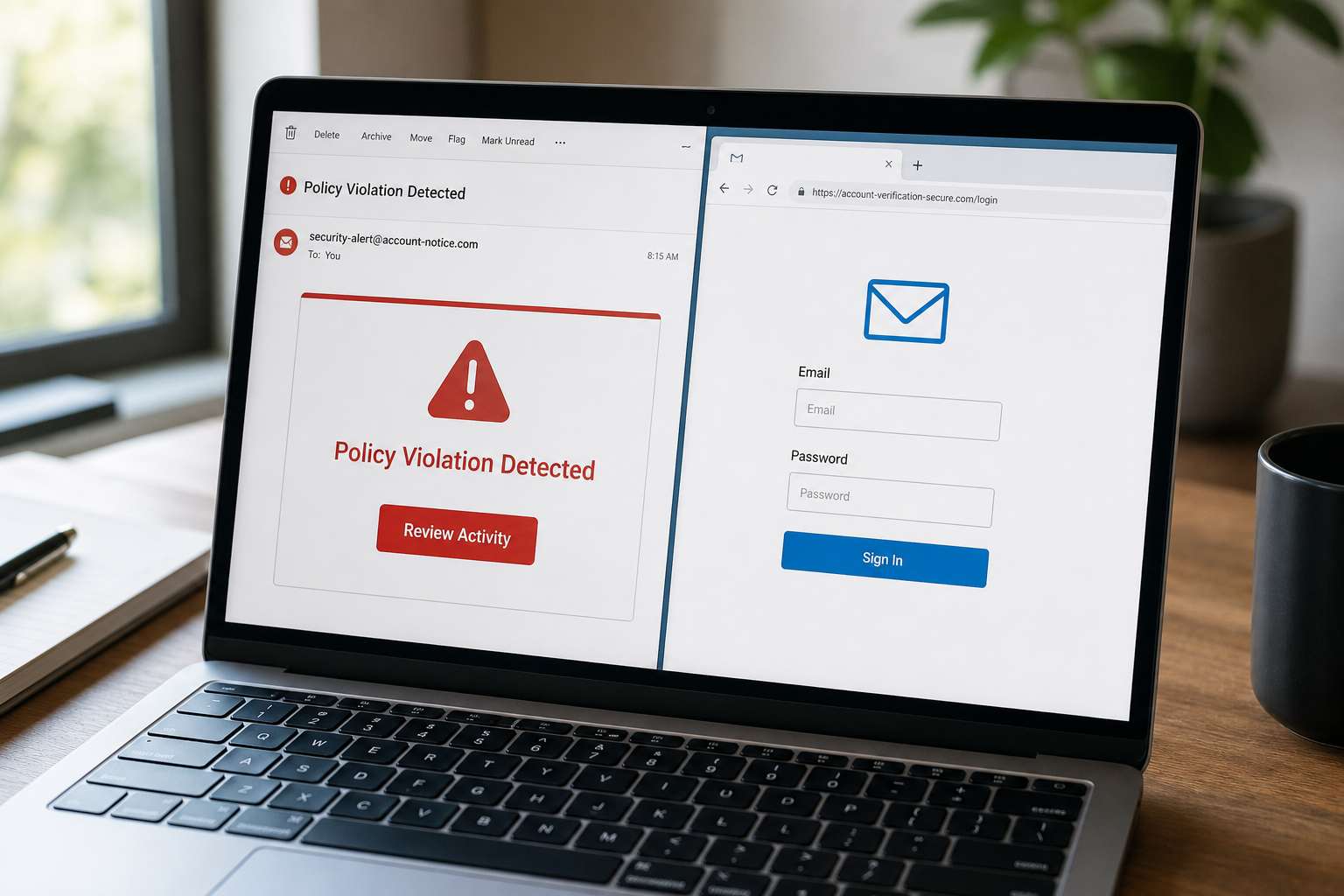
Policy Violation Detected Email Scam Overview
The message presents itself as an automated warning from the recipient’s email service. It says that activity violating an unnamed policy was found and warns that the account could become inaccessible. A Review Activity button promises a chance to examine the problem before access is lost. The wording is intentionally vague because the same template is sent to users of many different providers.
No evidence of a real violation is supplied. The email does not identify a specific message, login, rule, date, device or policy section that caused the warning. Instead, it relies on fear of losing the inbox. Email accounts contain personal conversations and reset links for other services, so even cautious users may react quickly when a message says that access is about to disappear.
The button leads to a phishing page hosted on an unrelated address rather than the provider’s official account portal. Campaign links can include the recipient’s email address or domain, allowing the page to decide which branding to display. A Gmail-style form was used in one version, but the same mechanism can imitate Microsoft, Yahoo or another service. The real companies have no connection to the campaign.
Submitting the form sends the email address and password to the scammers. The fake page may show an error, ask for the password twice or redirect to a real provider afterward so the victim assumes the first attempt simply failed. By the time the real page appears, the criminals may already be testing the credentials and creating their own persistent access.
A stolen mailbox is more than one compromised account. Attackers can read financial conversations, search for identity documents, reset passwords elsewhere, impersonate the owner and send convincing scams to trusted contacts. In business accounts, they may create hidden forwarding rules, monitor invoices and replace payment instructions at the right moment. Password reuse can extend the compromise to cloud storage, shopping, social media and workplace portals.
The email should be treated as a confirmed phishing attempt. Do not click the link or reply. If you want to check the account, open the provider’s official app or type its known address directly. A legitimate policy notice will also be visible inside the authenticated account and will not require a password on an unrelated hosting domain.
How the Policy Violation Phishing Scam Works
Step 1: A warning threatens the mailbox
The subject uses urgent language such as Immediate action required. Inside, the message claims prohibited activity was detected and suggests that access may be removed.
The lack of a specific violation helps the same email apply to any recipient while making the reader imagine the worst.
Step 2: The Review Activity button offers a quick solution
The button appears to be the only way to prevent closure. This framing discourages the recipient from opening the provider independently or asking support through an official channel.
Hovering over the link may reveal a cloud-hosting or unfamiliar domain unrelated to the email service.
Step 3: The link personalizes a counterfeit login page
Information embedded in the URL can tell the phishing kit which provider to imitate. Familiar colors, a logo and a blurred mailbox image make the page feel connected to the user’s real account.
Visual similarity is not authentication. The address bar remains the most important signal.
Step 4: The page collects the email password
The form asks the user to sign in before reviewing the alleged activity. A real provider may require reauthentication, but it does so on its own verified domain and inside an account flow the user can reach independently.
Anything entered on the counterfeit page is transmitted to criminal infrastructure.
Step 5: The victim is redirected or shown an error
Some phishing kits reject the first password to collect a second candidate. Others redirect to the real provider, making the login appear successful and reducing the chance that the victim reports the page.
The absence of a visible confirmation does not mean the password was safe.
Step 6: The mailbox becomes a platform for more fraud
The criminals can change recovery information, register app passwords, create forwarding rules and search for high-value messages. They may impersonate the victim or use reset emails to compromise other accounts.
If the address belongs to a company, administrators should treat the event as a possible business email compromise.
Red Flags That Expose the Fake Warning
- The email never identifies the specific policy, message or activity involved.
- Account loss is threatened unless you act immediately.
- The sender address does not match the provider’s official domain.
- The Review Activity button opens an unrelated cloud-hosting address.
- The login page changes branding based on the email address in the link.
- The page asks for a mailbox password outside the provider’s verified domain.
- The message uses a generic greeting and supplies no independently verifiable case number.
What to Do If You Entered Your Password
- Open the real provider directly. Use the official mobile app, a trusted bookmark or an address you type yourself.
- Change the password immediately. Use a new, unique password that has never protected another account.
- Sign out all active sessions. Remove unfamiliar devices, app passwords, security keys and connected applications.
- Enable strong multi-factor authentication. Prefer a passkey, hardware key or authenticator app instead of relying only on SMS.
- Inspect mailbox rules and delegates. Delete unknown forwarding addresses, filters, inbox rules and recovery contacts.
- Change reused passwords elsewhere. Prioritize banking, cloud storage, shopping, workplace and social media accounts.
- Warn contacts and workplace IT. Attackers may already be sending messages from the compromised inbox.
- Review sign-in and account activity. Save evidence of unfamiliar locations, password changes and messages before removing them.
How to Check a Real Account Warning Safely
Leave the suspicious message closed and open the provider through its official app or a trusted bookmark. Review the security dashboard, recent sign-ins and service notifications from inside the authenticated account. If no corresponding alert exists there, the email has not established that any violation occurred.
When contacting support, obtain the telephone number or help address independently. Do not use contact details embedded in the warning. Provide the subject line and sender address, but never send your password or a multi-factor authentication code to a support representative.
Inspect the complete link before visiting it. The meaningful portion is the registered domain immediately before the first slash. A provider’s name inside a long subdomain, URL parameter or page title does not make the site official. HTTPS only encrypts the connection to that site; it does not prove who operates it.
Why Email Accounts Are High-Value Targets
- They receive password-reset links for many other services.
- Old messages can contain identity documents, invoices and personal details.
- Trusted contacts are more likely to believe scams sent from a real account.
- Business inboxes reveal suppliers, payment schedules and approval chains.
- Hidden forwarding rules can silently copy future messages to the attacker.
- Session cookies or app passwords can maintain access after a simple password change.
Frequently Asked Questions
Can an email provider suspend an account for policy violations?
Yes, providers can enforce their terms, but a genuine notice identifies the service and is also available through the official account portal. Verify it by opening the service independently, never through the warning’s link.
Is the page safe because it uses HTTPS?
No. HTTPS protects data while it travels to the website, including a phishing website. It does not prove that the operator is your email provider.
The Bottom Line
The Policy Violation Detected email is a confirmed password-stealing campaign. Its vague account threat and Review Activity button lead to a counterfeit provider login rather than a real policy case.
Delete the message. If you submitted credentials, change the password through the official service, revoke sessions, inspect mailbox rules and secure every account that reused the same password.
Here are signs that this email is a scam, even though it looks like it comes from a company you know — and even uses the company’s logo in the header:- A generic greeting is used in place of a name (eg. “customer,” “account holder,” or “dear”).
- The sender’s email address is not associated with a legitimate domain name
- The email invites you to click on a link to resolve an issue. Most reputable organizations will not ask users to disclose sensitive information (e.g. credit card numbers) by clicking on a link.
- There is a time limit or uncharacteristic sense of urgency
- Poor grammar, spelling, and sentence structure may hint that an email is not from a reputable source.

Join the discussion
0 commentsShare your experience or ask a question about this article.
Discussion
Start the conversation
Have a question or something useful to share? Add the first comment.