


A reward for trades you already made can sound more believable than a random giveaway. The page says the allocation is based on past activity, so the offer feels personal.
If you’ve seen the Polymarket page promising a share of 250 million POLY, there’s a distinction worth making before you reach for your wallet.
Overview
A community reward with a very specific sales pitch
The Polymarket Community Rewards scam uses a copied prediction-market page to promote a supposed POLY distribution.
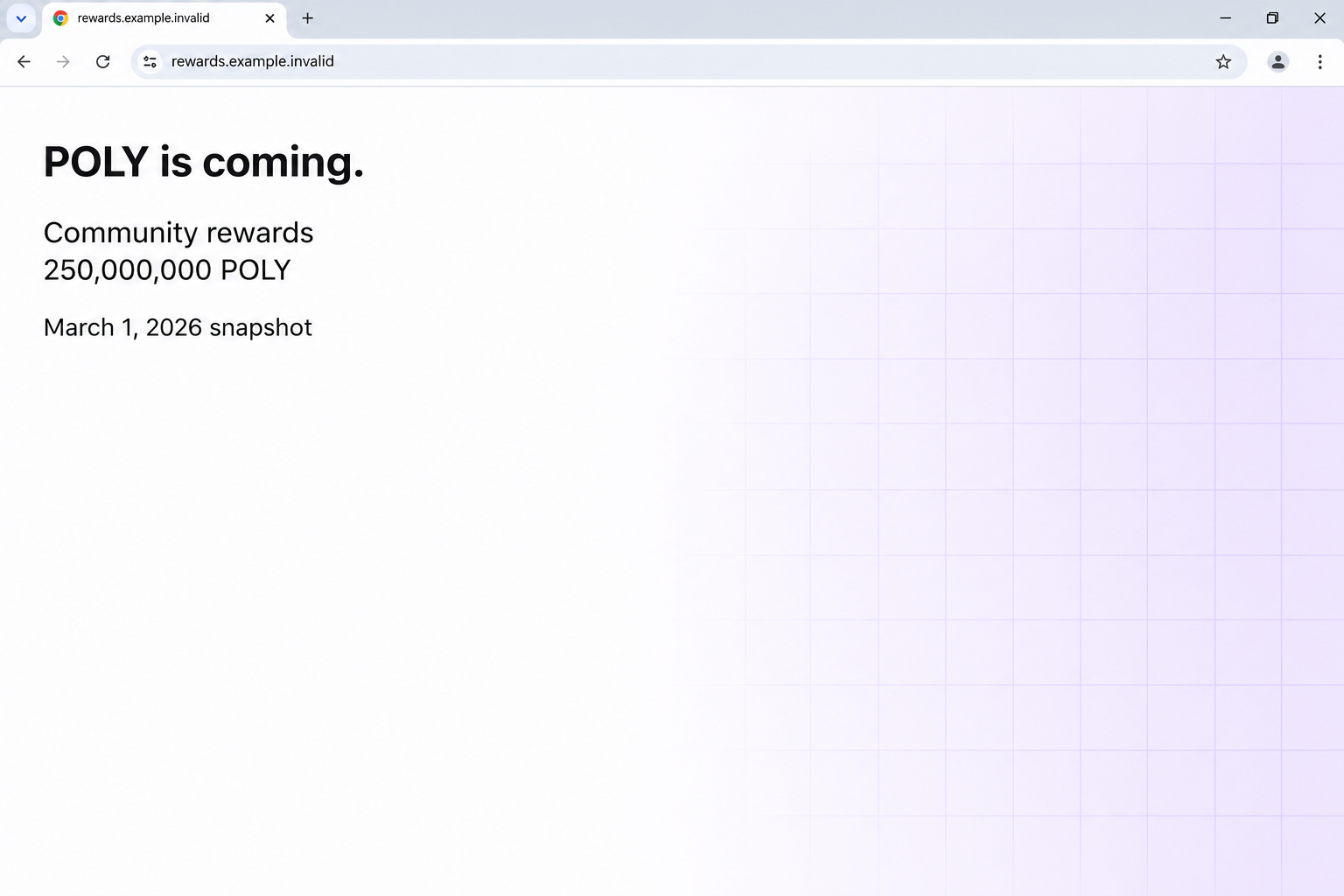
The page claims the pool contains 250,000,000 tokens, or 25% of the total supply.
It says active traders, people making predictions and liquidity providers can get a share based on a March 1, 2026 snapshot.
Those are claims from the impersonator, not confirmed eligibility rules.
The first screen looks more like an announcement than a wallet request. The page uses familiar prediction-market navigation and gives the supposed launch its own place in the design.
The image above recreates those opening claims without linking to the page. The documented offer appeared on an unrelated domain, outside the genuine Polymarket service.
Why this isn’t the same as an ordinary trading reward
A trading platform can have incentives, and people who use it may recognize words like liquidity or snapshot. The scam relies on that familiarity.
A snapshot is generally a record of activity or balances at a particular point. Putting a date on a page doesn’t demonstrate that anybody took one or will distribute anything.
The same goes for a large supply figure. It isn’t a promise that a token exists, that you qualify, or that the amount shown will have any exchange value.
Polymarket’s official token guidance is a better place to check what it offers. This particular page is separate from legitimate trading or liquidity incentives.
The eligibility check moves the risk to your wallet
The page presents an eligibility button. Selecting it leads to a connection prompt that displays familiar wallet names, including MetaMask and Trust Wallet.
Those names tell you what the prompt imitates or offers to open.
They do not tell you whether the site is allowed to request access or whether the next action is safe.
The recorded flow was reported as a wallet-draining scam. The available record doesn’t establish the exact signing prompt or prove that a connection alone moved assets.
These are different events to look for in your own history:
- Opening the page or seeing a list of wallets.
- Connecting a wallet and exposing its public address or account information to the site.
- Signing a message, approving token access or confirming a transaction.
- Sharing recovery words, a separate exposure that can put the whole wallet at risk.
How the Polymarket Community Rewards Scam Works
Step 1: It describes a reward you might think you earned
The promise is aimed at people who can picture themselves qualifying. You might have made a few predictions, left liquidity on the platform, or followed a conversation about token rewards.
That sounds different from an anonymous page offering money to everyone. Past activity makes the allocation seem like something the platform could calculate without asking you to pay first.
The page doesn’t show an account record proving that a reward is owed. It offers a broad category you can mentally fit yourself into.
If you have never used Polymarket, an eligibility screen probably looks less persuasive. If you do use it, start by opening the same service you normally use.
Step 2: The page borrows the look of the marketplace
The recorded site copies the brand and surrounds the promotion with familiar site furniture. It looks like a notice on a place you might already visit.
The copied frame can take attention off the actual domain.
A name in the browser tab or a recognizable logo next to the navigation does not tell you who controls it.
The recorded page’s web address did not belong to Polymarket. That is a stronger reason to stop than whether its colors look right or the layout seems professional.
Start from a known bookmark or the service’s verified support route. Don’t use a social reply or another result labeled as the official claim page.
Step 3: Labels try to make a risky interaction look free
Claims about no gas fees and blockchain verification sit beside the offer. They answer the sort of concern a crypto user might raise before clicking.
A page can print those words without creating any entitlement. Gas fees are not a measure of whether a request is safe, and a free signature can carry consequences.
A statement that something has been verified on-chain needs a real record and a reason you can check independently. A badge is just a claim until then.
The key question isn’t what it costs to start. It’s what the wallet is being asked to share, sign or let somebody move.
Step 4: An eligibility check opens a wallet prompt
The page makes a connection seem like a normal way to look up your past activity. That feels less serious than pressing a button labeled send or withdraw.
A standard connection generally makes account information available to the site. It shouldn’t be confused with a signature, a transfer, or a token approval.
If a separate prompt appears, read it as its own request. A harmless label on the website doesn’t override the action the wallet is asking you to confirm.
Do not approve it to see whether tokens appear afterward. You should be able to verify an offer before exposing any wallet you use.
Step 5: The outcome depends on what the wallet authorized
A clear transaction may ask to send an asset. An approval can instead grant a third party permission to spend a token later, depending on its chain and terms.
Some signatures authorize actions even though the confirmation doesn’t look like an ordinary payment. If you signed something you don’t understand, don’t dismiss it just because no money moved immediately.
The documented page was built around that wallet interaction. It did not establish that every advertised wallet option worked or that every person experienced the same follow-up.
If you see an unknown transfer, treat it as a real incident. If you only connected, disconnect and check what is on record before taking a more disruptive step.
How to Verify a Polymarket Reward Without Using the Claim Page
Look for the announcement where you already use the service
Open the service independently and review what it actually says about rewards in the version you use.
Make sure the account or app you open is the one you normally trust.
A general mention of rewards doesn’t validate somebody else’s token allocation. Look for the exact name, eligibility rules and destination, not just the word Polymarket.
If you can’t locate the exact program, use Polymarket’s official support instructions. Don’t ask a person who commented below the fake offer.
Different platforms or regional versions can have different support routes. Use the one your official account directs you to. Never send wallet recovery words to identify yourself.
Separate wallet balances from offers made in a browser
A reward figure shown on a webpage isn’t a deposit. An unknown token appearing in a wallet also isn’t a reason to follow a link that came with it.
Verify transactions through your wallet history and a reputable explorer for the correct network. A public transaction hash can help you check what happened without exposing a secret.
If the displayed number is all you have, there is no confirmed reward to recover. Do not pay a fee to unlock, authenticate or withdraw it.
For legitimate incentives you already know about, keep a link to the official documentation. You’ll have something concrete to compare when a new offer turns up.
Know which wallet the message is talking about
Some people use their main wallet for storage and a different wallet for trading. A browser may open whichever account is currently selected, not the one you intended.
That’s another reason not to try the form with an empty wallet. Selecting a different account doesn’t make a fraudulent offer real or tell you what another user would see.
If you have a trading balance inside a service, don’t confuse that balance with the assets visible in an external wallet.
Record the account name and network before asking for assistance.
The account arrangement also determines who can help. Ask the platform about an account held with it, and use the wallet provider’s guidance for permissions involving a wallet you control.
Treat any new token in your wallet as a separate clue
An unsolicited token may arrive with a name that sounds like the promotion. Its label is not enough to identify the project that issued it.
You don’t have to trade or claim an unfamiliar asset to inspect your balance. Leave any link in the asset description alone, particularly if it promises to fix a transfer.
If you’re trying to work out what happened, write down the difference between a token appearing, a permission being granted and assets leaving. They aren’t the same event.
For an unauthorized transfer, the network record is more useful to a support team than the amount advertised by the fake page. Save what the wallet actually shows you.
What to Do If You Fell Victim
-
If you only saw the offer, leave it closed.
Don’t revisit the lookalike, switch wallets to test it, or send the page to somebody else to ask whether they qualify.
If you need to report it, use the address or screenshot you already have. Share it privately through a verified support or reporting route.
A webpage announcing a reward does not, by itself, establish a charge, wallet exposure or device infection.
-
If you connected without signing, end the connection and inspect recent activity.
Use the connected-sites or sessions area in the wallet you already trust. Remove the unfamiliar site there, rather than trusting a disconnect button on the offer page.
Check whether the wallet recorded a transaction or approval at the time. The exact menus differ by wallet and network, so follow help for the product you actually use.
Don’t assume unplugging hardware or closing the browser revokes an on-chain permission you may have approved.
-
If you signed or approved something, identify what it allowed.
Check the exact account and network. Look for unfamiliar transfers or token allowances and record public transaction identifiers without sharing private wallet data.
Follow reputable wallet guidance, such as MetaMask’s explanation of token approvals and revocation, if it matches your setup.
Revoking an allowance can stop later use of that permission, but it won’t undo a completed transfer. Get verified help if you can’t tell what the signature granted.
-
If you revealed recovery words, treat the backup as compromised.
Use a trusted wallet setup and a genuinely new recovery phrase. Never reuse or enter the exposed words into a page promising to repair them.
If assets remain, plan a safe move to addresses you can verify on the correct networks. Don’t erase the only working access before you confirm what remains.
If you separately installed an extension or software from an untrusted source, get help securing that device and use a clean setup for recovery.
-
If funds moved, keep the transaction record and report it.
Note the network, hash, time and receiving address. Contact your wallet provider, the affected service or a known exchange through their established channels if relevant.
Report unauthorized activity to the appropriate local authority. A confirmed blockchain transfer usually cannot be reversed by your wallet provider.
Ignore offers that guarantee recovery or say you must connect again. Don’t send a recovery fee or a second signature to someone who approached you after the loss.
Frequently Asked Questions
Is the offer to distribute 250 million POLY real?
The documented offer appeared on a Polymarket lookalike. Its allocation, supply percentage and snapshot were bait. Check the exact announcement through Polymarket instead of trusting this page.
Does the March 1 snapshot prove I’m eligible?
No. A date is easy to print. It doesn’t identify a real record, prove you qualify or authorize somebody to request signatures from your wallet.
Can visiting the fake rewards page drain my wallet?
Viewing a page isn’t the same as granting wallet permissions. The action to inspect is whether you connected, signed, approved a transaction, or revealed a private secret.
Will disconnecting cancel a token approval?
No. Disconnecting a site and revoking an on-chain approval are different. Check the permissions in the wallet and network you used.
Do I need to replace my wallet if I only opened the page?
Not on that fact alone. Check what you actually shared or approved. A disclosed recovery phrase is a much stronger reason to move assets to a new wallet.
Is the real Polymarket platform behind the scam?
No. This is a copied page abusing the platform’s name. Genuine account questions belong with the service you already use, not the fake rewards page.
The Bottom Line
Don’t connect a wallet to the page promising 250 million POLY. Its snapshot date and badges don’t turn a copied site into an official reward.
If you already interacted, check the wallet rather than the claim page. End the connection, investigate anything you signed and protect remaining assets if a recovery phrase was exposed.

Join the discussion
0 commentsShare your experience or ask a question about this article.
Discussion
Start the conversation
Have a question or something useful to share? Add the first comment.