


RedLightViolations.com is a real payment and video portal, not a scam, because six village sites we read send drivers to the same address for their mailed red light camera notices.
It is also an old site with a stale security page and fees that vary by village, so the safe habit is to reach it only from your own notice.
Overview
What the portal asks for
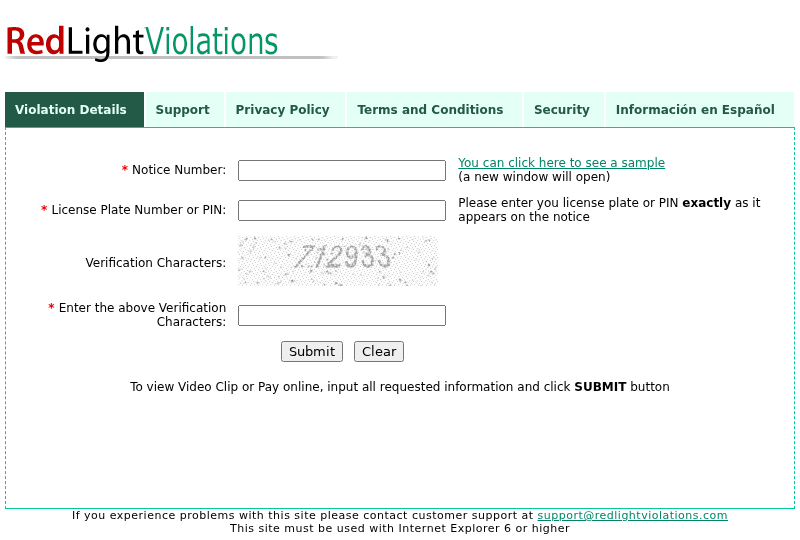
The landing page asks for three things: a notice number of up to 16 characters, a license plate number or PIN, and a six character code from a distorted image.
It asks for no name, address, card number or date of birth on that first screen, and the text under Submit offers a video clip or an online payment.
Who sends people there
Six village police and government pages tell drivers to log on to the portal with the notice number and plate shown on the mailed notice.
Four of those pages add that the notice was mailed to the registered owner, and not one of the six mentions a text message asking for payment.
What we could not confirm
No page on the portal names the company that runs it, and we entered no notice number, so we cannot tell what the later payment screens look like.
We also never held a printed notice, so our picture of the genuine mailer comes from the portal’s own sample image and the village pages.
- Verified by us: the portal’s pages and form fields, its certificate and domain records, six village pages and several nearby domain names.
- Not found: an operator name, a street address or a phone number anywhere on the portal’s own pages.
- Not verified: the payment screens, the card processor behind the charge and the contents of a real printed notice.
Use the portal only from the address printed on your own notice, and ignore the link in any text or email that asks you to pay.
Six Village Pages Name the Same Address
We opened the red light camera pages of Addison, Melrose Park, Riverdale, Schiller Park, Winfield and Worth on November 12 and read each one as text.
Each page names the portal as an online payment route, and five of them tell you to type the violation notice number and plate exactly as printed on the notice.
Addison, Melrose Park, Schiller Park and Winfield also point to the portal for the video of your violation, which matches what its landing page offers.
Our links go to the Worth, Melrose Park, Addison and Riverdale pages, which we opened ourselves.
Those pages belong to the villages that issue the notices, so the address comes from the people who send the notice, a stronger link than any search result.
The Addison, Melrose Park, Schiller Park and Winfield pages add that the notice is mailed to the registered owner after the images pass a review.
None of the six mentions a text message or an email asking for payment, and the phone route they list is a toll free number printed on the notice.
Riverdale adds a useful detail: a notice number that begins 17036 comes with a payment notice and return envelope in the mail, and payment must be by credit card.
That fits the portal’s own Support page, which gives a violation number as 16 digits beginning with 170 or 200, and 17036 begins with 170.
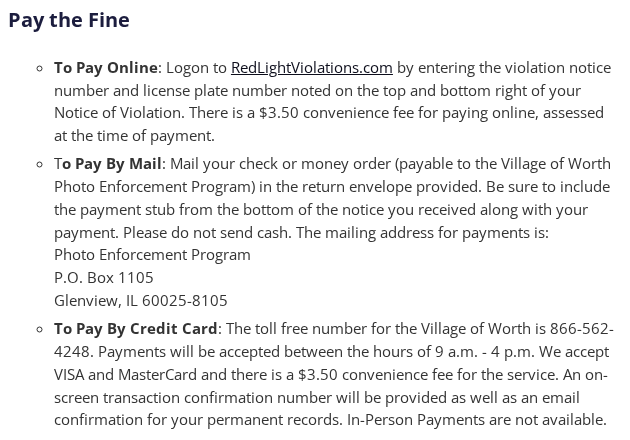
The Worth page, shown above, is typical: it lists the portal first, then a mailing address and a toll free line, so the portal is one route among three.
Having three routes means a driver can always pay without following a link from a message, which is the habit that protects you most.
What the Landing Page Asks For and How a Notice Looks
We opened secure.redlightviolations.com and read its source as text, and the form has exactly three fields plus a Submit button and a Clear button.
The first field takes 16 characters for the notice number, the second takes up to 15 for a plate or PIN, and the third takes the six character code.
A link beside the first field opens a sample notice, and we opened it because it shows, in the operator’s own picture, where the number sits on the paper.
The sample shows two layouts, a Notice of Red Light Violation with a license plate and a Red Light Violation Warning Notice with a four digit PIN and a barcode.
Both layouts put the notice number in a green boxed area on the right, where the village pages tell you to look, at the top and bottom right.

The sample numbers are placeholders made of zeros, so the picture shows the length and position of the number, not a real prefix.
The Support page asks for a 16 digit violation number or, without one, the plate, the owner’s name, an email address and the issuing community.
It also tells visitors not to submit contests, affidavits or hearing requests through the site, and points to the back of the notice and a community toll free number.
That limit is worth knowing: if you want to contest a notice, the portal is the wrong place, and the instructions are printed on the paper you received.
The page code holds one more detail: after three minutes without activity a box asks if you are still there, and fifty seconds later the page returns to the start.
Fees Change From Village to Village
The portal’s landing page, Terms and Support page never mention a payment fee, yet five of the six village pages do, and the amounts are not the same.
Winfield, Melrose Park and Worth list a $3.50 convenience fee for paying online, and Schiller Park lists $3.50 for every credit card payment.
Addison lists a 5% fee for paying online and $3.50 for paying by phone, and its page gives the fine as $100.00 for each violation.
At that fine, 5% is $5.00, so Addison’s notice costs $105.00 online and $103.50 by phone, while a mailed check, which the page lists with no fee, costs $100.00.
Riverdale’s page lists no fee, but it requires a credit card for notices that begin 17036, so we do not know if a fee applies there.
These sums are ours, and the pages add the fee at the time of payment, so we could not see how the payment screen presents it.
The fee is not hidden, since each village publishes it, but a driver who types the portal’s address into a search box finds no figure on the portal itself.
The mailing address also differs by village: Worth’s page gives a post office box in Glenview, Illinois, while Riverdale’s gives one in Decatur.
Because those boxes differ, the return envelope in your own notice is the safe way to pay by mail, and an address copied from another village is not.
What the Terms Promise If a Payment Goes Wrong
We read the Terms and Conditions page from top to bottom, twelve numbered sections, to see what a driver gets if a payment fails or is charged twice.
Section 11 covers payment disputes: they must be brought within one year, the parties try to settle for up to 30 days, and then either may ask for mediation.
Sections 6 and 7 disclaim every warranty and any liability for damages, and they add that your sole remedy if you are dissatisfied is to stop using the site.
Section 3 lets the operator change or end the service without notice, and section 10 chooses federal and Illinois law without naming a court.
The Terms are therefore a standard shield for the operator, and they offer a driver nothing more than mediation, which is why the card network is the real protection.
The FTC guide to credit card disputes explains how to contest a charge with your card issuer, a route the Terms neither limit nor mention.
That is a practical reason to pay by credit card and to keep the confirmation number and email, which several village pages list as part of the payment.
An Old Site With a Security Page That No Longer Matches
The Terms page is headed Last Updated September 2009, the Privacy page January 2007, and every page footer tells visitors to use Internet Explorer 6 or higher.
Internet Explorer 6 came out in 2001, so the footer is a leftover from the site’s first years, not a sign that someone rebuilt it recently.
The pages never name a company, address or phone number: the Terms name the operator only as RedLightViolations.com or its parent, subsidiary or affiliated companies.
The only contact is the address support@redlightviolations.com, and the Terms choose Illinois law, which fits the Illinois villages we found, but the operator stays unnamed.
The Security page is the odd one, because it invites visitors to click a GoDaddy Secure Site seal and calls the site a GoDaddy Secure Site.
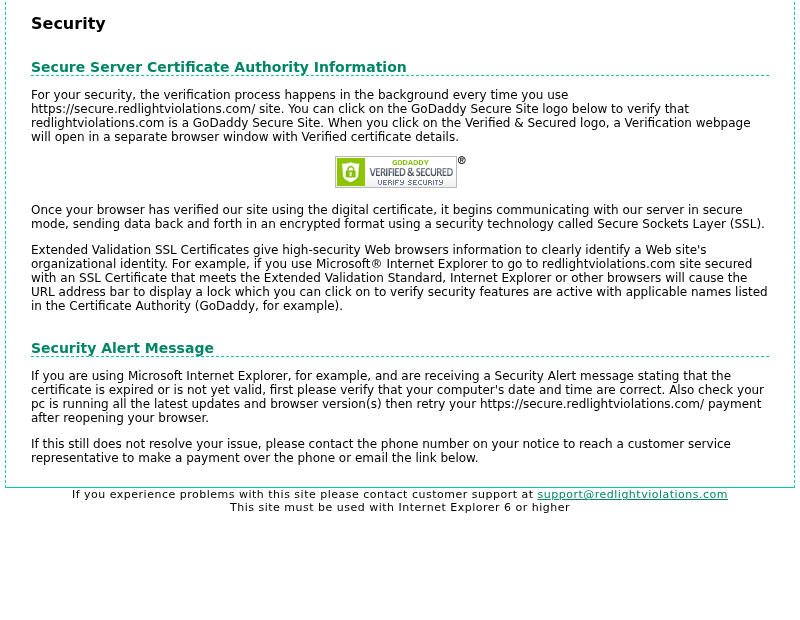
We read the public certificate logs and the live certificate to see whether that still holds, and the issuer has changed.
GoDaddy certificates for secure.redlightviolations.com ran from January 2017 until at least December 2025, and before them came Symantec and VeriSign certificates dating back to February 2007.
Between May 31 and October 3, 2026 the logs list five new certificates from Let’s Encrypt and Google Trust Services, and the current one expires on January 1, 2027.
A Let’s Encrypt certificate carries only the domain name, so the page’s GoDaddy wording is out of date, even though the connection itself is still encrypted.
That is a finding about upkeep, not about safety: the encryption works, but the page that explains it was not updated when the certificate provider changed.
We also found that the server sends only its own certificate and leaves out the intermediate one, and our command line client refused the connection until we skipped that check.
We skipped it only to read public pages as text, and common browsers can often fetch a missing intermediate on their own, so many visitors will not notice.
Some phones, tools and older systems may still show a warning, and the Security page itself covers that case by pointing to the phone number on the notice.
A certificate warning is therefore a reason to stop and call the number on your notice, since clicking through removes the protection the page exists to give.
Who Holds the Domain and Where It Is Hosted
RDAP, the public registration database for .com, shows that redlightviolations.com was registered on June 20, 2006 through Register.com and runs until June 20, 2027.
The record lists only the registrar and a transfer lock, with no registrant name, and its last change was on May 21, 2026.
That change came ten days before the first Let’s Encrypt certificate, which hints at a move of hosting or management, but the record gives no reason.
Both the root name and the secure name point to 50.224.8.212, and the web server answers as Microsoft IIS 10 running ASP.NET.
That address and the two in the mail record all sit in one block registered to Comcast Cable Communications, LLC, so the portal appears to run on a cable connection.
The mail record sends email through Microsoft 365, authorizes two addresses and ends with a strict -all rule, which asks receiving servers to reject mail from any other source.
A message that appears to come from this domain but is sent from elsewhere should therefore fail checks at servers that apply the rule.
The Internet Archive holds a capture of the secure address from February 3, 2011 and at least one a year since, which gives the site 15 years of continuous history.
The 2011 capture already shows the same form, and its plate field was labelled License Plate Number only, so the option to type a PIN was added later.
Close Names We Checked
To see whether lookalike addresses exist, we looked up the singular redlightviolation.com, the .net and .co endings and a handful of other names a driver might type.
Six spellings, including redlight-violations.com and payredlightviolations.com, are not registered in the .com and .net registries.
The singular redlightviolation.com has been registered since March 27, 2005 through GoDaddy, and it presents a certificate for a different name, so a browser would warn on it.
With verification skipped, it returned a 24 character plain text line reading no https for this domain, with no form, and its plain http connection was reset.
The .net name was registered on December 15, 2011, uses parking name servers and loads a blank page that redirects to a /lander page, which we did not open.
The .co name had no registry data we could read, and its secure port did not answer within our time limit, so we could not look at it.
None of the names we found carried a payment form, so we have no live fake portal to show, and a copy built later would not appear in our results.
A text message can carry any address, so the hyphen, the singular form and the .net ending are the swaps to look for, and the real portal uses none.
The portal’s root name redirects to the secure subdomain, so the address to trust is secure.redlightviolations.com, with the word secure first and .com last.
Our articles on the Arizona, Texas and Michigan ticket texts cover scam messages about unpaid traffic tickets.
Those messages arrive by text, whereas the village pages we read lay out a notice sent by mail, so a camera ticket demanded by text deserves extra doubt.
What to Do If You Got a Red Light Camera Notice
-
Check your mail. The village pages we read lay out a paper notice sent to the registered owner, with a 16 digit notice number and a due date.
-
Match the address. Compare the web address on the notice with your village’s own police or government page, which should name the same portal and the same payment options.
-
Type it yourself. Enter secure.redlightviolations.com in the address bar, or open it from your village’s page, and never follow a link from a text or email.
-
Know the form. The genuine landing page asks only for the notice number, a plate or PIN and a six character code, so stop if it asks for more.
-
Pick the cheapest route. Online fees run from $3.50 to 5% on the pages we read, while a mailed check lists no fee, so compare before you pay.
-
Do not click through a warning. If your browser shows a certificate warning, close the page and pay by mail or on the toll free number printed on the notice.
-
If you paid on a fake site. Call your card issuer now, ask for a replacement card and dispute the charge in writing, then change any password you reused.
-
File a complaint. File at ReportFraud.ftc.gov and call the police department named on your village’s page to ask whether a real notice exists under your plate.
Frequently Asked Questions
Is RedLightViolations.com legit?
Yes, as far as we could verify: six village pages direct drivers to it, and the site matches the notice layout they list, although we could not identify its operator.
Is secure.redlightviolations.com the same site?
Yes, the root name redirects to the secure subdomain, and the portal’s own Security page names the secure address for payments.
Why does the site look so old?
Its Terms date from September 2009, its Privacy page from January 2007 and its footer mentions Internet Explorer 6, and the archive shows the same form since 2011.
Do I have to pay online?
No, the village pages we read also list mailing a check in the return envelope and a toll free number for card payments, plus ways to contest.
What if a text or email demands payment?
None of the six pages contains a text or email demand, so do not use its link, check your mailbox and use the number printed on your notice.
What if I already paid on the wrong site?
Call your card issuer, dispute the charge and replace the card, then change any reused password and file a complaint with the FTC and your village police.
The Bottom Line
RedLightViolations.com is a real portal that six villages name for their camera notices, but it is dated, its fees vary and its operator is unnamed.
Reach it from the address on your own notice or your village’s page, compare its fee with the mail option, and treat any text or email demand as a warning.
If you already paid on a lookalike, call your card issuer, dispute the charge, change reused passwords and file a complaint at ReportFraud.ftc.gov and with your village police.

Reviews & discussion
0 commentsShare a firsthand experience, or ask a question.
Community reviews
redlightviolations.com
Moderated reader experiences, not an editorial verdict.
Start the conversation
Have a question or something useful to share? Add the first comment.