


We opened Seedream6.ai expecting ByteDance’s image model and found a sign-in button, three credit packs and no company name anywhere on the site.
ByteDance’s own Seed site lists Seedream 5.5 as its newest version, so we compared the two, read the site’s code and worked out what a credit really costs.
Overview
What the site offers
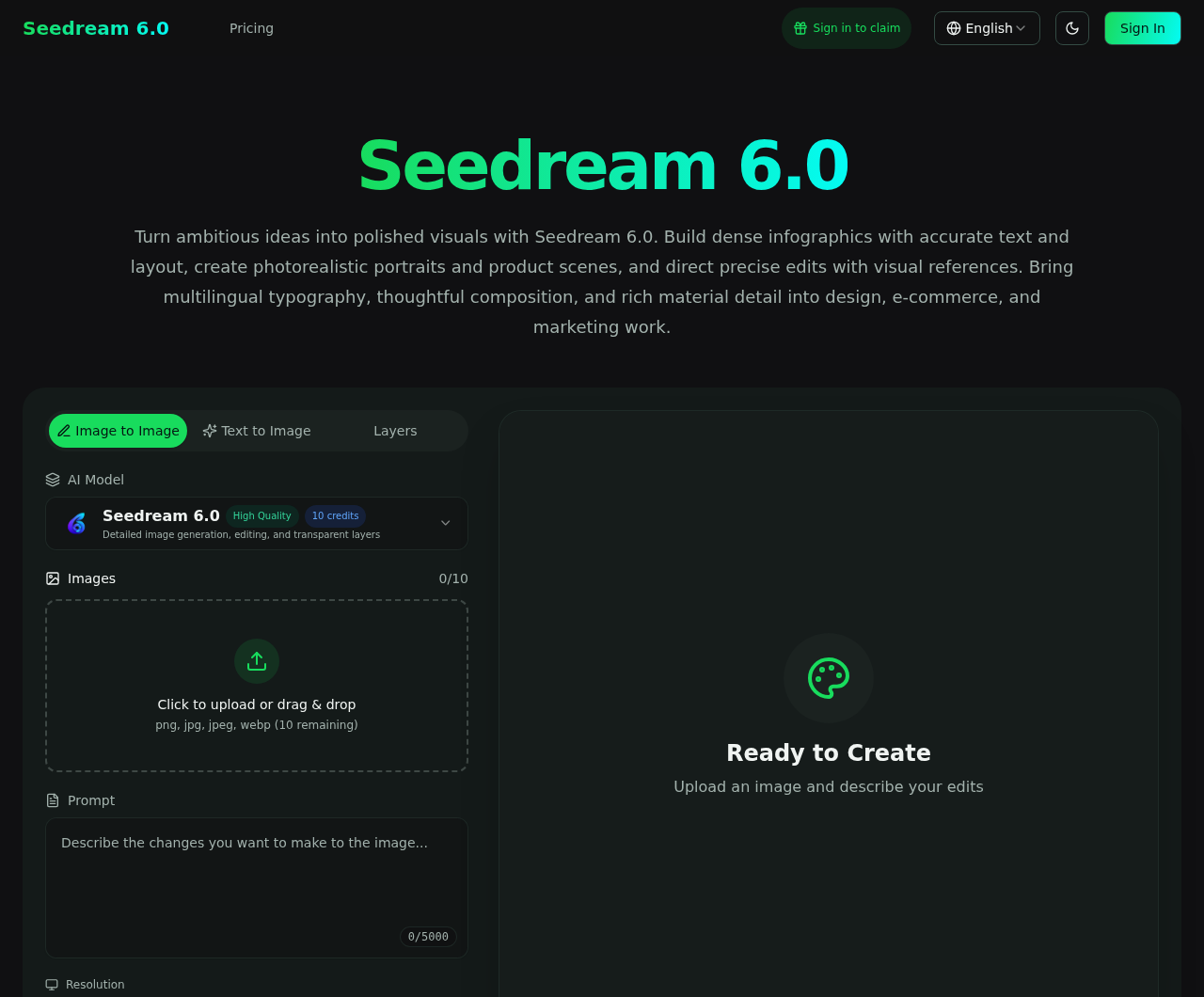
Seedream6.ai is an image generator and editor with a prompt box, a 1K and 2K resolution switch and a model menu whose first entry is called Seedream 6.0.
One 1K image costs 10 credits, and credits come in three one-time packs: 1,000 for $19.90, 3,000 for $39.90 and 9,000 for $99.90.
What we found behind the page
ByteDance’s Seed site, which we read in full, lists Seedream 5.5 as the newest image model and never mentions a Seedream 6.
The site’s own code gives its Seedream 6.0 entry the internal name seedream-5-0-pro and sends requests to a route named kie, which looks like an outside image service.
The terms and policies name no company, no address and no country, and the only contact is a support mailbox on the same domain.
What we could and could not verify
Here is where the evidence stands after our checks:
- Verified by us: the domain dates, the version labels in the page and its code, the model list, the prices, the refund rules and the official Seed pages.
- Not found: a company name, an address, any link to ByteDance, a subscription plan on the pricing page, or any real customer review.
- Not verified: which model produces the images, the price in the editor for the Layers mode, and what a checkout shows, because we did not sign in or pay.
Our advice is to reach Seedream through ByteDance’s own links, and to read the refund math below before you buy credits on this site.
Is Seedream6.ai the Official Seedream Site?
We started with ByteDance’s side of the question, because an official product should be easy to reach from the company’s own pages.
The ByteDance Seed home page lists six models: Seed2.1, Seedance 2.5, Seedream 5.5, SeedRealtime, Seed Audio 1.0 and Seed GR-RL.
Its Seedream 5.5 announcement is dated November 9, 2026, and measures the new model against Seedream 5.0 Pro.
The announcement also ends with a promise that a Pro version of the 5.5 series will follow, which is the only future version it names.
We searched the page source of the Seed home page, the Seedream 5.5 page and the announcement for a Seedream 6, and found none.
Then we searched the other way. The visible text of the Seedream6.ai home, pricing, terms, privacy and refund pages never uses the words ByteDance, BytePlus or official.
The Try now buttons on the official Seed pages lead to the BytePlus playground and the Dola chat app, and both loaded when we opened them.
Seedream6.ai links to neither of them, and none of its pages links to any ByteDance site.
We found no sentence on the site that claims to be official, which matters, because the risk here is a buyer assuming a connection, not a false statement.
The name Seedream does the work. It tells a shopper that this is the ByteDance image model, while the footer reads only Copyright 2026 Seedream 6.0.
So we cannot call it the official site. ByteDance’s own pages point elsewhere, and Seedream6.ai never shows a link to the company.
A Model Labeled 6.0 That the Code Calls 5.0 Pro
The model menu is where the label and the evidence part ways, so we read the JavaScript that the site sends to every browser, as text and without running it.
Its model list gives the first entry the display name Seedream 6.0, the internal id seedream-5-0-pro and a request route that ends in kie/generate.
The next entry is Seedream 5.0 Flash, with the id seedream-5-0-flash, and both entries cost 10 credits at their default sizes.
On the home page, the image-to-image paragraph tells you to use Seedream 5.0 Pro to explore different styles, a phrase left in a page that otherwise says 6.0.
The archived copy of the page from November 4, 2026 already carries the Seedream 6.0 title together with the same 5.0 Pro references.
Now put the pieces together. ByteDance measures its newest model against Seedream 5.0 Pro, and the site’s entry labeled 6.0 carries the internal name seedream-5-0-pro.
That fits a model one generation behind ByteDance’s current one, sold under a higher number. We did not generate an image, so we cannot see what runs on the server.
The footer adds a second mismatch. Every page promises up to 4K output, yet the Seedream 6.0 entry offers only 1K and 2K, in our screenshot and in the code.
The page data also holds text for a video feature, including a line that describes Seedance as a ByteDance model, although the site sells only images.
That is the only place where the word ByteDance appears in the site’s data, and no visitor sees it, so it looks like a leftover from a shared template.
One Menu, Ten Models, Four Outside Routes
Seedream 6.0 is not the only product in the menu. The code lists ten models, and the terms describe the site as a multi-model creative platform.
Besides the two Seedream entries, we counted Nano Banana Pro, Nano Banana 2, GPT Image 2, Flux 2 Max, Flux 2 Pro, Z-Image, Flux Kontext Pro and Flux Kontext Max.
Their requests go to four different routes: kie for five models, wavespeed for two, replicate for two and fal for one.
Those names match well-known outside image services, which suggests that the site passes your prompt on and sells the result. The code alone does not prove it.
The privacy policy fits that picture in general terms, because it lists AI model hosting among the service providers that receive your content.
It also promises not to train any AI model on your prompts, uploads or results. We can read that promise but cannot test it.
The policy names none of the outside services, so we cannot tell what their own rules say about the photo you upload.
A buyer who sends a family photo for editing therefore sends it to an unnamed operator, and possibly on to services the policy never lists.
What the Credits Really Cost
The pricing page lists three one-time packs, so we divided each price by its credits, then multiplied by the 10 credits that one image costs at 1K.
The Starter Pack costs $19.90 for 1,000 credits, which is about $0.0199 a credit and $0.199 for one 1K image, roughly 20 cents.
The Growth Pack costs $39.90 for 3,000 credits, or $0.0133 a credit and $0.133 per image. The Professional Pack costs $99.90 for 9,000 credits, or $0.0111 and $0.111.
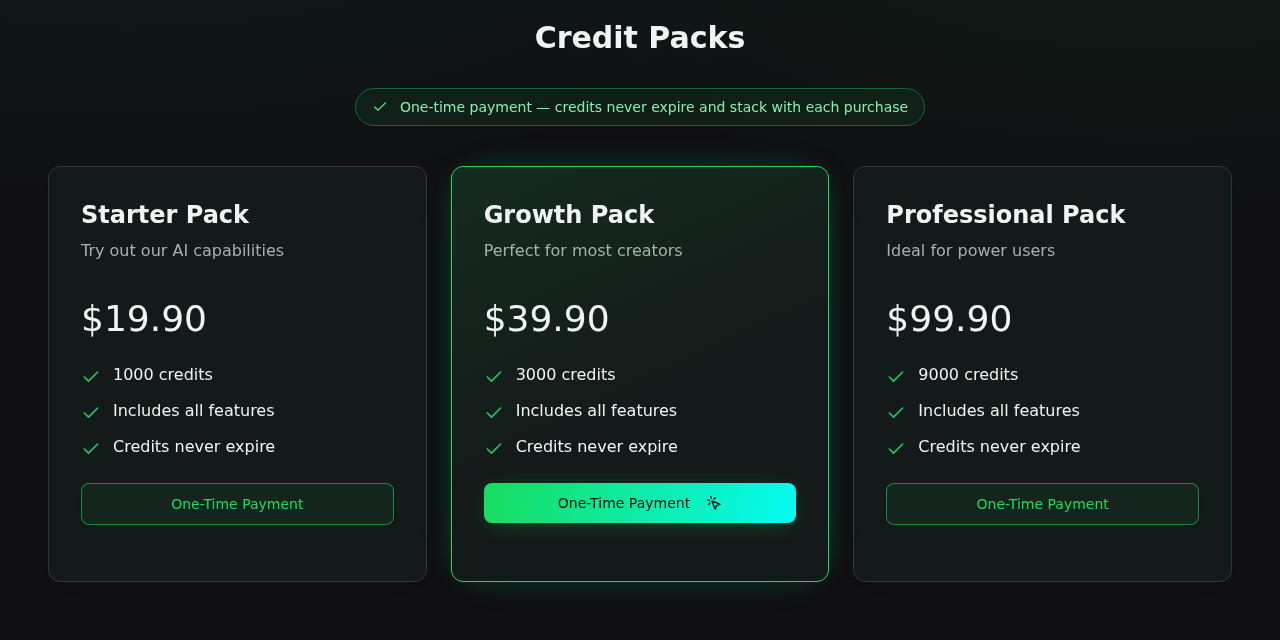
A 1K image therefore costs between 11 and 20 cents. The code prices a 2K image at 20 credits, which makes it between 22 and 40 cents.
The packs hold 100, 300 and 900 images at 1K, or 50, 150 and 450 at 2K, so the cheapest pack buys fewer pictures than most people expect.
The Layers mode costs more. The code multiplies the price by five, which would make one 1K image 50 credits, or about $0.56 to $1.00.
We could not confirm that figure in the editor, because the Layers price appears only after you choose that tab and sign in.
Batch generation lets you queue up to 10 images with one click, which is 100 credits at 1K, or $1.11 to $1.99 for a single press.
The editor also shows a free-generation counter that reads 0 available, next to a Sign in to claim Free button.
We did not sign in, so we do not know how many free images a new account receives, or whether they carry the same quality as paid ones.
Subscriptions in the FAQ, None on the Pricing Page
The pricing FAQ answers questions about upgrading a subscription, monthly credit refreshes, team plans and canceling a renewal.
We counted the plans in the page data: three, all one-time credit packs, with no monthly or annual subscription among them.
So the page lists nothing that a buyer could cancel or upgrade. The subscriptions may be hidden, retired or planned, and we cannot tell which.
The refund policy carries the same leftovers. It covers monthly and annual subscriptions, an annual plan converted to monthly, and automatic renewals.
It names two payment providers, Stripe and Creem, but the code we read calls routes for Stripe and PayPal only. PayPal is switched off in all three plan records.
A buyer who reads the FAQ may therefore believe that a subscription exists. The only purchase we could find is a one-time pack.
The Refund Rules in Numbers
The refund policy is the most specific document on the site, so we turned it into numbers for the pack that most buyers will choose.
For credit packs the window is 30 days from purchase, and a refund is possible only if you used less than 50% of the credits.
The refund covers the unused credits only, minus processing fees, and credits you have used are not refundable.
Take the Growth Pack at $39.90 for 3,000 credits. Spend 1,000 credits, which is 100 images, and you have used 33% while 2,000 credits remain, worth $26.60.
The policy puts processing fees at approximately 5% for subscriptions and gives no figure for packs. A fee of that size would take $1.33 to $2.00.
That leaves roughly $24.60 to $25.27 back, and you must ask by email, with your account address and a reason, then wait 5 to 7 business days.
The rule has a gap at the exact middle. Refunds are available below 50% used and excluded above 50%, and the policy says nothing about exactly 50%.
The window is also firm. On day 31 the right to a refund ends, whatever you used, and 100 images in one weekend use up the entire Starter Pack.
The practical reading is simple: buy the smallest pack, test it within a few days, and ask for any refund while you have used well under half.
A Domain Registered in March, a Site Seen in November
We looked the domain up in the .ai registry. Seedream6.ai was registered on March 19, 2026 through Cloudflare’s registrar and runs until March 2028.
The owner details are redacted, which is normal under privacy rules and tells us nothing for or against the site. You can repeat the ICANN lookup yourself.
The earliest archived copy of the home page we found is from November 4, 2026, and the terms, privacy and refund pages are dated October 27, 2026.
The gallery images carry file names dated October 26 and 27, so the site’s public face was about nine days old when the archive first copied it.
The timing lines up with the version question. The 6.0 label was already online on November 4, when ByteDance’s newest announced model was Seedream 5.0 Pro.
Five days later ByteDance announced Seedream 5.5, not a Seedream 6, so the label on this site has no counterpart on the official pages.
How Buying Credits Would Unfold
Step 1: A free-looking start
The editor opens with an empty canvas that reads Ready to Create and a free-generation counter at zero, so a first image needs an account.
Step 2: A model menu with prices
The Seedream 6.0 entry shows 10 credits at 1K, and the code doubles that at 2K, so a careless switch from 1K to 2K raises the price of every image.
Step 3: Three packs and no plan
The pricing page offers the Starter, Growth and Professional packs, with the middle one highlighted as the pick for most creators.
Step 4: A third-party checkout
The terms say payments run through third-party processors, and the code calls a Stripe checkout route, so the card form should belong to the processor and not the site.
Step 5: A refund by email
A refund request goes to the support address with your account email and a reason, and the policy promises processing within 5 to 7 business days.
An Operator Nobody Names
The terms open with the sentence that the website is operated by Seedream 6.0, so the product name stands in for the operator.
We found no company name, registration number, street address or country in the terms, the privacy policy, the refund policy or the footer.
The only contact is a support mailbox on the same domain, so a buyer in a dispute has no legal name to cite and no postal address for a letter.
We then looked at what else the pages load. They call an analytics script from plausible.huanhetech.net, next to Google Analytics, Microsoft Clarity, TikTok and Bing tags.
Three other sites we opened load the same script from the same host: imageeditorai.ai, nanobanana3.design and seedworld.si.
Their domains were registered on June 18, September 28 and September 29, 2026, and all of them use the same pair of Cloudflare name servers, bingo and owen.
The analytics domain, huanhetech.net, was registered on June 22, 2025 and uses that same pair, which is a link between the sites and the script host.
Shared name servers and a shared analytics host show a common setup. They do not prove a common owner, because unrelated accounts can also receive the same pair.
All four sites are young and share infrastructure. We cannot name the people who run them, and that missing name is the answer a buyer needs.
Testimonials Written in the Conditional
The home page carries nine quotes from named professionals, from a store owner to an author, and we read them the way a buyer would.
Each one is phrased as a plan: I would start with a reference, I would use the model to explore, I would bring in references.
The section’s own introduction calls them illustrative scenarios, so they are examples written for the page and not customer reviews.
We found no review, rating or user count anywhere on the site, so a shopper looking for proof from other buyers will not find it here.
The gallery works the same way. Its captions give a genre and a subject, but none tells you the model, the size or the prompt behind the picture.
What to Do Before You Buy or After You Paid
-
Start with the official route. Open seed.bytedance.com, go to Seedream 5.5 and use its Try now links to the BytePlus playground or the Dola app.
-
Check the version. Treat any site that sells a Seedream 6 as a different product, and ask which model it really runs before you pay.
-
Ask for a name. Email the support address and ask for the legal company name, the postal address and the exact model behind the Seedream 6.0 label.
-
Keep personal photos out. Test with a harmless prompt, because the policy does not name the outside services that may handle an uploaded image.
-
Buy the smallest pack. Pay by credit card, and note the purchase date, because the 30-day refund window starts then.
-
Stay under half. Request a refund by email while you have used less than 50% of the credits, with your account address and a reason.
-
Cancel any renewal. If you somehow hold a subscription, switch off renewal on the subscription page, and ask for a renewal refund within 7 days.
-
Dispute and report. If the site refuses, send a card dispute letter within 60 days and file at ReportFraud.ftc.gov.
Frequently Asked Questions
Is Seedream6.ai the official Seedream site?
We found no sign that it is. ByteDance’s pages link elsewhere, and Seedream6.ai names no company and links to no ByteDance site.
Is there a Seedream 6?
Not on ByteDance’s pages. The newest model there is Seedream 5.5, announced on November 9, 2026, and the announcement names no Seedream 6.
Is Seedream6.ai a scam?
We found no proof that it takes money and delivers nothing, but an unnamed operator and a mislabeled version make it a risk we would not take.
Does it use ByteDance’s model?
We cannot see the server. The code names the model seedream-5-0-pro and sends requests to a route named kie, which suggests an outside service.
How much does one image cost?
Between $0.11 and $0.20 at 1K, and between $0.22 and $0.40 at 2K, depending on the pack, if the code matches what you are charged.
Can I get a refund?
Possibly: within 30 days, with under 50% of a pack used, minus fees, by email. Used credits are never refunded.
The Bottom Line
Do not treat Seedream6.ai as the official Seedream site: ByteDance’s pages point elsewhere, the 6.0 label has no official counterpart and no company stands behind the page.
If you want Seedream, use the Try now links on ByteDance’s Seed site. If you still want this one, buy the smallest pack and spend under half within 30 days.
If you already paid, save the receipt and the account email, ask support in writing for a refund, and dispute the charge with your card issuer within 60 days.

Reviews & discussion
0 commentsShare a firsthand experience, or ask a question.
Community reviews
seedream6.ai
Moderated reader experiences, not an editorial verdict.
Start the conversation
Have a question or something useful to share? Add the first comment.