

If your computer is locked, and you are seeing a “Your PC is blocked” notification from the International Cyber Security Protection Alliance (ICSPA), then your computer is infected with a piece of malware known as Trojan Reveton.
This threat is distributed through several means. Malicious websites, or legitimate websites that have been compromised, may drop the threat onto a compromised computer. This drive-by-download often happens surreptitiously. Another method used to propagate this type of malware is spam email containing infected attachments or links to malicious websites. The threat may also be downloaded manually by tricking the user into thinking they are installing a useful piece of software. Ransomware is also prevalent on peer-to-peer file sharing websites and is often packaged with pirated or illegally acquired software.
Once installed on your computer, the ICSPA virus will display a bogus notification, that pretends to be from the official law enforcement agency (FBI, Europol or another law enforcement agency) and states that your computer has been blocked due to it being involved with the distribution of pornographic material, SPAM and copyrighted content.
The International Cyber Security Protection Alliance (ICSPA) virus will lock you out of your computer and applications, so whenever you’ll try to log on into your Windows operating system or Safe Mode with Networking, it will display instead a lock screen asking you to pay a non-existing fine in the form of a MoneyPak, Ukash or PaySafeCard code.
Furthermore, to make its alert seem more authentic, this virus also has the ability to access your installed webcam, so that the bogus ICSPA notification shows what is happening in the room.
The ICSPA notification is used by cyber criminals alongside the name of known international law enforcement agencies like Federal Bureau of Investigation (FBI),Europol and Central Intelligence Agency (CIA), or local law enforcement agencies: Royal Canadian Mounted Police, United Kingdom Police or Australian Federal Police.
![[Image: International Cyber Security Protection Alliance virus]](https://malwaretips.com/blogs/wp-content/uploads/2013/02/International-Cyber-Security-Protection-Alliance-virus.png "Remove ICSPA lock-screen virus (Removal Guide) 1")
![[Image: ICSPA virus]](https://malwaretips.com/blogs/wp-content/uploads/2013/02/ICSPA-virus.jpg "Remove ICSPA lock-screen virus (Removal Guide) 2")
![[Image: ICSPA Ukash virus]](https://malwaretips.com/blogs/wp-content/uploads/2013/02/ICPSA-Ukash-virus.jpg "Remove ICSPA lock-screen virus (Removal Guide) 3")
The message displayed by the threat can be localized depending on the user’s location, with text written in the appropriate language. Depending on the variant, the Trojan may only display a message in the language spoken by its authors, or the country that was intended as the main target of the attack.
Here is an example of how the bogus ICSPA notification:
FBI CYBERCRIME DIVISION
International Cyber Security Protection Alliance
ATTENTION! Your PC is blocked due at least one of the reasons specified below.
You have been violating Copyright and Related Rights Law. (Video, Music, Software) and illegally using or distributing copyrighted content, thus infringing Article 1, Section 2, Clause 8, also known as the Copyright of the Criminal Code of United States of America.
Article 1, Section 2, Clause 8 of the Criminal Code provides for a fine of 200 to 500 minimal wages or a deprivation of liberty for 2 to 8 years.
You have been viewing or distributing prohibited Pornographic content (Child Porn/Zoophilia and etc). Thus violating Article 2, Section 1, Clause 2 of the Criminal Code of United States of America.
Article 2, Section I, Clause 2 of the Criminal Code provides for a deprivation of liberty for 4 to 12 years.
Illegal access to computer data has been initiated from your PC, or you have been…
Article 2, Section 1, Clause 8 of the Criminal Code provides for a fine of up to 5200,000 and/or a deprivation of liberty for 4 to 9 years.
Illegal access has been initiated from your PC without your knowledge or consent, your PC may be infected by malware, thus you are violating the law On Neglectful Use of Personal Computer.
Article 2, Section 1, Clause 1 of the Criminal Code provides for a fine of up to 5200,000 and/or deprivation of liberty for 4 to 9 years.
Spam distribution or other unlawful advertising has been effected from your PC as a profit-seeking activity or without your knowledge, your PC may be infected by malware.
Article 2, Section 1, Clause 2 of the Criminal Code provides for a fine of up to 5500,000 and a deprivation of liberty of up to 6 years. In case this activity has been effected without your knowledge, you fall under the above mentioned Article 2, Section 1, Clause 1 of the Criminal Code of United States of America.
Your personality and address are currently being identified, a criminal case is going to be initiated against you under one or more articles specified above within the next 72 hours.
Pursuant to the amendment to the Criminal Code of United States of America of February 05, 2013, this law infringement (if it is not repeated – first time) may be considered as conditional in case you pay the fine to the State.
Fines may only be paid within 72 hours after the infringement. As soon as 72 hours elapse, the possibility to pay the fine expires, and a criminal case is initiated against you automatically within the next 72 hours! To unblock the computer you must pay the fine through MoneyPak of $300. When you pay the fine, your PC will get unlocked in 1 to 72 hours after the money is put into the State’s account.
Since your PC is unlocked, you will be given 7 days to correct all violations.
In case all violations are not corrected after 7 working days, your PC will be blocked again, and a criminal case will be initiated against you automatically under one or more articles specified above.
The ICSPA notification is a scam, and you should ignore any alert that this malicious software might generate.
Under no circumstance should you send any money via Ukash to these cyber criminals, as this could lead to identity theft,and if you have, you can request a refund from Ukash stating that the payment was due to a scam and a computer virus.
ICSPA – Virus Removal Instructions
STEP 1: Remove ICSPA lock screen from your computer
ICSPA Ukash Ransom has modified your Windows registry and added its malicious files to run at start-up, so whenever you’re trying to boot your computer it will launch instead its bogus notification.To remove these malicious changes, we can use any of the below methods :
Method 1: Start your computer in Safe Mode with Networking and scan for malware
Some variants of ICSPA virus will allow the users to start the infected computer in Safe Mode with Networking without displaying the bogus lock screen. In this first method, we will try to start the computer in Safe Mode with Networking and then scan for malware to remove the malicious files.
- Remove all floppy disks, CDs, and DVDs from your computer, and then restart your computer.
- Press and hold the F8 key as your computer restarts.Please keep in mind that you need to press the F8 key before the Windows start-up logo appears.
Note: With some computers, if you press and hold a key as the computer is booting you will get a stuck key message. If this occurs, instead of pressing and holding the “F8 key”, tap the “F8 key” continuously until you get the Advanced Boot Options screen. - On the Advanced Boot Options screen, use the arrow keys to highlight Safe Mode with Networking , and then press ENTER.
![[Image: Safe Mode with Networking]](https://malwaretips.com/blogs/wp-content/uploads/mwt-media/64/643bc8414681b9681a44bc5e4bcc1f262450adeb64e97cbe54283b2262685c25/ae66c9197205f3f8f621e96a0c6df6c869aef5cadff6897bb6645b9d1e24ca16-539.webp "Remove ICSPA lock-screen virus (Removal Guide) 4")
- If your computer has started in Safe Mode with Networking, you’ll need to perform a system scan (as seen on STEP 2) with Malwarebytes Anti-Malware and HitmanPro to remove the malicious files from your machine.
IF the ICSPA virus didn’t allow you to start the computer in Safe Mode with Networking,you’ll need to follow Method 2 to get rid of its lock screen.
Method 2: Restore Windows to a previous state using System Restore
System Restore can return your computer system files and programs to a time when everything was working fine, so we will try to use this Windows feature to get rid of ICSPA lock screen.
- Restart your computer, and then press and hold F8 during the initial startup to start your computer in safe mode with a Command prompt.
Note: With some computers, if you press and hold a key as the computer is booting you will get a stuck key message. If this occurs, instead of pressing and holding the “F8 key”, tap the “F8 key” continuously until you get the Advanced Boot Options screen. - Use the arrow keys to select the Safe mode with a Command prompt option.
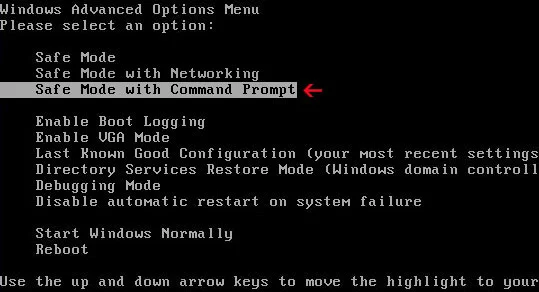
- At the command prompt, type cd restore, and then press ENTER.
Next,we will type rstrui.exe , and then press ENTER.
Alternatively, Windows Vista, 7 and 8 users, can just type : C:\windows\system32\rstrui.exe.
If you are using Windows XP, you will need to type C:\windows\system32\restore\rstrui.exe, and then press ENTER.

- The System Restore window will start and you’ll need to select a restore point previous to this infection.
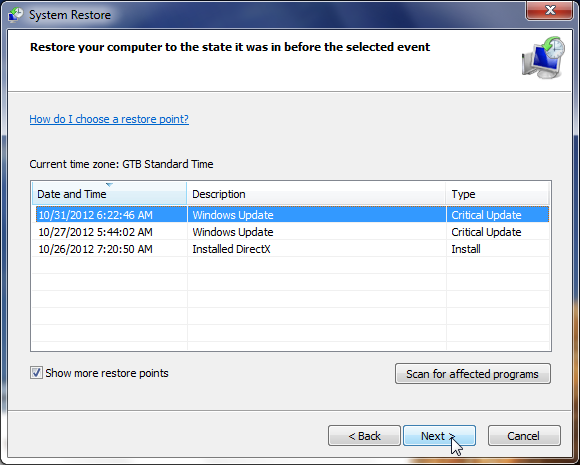
- After System Restore has completed its task,you should be able to boot in Windows normal mode,from there you’ll need to perform a system scan (as seen on STEP 2) with Malwarebytes Anti-Malware and HitmanPro to remove the malicious files from your machine.
IF the ICSPA virus didn’t allow you to start the computer in Safe Mode with Command Prompt you’ll need to follow Method 3, to get rid of its screen lock.
Method 3: Remove ICSPA virus with HitmanPro Kickstart
IF you couldn’t boot into Safe Mode with Command Prompt or didn’t have a System Restore point on your machine, we can use HitmanPro Kickstart to bypass this infection and access your computer to scan it for malware.
- We will need to create a HitmanPro Kickstart USB flash drive,so while you are using a “clean” (non-infected) computer, download HitmanPro from the below link.
Download HitmanProOfficial Sophos download. Free scan, free 30-day trial to remove threats. - Insert your USB flash drive into your computer and follow the instructions from the below video:
- After you have create the HitmanPro Kickstart USB flash drive, you can insert this USB drive into the infected machine and start your computer.
- Once the computer starts, repeatedly tap the F11 key (on some machines its F10 or F2),which should bring up the Boot Menu, from there you can select to boot from your USB.
Next,you’ll need to perform a system scan with HitmanPro as see in the below video:
- After HitmanPro Kickstart has completed its task,you should be able to boot in Windows normal mode,from there you’ll need to perform a system scan (as seen on STEP 2) with Malwarebytes Anti-Malware and HitmanPro to remove the malicious files from your machine.
STEP 2: Remove ICSPA malicious files from your computer
No matter what method you have used to get rid of ICSPA lock screen, we will need to remove its malicious files from your computer.
Please download and run a scan with the following scan to completely remove ICSPA virus from your computer.
Run a computer scan with Malwarebytes Anti-Malware Free
- You can download Malwarebytes Anti-Malware Free from the below link,then double click on it to install this program.
Download MalwarebytesFree official installer. Your download starts right away. - When the installation begins, keep following the prompts in order to continue with the setup process.
DO NOT make any changes to default settings and when the program has finished installing, make sure you leave both the Update Malwarebytes’ Anti-Malware and Launch Malwarebytes’ Anti-Malware checked,then click on the Finish button.
![[Image: Malwarebytes Anti-Malware final installation screen]](https://malwaretips.com/blogs/wp-content/uploads/mwt-media/47/471448d4dd5aa1d55ea545effccf0ac9c8ccb5a29622da4e38ac677b5d8c37b5/9f473303c15a00262451cc5a56b904de929157b59e19e3cfb2c03ec88f643390-402.webp "Malwarebytes Anti-Malware final installation screen")
- On the Scanner tab,select Perform quick scan and then click on the Scan button to start scanning your computer.
![[Image: Malwarebytes Anti-Malware Quick Scan]](https://malwaretips.com/blogs/wp-content/uploads/mwt-media/1e/1eb209597ca2f06e596fd060345ac7e3100355f1ec8fc8ea2d9dec7abbb05ea0/3afba9b0b97b56945ffc33817ac48f7433c799241a22e422966180b76473a906-521.webp "Run a Quick Scan with Malwarebytes Anti-Malware")
- Malwarebytes’ Anti-Malware will now start scanning your computer for ICSPA virus as shown below.
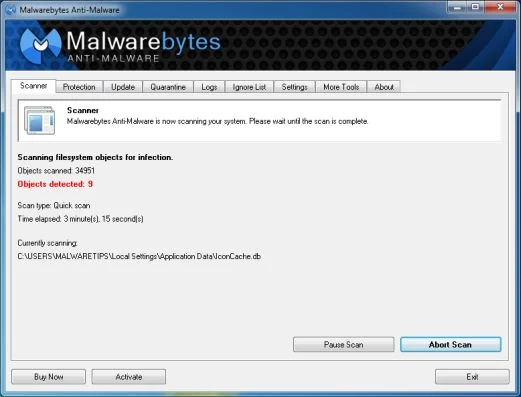
- When the Malwarebytes scan will be completed,click on Show Result.
![[Image: Malwarebytes Anti-Malware scan results]](https://malwaretips.com/blogs/wp-content/uploads/mwt-media/84/84c62dd46289424dbc686abc53672cb0810111920c8c0bbd69e973844d0a9ab0/a4c04aa700e641f47afec9965f79ff346740668e5952955ccbe5b4c3658b5897-521.webp "Malwarebytes when the system scan has completed")
- You will now be presented with a screen showing you the malware infections that Malwarebytes’ Anti-Malware has detected.Please note that the infections found may be different than what is shown in the image.Make sure that everything is Checked (ticked) and click on the Remove Selected button.
![[Image:Malwarebytes removing virus]](https://malwaretips.com/blogs/wp-content/uploads/mwt-media/d8/d86b6a8bac0e4ece9fd2d259a83db71487943f6b04b567edb0e9adcc3200f492/4eb94651b0e34cc99689c56dc71cd0a49444498ed05c5803ea55fda1cfee1b1f-521.webp "Click on Remove Selected to get rid of Your computer has been locked virus")
- After your computer will restart in Normal mode, open Malwarebytes Anti-Malware and perform a Full System scan to verify that there are no remaining threats
Run a computer scan with HitmanPro
- Download HitmanPro from the below link,then double click on it to start this program.
Download HitmanProOfficial Sophos download. Free scan, free 30-day trial to remove threats.
IF you are experiencing problems while trying to start HitmanPro, you can use the Force Breach mode.To start HitmanPro in Force Breach mode, hold down the left CTRL-key when you start HitmanPro and all non-essential processes are terminated, including the malware process. (How to start HitmanPro in Force Breach mode – Video) - HitmanPro will start and you’ll need to follow the prompts (by clicking on the Next button) to start a system scan with this program.
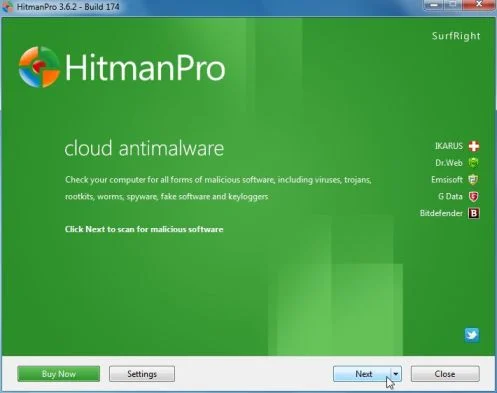
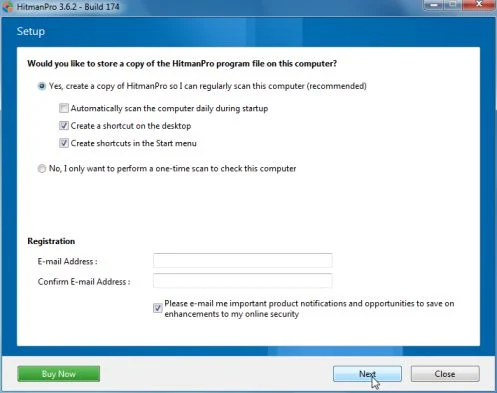
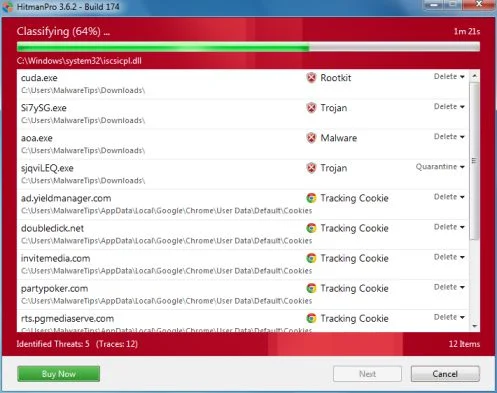
- HitmanPro will start scanning your computer for ICSPA malicious files as seen in the image below.
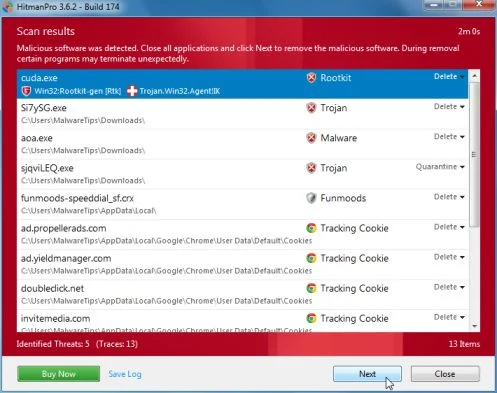
- Once the scan is complete,you’ll see a screen which will display all the infected files that this utility has detected, and you’ll need to click on Next to remove these malicious files.
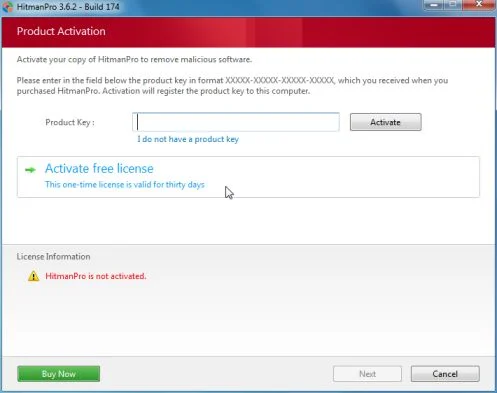
- Click Activate free license to start the free 30 days trial and remove all the malicious files from your computer.

Join the discussion
14 commentsShare your experience or ask a question about this article.
Your progress
Did these steps help?
Let us know how the guide worked for you.
Describe what you see and the step you reached. Keep passwords and other private information out.
Discussion
First and foremost, thank you for the guide on getting rid of this awful virus. I have never had this problem before, but I was able to fix it on my own. However, none of these ways worked, and I found a way that worked immediately for my computer.
I have a Toshiba Satellite P755-S5320 running on Windows 7 Home Premium. Here are the steps I used:
I rebooted the same way it instructs in all ways. Repeatedly pressing F8 worked best FYI. Sometime I would start holding it down too late, or too early. Except, I had another option in the initial menu. Right above the Safe Mode options, there was an option to Repair Computer (or worded similarly). I chose that option and it took me directly to restoring my computer to it’s last update. I followed the steps, and it worked!!! I used Malwarebytes Anti-Malware and HitMan Pro and I am free of this nasty awful virus.
I am a 25 year old female bartender with hardly any computer experience. If I can do it, so you can you. (My friends tried to tell me I needed a computer tech pshhhhhh)
THANK YOU AGAIN MALWARETIPS. I couldn’t have found my computers unique way of fixing itself without you!
Hello Angelo,
We do not sell anything….So there is nothing to buy! I’m glad that your computer is clean now!
I highly recommend that you take a look at this article so that you’ll learn how to avoid malware: http://malwaretips.com/blogs/how-to-easily-avoid-pc-infections/
Stay safe!
Hello,
Please create a HitmanPro Kickstart USB as seen here: http://malwaretips.com/blogs/remove-police-trojan/#hitmanpro
OR
Please create a bootable Kaspersky Rescue Disk as seen here: http://malwaretips.com/blogs/remove-police-trojan/#kaspersky
Stay safe!
Agree with Ian -This solution to ICSPA really works and is SAFE! Method 2 -system restore worked for me.
Thanks a lot guys for the assist.
Aside-How come the smart ‘good guys’ in the computer world can’t follow the Ukash money trail scam and arrange a little Bin-Laden-Delta Force ‘upgrade’ for these Internet parasites???
Just a quick tip, if you cant boot in safemode, load up windows normally and when u get to the locked desktop, click alt ctrl del. after this click restart computer and when u return to the desktop it should remove the lock and try and shutdown, at this point hopefully u’ll get a prompt to “force shutdown” a program. Quickly click cancel and u shud have complete control of ur desktop again. Then continue this tutorial from running malwarebytes. Hope this helps!
In case you are worried, this recovery programme really works. I got one of these god damned viruses and after the shock and some research was calm enough to work this all through. I got back to a restore point and bingo no problem. I have Hit Man Pro on my machine for scnning purposes. Norton, my virus protecyor foe ever, my faith has been shaken in your not picking up, isolating or notifying of the virus.
You are a life saver. Great instruction…with al the possible glitches solved. Thank you so much.
Thanks for saving my whole life. I got this virus and thought I was going to loose all my information. I removed this virus using your 2nd method and it worked a treat, simple and easy.
Thanks for the help
Steve
Thank you for posting this! My children &pregnant I were looking up the stages of a pregnant neon tetra (fish) when the virus popped up. The second step fixed our problem and I made sure to post it on Facebook for others to learn :)
I picked up the ICSPA Ransomware virus through a builders website and used your 2nd suggestion, which worked perfectly, only loosing 1/2 day’s work.
Good to see your with Barca, but stay away from Starbucks, that is really nerdy.
Thank you so much for showing me how to remove this awful virus from my computer! My fiance is currently deployed to Afghanistan and I haven’t been able to video chat or e-mail him since I got this virus, as you can imagine it’s already hard enough on us! Thank you so much I am so glad that I was able to get it removed for free! I have spread the word about you!
Thank you so much! This was very helpful and it worked. As said previously, you are a life saver. I really cant thank you enough. Im definitely spreading the word and your name.
thank you so much for your help in removing this virus. i was really freaking out that it froze up my computer and actually took a screen shot of me. scary feeling. so thank you so much for these instructions as i would not be able to afford to have taken it to a computer place to get repaired and i would have been without a computer for a long time – which would have made my life miserable and much more difficult. you’re a life saver.
Stelian, I accepted the FaceBook ‘like’ as I believe there are lots of Computer Users whose skills are not up to scratch who could well gain some benefit from your great Website/Blog.
My Computer skills are quite good & I have had reason to research the Trojan.Vundo that MalwareBytes located in my XP Pro SP3 Registry-I use Microsoft Security Essentials on this unit plus CClean & I am pleased that I decided to use MalwareBytes once again-it is good software
& I am pleased to see their other products which can handle/eliminate the dreaded Spam/Phishing attacks that lots of New Zealanders have experienced of late. Telecom NZ which runs Xtra as the
ISP & Yahoo for the webmail server, have been inundated with more than 450000 users email accounts being compromised. Users of this service have been advised to change & user ‘stronger’ Passwords to help eliminate this problem. I was surprised to find this Trojan.Vundo in the Registry & I hope others find this site of yours as helpful as I have.
Thanks,
Warren