


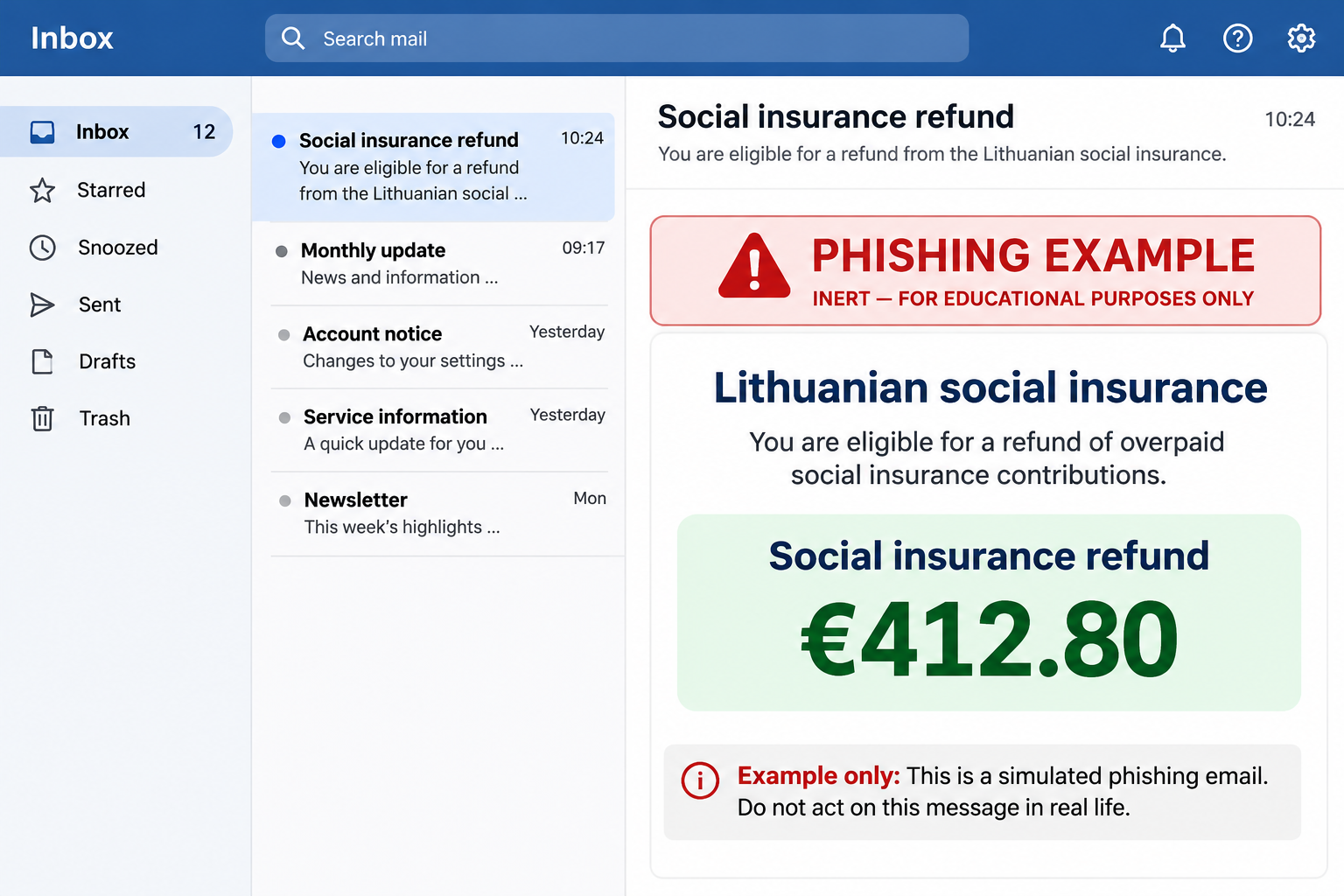
The email says Lithuania’s social insurance agency has approved a €412.80 refund. It even gives you a decision number, as though the paperwork is already settled.
If you’re waiting for an answer from Sodra, that sounds like good news. Before you open the notice, check where an actual decision would appear.
Overview
A refund amount Sodra has warned about
The Sodra €412.80 refund scam uses a Lithuanian notice about an apparent overpayment of social insurance contributions. Its promise is a payment to you, not a bill you owe.
This isn’t simply a similar-sounding scam. In its own warning, Sodra describes a false benefit message with the same €412.80 amount and a purported decision number.
The example reviewed here says the refund was approved. It then sends readers to an unofficial site that asks for banking or payment card information.
Sodra is the real agency being impersonated. It says it doesn’t send notices inviting people to claim a benefit through a link. Actual decisions can be checked in your account.
Why the message looks like an administrative decision
The Lithuanian wording refers to a refund of excess social insurance contributions. That sounds like an adjustment someone has already calculated, not a prize offered to a stranger.
A precise total makes the notice feel tied to your records. A reference number reinforces that impression, even though it hasn’t been checked against anything you can see independently.
These details matter because people can genuinely have questions about contribution overpayments. You don’t have to believe the agency never issues refunds to recognize that this notice is fraudulent.
Check your own records instead of using the email as your record. If you never made a request, mention that when asking Sodra to verify the purported decision.
What the fake refund asks you to give up
- The email directs you away from the real Sodra account.
- The next page imitates a refund summary and presents banking choices.
- A supposed bank sign-in can expose your online banking information.
- A card form can expose details used to make purchases.
- An unexpected authorization in your banking app can expose more than your password.
The amount is bait. A form asking for the security code on your card is not evidence that a Lithuanian agency has money ready to transfer to you.
How the Sodra Refund Scam Works
Step 1: The notice makes an overpayment sound settled
The message says a request about social insurance contributions has already been approved. In the email example, the decision details sit close to the amount to make both look official.
It doesn’t ask you to argue a case or fill out a government application. It makes the hard part sound finished and the remaining task small.
If you’ve recently changed employment or checked a contribution balance, the email may arrive at a plausible moment. That coincidence doesn’t mean its sender had access to your agency records.
Someone who hasn’t dealt with Sodra may assume an automatic review found an error. The notice gives both kinds of reader a reason to keep going.
Step 2: The email sends you to a supposed refund record
The example invites the recipient to view the decision in an account. The page that opens imitates Sodra instead of taking the reader to the agency’s genuine portal.
The refund total is repeated, which makes the second page feel like a continuation of the first. Both screens can say the same thing without either being connected to Sodra.
You don’t need to decide whether the formatting is a perfect match. Go through the agency site independently and check whether the decision exists there.
If you already followed the link, don’t return to see whether the page has disappeared. It’s the action you took there that determines whether you need to call the bank.
Step 3: Choosing a bank changes what the reader is asked for
The reported page offered recognizable Lithuanian banking options, including Swedbank and SEB. Some versions of the flow showed an imitation of the bank’s sign-in after a choice was made.
That is where the look of the page becomes especially misleading. Seeing the name of your actual bank doesn’t establish that you reached a site it operates.
The example also offered a payment card route. It asked for card details, including the security code, under the pretense that this was how you could receive the refund.
Whether you chose a bank or a card, don’t test the page with partial information. If you already entered something, note which route you chose so the bank can respond.
Step 4: The risk can move into your genuine banking app
Some impersonation attempts don’t end at a fake form. They may be followed by a real approval request for an action you didn’t start.
Sodra has described a separate case in which a person followed a fake agency link and later discovered money had been taken. That doesn’t prove this copy caused a transfer.
Read any approval on the device that displays it. If it asks you to confirm a login, payment or change you didn’t start, decline it.
If you already approved a request, tell your bank what the approval said. A payment, new device registration and ordinary sign-in are not the same event.
How to Check a Real Sodra Refund Without the Email
Look for the decision where Sodra says it belongs
Go to Sodra independently and open your personal account from there. Use your normal bookmark or type the official agency address yourself, rather than copying it from the message.
Check any actual request and its status. If the notice gives a reference, compare it only with records you reached independently; don’t assume its official-looking format proves anything.
If the decision isn’t there, use the official agency contact route. Tell the agent what the email claims and ask whether a genuine request exists under your account.
The official Sodra warning about false benefit notices is especially useful because it describes this exact amount and explains where genuine decisions can be checked.
Keep your identity check separate from the claimed payment
It can be normal to verify your identity when you start a sign-in at a government service. That does not make a sign-in started from this email legitimate.
The distinction is who initiated the action and where it began. If you didn’t begin it through the real service, the prompt isn’t yours to approve.
If the process you reached through the real site is unfamiliar, stop and check with Sodra. Don’t use the email as a shortcut for logging in.
If an employer handles the contributions, ask before acting
Payroll and employees may see different records. If you ask payroll about the message, flag it as suspicious instead of forwarding it as a genuine request.
Use an established workplace channel and describe it as suspicious. Give payroll the subject, claimed amount and time, without asking anybody to open the original link.
If a real employer refund or adjustment is pending, the person responsible can check it in the appropriate account. They don’t need your personal card details to do that.
What to Do if You Have Fallen Victim to This Scam
-
Stop at the point you reached.
Close the page. If you only saw the message, report it as phishing. If you opened the page, don’t go back to check which details it might have captured.
Write down whether you chose a bank, entered card information or saw an authorization. You can do that without interacting with the original notice again.
-
Call the bank using a number you obtain independently.
Use the number inside the bank’s usual app or on your card. Tell the fraud team you followed a false Sodra refund and explain what you entered.
If you supplied a card number or security code, ask whether the card should be blocked or replaced. Mention any recent payment attempts you can see in the genuine app.
If you gave online banking credentials, say so even if you didn’t finish the form. Let the bank decide which access to suspend or reset.
-
Flag any approval or transfer separately.
Record the time, amount and recipient if visible. Ask the bank what it can do about that transaction, rather than assuming that resetting access automatically reverses it.
If you can’t see the account because access was suspended, report the incident anyway. Bank staff can tell you what evidence they need and what deadline applies.
-
Keep evidence without circulating banking data.
Save the original message and relevant bank records privately. Don’t post the full message, personal identifiers or account activity to a public comment thread.
If the bank wants a screenshot, use the secure channel it specifies. Never send an authentication PIN or full card security details as part of a report.
-
Check whether the information exposed goes beyond the bank.
Tell Sodra through its official contact process if you disclosed an identity number or agency account information. Describe what you shared and ask what to review.
Protect any email account used to recover affected services if you also disclosed its credentials. A card replacement will not protect a password you reused.
-
Decline follow-up offers to reverse the incident.
A caller might claim they can release the original refund or reverse a suspicious transfer. Do not approve another prompt or send money to prove you own the account.
Contact the bank yourself and quote the case number it gave you. Keep a record of any new messages and ask whether they are relevant to the existing report.
What the €412.80 Amount Does and Doesn’t Tell You
It is a useful clue when you are comparing the email with the agency’s warning. It is not a rule that every fraudulent Sodra message will use the same amount.
A real overpayment might be close to the number quoted. Matching totals don’t confirm a decision; the record inside your genuine account does.
If you forwarded the notice to a relative, tell them not to open it. Ask them whether they already entered details, because that changes the advice you should give.
For someone helping an older family member, open the verified bank or agency site together. Don’t ask them to send you authentication codes or photos of their card.
When the bank asks what the message promised
Describe it as a supposed incoming refund, not as a payment you meant to make. That tells the fraud team what you believed would happen when you opened the page.
If you see a debit for the same amount, don’t assume it proves the refund is on its way. Check whether the entry is money in or money out.
If you already reported the transaction, keep the case number and any instructions from the bank. Use that case number when you call back through the official channel.
Check the replacement card or new access method before trying again. Don’t follow a text sent by an unknown caller that says it will activate the replacement.
If you don’t have a Lithuanian social insurance account
There is no reason to set one up through an email promising money. The fact that you received the notice does not establish that you owe contributions or qualify.
If you lived or worked in Lithuania and genuinely have an unresolved question, contact Sodra independently. Keep that administrative question separate from reporting the message as phishing.
If you need to keep a record for family or workplace awareness, write down the hook instead of sharing the live message. The amount and the claimed source are enough.
Frequently Asked Questions
Is the €412.80 Sodra refund real?
The email covered here is false. Sodra has warned about a message promising this exact amount. Check any real refund decision independently in your Sodra account.
What does the Lithuanian refund phrase mean?
It refers to returning excess social insurance contributions. The phrase describes a plausible administrative matter, but it does not authenticate the email.
Why was my bank on the refund page?
The reported page presented familiar banks as choices. A bank name or logo can be copied and does not make the form part of your bank’s service.
I entered my card details but didn’t see a charge. Should I wait?
No. Contact your card issuer now and explain what you entered. It can advise on blocking or replacing the card before any unauthorized transaction appears.
Does a real authentication notification mean Sodra initiated it?
No. A real app can display an approval someone else initiated. If you didn’t start the action yourself, decline it and contact the bank if you already approved it.
What if I really requested an overpayment refund?
Check the request through Sodra’s genuine account portal. Don’t use the email link to check it, even if you are expecting a decision this week.
The Bottom Line
Do not try to claim the €412.80 through the Sodra refund email. Sodra has warned about the false promise, and genuine decisions are available in your actual account.
If you gave away card or banking details, or confirmed a prompt you didn’t start, call your bank through its official route. Don’t wait for a charge to appear.

Join the discussion
0 commentsShare your experience or ask a question about this article.
Discussion
Start the conversation
Have a question or something useful to share? Add the first comment.