

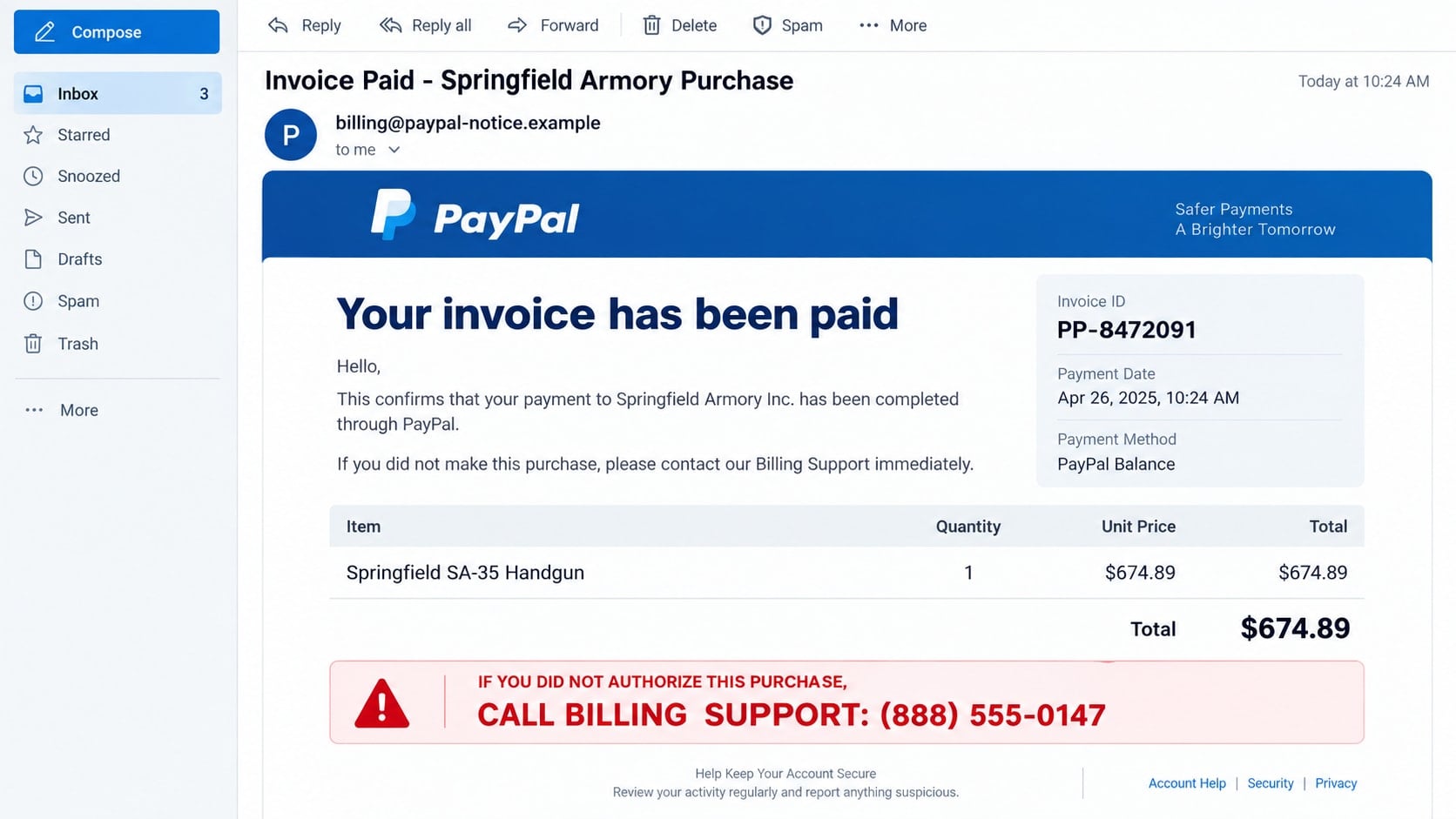
The invoice is designed to stop you cold. It claims PayPal has processed a $674.89 firearm purchase from Springfield Armory, and a large support number promises to cancel it before the charge becomes final.
The gun purchase is not a random detail. It creates a sharper jolt than an ordinary renewal, giving the sender a few precious seconds in which panic can replace verification.
Overview
The invoice describes a purchase that usually never happened
The Springfield Armory PayPal scam arrives as an email, PDF invoice, payment request, or DocuSign-style notice. It claims the recipient bought a handgun, rifle, ammunition, or related item costing $674.89 or another substantial amount.
The message is not evidence that PayPal was hacked or that money left the account. In many versions, the criminal simply created a convincing invoice image and inserted a telephone number controlled by a fake support team.
The firearm description is used to create maximum panic
An unauthorized gun purchase feels more alarming than an unfamiliar streaming charge. Victims may worry about money, identity theft, law enforcement, or a weapon being ordered in their name.
That fear encourages an immediate call. PayPal’s current Acceptable Use Policy also restricts transactions involving firearms and ammunition, making the supposed purchase another reason to verify the claim outside the email.
The callback number is the real doorway into the scam
The invoice prominently says to call “Billing Support” or “Fraud Prevention” if the purchase was not authorized. The person answering is not PayPal or Springfield Armory.
The caller may be asked for card details, account credentials, a one-time code, gift cards, or access to a computer. The fake invoice is only the opening story for a phone-based refund and remote-access scam.
- The email announces an expensive firearm purchase you do not recognize.
- A callback number appears in the invoice body or attached PDF.
- The message insists that cancellation must happen within minutes or hours.
- The sender address is unrelated to PayPal or uses a lookalike domain.
- The caller asks for passwords, security codes, gift cards, or remote access.
- The supposed agent tells you not to contact your bank while a refund is pending.
Why the Fake Gun Invoice Feels More Urgent
Invoice scams often use products chosen for emotional impact. A recipient who sees “Springfield Armory” and a handgun model may fear that a criminal used their identity for something dangerous.
The amount is usually high enough to matter but low enough to look like an ordinary retail purchase. A total between $300 and $900 can appear more believable than an extravagant five-figure transaction.
Scammers also borrow the visual language of payment platforms. Logos, transaction tables, invoice numbers, privacy footers, and blue buttons can all be copied without access to a real account.
The only element the criminal truly needs you to trust is the phone number. Once you call it, the scammer controls the conversation, invents additional account problems, and presents each dangerous instruction as part of a refund.
How the Springfield Armory PayPal Scam Works
Step 1: A fake payment notice lands in the inbox
The subject may say an invoice was paid, a money request was accepted, or an order is being prepared. The body lists Springfield Armory or a misspelled variation, a firearm description, and a precise total.
Some messages are entirely fabricated. Others abuse legitimate invoice or money-request features to place scam text inside a real payment-platform notification. A genuine-looking email format still does not make the seller or callback number legitimate.
Step 2: The recipient is told to call rather than check the account
The invoice says unauthorized purchases must be disputed through the number printed in the message. It may warn that the transaction becomes irreversible after 24 hours.
This route keeps the victim away from PayPal’s real help center and transaction history. The criminal wants the email to define both the problem and the only permitted solution.
Step 3: A fake agent confirms the frightening story
The caller hears hold music, department names, and scripted questions. The agent may claim that several firearm orders, cryptocurrency purchases, or foreign logins are connected to the account.
Basic information such as a name or email address may already be known from the call or a data breach. That familiarity is used to make the invented account investigation sound real.
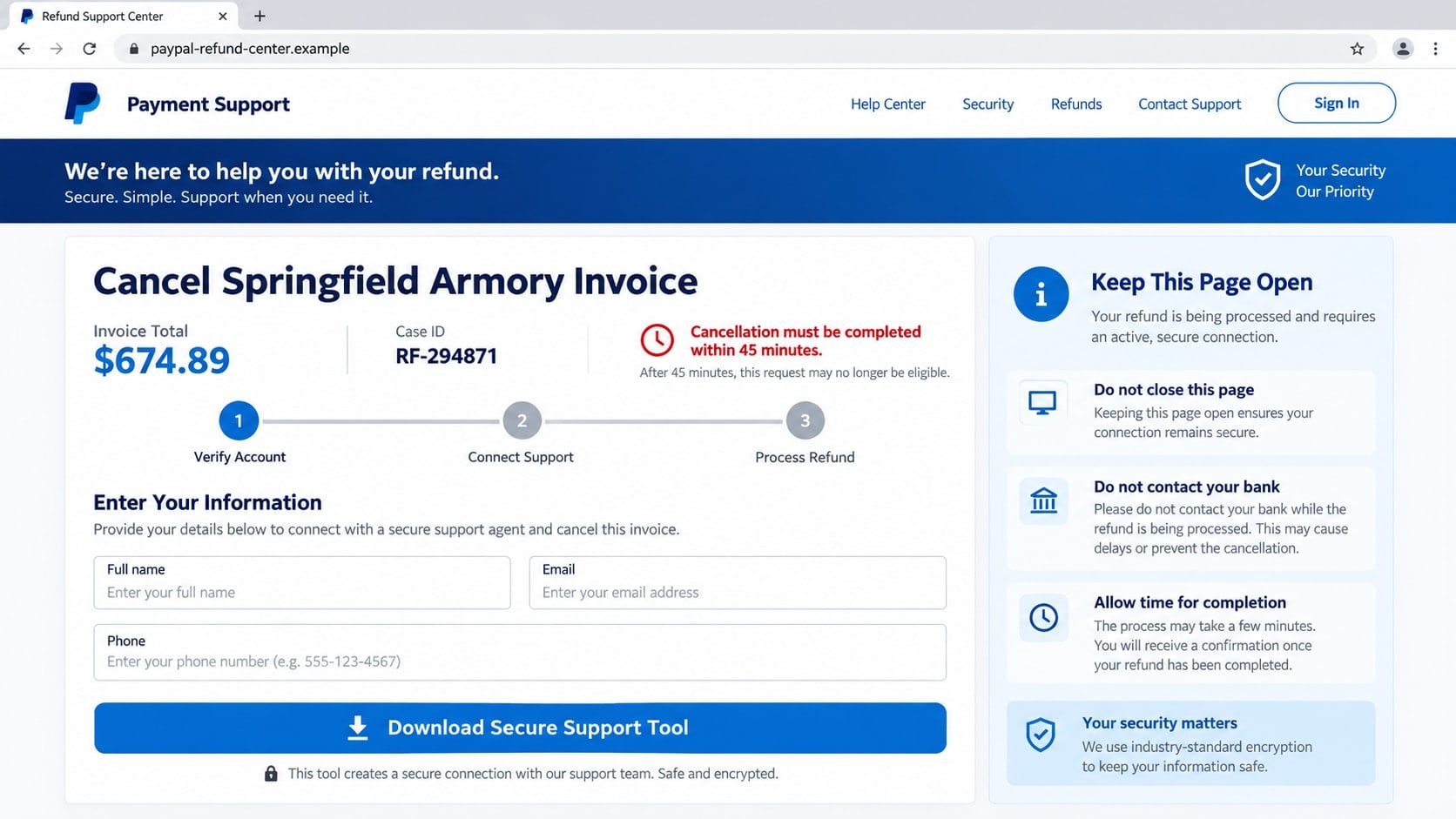
Step 4: Remote-access software is presented as a refund tool
The agent may send a link or ask the victim to install AnyDesk, ScreenConnect, TeamViewer, or another legitimate remote-support program. The software itself has lawful uses, but the scammer uses it to see the screen and control the computer.
The victim may be told to sign in to online banking so the refund can be deposited. In reality, the attacker is watching credentials, manipulating the browser, or preparing a transfer.
Step 5: A fake refund creates a new payment demand
One common trick changes what appears on the screen so it looks as if the company refunded too much. The caller then claims the victim must return the excess immediately or the employee will lose their job.
Payment may be demanded through gift cards, cryptocurrency, wire transfer, cash withdrawal, or a person-to-person app. The “overpayment” is only a display trick or temporary bank movement controlled by the criminal.
Step 6: Accounts are drained while the victim is kept occupied
The scammer may black out the screen, move money between the victim’s own accounts, add transfer recipients, or capture security codes. Instructions to keep the phone line open prevent the victim from calling the bank.
After the theft, the criminal may promise that funds will return after an audit. This delay gives transactions time to settle and makes recovery more difficult.
Identity, Contact, and Payment Checks
Open PayPal independently and inspect recent activity
Do not use a button, attachment, or phone number from the invoice. Open the official PayPal app or type the known PayPal address yourself, then review Activity, invoices, and money requests.
If the transaction does not appear, the alarming email has failed the most important check. If an unfamiliar request does appear, report or cancel it through the official account interface.
Check the sender and callback number separately
A displayed sender name can say PayPal even when the actual address belongs to an unrelated domain. Expand the sender details and inspect the complete address.
Never call the number printed inside a suspicious invoice. PayPal advises users to ignore unrecognized money requests and contact support through its official Help Center.
Recognize what real support will not request
A legitimate representative does not need your password, full card security code, one-time login code, or remote access to cancel an invoice. Support also does not process refunds through gift cards or cryptocurrency.
If a caller asks you to hide the conversation from a bank employee, the request is fraudulent. Secrecy protects the scam, not the account.
Separate the merchant name from the payment claim
Springfield Armory is a real manufacturer, but its name on an unsolicited invoice does not establish a purchase. Criminals often borrow recognizable companies because recipients can picture the item immediately.
Contact any merchant only through independently verified details. Do not assume the merchant phone number inside the same suspicious document is genuine.
Warning Signs Inside the Invoice
A fake invoice often spends more space on the cancellation number than on ordinary transaction details. The phone line is the product of the scam, so it receives the largest type and strongest warning color.
Look for a sender that does not match the brand, a PDF you were not expecting, inconsistent company names, or a transaction that cannot be found in your account. A long invoice number is easy to invent.
Urgency is another clue. A real unauthorized transaction deserves attention, but verification does not require calling an unknown number within 45 minutes or surrendering control of a computer.
The gun description can be especially distracting. Focus on account evidence. If PayPal and the funding card show no transaction, do not let the item’s emotional weight pull you into the caller’s story.
How to Handle an Unrecognized PayPal Invoice Safely
First, do not call, reply, or download anything. Sign in through the official PayPal app or a trusted bookmark and review the account.
If the invoice or money request appears in PayPal, use the official interface to decline or report it. A request is not the same as a completed payment, and receiving one does not mean the sender has access to your balance.
Review the bank or card account linked to PayPal. If no matching charge exists, preserve the message as evidence and report it as phishing.
PayPal asks users to forward suspicious messages to its phishing address and then delete them. Do not add commentary or follow the invoice’s instructions while forwarding the original message.
Why a Real PayPal Notification Can Still Carry a Scam
Not every dangerous invoice email is a complete visual forgery. Payment platforms may allow customers to create invoices or money requests and enter their own descriptions, notes, business names, and contact details.
A scammer can abuse that feature to make PayPal send an authentic notification about a request the recipient never approved. The email may pass technical authentication because PayPal delivered it, while the user-supplied invoice text remains fraudulent.
This distinction explains why inspecting the sender alone is not always enough. The recipient must also check whether the notice describes a completed payment, a pending invoice, or merely a request that anyone with an account could send.
A money request does not give the requester automatic access to the recipient’s balance. The safest response is to avoid the embedded phone number, open PayPal independently, and use the platform’s own reporting controls.
Do not write an angry message in the payment note or send a tiny amount to test the requester. Either action can confirm that the account and email address are monitored, creating an opening for more targeted contact.
What to Do if You Have Fallen Victim to This Scam
- End the call and disconnect remote access. Close the remote-support program and disconnect the device from the internet. Do not continue because the caller claims the refund is almost complete.
- Call the bank and PayPal through official channels. Explain that a fake invoice caller may have viewed or controlled the account. Ask about blocking transfers, replacing cards, removing unauthorized recipients, and securing the PayPal profile.
- Change exposed credentials from a clean device. Begin with email, PayPal, and online banking. Use new, unique passwords, change security questions or passcodes, and sign out unknown sessions.
- Report every security code you shared. Tell the bank the exact wording of any one-time message. The code may have approved a login, password reset, wallet enrollment, or payment.
- Remove remote-control software. Uninstall any program the caller requested, revoke unattended-access permissions, and check for newly created user accounts, browser extensions, scheduled tasks, and startup applications.
- Run a full Malwarebytes scan. Malwarebytes can detect malicious installers, information stealers, unwanted remote tools, and persistence left behind during the session. Update it first and quarantine confirmed threats.
- Use AdGuard as an additional blocking layer. AdGuard can reduce exposure to malicious ads, deceptive redirects, and known phishing pages used in invoice campaigns. It cannot reverse a transfer, so financial reporting remains urgent.
- Preserve evidence. Save the original email, PDF, callback number, remote-session ID, screenshots, receipts, wallet addresses, and transaction records. Do not reopen attachments simply to gather more details.
- Report the scam. Forward the message to PayPal’s official phishing channel and report losses to the FTC, IC3, local police, and the payment provider where appropriate.
- Expect recovery scams. Someone may later claim they traced the invoice and can recover the money for an upfront fee. Work only with the bank, payment platform, law enforcement, or a verified attorney.
Frequently Asked Questions
Was my PayPal account hacked if I received this invoice?
Usually not. A scammer can email a fabricated invoice or send a money request without entering your account. Verify recent activity independently and secure the account if you find unfamiliar logins or changes.
Why does the scam mention Springfield Armory?
A firearm purchase creates urgency, fear, and concern about identity misuse. The recognizable merchant name makes the invented transaction easier to picture and harder to ignore.
Can a PayPal invoice contain a scam phone number?
Yes. Criminals can place misleading text in an invoice or money-request description. Never treat a number inside a user-created invoice as official PayPal support.
What if I called but shared no information?
End contact and block the number. Risk is lower if you did not install software, reveal codes, enter credentials, or send money, but watch for more targeted follow-up attempts.
Should I pay an invoice to make it disappear?
No. Decline or report an unfamiliar request through the official PayPal interface. Paying it sends money to the requester and does not protect the account.
Can PayPal support remotely control my computer?
Do not grant remote access to an incoming caller. Account support can investigate an invoice without controlling your screen or watching you sign in to online banking.
The Bottom Line
The Springfield Armory PayPal scam uses the shock of an unauthorized gun purchase to push recipients toward a fake support number. The invoice is bait; the dangerous stage begins when the caller asks for codes, payment, or computer access.
Check PayPal and the funding account independently. If the transaction is absent, ignore the invoice’s phone number, report the message, and delete it.

Join the discussion
0 commentsShare your experience or ask a question about this article.
Discussion
Start the conversation
Have a question or something useful to share? Add the first comment.