


A caller says your bank just stopped someone from taking your money. A second call comes through at work, from someone who claims to represent Türkiye’s banking regulator.
Then an email arrives with a QR code. The voice on the phone says it’s for your refund.
Overview
Two calls make one story sound like it’s been checked
In the Turkish bank refund QR scam, one caller pretends to work for a bank and another claims to represent its regulator.
Both tell the recipient the same story about money at risk.
A person in Türkiye reported that the first caller said an attempted withdrawal had been blocked.
A second caller reached their work phone and knew personal details, which made the supposed handoff feel credible.
The recipient said an emailed QR code was presented as a way to get a refund.
They went through the payment screen and realised afterward that they had sent money out.
Türkiye’s banking regulator has warned about impersonators
Türkiye’s Banking Regulation and Supervision Agency, known as BDDK in Turkish and BRSA in English, has warned about people impersonating the agency to promise refunds or fix supposed account problems.
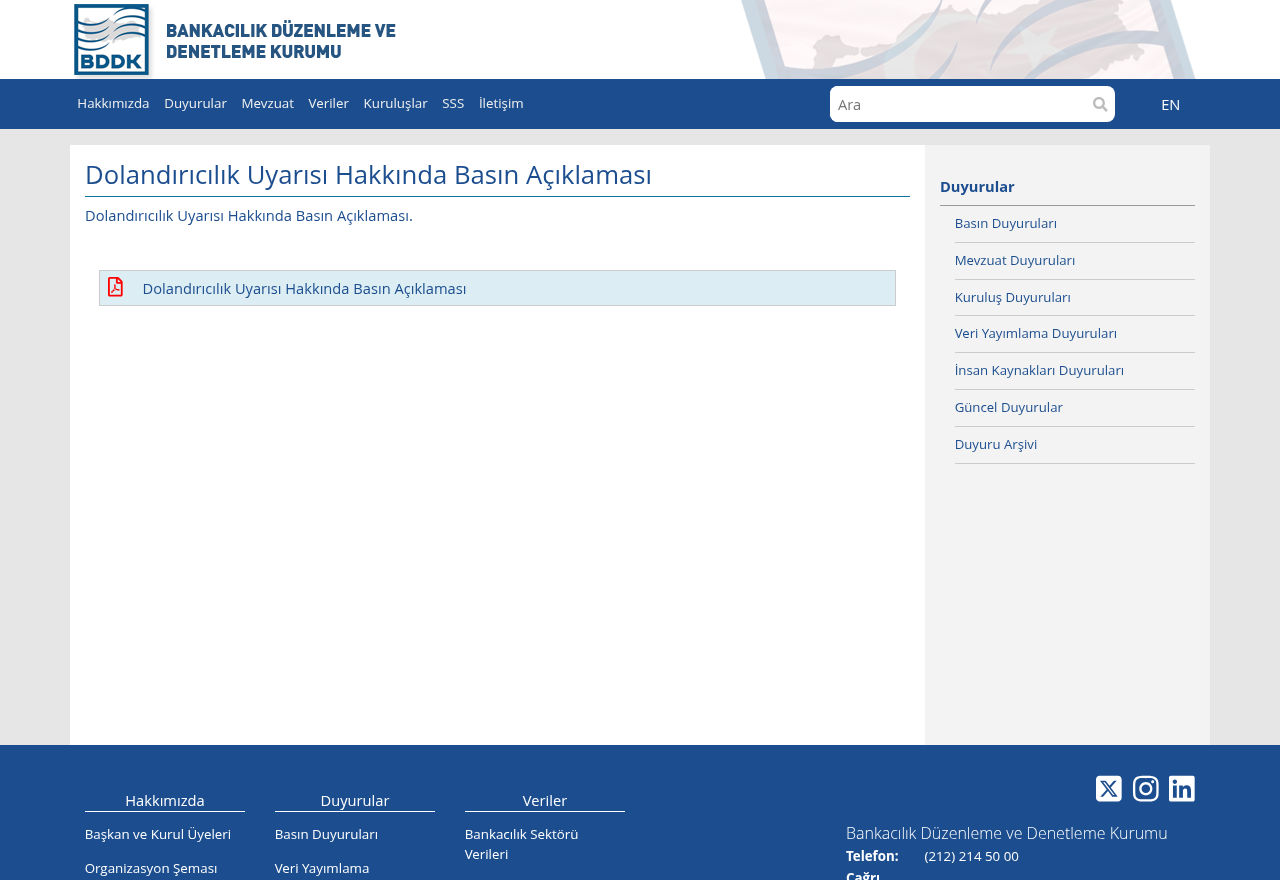
The agency’s official warning page, shown above, says it doesn’t ask for personal information by phone, email or through a website.
The public report describes the calls and the outgoing payment.
The original QR code and bank record are unavailable, so the exact payment service, recipient account and final outcome are unknown.
The decision comes down to what the bank screen says
- The callers know details about you and claim that knowledge verifies who they are.
- A caller you didn’t contact tells you to expect a second call.
- An email describes a QR code as a way to receive a refund.
- Your banking app shows money leaving your account or asks you to approve a payment.
Stop at that last screen. Close it and call your bank through a number you already trust. Describe the transaction exactly as it appeared in the app.
Why the Second Caller Makes the First One More Believable
If a stranger says your bank account is at risk, you may want a second opinion.
Here the first caller supplies one. The next voice sounds like somebody from outside the bank.
That can feel like a reassuring escalation. The person says they’ve been brought in because the matter is serious, then repeats facts you just heard from the first caller.
Two calls coming from different numbers leave the same question open. Who decided where the next call would come from?
If the first caller arranged it, you still need your own check.
In the Turkish report, the second call reaching a work number made it feel more official.
It also arrived while the recipient was trying to do their job and keep up with the story.
The best time to break that chain is before the second conversation. You can tell the bank’s real fraud team what happened without waiting to hear the stranger’s next instruction.
How the Turkish Bank Refund QR Scam Works
Step 1: The bank security story creates a reason to stay on the line
The first caller says somebody tried to access the account. They claim the bank stopped the attempt and that more checks are needed.
Notice how reassuring that sounds. The caller says the worst has already been prevented.
That can make it easier to trust the person who then asks you to do something about it.
Open your own banking app after ending the call. Check genuine alerts and recent activity. A claim that something was blocked is something the bank can check directly.
Step 2: A supposed regulator takes over
The first caller tells you that Türkiye’s banking regulator will contact you. The new caller arrives as promised and presents themselves as someone with the authority to finish the investigation.
The real BDDK says it does not call people to request personal information used in banking transactions.
An unsolicited caller asking for banking details under its name gives you an immediate reason to stop.
There’s no benefit to finishing that conversation before calling the bank.
Let the real fraud team tell you whether it has an open case and what the next step should be.
Step 3: Personal details make questions about money feel routine
The person who reported the scam said the callers knew details such as their home address.
The conversation turned to how much was in their accounts and what they could transfer.
A stranger who knows your address can still lie about where they work. Information they already have also says nothing about what they need from you now.
If a caller asks you to read out balances or transfer limits, end the call. Then ask your bank whether it can see any recent attempts to use your account.
Step 4: The promised refund arrives as a QR code
The email gives the recipient a specific thing to do. The story on the phone says the QR code will return the money that was supposedly at risk.
That framing can stick as the person moves from the email to the banking app.
It’s easy to read a confirmation screen quickly when you think you already know what it will do.
Put the caller’s explanation aside and read the bank’s own labels.
Look at the account being debited, the recipient and the amount. Stop before approving anything you didn’t intend to send.
Step 5: The transfer goes out and the real bank has to respond
The recipient said they sent money after following the instructions. They contacted their banks and filed a police report. The report doesn’t say what happened to the money afterward.
If you just approved an outgoing payment, call the bank immediately. Tell it the time, amount and recipient as they appear in the actual transfer history.
Ask what can still be stopped or recalled and what the bank can flag with the receiving institution.
A recall is a request, and your bank can tell you which options remain.
Read the Banking Screen Before You Authorise Anything
A QR code can carry information used to start a payment. Türkiye’s central bank explains that its FAST-TR Karekod service supports payments between individuals and purchases.
That gives you a useful point of comparison when you see a QR code in a refund message.
The banking app should tell you what action you’re taking and where the money will go.
Look for the name of the recipient. Read the amount and currency. If there’s a source account, check whether it is yours and whether it will be debited.
If the only reason for approving is something a caller told you, stop. A real bank employee can explain the transaction through a call you initiate yourself.
A blocked withdrawal and a refund are different records
Ask the bank whether the suspicious withdrawal was ever posted. A blocked attempt and money actually leaving your account are different events, and each has a different record.
If the bank confirms a debit, ask it to start the appropriate fraud or dispute process and explain how it will notify you.
Keep the reference so you can check it later.
If the bank can’t find a matching debit or an open case, ask whether it sees any attempt. You can then report the impersonation with the information you actually have.
The caller may present a code as evidence a refund exists. A better source is your own account history and the case number the bank gives you directly.
An account alert may show a failed sign-in, a declined payment or a completed transfer. Read the bank’s wording carefully and check which account the alert belongs to.
If the caller mentions a different account from the one on the alert, give that detail to the bank. It can confirm whether the events are connected.
When the calls reach your workplace
Someone calling a work number can sound more legitimate because you associate that line with known customers, colleagues or service providers.
Treat it like any other unexpected call about your finances.
If you can, end the call and take a minute to open the banking app somewhere private.
It’s easier to compare account details when you aren’t talking to someone and trying to work.
If you entered a work password or allowed access to a company device, tell your IT or security team promptly.
Give them the time of the call and what you did on the device.
What to write down for the real fraud team
Start with the time the money left the account. If you have the banking app open, note the amount, currency, transfer reference and recipient displayed in the completed payment.
Next, write down which caller made which claim. You may remember the order of events more easily than their exact words. Give the bank the sequence you remember.
Save the email separately from the bank record. The email shows what you were told to expect. The transaction record shows the action your bank recorded.
If you received the second call at work, your phone system may have a record of the call time.
Ask the appropriate person to preserve it if the police request it.
Keep any screenshots private. The QR image may contain payment information that shouldn’t be reposted. A bank or police investigator can tell you where to send it securely.
After you report the payment, ask how to check the case without accepting incoming calls. An in-app message, published support number or branch can give you a route you control.
If another caller already knows the amount you lost, keep the same rule. The amount is something a person involved in the first call may already know.
What to Do if You Have Fallen Victim to This Scam
-
Hang up. Use the official banking app, the number on your card or another published bank contact you find independently.
-
If you approved a transfer, tell the fraud team it was induced by a fake refund call. Give it the transaction reference, amount, time and recipient.
-
Ask the bank whether it can stop or recall the payment and notify the receiving institution. Request the bank’s case number and keep it.
-
Tell the bank about any password, code, card information or app approval you shared. Ask it to review sessions, devices and recent changes.
-
Contact any other bank whose information you disclosed. Check your recent transfers and account alerts. Follow each bank’s instructions for securing the affected account.
-
Preserve the email and QR image privately. Save the numbers, timestamps and bank records, then report the suspected fraud to the police.
-
Keep the bank’s written response and proof you raised the issue. If a dispute remains, check the Banks Association of Türkiye’s eligibility and application rules.
The Banks Association of Türkiye says customers must apply to their bank in writing before seeking eligible arbitration. Keep the acknowledgement of that application as well as the bank’s response.
If the QR code opened a web page, check what you entered or downloaded.
If it opened only a transfer screen inside your bank’s app, review whether you actually confirmed a payment.
If you opened a suspicious download, an updated Malwarebytes scan can help check the device. Use a different trusted device for the urgent banking steps.
AdGuard can block some deceptive destinations and ads. Always read the bank’s own confirmation screen before approving a payment, even when no browser warning appears.
Frequently Asked Questions
Does BDDK call people to arrange a refund?
The agency warns that it does not call citizens to request banking information. Check a supposed account issue directly with your bank through its published contact details.
Did scanning the code send my money?
Check the transfer history in the banking app. Opening a page or seeing a payment screen and approving a transfer are different events. Tell the bank what you actually did.
How do I know if a QR code wants me to pay?
Check the bank’s payment screen for the recipient, amount and account being debited. Stop if it shows an outgoing payment you hadn’t planned.
What if the caller knew where I live or work?
Treat that as information the caller had about you. It gives you no independent way to verify their employer. Hang up and call your bank yourself.
Can my bank reverse the payment?
Contact it immediately and ask which options are available. The answer depends on the payment and its status. Keep the reference and ask the bank how to follow up.
What if there is no transfer in the banking app?
Tell the bank what you shared and what the scan opened. Check whether any other account was involved and save the email for a fraud report.
The Bottom Line
Leave the emailed QR code alone and call the bank yourself. In this scam, the caller calls it a refund while the banking app shows an outgoing payment.
If you approved the transfer, contact the bank now with the payment reference.
Save the email and call details so your bank and the police can see how the payment started.

Join the discussion
0 commentsShare your experience or ask a question about this article.
Discussion
Start the conversation
Have a question or something useful to share? Add the first comment.