


A text says you need to update your details to keep using the BENU pharmacy portal. The page it opens asks for a tiny verification payment.
Then the screen tells you the payment failed. What looks like a technical problem can turn into a conversation with someone claiming to be your bank.
Overview
The pharmacy text is the first contact
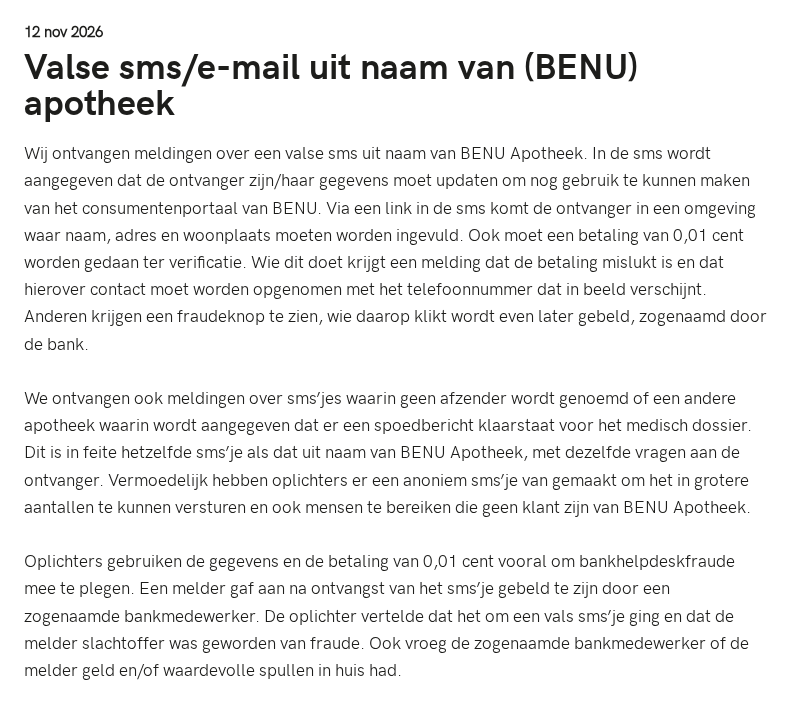
The Dutch Fraudehelpdesk described texts using BENU Apotheek’s name to threaten loss of access to its customer portal. Recipients are sent to an outside form.
Some reports use a different pharmacy name or no name at all. An urgent note supposedly waiting in a medical file is another way to start the same conversation.
- The false pharmacy form asks for a name, address and place of residence.
- A token verification payment leads into a failed-payment or fraud-help screen rather than authentic pharmacy enrollment.
- Someone may then pose as a bank employee, including calling the person who just reported the problem on the fake site.
The bank call can be part of the same scam
The important clue is how you got to the call. A number or fraud button displayed by a suspicious pharmacy page cannot authenticate its own support channel.
One report described an apparent bank employee asking whether the recipient had cash or valuables at home. The warning does not say any valuables were collected.
The actual pharmacy and bank are separate contacts
BENU warns customers about phishing in its name. A real pharmacy can answer whether it sent a message; your bank can independently inspect a payment or approval.
Do not let a link in the text choose either of those contacts. Open the pharmacy portal you already use and call the bank from its own app.
How the BENU Pharmacy Text Scam Works
Step 1: Make portal access sound at risk
A pharmacy portal is a credible pretext because patients may use it for practical matters such as prescriptions. The text suggests you could lose that familiar route.
The Fraudehelpdesk alert says the BENU version asks customers to update their details. Other messages claim there is an urgent item in a medical file.
Both stories place a link where you would expect a way to resolve the issue. Neither explains why you cannot see the same request in your usual portal.
If you are expecting a prescription, open the pharmacy app separately or call the branch you already use. That keeps a genuine medicine question separate from the text.
Step 2: Collect personal details and request a token payment
Reports describe a form asking for a name, street address and place of residence. Those details are useful even before a payment goes through.
A contact who repeats that information later can sound like an employee with access to an account. In this sequence, the information may simply have come from the first form.
The next request is for a tiny verification payment. The amount makes it look cheap to proceed, but it tells you nothing about the purpose or destination.
There is no benefit in trying it with a spare card to see if the page works. Any approval you complete is still an action requiring a trusted reason.
Step 3: Turn a supposed payment failure into a second contact
Some people reported a failed-payment message that displayed a number to contact. Others saw a fraud button and later received a call from someone claiming to be the bank.
These are reported variations, not mandatory steps for every recipient. What they share is that the suspicious page decides where you go when the apparent problem occurs.
A failure notice is not proof that no money moved. Check your actual account and let your real bank determine whether a transaction or approval was recorded.
Do not repeat the payment to clear the error. A second attempt adds exposure without telling you whether the first instruction came from your bank.
Step 4: Pose as the person who can stop the fraud
The supposed bank employee may acknowledge that the first message was false. That can make the second contact feel genuine, even though it can be part of the deception.
One person told Fraudehelpdesk the caller asked about cash or valuable items in the home. If that happens, do not describe your belongings or arrange a handover.
Even if the caller uses the same facts you entered on the first screen, end the call. Speak to the actual bank through a completely separate contact route.
There is no need to prove that both stages had the same operator before taking action. The first page did not provide a trustworthy way to reach the bank.
How to Check a BENU Message Without Following It
The pharmacy’s official warning about false messages describes pressure to update health information, check benefits or pay healthcare costs through a link.
BENU also publishes examples of the real domains it uses. But a familiar display name, plausible address or logo is not enough to make an unexpected payment request safe.
Its official billing information lists an invoicing partner among legitimate senders. That is another reason not to guess from an address alone or reject every non-BENU name automatically.
Go through the pharmacy app or official site, or call your pharmacy from a number you previously used. Ask whether a notice exists and what it actually requires.
Do not send your prescription history to an email address the message provides as a test. A genuine pharmacy can start with a conversation you initiated yourself.
Someone who does not use BENU can still receive a generic pharmacy text. Report the attempt without assuming the sender guessed your actual pharmacy or obtained your medical records.
If you did schedule a collection before receiving the message, keep the appointment through the existing channel. Timing alone does not turn a new verification link into a receipt.
Check which organization actually has something to verify
At the pharmacy, ask whether your portal access or prescription needs attention. That question does not require you to share a payment card with the caller.
At your bank, ask whether there was a card authorization, transfer or registration attempt. The fact that the caller claimed to be the pharmacy is useful context, not an answer.
If you are dealing with a genuine pharmacy invoice, compare its reference with your account records. Do not treat a portal-verification form as proof of an outstanding bill.
If the fake caller says your pharmacy provided your bank details, do not accept that explanation. The helpdesk describes a form collecting information before the bank impersonation appeared.
Ask which organization you would normally contact if the text had never arrived. Using that channel breaks the link between the false portal and the false remedy.
What to tell someone who may follow the next prompt
Start with the sequence, not a lecture about spelling. An update text, a small payment and a fraud callback can all sound routine when considered one at a time.
Tell the person to end the callback and call the bank directly. Ask whether they opened a page, entered details, approved a payment or arranged a visit.
If they are waiting for important medicine, call the pharmacy separately. An urgent healthcare concern is a good reason to use a verified contact, not to hurry through the link.
What to Do After a BENU Text or Fake Bank Call
-
If you only received the text, do not use its link. Check your account separately if you were expecting a genuine notice from the pharmacy.
-
If you entered contact details, stop responding and expect the possibility of a follow-up. Mention the disclosed information if you report a suspicious call.
-
If you entered banking details or approved the test payment, contact your bank promptly. Tell it what you authorized and report any unexplained activity or payment requests.
-
If the caller asked you to hand over property, cancel contact and do not meet anyone. Get help from local police if a person is on the way.
-
If you shared a pharmacy account password, change it through the genuine portal. Change equivalent reused passwords separately, starting with accounts able to reset the rest.
-
Save the text, bank alert, time of the call and any transaction reference. Report the incident to Fraudehelpdesk and tell BENU if its name was used.
Give the bank two versions of the payment story
Explain what the fake web page said and what you can actually see in the banking app. Those may be different, especially after a supposed failure.
If you approved a prompt that you thought was a test, say that clearly. The bank needs to distinguish a completed approval from an attempt you refused.
Do not share a new security code over the phone to prove an earlier request was fraudulent. Use the bank’s independently reached help and follow its verified instructions.
Keep a note of the contact route, especially if you pressed a fraud button. The wording helps explain why you thought the caller was connected to your bank.
Keep medical and financial records apart
The bank normally needs the payment details, not a copy of your prescription or pharmacy history. Keep any screenshots with medical information away from public posts.
Tell the pharmacy what happened if you typed a portal password or changed account details. The bank can act on money movements but cannot repair your pharmacy account.
If the callback did not include a payment request, you can still report the handoff. An attempted impersonation can be documented without calling it a completed theft.
Deal with a new call as a new exposure
A caller who knows you received a suspicious message may use that timing to sound credible. Do not give them updates on bank checks or refunds.
Continue your conversation through the case number the genuine bank provided. If you need to check whether a representative called, contact the bank again through its verified route.
Ask family members not to receive a courier at your address in connection with the call. Do not circulate the original message with an active link still attached.
What the Follow-Up Call Can Reveal About the First Text
Calling after an apparent problem creates a second opportunity to obtain approval. The criminal no longer has to sell a pharmacy update if you now expect help with fraud.
The helpdesk reports the request about property as one case, not an outcome seen in every call. You can act on that warning without assuming a visit has been arranged.
If the supposed bank employee presents a case number, save it as part of the report. Do not assume the number exists in your bank’s records.
Ask the real bank whether someone used your payment information or attempted to enroll another device. Keep those two possibilities separate from the fake site’s on-screen error.
If you stopped before paying, tell the bank whether the form still received any financial details. An incomplete purchase can leave information exposed without leaving a completed transaction.
If the only information you entered was your address, the immediate issue is different. Be ready for follow-up impersonation and avoid telling new callers what happened with the bank.
A household member may answer a repeat call without knowing the original story. Tell them not to confirm who lives there or whether anyone is expecting somebody at the door.
If you are helping someone else report it, let them explain their own actions to the bank. Do not put passwords or medical information into a shared record.
A real pharmacy can help resolve a real prescription question after you stop the suspicious conversation. The text does not get to set the terms for that contact.
Frequently Asked Questions
Does BENU require this payment to keep the portal active?
The warning describes a fake link, not a real enrollment step. Check for any actual account requirement in the official portal or with your own pharmacy.
Does a failed payment mean there is nothing to report?
The message on a suspicious page does not establish what the bank recorded. Contact the bank if you provided payment details or authorized anything in its app.
Is the person who calls after I click the fraud button my bank?
The fraud button is not a verified bank route. Hang up and contact the bank independently before discussing your balance, codes or anything you keep at home.
Can I receive this text without being a BENU customer?
Fraudehelpdesk reported unnamed pharmacy variants too. Receiving one does not establish that the sender knows your actual pharmacy or has access to medical records.
How do I know whether a real prescription notice is waiting?
Open your usual pharmacy app or contact the branch using its existing details. Do not use the text to check whether the text was genuine.
Is a screenshot enough when I contact my bank?
It can help explain the setup, but the bank will also need to know what you disclosed, whether you approved anything and whether you see a charge.
The Bottom Line
Ignore the BENU verification link and the payment or fraud number it supplies. The fake pharmacy message can be the setup for someone impersonating your bank.
If you entered bank details or approved a payment, call your bank now from a known route. Check any genuine pharmacy concern separately through BENU or your own branch.

Join the discussion
0 commentsShare your experience or ask a question about this article.
Community experiences
Did this happen to you?
Your experience could help someone recognize the same scam. Submit a private report for our team to review.
I experienced this tooReports are reviewed before publication. Sharing publicly is always your choice.
Discussion
Start the conversation
Have a question or something useful to share? Add the first comment.