


A message says your uParcel delivery failed because the address was wrong. The sender gives you a short window to fix it and release the parcel.
If you are expecting an order in Singapore, the message can arrive at exactly the right moment. The problem is where it tells you to check.
Overview
The delivery notice is not a reliable tracking record
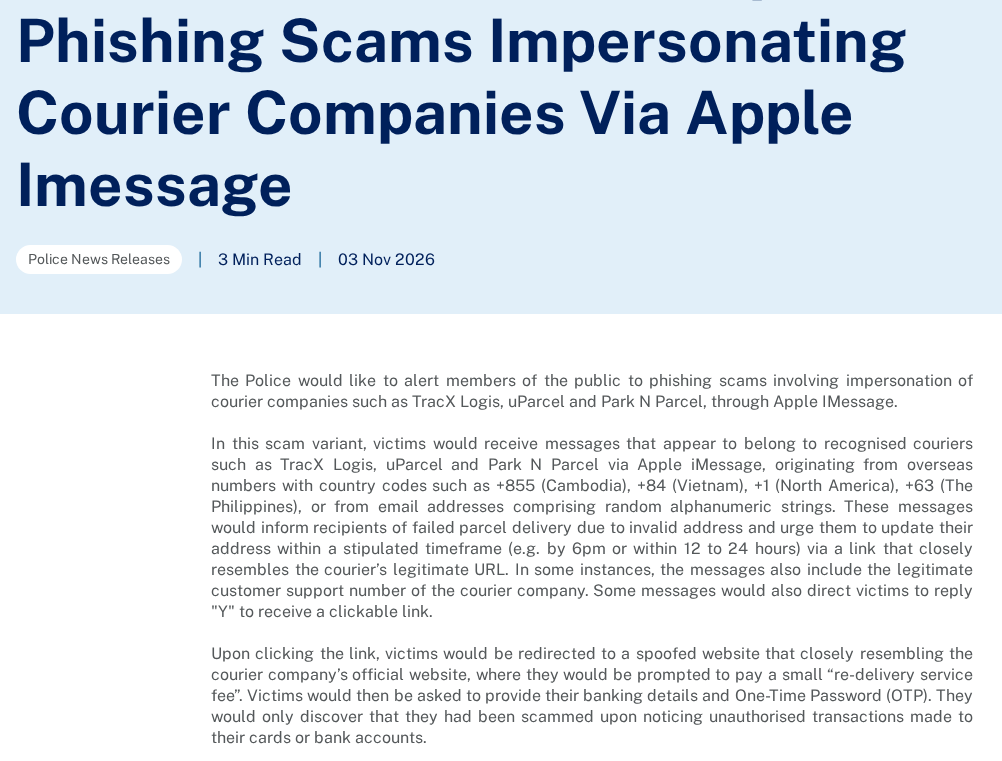
Singapore police named uParcel, TracX Logis and Park N Parcel in a November warning about courier impersonation. The notices describe a failed delivery or invalid address.
The couriers are real, but the request to pay through the spoofed page is not their delivery process. This version deserves particular care if you already expect a parcel.
- The message can set a same-day cutoff or ask you to act within a short number of hours.
- Some versions include an apparent support number or ask you to reply before sending the link.
- The false courier page can request a small delivery fee, banking information and a one-time code.
What uParcel says about its own messages
uParcel says it does not request payment by SMS or WhatsApp. It tells customers to open the genuine app or make independent contact to check a delivery.
A message can say uParcel without coming from the company. A real support number included in a fake message does not turn the page into a real checkout.
The point at which the bank should get involved
If you only saw the notice, start by checking the order with the merchant or courier. If you entered payment details or approved a prompt, call your bank.
The bank can tell which transaction or account action was recorded. The amount displayed on the fake courier form does not answer that question.
How the uParcel Re-Delivery Fee Scam Works
Step 1: Turn an ordinary delivery problem into a deadline
The Singapore Police Force warning describes messages that say an address is invalid. In some examples, the recipient is told to fix it by a set time that day.
That is a real type of shipping problem, which is what makes the claim sound reasonable. But the delivery message must still match an order you can check independently.
Some notices come from an ordinary number or an email address in iMessage. The sender can put a courier’s name in the text without controlling the courier’s system.
The warning does not imply every overseas sender is fraudulent. The stronger test is whether the order, carrier and tracking status agree outside the message.
Step 2: Move the address correction onto a lookalike page
Police say some messages present a link immediately, while others instruct the recipient to reply first. You do not need to respond to decide whether the parcel exists.
One variation can include what looks like a real customer-support number. A phone number and a link in the same message do not independently verify each other.
The false route can carry logos and familiar wording. It is still safer to reach the carrier from an order record or the app you already use.
Start with the parcel number from the original merchant order rather than one printed only in the text. That avoids comparing the suspicious message with another copy of itself.
Step 3: Introduce a payment that sounds too small to matter
The spoofed page can ask for a small re-delivery fee. The low amount makes it easier to proceed before checking whether the carrier asks for payment this way.
uParcel’s own notice rejects payment requests by SMS and WhatsApp. For its customers, that is a more specific test than trying to decide if the amount looks reasonable.
A small amount on the webpage is also a separate fact from the action requested in your banking app. Read the actual approval, including its purpose and amount.
Do not enter a backup card to see whether the page is legitimate. A real parcel does not require you to test an unexpected payment request.
Step 4: Ask for bank details and a security code
The police advisory says the false courier page requests financial details and a one-time password. People reported discovering unauthorized transactions afterward.
A code received from a real bank does not authenticate the page. It can still be tied to an action different from the delivery charge you expected.
If the approval describes a merchant you do not know, adding a card to a device or a transaction you did not start, do not confirm it.
Contact your bank even if you did not see a charge immediately after submitting details. The question is what was exposed or approved, not only what posted that minute.
Check the Real uParcel Order Without Using the Text
Start with the order confirmation from the store or marketplace where you paid. Look for the carrier, tracking number and delivery address associated with that order.
If uParcel is actually carrying it, use the company’s app or its independently reached tracking route. The courier’s own scam notice explains which contact routes it recommends.
If the retailer has not named the carrier, ask the retailer to confirm it. Do not assume uParcel is handling the package because its name appeared first in Messages.
If a real tracking entry shows an address problem, ask verified support how to update it. That can be a separate issue even when the first text was fake.
Be careful with orders for relatives or co-workers. A parcel may legitimately be headed to your address while the person who bought it is the one with its details.
Ask that person to check the original order independently. Do not ask them to forward or test the suspicious link so you can compare screens.
What a matching tracking detail can and cannot tell you
A correct city or a plausible parcel number does not settle who sent the text. A genuine detail can also appear in a message that asks for a false payment.
If the message and the shop both show a delay, resolve the delay inside the shop or courier route you found yourself. Leave the unexpected payment page closed.
If the message refers to a parcel you cannot identify, you have no reason to pay just to find out whose order it is.
Check which sender normally issues your updates
uParcel says its SMS notifications use its official sender ID. In its warning, the company distinguishes these from messages arriving from an ordinary number or email address.
That rule concerns the company’s own SMS, not everything a seller or marketplace might send. Begin with your order if somebody other than uParcel arranged the delivery.
Do not assume a message is an SMS just because it appears in the same app as other texts. The police warning deals specifically with messages delivered through iMessage.
The carrier also says it will not ask for passwords, full card details, security codes or Singpass details by message. Those requests deserve an independent call, not a reply.
Resolve the genuine order if both events happen at once
Check the date of the order and whether the retailer actually sent both items in one parcel. A delay on one shipment may not affect the other.
Ask verified support whether you can arrange a new time without paying anything through the text. Keep any new scheduling information in the existing order record.
If you bought from a marketplace, avoid switching the complaint into a private chat suggested by the message. Keep the seller accountable through the purchase platform.
What to Do If You Replied, Opened the Page or Entered a Code
-
If you only saw the text, leave the link alone and verify the order separately. Report the message through the platform or Singapore’s official scam reporting channels.
-
If you replied, do not follow a new link or continue the conversation. Watch for additional messages that claim the reply started a delivery or payment process.
-
If you opened the page but did not submit details or accept anything, close it. Keep the message so you can describe what happened without going back.
-
If you entered card or bank details, call your bank using its own app or number. Say whether you also shared a security code or approved a prompt.
-
Ask the bank to check for pending items and unexpected approvals. Save its case number, the message time and relevant transaction records from your real account.
-
Report money loss or data exposure to the police as appropriate. In Singapore, the ScamShield alert explains how to check this courier impersonation pattern.
When the amount on the receipt does not match the fee
Write down both figures separately: what the page advertised and what your bank shows. That makes clear why you may not recognize a charge resulting from the interaction.
If you approved a prompt without reading the full description, tell the bank that. Do not claim you sent nothing if you cannot remember how the screen ended.
Use your own payment history rather than an email claiming to show a successful refund. Contact the institution that handled the charge if an offer asks you to pay again.
Send useful evidence without forwarding the threat
For an official report, retain the sender, date and actual text. Share the relevant details through a verified reporting channel rather than posting private card or order information publicly.
When warning family, use a short description of the failed delivery claim and fee. They do not need a clickable version of the link to recognize the story.
If you use message filtering, treat it as a way to sort incoming traffic. It does not make a payment request safe when one still reaches your inbox.
Tell the bank which permission you thought you gave
If the banking prompt named a digital wallet, mention that explicitly. It is a different question from whether an actual courier fee reached your card statement.
If a later caller asks you to undo the payment, decline their instructions and call the bank directly. Do not approve a second action to test the first.
Follow the bank’s advice about card replacement or temporary restrictions. The right step depends on whether the details were exposed and which approvals actually went through.
For an existing legitimate delivery, tell the actual courier only what it needs to verify the shipment. It does not need your bank’s fraud case paperwork.
If an order arrives after you report the message, keep the events separate. A successful delivery does not establish that an earlier payment request belonged to the courier.
If you have no charge to dispute, report the phishing attempt as such. Identify the message and the carrier it claimed without describing a loss that did not happen.
What the November Warning Adds for Local Deliveries
The police warning names three carriers, so the same address story might appear under a different courier’s name. Do not assume each name means a different bank risk.
A change of courier should first appear in your order history or from a merchant you recognize. If your order still names another carrier, ask the merchant to clarify.
The report gives examples of short deadlines, not a universal time limit for fixing a real address. The genuine carrier can explain whether a parcel is awaiting an update.
Do not delete order records when you delete a fake message. Those records are how you can prove which courier was assigned to a genuine parcel.
A support agent can check shipment status without asking you to approve an unrelated financial action. A request to authorize something new belongs with your bank.
To warn staff who receive packages at a shared address, agree on which account holds order confirmations. They can redirect delivery questions without using the message.
Frequently Asked Questions
Is uParcel itself sending the fake fee requests?
uParcel says it does not ask for payments by SMS or WhatsApp. The police warning describes people impersonating the company and other couriers.
Can a real parcel be delayed while the text is fake?
Yes, the two things can happen together. Check the actual status through your merchant or uParcel instead of using an unexpected fee request to resolve it.
Does a genuine phone number in the text prove the link is safe?
A message can copy a public number while linking somewhere else. Get the carrier’s contact information independently and check your order through that channel.
Does replying mean my bank account was accessed?
Replying does not establish that banking information was exposed. Stop responding and contact the bank promptly if you later shared payment details or approved a request.
What if I gave a one-time code for a small payment?
Tell your bank immediately and ask what the code authorized. The amount advertised on the courier page does not establish the amount or purpose recorded by the bank.
Where should I check a uParcel delivery?
Start with the merchant’s order details or the genuine uParcel app. If you need help, find the carrier’s contact information separately from the text.
The Bottom Line
Do not pay a uParcel re-delivery fee through an unexpected message. Check the parcel through your original order or the real courier before changing any delivery details.
If you supplied payment details or a security code, stop the conversation and contact your bank now. Report what was actually requested and what you approved.

Join the discussion
0 commentsShare your experience or ask a question about this article.
Community experiences
Did this happen to you?
Your experience could help someone recognize the same scam. Submit a private report for our team to review.
I experienced this tooReports are reviewed before publication. Sharing publicly is always your choice.
Discussion
Start the conversation
Have a question or something useful to share? Add the first comment.