


A Discord friend asks why you contacted them, but you don’t recognize the message. Around the same time, a security alert appears on your Windows PC.
Those signs are worth checking without rushing to explain them. What you find on each side will help you decide where to start.
Overview
VVS is designed to steal access from a Windows computer
Palo Alto Networks Unit 42 studied VVS, a Windows information stealer that targets material associated with Discord and web browsers. Its research described more than saved passwords.
A stolen sign-in token can let another person use an existing session. That matters if a friend receives a message from your account and you cannot explain it.
The image is a fictional message list, not a captured conversation or an actual record of a victim. It illustrates the point of view of someone checking their account.
The client itself may need attention
Researchers also described altering files associated with the local Discord client to interfere with sessions. Resetting a password while using a compromised installation could create fresh exposure.
This is not evidence that Discord’s service distributed VVS or that a genuine client is malicious. The reported threat involved changes on an affected user’s Windows computer.
Don’t depend on an ordinary app restart to resolve uncertainty about local files. Secure the account from elsewhere and let the device cleanup address the affected installation.
Different evidence points to different recovery work
A Windows detection, a message you didn’t send and an unexpected payment can arrive together. Each needs to be checked where it can actually be confirmed.
A scan can identify a threat on Windows without telling you who read a message or used a stored account. Likewise a changed password does not clean the computer.
Keep the evidence you have in separate buckets:
- Read the original security finding and note whether Windows blocked a file or reported active malware.
- Review Discord access, connected apps and messages from trusted equipment.
- Check email, payment and browser account activity separately if those services were available on the PC.
- Use a trusted installer only after the computer is ready to return to use.
What a VVS Detection Can Mean for Discord
Someone can seem familiar without being the person you know
A message can come from a real account without matching anything its owner did. A friend may be more likely to trust it because they recognize the name.
If your account sent anything suspicious, warn people over a separate channel. Say which message to ignore without attaching the same file or link.
If you moderate a community, ask another authorized moderator to remove unsafe content and pin a short warning. You don’t need to identify every person who viewed it.
A login, a connected app and a message are separate events
A connected app may have access you granted earlier, while a session uses a sign-in that already happened. The right recovery action depends on which one you find.
Use Discord’s account and authorized-app settings from a safe device. Check both because fixing one kind of access does not necessarily remove the other.
You may still need to contact support if someone changed your email address or access to the account. Don’t accept recovery help from unsolicited Discord messages.
A restart prompt doesn’t identify every infection
The researchers described samples that could display a false system error. A normal Windows error has plenty of other explanations, so don’t diagnose VVS from a pop-up alone.
A detection passing through Windows security history is better context than the words on the screen. Record the application’s name and what your security product said, without following the prompt.
The research doesn’t establish a single lure for every affected user. If you can identify a downloaded item or installer, preserve the timeline rather than assuming how it arrived.
What to Check Outside Discord
Start with the mailbox that controls account recovery
Check for login alerts, new forwarding rules or a different recovery method in your primary email.
Use a separate device to open the provider, not a link embedded in an alert.
If you see an unfamiliar forwarding rule, record its existence before removal when safe. A mailbox problem can expose password resets for services far beyond Discord.
Consider what other services the browser kept signed in. A password you never saved can still be associated with an active session that needs to be reviewed.
Compare payment records with what the platform shows
If there is an unrecognized purchase or subscription, check the platform’s own billing area and your card statement. Report the specific transaction through the channel that can verify it.
An unexpected message claiming you bought something doesn’t establish that money moved. Check the bank’s record instead of calling numbers printed in follow-up messages.
Don’t share the full card number or authentication code in public support threads. Use the provider’s secure process if the case requires more details.
Review what the PC could reach, not everything you own
If you used a work browser profile or private administrative account on the PC, notify the team responsible for it. They may need to end work sessions or replace credentials.
If you found a specific security alert for the browser or another installation, retain that alert too. Don’t make one VVS finding explain all future login problems.
There is no need to change every password on the suspect PC to get through the list faster. Start protecting the accounts that let you recover the others.
What to Do if You Suspect a VVS Infection
-
Stop using Discord on the affected Windows PC. If a verified detection indicates the malware ran, disconnect the machine and move sensitive work to another device.
If it is managed by your employer, report the finding and wait for authorized advice before changing files or starting a scan.
-
Recover the account through the official service. Follow Discord’s account recovery guidance from a trusted device if your password or recovery address was changed.
After recovery, review the account’s sign-in protections and enable multifactor authentication if appropriate. Don’t share backup codes, session tokens or passwords with anyone in chat.
-
Review third-party apps and recent activity. In Discord, open User Settings > Authorized Apps and remove access that you don’t recognize or no longer need.
If a payment or moderation action isn’t yours, preserve its reference and report it separately. Revoking an app doesn’t undo a transaction or delete a message someone already received.
-
Tell affected contacts without redistributing the content. Use another channel to tell people which message time or thread to watch for.
Ask moderators to preserve relevant evidence and remove unsafe material where appropriate. Avoid posting copies of downloaded files or sharing entire private conversations.
-
Check important browser and payment accounts on clean equipment. Review recent activity, revoke unfamiliar access and replace exposed passwords from the provider’s own settings.
Keep an incident record, including which access you closed and which reports still need a response. Don’t go back to the old Discord client just to confirm the new password.
How to Remove VVS Stealer From Windows
Step 1: Preserve the record and leave the suspect client closed
Use detection history to get the item and action that the scanner recorded. If you didn’t get an alert, note the account activity and what you know about the PC.
A managed computer may contain logs your organization needs to keep. Contact its security team before restarting, deleting an app or copying files to another device.
Avoid running Discord solely to collect a screenshot. The reported client changes make it more useful to inspect your account from a different device.
Step 2: Uninstall only software tied to your cleanup plan
On a personal PC, open Windows Settings > Apps > Installed apps and use the menu beside Discord to uninstall it if the installed client was affected.
If an identified unwanted program also appears, remove it only when its role is clear. Uninstalling a legitimate application on its own does not necessarily remove the stealer.
Do not copy the old client files or app data into a new installation. A technician can tell you which remaining folders or records should be preserved.
Step 3: Install a reputable scanner from a known source
From a clean computer, get the Malwarebytes installer for Windows. Use an approved transfer method and keep the file separate from the suspect client’s data.
Review the publisher in the Windows prompt before running setup. If your incident plan temporarily isolates the PC, ask support what connectivity the installer needs before reconnecting.
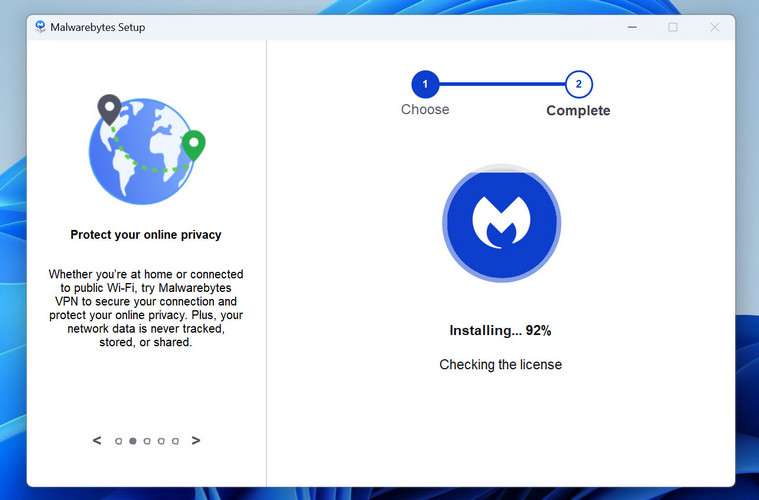
Use the setup screen only to confirm you’re in the correct tool. A prompt asking for Discord credentials would not be part of this installation.
Step 4: Scan the PC and check for a persistent finding
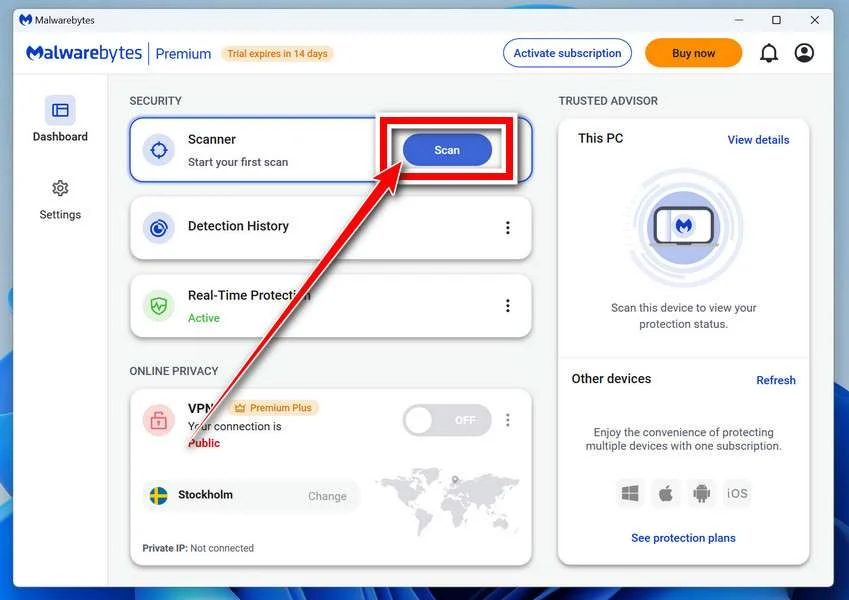
Open Malwarebytes, find the Scanner card and select Scan. Review what it found and use quarantine for verified threats.
If a restart is needed and allowed, check whether the finding returns afterward. Record any additional malware separately and don’t assume it came from the same installation.
The Malwarebytes Premium for Windows option is an affiliate link, not a requirement for manual scanning. A product upgrade doesn’t restore account control.
Step 5: Reinstall Discord only on a trusted Windows setup
When the PC is cleared for normal use, use Discord’s own download page to get the official installer. Don’t restore the previous client folder as part of that process.
If setup keeps failing or the original alert returns, stop. A qualified technician or the MalwareTips support forums can help assess whether a clean rebuild is needed.
Review authorized access again after returning to use. A clean install solves a PC problem, but it won’t make the account’s earlier messages or payments disappear.
How a Community Can Contain Messages Sent From Your Account
Give moderators something they can verify
Tell another moderator the approximate time, channel and account involved. Avoid sending the original attachment, even if you want to prove that it came from the affected account.
If the community has a record of role or permission changes, ask an authorized moderator to review that record independently. Don’t rejoin the suspect client just to check.
Keep the public warning short and specific. A member needs to know which message or link to ignore, not the names of everyone in your private inbox.
If a shared moderator account or staff integration was accessible from the PC, involve the person responsible for it.
They can review that access without blaming everyone who used the account.
Check what was restored before you rely on the account again
After recovery, confirm settings from a trusted device before reopening ordinary moderation work. The account may have changed permissions or sent messages while you were locked out.
If people report another message after you recovered access, save the timestamp and ask whether it is a new message or a notification about an older one.
Look at the existing audit record instead of asking members to forward suspicious content. This reduces the chance that someone opens it again while trying to help.
Make sure other account resets don’t depend on the old PC
Your Discord contacts may be waiting for a reply, but a primary mailbox or work account may be more urgent. Make those changes from trusted equipment before logging back in.
If you need a temporary way to help your community, use a previously approved and independently verified channel.
Don’t create an unofficial support room that people could mistake for the original.
When the issue is resolved, tell moderators which finding was confirmed and which wasn’t. An unexplained message can be worth investigating without proving that every browser credential was used.
Frequently Asked Questions
Did VVS come from the official Discord installer?
The research describes malware targeting Discord information and interfering with a local installation. It does not establish that the official installer delivered VVS.
Does a password change stop every old Discord session?
Treat account sessions and other authorization separately. Use the service’s recovery guidance and review the available access controls instead of assuming a password change answers everything.
Can a friend tell whether a message really came from me?
They can recognize the account, but that may not tell them who controlled it. Confirm through a separate trusted channel and make clear which message not to open.
Does every crash notice mean the stealer is installed?
No, many unrelated issues produce error messages. A reliable product finding or a verified account event is stronger evidence than a crash notice alone.
Can I reinstall the client before scanning the computer?
If the malware may be active, leave the client closed and clean or rebuild the PC first. Use a separate trusted device for account recovery.
Is my browser data safe because Discord was the main target?
The research also describes browser data collection. Check services you actually used on the affected PC, including sessions that stayed active after you closed the browser.
The Bottom Line
If VVS was found on Windows, protect Discord and your recovery email on another device before returning to the affected client. Warn contacts privately about anything your account sent.
Use a trusted cleanup or rebuild process and install Discord from its official route only after the PC is ready. Check the account and the computer separately.

Join the discussion
0 commentsShare your experience or ask a question about this article.
Your progress
Did these steps help?
Let us know how the guide worked for you.
Describe what you see and the step you reached. Keep passwords and other private information out.
Discussion
Start the conversation
Have a question or something useful to share? Add the first comment.