


The message is easy to answer while you’re doing something else. A friend asks you to vote for a child in a ballet competition.
If you already scanned the code, don’t waste time debating whether the contest was real. Start with one screen inside WhatsApp.
Overview
A November Ballet Request With an Older Backstory
Guardian columnist Zoe Williams described receiving a request that appeared to come from her sister. It asked her to vote for a child whose prize would help pay for education.
Williams said she scanned a QR code using WhatsApp.
Her account of that moment explains why the request was persuasive, but it doesn’t establish what anyone subsequently accessed on her account.
This was not the first fake WhatsApp vote.
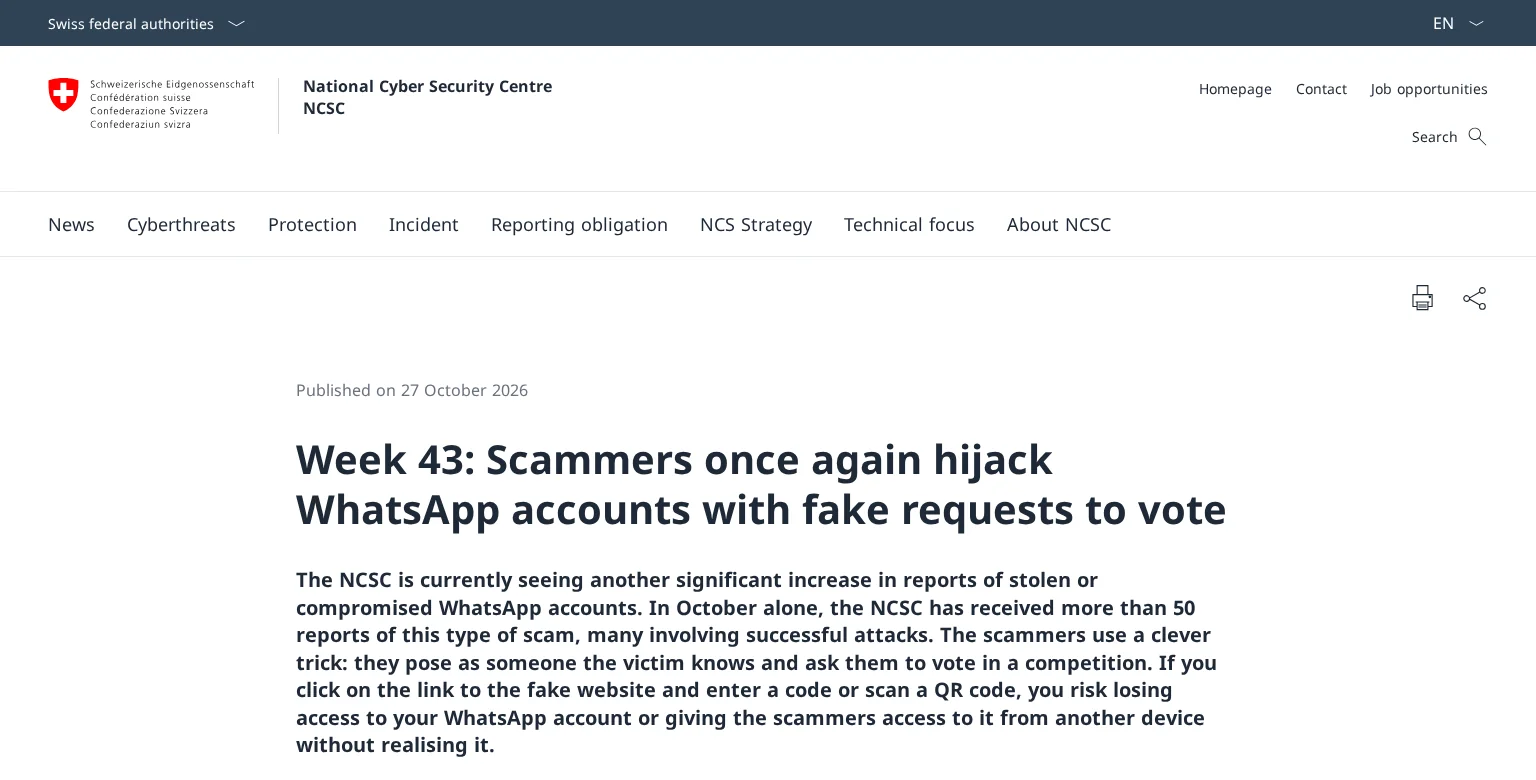
On October 27, Switzerland’s National Cyber Security Centre described a new wave and said it had received more than 50 reports during October.
The agency documented two kinds of requests: scanning a QR code or supplying an SMS registration code. Those requests can create different problems, so the recovery steps aren’t interchangeable.
Keeping Your Chats Open Does Not Rule Out Access
A linked device is a way to use the same WhatsApp account on another trusted device.
It’s normal when the device belongs to you and you set it up on purpose.
The fake vote exploits that distinction. A QR code that you believe is casting a vote can instead be related to linking another device.
On this branch, you may still have access on your own phone.
Opening the app and seeing your usual chats is not the same as checking the list of connected devices.
On the other branch, an SMS code can be used to register WhatsApp under your number on another phone.
You may find that your usual phone no longer opens your account.
Which Part of the Message Did You Act On?
- If you only saw the request, verify it with the person by another route and report the suspicious message.
- If you opened the vote page but took no further action, close it and don’t go back for a screenshot.
- If you scanned a code with WhatsApp and can still open the app, review Linked Devices promptly.
- If you entered a WhatsApp registration code into the page or lost access, follow the account recovery steps below.
- If someone asked you or your contacts for money, treat payment recovery separately from securing the chat account.
If you’re unsure whether you approved a connection, check the device list anyway. You don’t need to interact with the vote page again to find out.
How the WhatsApp Ballet Vote Scam Works
Step 1: The Request Arrives Under a Name You Know
The initial message may come from an actual account that someone else now controls. A familiar name on the screen can be real even when the writer isn’t.
That is an important difference from an unknown number pretending to be a friend. You may already have a long conversation with the account, complete with photos and past plans.
A live chat reply doesn’t settle the question if the stranger can still use that account. Use a separate route you already trust, such as an ordinary call or SMS.
Avoid asking for another copy of the link while you verify. A genuine invitation can wait until you’ve spoken to the person who supposedly sent it.
Step 2: The Vote Gives You an Easy Reason to Continue
The official warning describes fake school or dance competition pages. The thing you’re asked to believe isn’t complicated: a child could win something if enough people help.
Requests like that feel small and kind. You may think less about the source because you’re doing a favor, not making a payment or downloading an app.
Compare the request with what you would do for an actual competition. You would expect to find the organizer or rules without following a link sent privately by a stranger.
If your friend confirms they didn’t send it, tell them their WhatsApp account may be in use elsewhere.
Let them know when the message appeared and whom else it may have reached.
Step 3: A Verification Prompt Changes the Task
The legitimate purpose of WhatsApp’s linked-device feature is to let a person use their account on equipment they trust. A contest doesn’t need that permission to count a vote.
Watch for the change in context. You started on a page about a competition, but the next instruction concerns access to a messaging account.
The Swiss agency also documented a version that requests an SMS code. A code from WhatsApp belongs to the account process named in the message, not the external contest.
Don’t finish the process to see which kind you received. Close the page and use the exposure that already happened to decide which recovery action fits.
Step 4: Access Can Be Used to Reach the Next Person
The account itself can be valuable because the contacts already trust it. The Swiss agency warned that people can receive new vote requests from an account after it is compromised.
A contact may instead be asked for money in a later exchange. Don’t assume that getting back into your account reverses anything another person already approved or sent.
If you secure the account, find out which people or groups received strange messages. Let them know which requests to ignore and ask them to verify any payment separately.
A single screenshot won’t establish everything someone could see. Record what actually changed or was sent, and avoid telling people every old conversation was necessarily copied.
Linked Devices and a Registration Code Need Different Checks
If WhatsApp Still Opens on Your Phone
On an iPhone, open WhatsApp, tap Settings, then tap Linked Devices. On Android, open WhatsApp, open the three-dot menu, and choose Linked devices.
Review each listed session, including any type or activity time WhatsApp displays. If you don’t recognize a device, select it and choose Log Out.
Confirm the entry disappears from the list. If you aren’t sure which entry is yours, you can sign out of uncertain sessions and reconnect only your own equipment later.
This is different from deleting your WhatsApp account or uninstalling the app. Neither is the first action to take when you can still see and remove an unfamiliar connection.
WhatsApp’s device removal instructions also cover trusted devices you need to sign out of. For an unfamiliar device, make the change from the primary phone you already control.
If you can still see a suspicious message after disconnecting the device, keep its date and recipients for your report.
A message that’s already reached somebody won’t disappear from their phone.
Check whether sensitive information was shared during the period you’re concerned about. If a contact sent an access code or payment details, ask them to deal with that provider directly.
If Your Number Was Registered on Another Phone
Use the official WhatsApp app on the phone you control. Start registration with your existing phone number and request verification through the method the app offers.
Enter the new registration code only in the genuine app. The Swiss agency says completing that code step signs out the other person who registered the number.
If WhatsApp subsequently asks for a two-step PIN you didn’t set, follow what the app shows. The Swiss advisory describes a seven-day wait when an unknown PIN can’t be reset.
If your phone has unexpectedly lost cellular service and you can’t receive a code, verify the line with your mobile carrier.
Use a trusted contact route or visit an authorized carrier store.
Wait for the app’s own timer if it asks you to try verification later. Don’t pay someone to speed it up, and don’t send them a code to prove ownership.
Once you’re back in, check the linked-device list again. Registration restores access to the account; don’t use it as a substitute for checking what’s connected.
What to Do if You Have Fallen Victim to This Scam
Leave the voting page and stop sharing account information.
Don’t scan another code to undo the first one or ask the sender to cancel a vote. Close the browser tab and work inside the installed WhatsApp app.
If you used the QR scanner but aren’t sure an action followed, check Linked Devices anyway. Treat an unknown entry as something to remove, not an invitation to investigate it.
Remove any linked device you didn’t knowingly approve.
Open the device list using the iPhone or Android menu above. Select the unfamiliar entry, choose Log Out, then verify it no longer appears.
You can reconnect a device you own later. If an unfamiliar session returns or you’re suddenly signed out of the app, move to the registration steps and seek official support.
Recover registration and turn on your own verification PIN.
If WhatsApp logged you out, register again using your number and the code issued inside the official process.
Don’t paste that code into a website or send it to another person.
After regaining access, go to Settings, then Account, then Two-step verification. Choose a PIN you can remember and enter a recovery email you can access if the app offers it.
Warn the people most likely to trust a message from you.
Reach them by normal phone call, text, or another platform. Say when the strange messages may have started and tell them to ignore any vote or money request.
Ask recipients not to forward the scam link. If they already scanned it, tell them to check their own account rather than assuming your cleanup fixes their device list.
Have anyone who paid contact their own payment provider.
Use the bank’s known number or the payment app opened independently. Give the date, reference, and destination, and explain that the request appeared to come from a compromised account.
Ask whether a pending payment can be stopped or reviewed. Getting control of WhatsApp doesn’t reverse a transfer, and only the payment provider can explain its recovery options.
Keep useful evidence and report the suspicious message.
Note the time, the apparent sender, the type of prompt, and which people received follow-up requests. Keep a copy of any payment receipt if money was sent.
Use the in-app reporting controls if available. If you can’t access the account, open WhatsApp’s contact page in your browser and explain what you already tried.
Frequently Asked Questions
Does Simply Opening the Voting Link Give Someone My Account?
Opening the page isn’t the same as approving a linked device or disclosing a registration code. Close it without following any prompts, and review what else you did.
If you aren’t sure whether a step was completed, check Linked Devices and watch for unexpected registration messages. Don’t open the link again to recreate what you saw.
Can Someone Read My Messages Even While I Can Still Read Them?
An unrecognized linked device can have access even while the account remains usable on your phone. Exactly what could be visible depends on the linked session and what was synced.
Don’t make promises about what was or wasn’t seen. Remove the session first and alert anyone who may have received a new message or shared sensitive information with it.
I Scanned With My Regular Camera. Should I Still Check?
Pointing a regular camera at a code is different from approving a link to your WhatsApp account. What matters is whether you then followed a prompt or shared a code.
If you can’t remember what happened after the scan, checking the device list is useful.
Look for a connection you didn’t make rather than assuming the camera view alone proves access.
My Friend Says They Sent the Message. Can I Vote Now?
Verify what they intended to send using a route you trust, and ask them about the contest organizer. They may have forwarded a link without seeing its later prompts.
A vote should never depend on sharing a WhatsApp registration code or connecting a messaging account to someone else’s device.
Stop if you reach either request, even with a real friend’s invitation.
Does Setting a PIN Remove an Existing Linked Device?
WhatsApp’s two-step PIN helps protect registration. It doesn’t replace the separate job of looking through Linked Devices and signing out of a session you didn’t authorize.
Do both checks if you aren’t sure which prompt you approved. Start by removing an unfamiliar connection if your regular phone still has access.
Should I Tell a Group to Delete Every Message From Me?
Start by identifying which requests weren’t yours and when they appeared. Give the group a way to confirm anything involving money or account access without replying in the affected chat.
If a source message is needed for a report, keep it privately without resharing the link. You can warn members without erasing the entire history of your real conversations.
The Bottom Line
Don’t scan a WhatsApp code to cast a vote. Call the person who appears to have sent the request, using a route you already trust.
If you already scanned it, look for unfamiliar linked devices now. If you gave away a registration code or can’t open your account, use the official app to start recovery.

Join the discussion
0 commentsShare your experience or ask a question about this article.
Community experiences
Did this happen to you?
Your experience could help someone recognize the same scam. Submit a private report for our team to review.
I experienced this tooReports are reviewed before publication. Sharing publicly is always your choice.
Discussion
Start the conversation
Have a question or something useful to share? Add the first comment.