


A Zelda music calendar looks like a good gift for somebody who already has the games. The tiny records are the part that makes it memorable.
Before you buy it for December, find out what those discs actually do.
Overview
The offer is about a player, not just a box of collectibles
A Zelda music Advent calendar ad can look like an ordinary fan gift until you read how the included player supposedly works. That’s the expensive part to get wrong.
In an offer documented by Malwarebytes, 25 discs supposedly worked with a standalone player. The same listing also described streaming services and using a phone app to change songs.
There are products that use small discs as collectibles or tags. That doesn’t mean a set advertised online contains the hardware needed for the demonstration.
A licensed soundtrack is a separate product
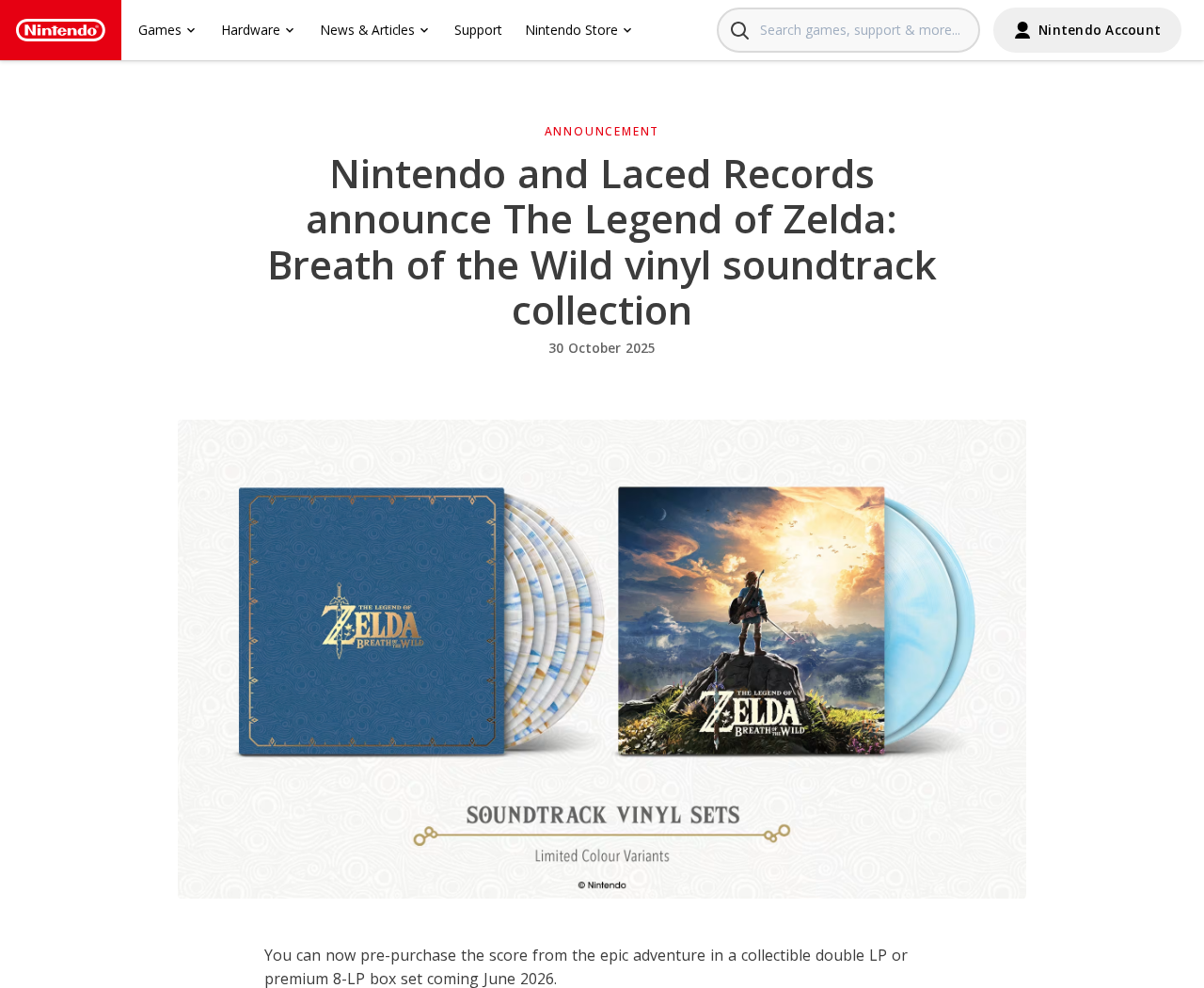
Nintendo has publicly announced Zelda soundtrack releases with Laced Records. Those releases have their own titles, formats and product descriptions.
Nintendo’s vinyl announcement, shown above, gives fans a comparison. It is not the calendar seller’s listing or a claim that Nintendo tested the calendar.
If the calendar listing uses the Zelda name and artwork, look for an independently identifiable license or manufacturer. A familiar character doesn’t identify the business taking your money.
Five details to check before committing
You don’t need to know anything about electronics to catch the central problem. Ask for answers you can compare with the box you would receive:
- Playback: Does the included player make sound on its own, or does a phone play the music?
- Contents: How many discs are included, and are the player and its power supply included?
- Music: Are the tracks actually stored locally, or do the discs open links?
- Seller: What company takes the order and authorizes a return?
- Delivery: What date is promised, and what happens if it misses the first day of Advent?
If the listing can’t answer the playback question consistently, don’t buy it as a working player. Treat the product name and photos as promises, not specifications.
Three Different Things the Mini Discs Might Do
Real standalone playback
A genuine standalone player has to get audio from somewhere. A disc might contain recorded music, or it might tell the player which track to play from local storage.
Neither design requires a streaming account for offline music. Both require real playback hardware, power and a way to hear the audio.
Look for a manual that explains those pieces. It should say how you power the unit, what a disc does and what happens if you have no phone.
A video with music playing over the footage doesn’t answer that. It is easy to show a disc turning while the soundtrack comes from the video edit.
A phone reads a tag
A small disc can carry a tag that points to a song or playlist. A compatible phone reads it, and the phone opens the destination.
That can be a fun gift if the listing says so clearly. It is not the same experience as dropping a disc into a player and hearing music offline.
The disc may still be useful without a moving player at all. Ask whether the base actually reads the tag or simply holds the disc for display.
If the seller tells you to reassign songs using a phone app, ask what the app changes. Updating a link isn’t the same as recording audio on a disc.
Streaming needs a way to reach the service
Spotify, Apple Music and YouTube normally need a device that can reach the service. Some apps can play previously downloaded material under their own rules.
A player that never connects and has no compatible app can’t fetch a new streaming track on demand. A phone could do that, but then it’s doing the work.
There may be two separate modes that explain an honest listing. The manufacturer would need to say what works offline and what needs a phone or connection.
The reported ad didn’t make that distinction clear. That’s a better reason to skip it than trying to decide whether one glossy picture looks convincing.
What the Calendar Promotion Actually Shows
The calendar isn’t the documented Nintendo record release
Nintendo’s soundtrack announcement names Laced Records and describes a double LP and an eight-LP box. It gives fans a specific release to check.
Those are vinyl releases of the Breath of the Wild soundtrack. They aren’t 25 tiny discs with an Advent calendar player.
If you want the licensed record, look it up by the release name. Don’t assume a store can sell you that edition by displaying the same artwork.
If you want something to open daily, check the actual contents and audience. A decorative miniature can still be a good gift when it’s honestly described and priced.
The sales pressure doesn’t explain the hardware
Malwarebytes reported resetting timers and review counts entered into the site theme in the stores it examined. Those are observations about those pages, not every calendar seller.
A low-stock message cannot answer whether there is a speaker, and a counter can’t tell you what a verified purchase included.
Read the product details before adding anything. If they shift from offline music to opening streaming links, don’t let the sale timer rush you past the difference.
The report also described optional charges such as shipping protection and queue skipping on some stores. Check whether any extra is selected before comparing prices.
The deadline is part of what you’re buying
A calendar that turns up halfway through December is different from a gift that works on day one. Look for a delivery promise, not only a dispatch estimate.
Check whether the seller actually guarantees the date or merely says most parcels are shipped in a few days. Shipping and arrival aren’t interchangeable.
If the calendar is a pre-order, save the date shown when you pay. Ask what cancellation options exist if it won’t arrive in time.
For US orders, the FTC’s online shopping guidance explains seller shipping promises and what to do when an order is delayed or doesn’t arrive.
Who Is Selling the Calendar, and Who Handles Returns?
The checkout name matters more than the artwork
A box with Nintendo characters may come from a seller you have never heard of. Identify the business behind the checkout and the address handling complaints.
Malwarebytes reported that the investigated calendar stores didn’t list a business address or phone number. Don’t transfer that finding to a different listing without checking its own terms.
Check the name at the payment stage against the seller’s legal page. If you can’t tell who is responsible for shipping, stop before sharing payment details.
Find the return destination before paying
A parcel may ship from one place and need to go back somewhere else. An address on a shipping label isn’t automatically authorized for returns.
Read the rules for a faulty item or a product that doesn’t match its description, not just the change-of-mind policy. Ask whether returns need prior authorization.
If there is no clear route for returning an opened calendar, don’t assume support will make an exception once you’ve broken the seal to test the player.
A support form should be able to answer a plain question
Ask whether the set plays music out loud with your phone switched off. Ask which exact model is included and whether you can read its instructions.
A reply pointing back to the same promo clip doesn’t settle that. You’re asking whether a gift will do a specific thing, not whether it looks nice.
Don’t send a card number or photo of an identity document to ask a product question. A seller doesn’t need either to explain how its speaker works.
A licensed design still needs a traceable product
A named licensor, publisher and product identifier give you something to verify. A generic statement about a partnership is not the same as a product authorization.
A marketplace carrying a listing doesn’t establish that the brand approved it. Check the publisher’s product announcement or an independently identified licensed seller.
If all you can confirm is a printed design, price it as decoration. Don’t pay a premium for licensed audio or offline playback that the listing can’t substantiate.
What to Do If You Ordered a Zelda Music Calendar
- Save the exact offer. Keep the listing, order summary and delivery date. Capture the wording about the player, music and included discs.
- Request cancellation promptly if the offer doesn’t match what you wanted. Use the seller’s written support channel. Save confirmation rather than treating a sent message as an approved cancellation.
- Document what actually arrived. Photograph the contents, packaging and model label. Keep any instructions showing whether the set requires a phone.
- Ask for the remedy that fits. State whether the problem is missing contents, late delivery or a player that doesn’t do what was advertised.
- Contact the payment provider if the seller won’t resolve it. Ask about its dispute deadline and provide the order, delivery evidence and relevant product claims.
- Verify follow-up messages separately. Use the carrier or merchant’s known site before acting on an unexpected delivery fee or refund request.
If the manual directs you to an unfamiliar app download, stop. Use the official app store to check the developer instead of installing software from a QR destination.
A delivery update doesn’t need your email password. If a page asks you to sign in to get a parcel or refund, close it and check independently.
Check the Gift Against the Person Who Will Use It
A phone-based set can be disappointing for a child who doesn’t have a compatible phone. Even a well-made tag is no substitute for the promised standalone player.
If you’re buying for a collector, ask about the track list and whether the discs hold anything. A numbered set isn’t necessarily a set of playable records.
For someone with an actual turntable, look at the record size and format. A novelty disc may not be usable on the equipment they already own.
Also check what happens when the link changes. A disc that points to a web page can lose its purpose if the seller or service removes that page.
The seller should say whether all the contents work on day one. If it won’t explain which features need a separate account, don’t buy for a deadline.
If the product needs a phone anyway, consider whether a licensed album or a music gift the recipient can use already would serve them better.
Check the intended age and any small-parts warning if it’s a child’s gift. Tiny discs and decorative accessories may be intended for display rather than play.
Finally, distinguish a gift box from the player in the promotional video. A photo that shows both does not override a contents list that includes only discs.
Frequently Asked Questions
Is a Zelda music Advent calendar an official Nintendo product?
The offer described here isn’t the same as Nintendo’s documented Laced Records release. The use of Zelda imagery alone doesn’t establish a calendar’s licensing.
Verify the exact calendar and manufacturer through an official release or a confirmed licensed retailer. Don’t treat another Zelda product as confirmation.
Can a mini record play without a phone?
Yes, if the package includes genuine playback hardware and locally available audio. The seller should be able to explain how the sound is produced.
A tag that opens a streaming link relies on the device opening it. Ask the seller to demonstrate the exact set without a phone or connection.
Do all music Advent calendars use the same technology?
No. A set could contain decorative discs, tags that open songs or playable media. The name alone doesn’t tell you which you’re buying.
Look for a model, a manual and an unambiguous list of contents. The same-looking gift box can be advertised with different promises.
Does a checkout badge prove the calendar is genuine?
No. A checkout service handles payment; it doesn’t prove the ad has a license or that the package contains a working player.
Check seller identity and return terms before paying. The ability to pay by card is not an independent review of the product.
What if the calendar arrived but the discs only open links?
Compare the instructions with what the original listing promised. If you bought a standalone player, save both the promise and the instructions requiring a phone.
Ask the seller to resolve that mismatch in writing. If it won’t, give the payment provider the same specific comparison rather than only saying the gift disappointed you.
Is a late delivery automatically fraud?
No. The delivery date and the seller’s response matter, but a late package alone doesn’t prove a deliberate scam.
Keep the date shown at purchase and any later delay notices. Ask for cancellation or another remedy through the seller and payment provider if appropriate.
The Bottom Line
Don’t buy the Zelda calendar from an ad that promises standalone music but can’t explain where the audio comes from. Choose a clearly documented gift instead.
If you’ve already paid, save the playback promise and delivery date. Use those details to request cancellation or dispute a product that doesn’t match what you ordered.

Join the discussion
0 commentsShare your experience or ask a question about this article.
Discussion
Start the conversation
Have a question or something useful to share? Add the first comment.