


A Zoho notice says your account needs a billing profile check. It supplies a due date and a reference number, the little details that usually make administrative mail feel ordinary.
If your business runs through that inbox, an interruption is the last thing you want. The question is where that notice expects you to go.
Overview
A billing request dressed up as account security
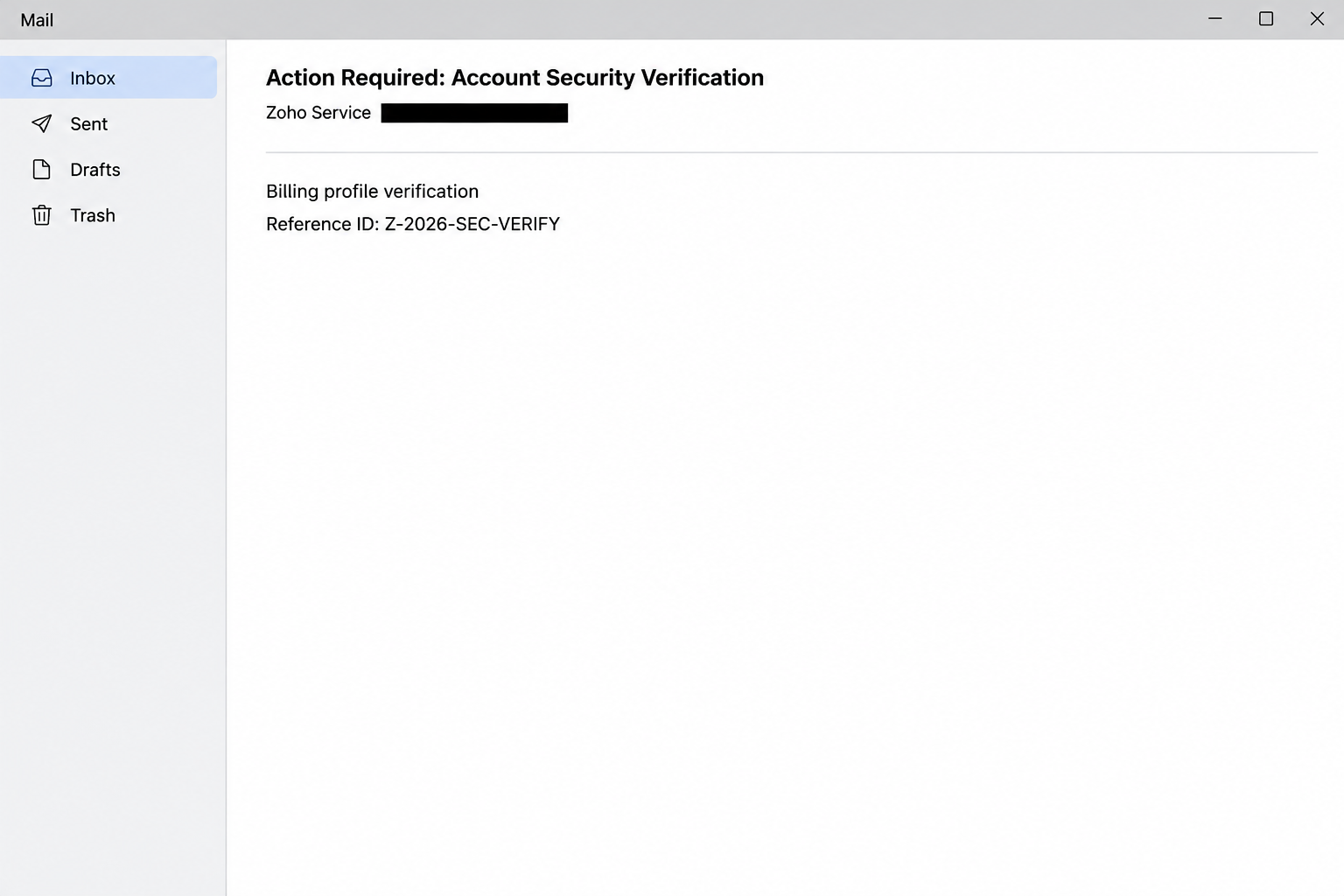
The Zoho account security verification scam presents a billing profile check as mandatory. The example gives April 7, 2026 as a deadline and includes the reference Z-2026-SEC-VERIFY.
That date belongs to the captured example, not to a deadline you need to meet. A copy with a different date can make the same request.
The email uses a Zoho-branded layout and an accounts-and-compliance signature. It warns that your service may be interrupted, without identifying a failed payment or giving you an invoice to reconcile.
A genuine subscription question has a place to check it. This message sends you somewhere else before you can compare its story with your actual plan.
The destination asks for your account password
The button in the documented example opened a page on beiratir[.]pt, a domain unrelated to Zoho’s sign-in service. The page called itself a Zoho Mail and Billing sign-in.
It invited visitors to supply an email address or mobile number and their password. The fields were for account access, even though the email advertised a billing profile check.
Zoho is a real mail and business software provider. The warning concerns the message and the imitation sign-in, not the legitimate platform or its actual billing procedures.
The strongest clue is the difference between what brought you to the page and what you are being asked to hand over.
What the sample shows, and what it doesn’t
The message and its destination show a credential-phishing route. They don’t show that Zoho suspended an account, collected a payment or changed anyone’s subscription.
The separate Zoho Workplace payment-update scam starts with an allegedly declined charge. This one demands a compliance check under a reference number and shows no card form.
- The urgent notice supplies a deadline but no independently verified account event.
- The reference number is printed in the email, not confirmed inside your account.
- The address bar on the reported landing page points outside the genuine service.
- The sign-in asks for credentials rather than showing a specific invoice or recorded payment.
- The documented page does not establish a software download or an infection.
There is no need to prove who controls an unfamiliar website before you close it. Its request for a Zoho password is enough reason to stop and check independently.
How the Zoho Account Security Verification Scam Works
Step 1: The notice makes an ordinary inbox feel at risk
The request doesn’t start with a prize or a refund. It sounds like the sort of small administrative chore that gets in the way of a busy morning.
For a shop owner, missing messages could mean missing an order or a supplier’s answer. For an office administrator, the warning seems to threaten everyone using the same domain.
The sender never has to prove that outcome. Putting an interruption next to a simple-looking task gives the reader a reason to hurry past the details.
A deadline can be real, but it cannot verify itself. If the plan is actually in trouble, someone authorized to see the account can check its status separately.
Step 2: The reference number makes the request look routine
A formatted code gives the eye something official-looking to land on. The example’s reference includes the year and a security abbreviation, but those details aren’t connected to an authenticated record.
The email borrows a corporate name and a compliance role. Someone who has previously dealt with vendor verification may recognize the formality without recognizing the sender.
The visible sender name can be chosen by whoever prepares the message. Even when your mail app shows a display name you recognize, expand it to see the actual address.
You do not need to trace the sender’s entire infrastructure. The practical question is whether the claim survives a check made outside that email.
Step 3: A fake billing check becomes a fake login
The button is phrased as a profile check. The next page changes the request into a sign-in, as if paying for mail and accessing the mailbox were the same task.
A copied logo and a familiar-looking password field make that jump easy to miss. Pay attention to the browser’s address bar, not text printed inside the page.
An address containing a recognizable name or a path mentioning Zoho isn’t necessarily operated by Zoho. In this example, the address belongs to a different registered domain.
Seeing HTTPS doesn’t fix that domain mismatch. It can protect your connection to the site without telling you that the site deserves your password.
Step 4: The account becomes more valuable than the invoice
A password entered on the imitation page can be collected outside Zoho. Respond based on what you entered, even if you haven’t seen a sign-in alert.
An intruder may see quotes, contacts and pending invoices. A believable follow-up can then arrive inside an ongoing conversation rather than as an obvious new message.
Look at the financial context separately. A fake billing notice doesn’t mean your card was charged, and an exposed company mailbox isn’t automatically evidence that money left the account.
The concern grows if you approved a sign-in or shared a code. A password and a second factor may let someone start a session.
Step 5: Normal mail delivery can conceal an account problem
You don’t have to be locked out for your account to be at risk. Someone may try the password later, see what they can access or leave settings changed.
An unfamiliar forwarding rule could send copies of selected mail elsewhere. A new recovery address or connected app deserves attention even if you can still read and send mail.
A strange city in a sign-in list isn’t conclusive by itself. Compare its device, browser and time with your own activity, especially if you use a VPN or travel regularly.
The useful test now is not whether the warning sounded right. It’s whether you recognize the people, sessions and settings that can reach the real mailbox.
Check Your Real Zoho Subscription Without Using the Email
Use the account that owns the subscription
If you have the administrator role for Zoho Mail, open the Zoho Mail Admin Console from a new tab. Use your organization’s known sign-in route if you normally use one.
In the console, choose Subscription, then Overview. Check the organization and plan before comparing licenses and add-ons with the purchase records you already have.
You can select Manage Subscription to view details in the store. Under Your Store Details, open Payment Method to inspect the saved method without changing it.
The observable result is the plan and billing information in your own organization. The suspicious email’s reference number is not needed to get there.
Keep account access separate from billing authority
If the Subscription menu isn’t available, you may not have the necessary role. Ask the administrator who ordinarily handles your plan to verify it from their console.
Send them the subject and reference code through your internal contact route. Don’t pass around a clickable button from the original notice or ask colleagues to test its destination.
An actual billing issue and a phishing email can happen on the same day. If there is a real problem, handle it from the account you opened yourself.
The Zoho subscription guide describes that admin route. It does not ask individual mailbox users to verify payment by typing their credentials into a third-party form.
What to Do if You Have Fallen Victim to This Scam
-
If you only received it, keep your response simple. In Zoho Mail on the web, open the mail preview without following its links. Open More options and select Report Phishing.
Look for the message in Spam after reporting. Give company IT the original through its usual reporting channel if they need it, not by forwarding the lure to everybody.
If you’re using an app without that option, switch to the web client. Seeing the message without downloading or running anything isn’t a reason to assume your device is infected.
-
If you clicked, separate what opened from what you entered. Close the tab and write down whether you typed a password, submitted a code or approved a sign-in.
If the page showed a failure after you entered a password, don’t rely on the error. Treat the password as exposed and continue from your usual account route.
If you installed software or ran a file after clicking, tell IT immediately. Use a different, trusted device to recover the account.
-
Change the exposed password from a trusted device. Open Zoho Accounts independently, select Security, and choose Change Password in the Password section.
Enter your current password, enter and confirm a unique replacement, then click Change Password. Choose to terminate active sessions when prompted, especially if you already see unfamiliar activity.
If locked out, enter your account address at the real sign-in page and choose Forgot Password. Pick a recovery email or mobile number you still control.
Request a code and enter it only on that verified page. Complete your configured second factor if prompted, set a new password, and sign in again to confirm recovery.
If your recovery methods no longer work, contact your administrator or write directly to support@zohoaccounts.com for a personal account. Use the official recovery guide to verify that address.
If your employer uses single sign-on, ask IT to reset the exposed credential through the identity provider. Change any reuse of that password on other accounts as well.
-
Verify that somebody else’s access didn’t survive. In Zoho Accounts, open Sessions, then Active Sessions. Select unfamiliar entries to compare their start times and devices with your own activity.
Choose Terminate for an unauthorized session. Return to the list and confirm the entry is gone, allowing for additional sessions you recognize on your own devices.
Next, open Connected Apps from Sessions and inspect unfamiliar entries. Select the unauthorized app and choose Delete; don’t disconnect business tools you haven’t identified.
Tell the administrator immediately if a session keeps appearing or recovery details aren’t yours. Save times and device names rather than including passwords or live access codes in a report.
-
Look for changes inside Zoho Mail. On the web, open Settings, choose Mail Accounts, and select the affected address. Look under Forwards for unfamiliar destinations.
Switch unauthorized addresses off or select their delete icon. Reopen the section and check the entries are off or gone. If the control is locked, notify your administrator.
In Settings, open Filters and review incoming rules that redirect, delete or hide messages. Disable or delete unauthorized rules and confirm they no longer appear as active.
Check Sent and Trash for messages you didn’t send. If an altered invoice went out, contact the recipient by an established number before anyone acts on new banking instructions.
-
Escalate if you exposed payment details. If you entered card data on a suspicious page, call your issuer using the number on the card.
If someone sent a transfer after taking instructions from a compromised mailbox, have the payer call their bank immediately and ask about a recall or a fraud case.
Keep the amount, transfer reference, invoice versions and what each person received. A reset protects future access, but it doesn’t recall a payment or retrieve copies of mail.
-
Make sure your team can close the incident. Send IT the claimed deadline, reference ID, time of the interaction and what actions actually happened. List each device or account involved.
Keep any ticket number and confirm the administrator reviewed the account if work credentials were exposed. If they identify affected conversations, coordinate any notifications through the company’s normal process.
If your account allows an authenticator app, open Multi-Factor Authentication in Zoho Accounts and choose Set up Now beside OTP Authenticator. Use your existing trusted authenticator to enroll.
Scan the code shown on that real account page, click Next, and enter the app’s current code in Zoho. Click Verify and confirm the authenticator appears in your settings.
In MFA Recovery Options, select Generate new codes if allowed. Save them offline, knowing old codes become invalid. Test sign-in before removing any other working recovery method.
If your organization controls these settings, leave its security configuration alone and ask IT which second factor to use. Never send setup codes or recovery codes to a caller.
Frequently Asked Questions
Is Z-2026-SEC-VERIFY a genuine Zoho billing reference?
It appears in the fake notice described here. Its format doesn’t authenticate an order or invoice; verify any actual subscription issue through the organization’s own Zoho Mail Admin Console.
Does the date in the email still apply?
April 7, 2026 was the deadline printed in one example, not a deadline Zoho set for your account. A sender can replace it when reusing the message.
Why does the page say Zoho Mail and Billing?
It borrows the billing story to explain a password request. The page’s address, not the words on the form, determines who receives anything you enter.
Should I reset my password if I never clicked?
No reset is necessary just because the message arrived. Report the email and check the account independently if you have another reason to suspect unusual activity.
What if the email reached a non-Zoho address?
The name in the message doesn’t prove what service holds your account. If you submitted a password, secure the account that actually uses that password, even if it’s elsewhere.
Can my subscription really have a problem at the same time?
Yes, but don’t let that coincidence establish the email’s legitimacy. Have the subscription owner check billing in the real console and handle anything outstanding there.
The Bottom Line
Don’t use the account verification button in this Zoho notice. The documented destination is an imitation sign-in on another domain, not where your organization manages its mail subscription.
If you gave the page a password or approved a sign-in, secure the real account, end unfamiliar sessions and check forwarding. Send the billing question to your administrator separately.

Join the discussion
0 commentsShare your experience or ask a question about this article.
Community experiences
Did this happen to you?
Your experience could help someone recognize the same scam. Submit a private report for our team to review.
I experienced this tooReports are reviewed before publication. Sharing publicly is always your choice.
Discussion
Start the conversation
Have a question or something useful to share? Add the first comment.