Troubleshoot 32bit - 64bit Software Questions

JakeXPMan

Level 17
Thread author
Verified
Top Poster
Well-known
Oct 20, 2014
825
3
3,245
1,568
45
USA
Briefly explain your current issue(s)
None
Steps taken to resolve, but have been unsuccessful
None
I recently got a new 64 bit Windows 7 PC.

Since I have had 32bit PC's before, I was wondering should I install all 64 bit software if its available?
I'm a little confused on what is the better choices... so far,
I have;

IE 11 x64

Firefox x86

CCleaner x64

MBAM x86


As I found out, the main download link is not always (x64) on the download webpages. Can I install the x64 versions of Malwarebytes and Firefox over the 32 bit (x86) versions I have already ? Or will it cause an error... should I keep Firefox and MBAM as is?

I also would like to know what are the benefits and downfalls of the 32 and 64 bit versions. Does adobe run 64bit flash player more efficiently then the 32 bits?

It seems IE 11 x64 runs youtube much smoother then x86 Firefox, or is that the browser itself? ...

Any light on this subject will be great, and not too familar yet with the bit versions, so far I learned 64 bit can handle a lot more RAM.
 
Exactly. I was not saying 64 bit will not run or utilize under 8 gig, but was pointing out that one would not see much benefit of running 64 bit under that amount.

Just wanted to give OP a better idea of what a 64bit system will run up normally. I actually mistook your reply as the OP's so I worded it as I was wording it for him. Sorry about that.
 
  • Like
Reactions: illumination
Upvote 0
Exactly. I was not saying 64 bit will not run or utilize under 8 gig, but was pointing out that one would not see much benefit of running 64 bit under that amount.


64 bit IE will be smoother then 32 bit firefox..
You just will not see the full benefit of 64 bit application with that little of ram.

I see, so it spikes all RAM when needing it?, or memory has more room to move at faster pace with 8 Gigs? Does more memory even when not used up serve a purpose?

(update)
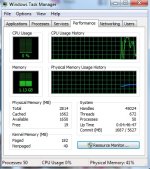
I opened my IE 11 (MSN.com) and Firefox (malwaretips.com) w/6 add ons enabled.

50 processes total, on 3G RAM. Windows 7 64bit OS.

Paint Picture created to show the usage on resources with a 64 and 32bit browser both running on my desktop PC.
 

Attachments

  • TM.jpg
    TM.jpg
    81.3 KB · Views: 422
Upvote 0

Linus is funny for sure, but he is wrong about 32 bit. 32 bit can only recognize up to 3 gig of ram, no matter how much ram is installed on the 32 bit system.

Open google chrome 32 bit on a 32 bit system with 3 gig of ram, run 25 tabs, now do the same with google chrome 64 bit on a 64 bit system with atleast 8 gig of ram, and tell me which one is still running smooth and which one is now lagging.
 
  • Like
Reactions: frogboy
Upvote 0
Can Chrome 32 & 64 both be installed side by side?

Flash is both 32/64 combine.
Java needs to install 64 bits seperately, right?

And Antivirus & WebShield works irrespective of 32 or 64 bits browsers i.e works with both?
 
Upvote 0
Linus is funny for sure, but he is wrong about 32 bit. 32 bit can only recognize up to 3 gig of ram, no matter how much ram is installed on the 32 bit system.

Open google chrome 32 bit on a 32 bit system with 3 gig of ram, run 25 tabs, now do the same with google chrome 64 bit on a 64 bit system with atleast 8 gig of ram, and tell me which one is still running smooth and which one is now lagging.
He is right it is around 4GB of ram
 
  • Like
Reactions: OokamiCreed
Upvote 0
To clarify all the information:

1)If you are under 64 bit system then you can install 32 bit without any problems but opppsite if you are in 32 bit system.

2) Its just utilize the RAM capacity for x64 but function of programs are same.

3)Try those browser like Cyberfox and few others which design for performance wise.

4) No need to install both x64 and x86 of Flash player or Chrome just choose one.

Except 7-zip where use x64 if you are using an OS under of that architecture to obtain Window Shell right click.

5) We know that Windows sub divide other amount of RAM based on your hardware type you've installed.
 
Upvote 0
I opened IE from program files 86 & IE from program files.
Task Manager shows the same 2 processes for both
i.e opened IE from program files 86, Task Manager shows iexplore.exe & iexplore.exe 32.
And opened IE from program files, Task Manager shows iexplore.exe & iexplore.exe 32.
Same processes for both?
 
Upvote 0
UPDATE:

It is the browser of IE 11 that runs smoother then Firefox 35.

It was not the 64 bits as IE 11 is the 32 bit version, received to me by Windows Update. :)

So far my one 64 bit install remains CCleaner 64. Runs very well and low RAM at 6ks.
 
  • Like
Reactions: frogboy
Upvote 0
If you round 3.5 it becomes 4.
If any rounding would be done, it would be rounded down, because what ever OS you are running will use some of that. Windows xp 32 bit for example would use around .5 of that 3.5 leaving only 3 gig of usable ram for the system, no matter how much was installed. Even though technically 32 bit can use up to 3.5 exactly, the OS no matter which one, will utilize some of that.
 
Last edited by a moderator:
Upvote 0
If any rounding would be done, it would be rounded down, because what ever OS you are running will use some of that. Windows xp 32 bit for example would use around .5 of that 33.5 leaving only 3 gig of usable ram for the system, no matter how much was installed. Even though technically 32 bit can use up to 3.5 exactly, the OS no matter which one, will utilize some of that.
I always learned in math if equal or bigger than 5 then you round up.
 
  • Like
Reactions: frogboy
Upvote 0
Why not for MSOffice?
Addons/plugins won't work since they aren't made for the 64-bit version of Office. The Office installer will warn you about that and doesn't even default to installing the 64-bit version at all. (Evernote updates will fail completely with Office x64 installed.)

--+--

The maximum 32-bit address space is 2^32 = 4GB. The reason we don't get the full 4GB as RAM is that ROM and I/O for all the pieces/parts also need to be in that address space, leaving typically 3-1/8 to 3-1/4 GB.
 
  • Like
Reactions: Venustus
Upvote 0