Hot Take About KTS migration to new product line!

I decided to uninstall plus (good for now 139 days) to see if Kaspersky would upgrade a Total security (that's good till Aprill 2024 I have,) after uninstalling and installing Total. Got blue screen then tried installing twice and both times got a install error, called it a day and went back to plus which reinstalled with no problem, maybe if I uninstalled registry record it would consider my Total security license and not block which I suspect might have happened
 
Kaspersky Security Cloud licenses almost have the same features as K.Plus :)
Dear @harlan4096 in the past I bought KTS from Amazon.com and recently also converted it to K+.
Now I only left 80 days of it.
If I buy Kaspersky Plus 2023 from Amazon Germany website, can I extend my current K+ considering that if on activation I connect to Germany via a VPN? Thank you so much.
 
People move all the time, it's not anybody's business where and who activated the product that person already paid for.
 
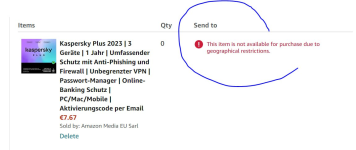
1680472735514.png
I asked a friend to buy it for me, which I have to pay for him, but he said he couldn't buy. Screenshot above. Why?
 
But question: When doing clean installation of Windows, then how many times is the for activation limit? More than two times, then I have to ask the Kaspersky support to reset my key?
@harlan4096 will be able to answer here, but the hardware ID should remain the same throughout all reinstalls and the key should not have a limit how many times it will work.
 
@harlan4096 will be able to answer here, but the hardware ID should remain the same throughout all reinstalls and the key should not have a limit how many times it will work.
Agree. As with Bitdefender, it recognizes the device over the OS reinstall. It just may be a MyKaspersky maintenance thing of deleting the previous device and Add Device (on the new Windows install). But, as you said, let the pro stop by and confirm things, I don't want to steer anyone wrong :)
 
The normal procedure to do a new clean K. install without license issues would be:


1.- Go to Your "My Kaspersky" site area, then in Devices, unlink Your system from the current license.

2.- In Your Kaspersky product, delete the license manually.

3.- Uninstall Kaspersky using its standard uninstaller in Windows Control Panel -> Programs and Features, without keeping any data remaining in the system (license data, etc.)

4.- In the new system, download installer (You can do also via Your "My Kaspersky" site area), install and activate/connect the product with Your "My Kaspersky" credentials.
 
Last edited:
Thank you so much Harlan, while I try NOT to do a clean Windows installation anymore, which sometimes I do due to the old habits only; and in the past I used to contact support of Kaspersky via support ticket to reset my activation code.
 
I am really impressed by the new product line. I have upgraded to standard version after it became avl. in my country around 1-3 weeks back. Looking forward to using it as @harlan4096 has tested its auto remediation of threats successfully for a very few threats. which were not getting the same action in KIS.
 
Hi @harlan4096,

I'm a little confuse about migration from KIS to Kaspersky Standard in my region Malaysia.
Fyi, I had KIS installed in Malaysia, with 69 days remaining.

1) Can i download the new K-Standard trial version from US website and install over existing KIS (Malaysia region), with existing license activated?

2) Looks like the distributor in Malaysia doesn't offer any new product line-up yet. Since i still have 69 days before KIS expire, could it be possible to purchase a KIS renew activation and activate in K-Standard?


Thanks in Advance.
 
1.- You can, but the product probably will warn You about it is not focused on Your country region.

2.- I would wait until K. Standard is available in Your country. You can renew Your KIS license, and later easily migrate directly to K. Standard just installing over KIS :)
 

Recently browsing

Members who viewed this thread in the last 5 minutes

Back
Top