Advice Request Adblock Detection: How to circumvent

Share practical recommendations that address the author's needs.

LDogg

Level 33
Verified
Top Poster
Well-known
Browsing the web like normal and I come across this site, when you have an adblocker enabled, it loads up a different page if an Adblocker is detected. My question is; how can a this website (Review about Avast) be circumvented to prevent it loaded a new page when it detects at adblocker?

Full link for website in question: Avast Free Antivirus review: Free of charge, full of features

~LDogg
 
Which adblocker are you using? The page loads fine for me in uBlock Origin without any annoyance or adblocker detection. With Adguard extension there's a huge on your face type of cookie notice which can be gotten rid of by subscribing to EasyPrivacy filter list.
 
Which adblocker are you using? The page loads fine for me in uBlock Origin without any annoyance or adblocker detection. With Adguard extension there's a huge on your face type of cookie notice which can be gotten rid of by subscribing to EasyPrivacy filter list.
Nano Adblock.

This page comes up after loading the website: Screenshot

It's annoying really, I wanna see what the review says xD

~LDogg
 
That page loads clean and clear here also. I use an anti-adblocking filter in uBlock Origin gotten off github. It has a very naughty title so I ain't posting here. Although I could, but then, where would I go next?

Anyone who wants the link to the raw github .txt, I can message you. Or, maybe some of you have guessed which list I'm referring to. It's seems effective but I also have the EasyList enabled, along with some others. (y)
 
Nano Adblock.

This page comes up after loading the website: Screenshot

It's annoying really, I wanna see what the review says xD

~LDogg
I think it's time to say farewell to Nano and go with the original uBlock Origin instead.
No ad block message with that and don't add too many filters.

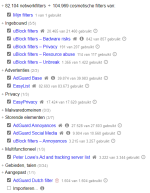
For reference, these are my filters:
Aantekening 2020-04-30 191432.png
 
Going to use Adguard a second, see what it's light

~LDogg
I use "only" the extension.
Three options I change are on general: disable "allow search ads and the self-promotion of websites" and "activate of the most appropriate filters automatically" on miscellaneous: I enable "use optimized filters".
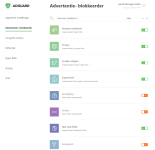
A good overview of the extension here:
 
I use "only" the extension.
Three options I change are on general: disable "allow search ads and the self-promotion of websites" and "activate of the most appropriate filters automatically" on miscellaneous: I enable "use optimized filters".
A good overview of the extension here:
Still happening even with Adguard, maybe it's Brave?

I'm not sure how to turn this off for adblocking to test it.

~LDogg
 
Still happening even with Adguard, maybe it's Brave?

I'm not sure how to turn this off for adblocking to test it.

~LDogg
Have you cleared all cookies? Any other extension that can interfere? What filters do you use in AdGuard?
Disable Brave shields:
You can’t disable it entirely, but you also shouldn’t have to. If you navigate to Settings --> Default Shields Settings, you can configure Brave to “Allow all” or "not block"whatever you’d like.
 

Recently browsing

Members who viewed this thread in the last 5 minutes

Back
Top