
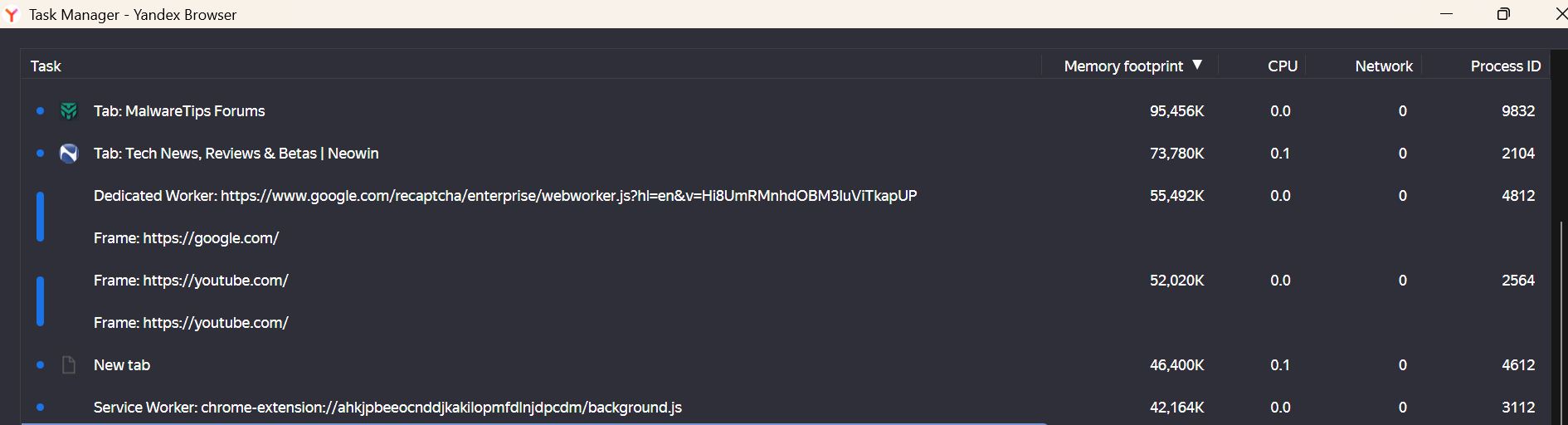
When installed on Edge browser, Adguard extension consumes more than half a GB of RAM, while on Yandex browser it only takes less than 50 MB, with same filters activated in both!



Open MalwareTips from your Home Screen or desktop. Follow discussions, find answers and pick up where you left off.
If you cannot find an install option, update your browser or use its bookmark option to keep MalwareTips close.
After installation, open the app and sign in. Enable push notifications in Preferences if you want alerts. On iPhone and iPad, push requires a Home Screen web app and iOS or iPadOS 16.4 or later.
Sign in to manage notificationsInstallation is optional. Your notification settings stay under your control.
All data was cleared before trying, cache and even cookies.This could be due to differences in how Edge and Yandex handle extensions. Try to clear Edge's cache or reinstall the Adguard extension. If the issue persists, please report it to Adguard's support team for further assistance.

I see. In this case, it's best to reach out to Adguard's support team directly. They can help identify and resolve the issue.All data was cleared before trying, cache and even cookies.
On edge, no websites were open while taking the snapshot.This depends on which websites are opened at the moment. On some websites ad blocker needs to work harder as they contain more ads while others might have just few things to block, hence the higher RAM usage.
MV3 from google store; tried also the old one MV2 which is still available on Microsoft store; still high RAM usage but less, almost the half of the newer one.Is this Adguard MV2 or MV3?

Adguard pulls a lot of tricks to get around MV3 requirements. And it has a lot of features, on both versions, that likely account for its performance. Compare your real-world experience of UBOL in basic mode which is entirely declarative. The browser does all the work, not the extension.MV3 from google store; tried also the old one MV2 which is still available on Microsoft store; still high RAM usage but less, almost the half of the newer one.
Now its consumption is getting higher in Yandex too; I'm going back to uBlock origin lite.Adguard pulls a lot of tricks to get around MV3 requirements. And it has a lot of features, on both versions, that likely account for its performance. Compare your real-world experience of UBOL in basic mode which is entirely declarative. The browser does all the work, not the extension.
You might try checking Adguard's performance by switching Edge's tracking prevention settings and see if that makes a difference.

It's really hard to beat uBlock Lite, isn't itNow its consumption is getting higher in Yandex too; I'm going back to uBlock origin lite.View attachment 288525


Actually, AG is blocking ads better than the uBlock origin lite (not the regular version); however, it consumes much more RAM.It's really hard to beat uBlock Lite, isn't it
It's really hard to beat uBlock Lite, isn't it
UBOL in basic mode works best for me in Edge. Bump up protection on sites as needed.Actually, AG is blocking ads better than the uBlock origin lite (not the regular version); however, it consumes much more RAM.
Every choice involves a tradeoff of some sort. Find and use what works with your browsing style. Enjoy life!If you switch to Firefox, you get best of both worlds—best ad blocking with much less RAM usage.
The only downside of Firefox that dark webpages need dark reader; in Edge or Yandex, I just use flags.If you switch to Firefox, you get best of both worlds—best ad blocking with much less RAM usage.

I don't understand, why would that be a con? Dark Reader extension lets you fine tune dark mode for each website, if it isn't optimized for it. I tried that flag on Chrome and Brave, and it sometimes completely broke the design of the website making it completely unreadable.The only downside of Firefox that dark webpages need dark reader; in Edge or Yandex, I just use flags.
Yandex has extra brilliant feature, manual switch of dark webpage flag for each website.

The other downside of Firefox is the excessive SSD writes.The only downside of Firefox that dark webpages need dark reader; in Edge or Yandex, I just use flags.
Yandex has extra brilliant feature, manual switch of dark webpage flag for each website.
That's the advantage of Yandex dark switch; when dark mode is not properly implemented, I switch it off for that specific page.I don't understand, why would that be a con? Dark Reader extension lets you fine tune dark mode for each website, if it isn't optimized for it. I tried that flag on Chrome and Brave, and it sometimes completely broke the design of the website making it completely unreadable.
Btw I was pleasantly surprised that Firefox using ETP on Strict blocks fine amount of ads. I'm using AdGuard Public DNS, and along with Firefox ETP, uBlock Origin's only job is to block ads which are coming from domains that also serve legit content and to remove ad placeholders.
Didn't use Vivaldi for a long time; good news.The other downside of Firefox is the excessive SSD writes.
Vivaldi has a built-in dark website option too.
Unfortunately, Yandex Browser is no-go for me because of privacy issues.That's the advantage of Yandex dark switch; when dark mode is not properly implemented, I switch it off for that specific page.
Members who viewed this thread in the last 5 minutes


