

The MalwareTips app
Your community, one tap away.
Open MalwareTips from your Home Screen or desktop. Follow discussions, find answers and pick up where you left off.
- Home Screen access
- Optional push alerts
- Your community
You're ready to explore.Explore what's new
Installation instructions
iPhone & iPad
- Open MalwareTips in Safari and tap Share. You may need to open the Page Menu first.
- Choose Add to Home Screen. If it is not listed, use Edit Actions to add it.
- Keep Open as Web App enabled if shown, then tap Add.
Android
- Open MalwareTips in Chrome or another browser that supports app installation.
- Open the browser menu and look for Install app, Install and create shortcut, or Add to Home screen.
- Choose Install and confirm. Wording varies by browser.
Desktop
- Chrome: use the install icon in the address bar, or the menu under Cast, save and share.
- Edge: open the menu, then More tools, Apps and Install this site as an app.
- Safari on Mac: choose Share or File, then Add to Dock. Firefox on Windows: look for the web apps button in the address bar.
If you cannot find an install option, update your browser or use its bookmark option to keep MalwareTips close.
Keep up with your conversations
After installation, open the app and sign in. Enable push notifications in Preferences if you want alerts. On iPhone and iPad, push requires a Home Screen web app and iOS or iPadOS 16.4 or later.
Sign in to manage notificationsInstallation is optional. Your notification settings stay under your control.
You are using an out of date browser. It may not display this or other websites correctly.
You should upgrade or use an alternative browser.
You should upgrade or use an alternative browser.
New Update AdGuard for Windows - Stable Updates Thread
-
 Thread starter
Petrovic
Thread starter
Petrovic
- Start date
- 373 Replies
- 130,941 Views


I didn't have it in the past, but it happened quite recently (before the alleged BSOD bug fix update). I had a BSOD in the middle of my online game which never happened before I installed ESET on the system and ran it with AdGuard. So yeah, the issue mainly but not exclusively happens when AdGuard and a third-party AV both utilize the WFP driver. AdGuard needs more optimization.Interesting... I use Adguard for Windows along with ESET IS and haven't experienced any BSOD issues.

Adguard for Windows v7.20.3

 github.com

 adguard.com
Have you ever noticed how the app crashes even when you have a freshly updated version? Well, notice no more! This hotfix solves that problem. From now on, just pure ad blocking all the way.
Release 7.20.3 · AdguardTeam/AdguardForWindows
Disclaimer AdGuard for Windows is not an open-source project. We use Github as an open bug tracker for users to see what developers are working on. Have you ever noticed how the app crashes even w...
github.com
Versions history | AdGuard
Download and learn about AdGuard versions — latest version, release date, version history, patches, features, etc.

Nightly build much more stable than release channel. lolAdguard for Windows v7.20.3
Release 7.20.3 · AdguardTeam/AdguardForWindows
Disclaimer AdGuard for Windows is not an open-source project. We use Github as an open bug tracker for users to see what developers are working on. Have you ever noticed how the app crashes even w...
Versions history | AdGuard
Download and learn about AdGuard versions — latest version, release date, version history, patches, features, etc.
Adguard for Windows v7.21
 github.com
 adguard.com
Along with the usual bug fixes, this version brings something new for those using Microsoft’s latest Copilot+ PCs. The Tracking protection section in AdGuard for Windows now includes an option Disable Windows Recall.
Release 7.21 · AdguardTeam/AdguardForWindows
Disclaimer AdGuard for Windows is not an open-source project. We use Github as an open bug tracker for users to see what developers are working on. Along with the usual bug fixes, this version bri...
github.com
Versions history | AdGuard
Download and learn about AdGuard versions — latest version, release date, version history, patches, features, etc.
BTW, this is what happened to me after updating
 github.com
Keeps crashing non-stop after updating to latest version 7.21 · Issue #5576 · AdguardTeam/AdguardForWindows
Please answer the following questions for yourself before submitting an issue Filters were updated before reproducing an issue I checked the knowledge base and found no answer I checked to make sur...
github.com
Adguard for Windows v7.21.1
 github.com
adguard.com
Filtering engines have been hit by enemy bugs, but AdGuard is stronger than that. With this hotfix, updated libraries bring you a cleaner and safer web.
Release 7.21.1 · AdguardTeam/AdguardForWindows
Disclaimer AdGuard for Windows is not an open-source project. We use Github as an open bug tracker for users to see what developers are working on. Filtering engines have been hit by enemy bugs, b...
github.com
Versions history | AdGuard
Download and learn about AdGuard versions — latest version, release date, version history, patches, features, etc.
Adguard for Windows v7.21.2
 github.com
adguard.com
Here’s an additional technical update following the previous one. In it, we’ve fixed bugs and kept working on the app stability.
Fixes
Release 7.21.2 · AdguardTeam/AdguardForWindows
Disclaimer AdGuard for Windows is not an open-source project. We use Github as an open bug tracker for users to see what developers are working on. Here’s an additional technical update following ...
github.com
Versions history | AdGuard
Download and learn about AdGuard versions — latest version, release date, version history, patches, features, etc.
Adguard for Windows v7.21.3
 github.com
adguard.com
A small bug has crept into the release. That’s why we’re publishing a hotfix today: so you can enjoy the service, and we can get on with some bigger tasks.
Release 7.21.3 · AdguardTeam/AdguardForWindows
Disclaimer AdGuard for Windows is not an open-source project. We use Github as an open bug tracker for users to see what developers are working on. A small bug has crept into the release. That’s w...
github.com
Versions history | AdGuard
Download and learn about AdGuard versions — latest version, release date, version history, patches, features, etc.

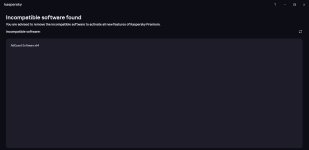

That happens every now and then. Should be solved quickly by AdGuard. Last time I had this I ran in no major problem but a blue screen around once a month.Kaspersky Premium marks the latest version of Adguard for Windows v7.21.3 (5089) as incompatible application and recommends deletion.
In this regard, the Adguard team stated that they had contacted Kaspersky but had not received any response.That happens every now and then. Should be solved quickly by AdGuard. Last time I had this I ran in no major problem but a blue screen around once a month.
F
ForgottenSeer 114717
Anyone notice that AdGaurd does not block advertisements within Windows Apps? For example, the Weather app? At least not in the UK, Turkiye, and North America.
Is Modern UI hosted apps checked in the filtered apps section in Adguard network settings?Anyone notice that AdGaurd does not block advertisements within Windows Apps? For example, the Weather app? At least not in the UK, Turkiye, and North America.
F
ForgottenSeer 114717
YesIs Modern UI hosted apps checked in the filtered apps section in Adguard network settings?
AdGuard for Windows 7.22 Released
adguard.com
Versions history | AdGuard
Download and learn about AdGuard versions — latest version, release date, version history, patches, features, etc.


With the new version, the application can now be downloaded from the Microsoft Store, which may have compatibility implications.The new version 7.22 feels slower than the previous one in general browsing. Surprisingly Kaspersky stopped showing adguard as incompatible software notification with the new version.
Recently browsing
Members who viewed this thread in the last 5 minutes
You may also like...
-
 New Update Adguard v8 released
 -

-

-

-