Setup PCPC setup
Hi,
My security setup for 2022 onwards.
Open for any comments/suggestions.
Thanks
Andy
My security setup for 2022 onwards.
Open for any comments/suggestions.
Thanks
Andy


Open MalwareTips from your Home Screen or desktop. Follow discussions, find answers and pick up where you left off.
If you cannot find an install option, update your browser or use its bookmark option to keep MalwareTips close.
After installation, open the app and sign in. Enable push notifications in Preferences if you want alerts. On iPhone and iPad, push requires a Home Screen web app and iOS or iPadOS 16.4 or later.
Sign in to manage notificationsInstallation is optional. Your notification settings stay under your control.
Imported from an earlier discussion · awaiting owner confirmation
Earlier staff assessment. The reviewer, date and configuration version were not recorded. It has not been verified against the current Hub setup.
How members rate the shared configuration. This is community feedback, not a security test.
Shared by the member. This is a configuration record, not a device scan.


Thanks,
I wasn't sure as the F-Secure extension sits very quietly in the background but the Malwarebytes Browser Guard has a count of items blocked.
Have removed Malwarebytes Browser Guard for now.

 www.malwarebytes.com
Just to inform, Malwarebytes Browser Guard counts even for blocked ads, so that's probably the main reason why it shows more "activity..."
Browser Guard: 100% free ad blocker browser extension
Malwarebytes Browser Guard for Chrome, Firefox, Safari and Edge helps protect your online privacy from ad trackers and more.

I'd choose either VoodooShield or Simple Windows Hardening.Possibly looking to add one or a combination of Windows Firewall Control, Simple Windows Hardening and O&O ShutUp ?
Is this overkill with current set-up ?
I never really used WFC, I always used Firewall Hardening which is from the same developer as Simple Windows Hardening:I already have VoodooShield Pro running so I think I will stick with that.
Would WFC add much over the build it Windows Defender Firewall do you think ? I have never had a separate Firewall Program before as previously i have picked software suites with firewall protection built in.

 malwaretips.com
It's portable so you don't have to install or uninstall anything.Just so I know,If I were to install Firewall Hardening and later uninstall it, do the firewall settings revert back to the default rules of the Windows Firewall ?
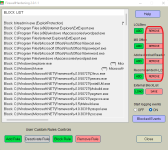
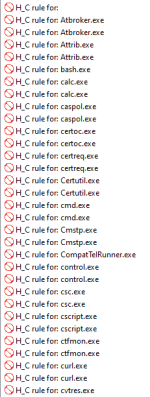
Better read all the information that is provided in the thread I sent you.I have Firewall Hardening on my PC now and have added Recommended H_C. Does recommended incorporate LOLBins and MS Office or do you add these separately as required ?
The user can add/remove some predefined rules: 'LOLBins', 'MS Office', 'Adobe Acrobat Reader', 'Recommended H_C'. They are visible on the right of the application GUI.
« 'LOLBins' rules are related to Living Of The Land executables from system folders, which are known to be commonly abused by malc0ders.
« 'MS Office' and 'Adobe Acrobat Reader' rules are related to Word, Excel, PowerPoint, Equation Editor, and Acrobat Reader applications.
« 'Recommended H_C' is a part of 'LOLBins’. These rules are suited to users who installed the Hard_Configurator Windows hardening application and applied the <Recommended Settings>.
No problem! if you still have any questions, just ask. I am pretty sure that you won't face any issues tho. After applying the rules you probably won't even notice any difference.Thanks
I had a read of that thread but still wasn't sure after reading it !

No problem! if you still have any questions, just ask. I am pretty sure that you won't face any issues tho. After applying the rules you probably won't even notice any difference.
One thing though... I'd recommend enabling the logging feature, so that you can check what's blocked.
Members who viewed this thread in the last 5 minutes


