Advanced Security  (From forum thread)AMD1's PC Security Config

Current configurationWindows 11
Version 1Updated
30 replies

Copied from AMD1's forum thread – not yet confirmed as current by the owner

Suggestions on the main improvements
Staff assessment Advanced Security· From forum thread

Taken from the forum thread's label. The reviewer and date were not recorded, and staff have not re-checked it against the current setup.

Device & operating system

, 3 answers
Operating system
Windows 11
Main use of this computer
For home and private use
Usage and exposure
Visiting familiar websites, Working from home, Online shopping and card payments, Logging into my bank account, Downloading software and files from reputable sites

Protection & updates

, 13 answers
Real-time protection
Windows Security
Device firewall
Microsoft Defender Firewall
On-device encryption
Windows BitLocker / Device Encryption
Device sign-in security
Windows Hello PIN or biometric sign-in (face / fingerprint / Touch ID)
Security updates
Allow security updates and latest features
Update channels
Allow stable updates only
User Account Control (UAC)
Notify me only when programs try to make changes to my computer
Smart App Control
Off
Network firewall
Enabled
Custom security settings
Defender UI
CyberLock with recommended Smart Firewall enabled
Adguard Desktop
Periodic malware scanners
Noton Power Eraser
Malware sample testing
I do not participate in malware testing
Environment for malware testing
N/A

Browsing, accounts & privacy

, 4 answers
Browsers and extensions
Microsoft Edge Browser (not used)
Firefox Browser (Default)
Malwarebytes Browser Guard
Adguard Extension
Enpass Extension
Secure DNS
Adguard Public DNS
Desktop VPN
Adguard with Adguard DNS Protection
Password and passkey manager
Enpass paid version

Backup & recovery

, 2 answers
File and photo backups
Network Attached Storage Device syncing data drive
System recovery
Macrium reflect (paid version)
AOMEI Backupper (additional recovery option)
EaseUS Home (additional recovery option)
Backup of C Drive daily
Backup of external D(data) drive daily ( contains Document, Photos, Videos, Music and Desktop folders)

Apps, specs & notes

, 5 answers
Maintenance tools
Windows disk cleanup utility
Windows defragment and optimise drives utility
Wise Care 365 (used occasionally)
Subscriptions
None
Computer specs
Lenovo All in One
8GB RAM
SSD
AMD Ryzen 7 5700U with Radeon Graphics
Notable changes
Replaced
Windows Hybrid Harnening Light (Windows Hardening) and Freedome VPN
Removed
O&O Shutup10+ (Privacy)
Added
Defender UI
Malwarebytes Browser Guard
Adguard VPN
Feedback preference
Suggestions on the main improvements
Community rating

Community rating

How members rate the shared configuration. This is community feedback, not a security test.

Not rated yet
An open invitation for useful feedback.

Sign in to rate this setup

Go to discussion

Copied from the member's forum thread. This is a configuration record, not a device scan.

One of 211 member setups in the Security Setup Hub. Browse setupsGet yours checked

Original discussion fields (as posted in the thread)
Thread details
Last updated
Jan 19, 2025
Main use of this computer
For home and private use
Operating system
Windows 11
On-device encryption
Windows BitLocker / Device Encryption
Device sign-in security
    • Windows Hello PIN or biometric sign-in (face / fingerprint / Touch ID)
Security updates
Allow security updates and latest features
Update channels
Allow stable updates only
User Account Control (UAC)
Notify me only when programs try to make changes to my computer
Smart App Control
Off
Network firewall
Enabled
Real-time protection
Windows Security
Device firewall
Microsoft Defender Firewall
Custom security settings
Defender UI
CyberLock with recommended Smart Firewall enabled
Adguard Desktop
Periodic malware scanners
Noton Power Eraser
Malware sample testing
I do not participate in malware testing
Environment for malware testing
N/A
Browsers and extensions
Microsoft Edge Browser (not used)
Firefox Browser (Default)
Malwarebytes Browser Guard
Adguard Extension
Enpass Extension
Secure DNS
Adguard Public DNS
Desktop VPN
Adguard with Adguard DNS Protection
Password and passkey manager
Enpass paid version
Maintenance tools
Windows disk cleanup utility
Windows defragment and optimise drives utility
Wise Care 365 (used occasionally)
File and photo backups
Network Attached Storage Device syncing data drive
Subscriptions
    • None
System recovery
Macrium reflect (paid version)
AOMEI Backupper (additional recovery option)
EaseUS Home (additional recovery option)
Backup of C Drive daily
Backup of external D(data) drive daily ( contains Document, Photos, Videos, Music and Desktop folders)
Usage and exposure
    • Visiting familiar websites
    • Working from home
    • Online shopping and card payments
    • Logging into my bank account
    • Downloading software and files from reputable sites
Computer specs
Lenovo All in One
8GB RAM
SSD
AMD Ryzen 7 5700U with Radeon Graphics
Notable changes
Replaced
Windows Hybrid Harnening Light (Windows Hardening) and Freedome VPN
Removed
O&O Shutup10+ (Privacy)
Added
Defender UI
Malwarebytes Browser Guard
Adguard VPN
Feedback preference

Suggestions on the main improvements

Thanks,

I wasn't sure as the F-Secure extension sits very quietly in the background but the Malwarebytes Browser Guard has a count of items blocked.

Have removed Malwarebytes Browser Guard for now.

Just to inform, Malwarebytes Browser Guard counts even for blocked ads, so that's probably the main reason why it shows more "activity..."
 
From the setup owner View current setup
Just to inform, Malwarebytes Browser Guard counts even for blocked ads, so that's probably the main reason why it shows more "activity..."

Thanks that makes sense. It was just the F-Secure extension seems so quiet which is a good thing in a way.
 
From the setup owner View current setup
One thing I am not sure of with F-Secure SAFE is the protection it provides for incoming emails and attachments, spam etc (not email address monitoring). With other products I have had these have had an Outlook add-in and something to manage good/spam email.

Presumably F-Secure is monitoring email activity but just does not have a spam filtering/logging facility ?

Comments appreciated thanks.
 
Possibly looking to add one or a combination of Windows Firewall Control, Simple Windows Hardening and O&O ShutUp ?

Is this overkill with current set-up ?
I'd choose either VoodooShield or Simple Windows Hardening.

F-Secure + Simple Windows Hardening + Windows Firewall Control seems like a nice combination to me. F-Secure has good signatures for PE-files as it is using Avira engine. Sadly the Avira engine is quite weak at detecting scripting malware, so Simple Windows Hardening is a nice addition in my opinion.

So it's up to you, but SWH + VoodooShield is overkill in my opinion and doesn't add any major value to your config.
 
I already have VoodooShield Pro running so I think I will stick with that.

Would WFC add much over the build it Windows Defender Firewall do you think ? I have never had a separate Firewall Program before as previously i have picked software suites with firewall protection built in.

I never really used WFC, I always used Firewall Hardening which is from the same developer as Simple Windows Hardening:

 
Just so I know,If I were to install Firewall Hardening and later uninstall it, do the firewall settings revert back to the default rules of the Windows Firewall ?
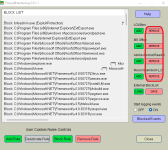
It's portable so you don't have to install or uninstall anything.

When you launch the tool for the first time, there won't be any rules added. You can choose which ones you want to add on the right side. When you want to remove the rules again, you just need to click on the remove buttons:
Screenshot 2022-05-14 124158.png

In case you want to check wether the rules are applied, you can always proceed like this:

1. Access the Windows Security Center
2. Click on the Firewall tab
3. Click on advanced settings
4. Click on outbound rules
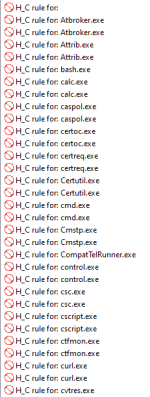
5. There you should see all the rules created by Firewall Hardening:
Screenshot 2022-05-14 124557.png
 
I have Firewall Hardening on my PC now and have added Recommended H_C. Does recommended incorporate LOLBins and MS Office or do you add these separately as required ?
Better read all the information that is provided in the thread I sent you.

Here a short abstract:
The user can add/remove some predefined rules: 'LOLBins', 'MS Office', 'Adobe Acrobat Reader', 'Recommended H_C'. They are visible on the right of the application GUI.

« 'LOLBins' rules are related to Living Of The Land executables from system folders, which are known to be commonly abused by malc0ders.

« 'MS Office' and 'Adobe Acrobat Reader' rules are related to Word, Excel, PowerPoint, Equation Editor, and Acrobat Reader applications.

« 'Recommended H_C' is a part of 'LOLBins’. These rules are suited to users who installed the Hard_Configurator Windows hardening application and applied the <Recommended Settings>.

As you don't have Hard_Configurator installed, you should probably use the LOLBins rules. If you have any Microsoft Office software like Word or Excel installed, you can add the MS Office rules too. And if you are using Acrobat Reader, you can add those rules as well.
 
Thanks

I had a read of that thread but still wasn't sure after reading it !
No problem! if you still have any questions, just ask. I am pretty sure that you won't face any issues tho. After applying the rules you probably won't even notice any difference. (y)

One thing though... I'd recommend enabling the logging feature, so that you can check what's blocked.
 
From the setup owner View current setup
No problem! if you still have any questions, just ask. I am pretty sure that you won't face any issues tho. After applying the rules you probably won't even notice any difference. (y)

One thing though... I'd recommend enabling the logging feature, so that you can check what's blocked.

Thanks and yes I spotted the logging feature and enabled it.

I have added LOLBins and MS Office
 
Last edited:

Join the discussion

Write your reply below. You'll create a free account or log in before it's posted.

Recently browsing

Members who viewed this thread in the last 5 minutes

Back
Top