New Update Announcing Windows 11 Insider Preview builds [Mega-Thread]

Hello Windows Insiders, today we’re releasing Windows Insider Preview Build 29553.1000 to the Windows 11 Insider Canary Channel on the optional 29500 build series.
What’s new in Canary Build 29553.1000

Changes and Improvements gradually being rolled out with toggle on*

  • This update includes platform changes in moving to a new active development build.

[Feedback Hub]

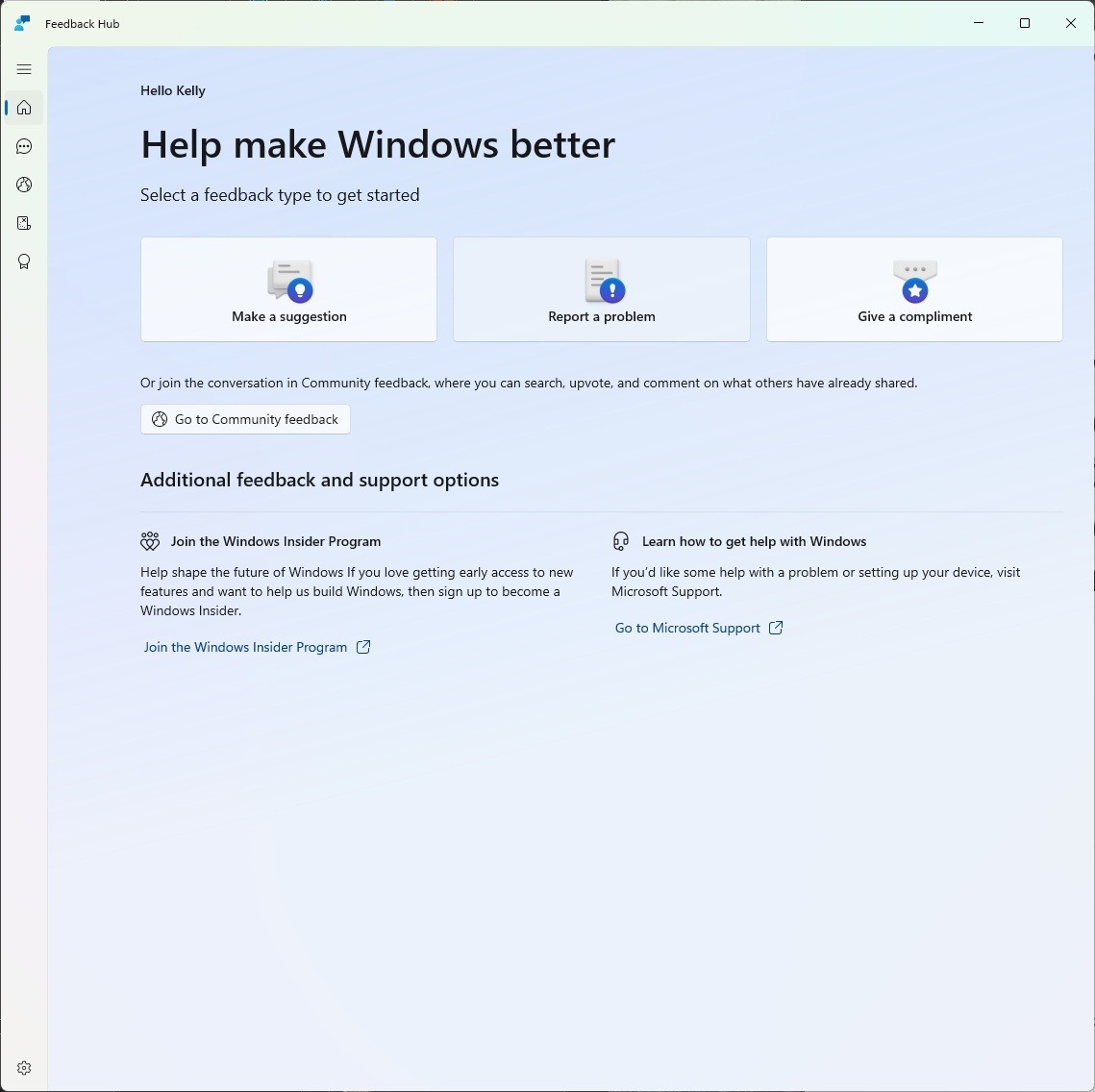
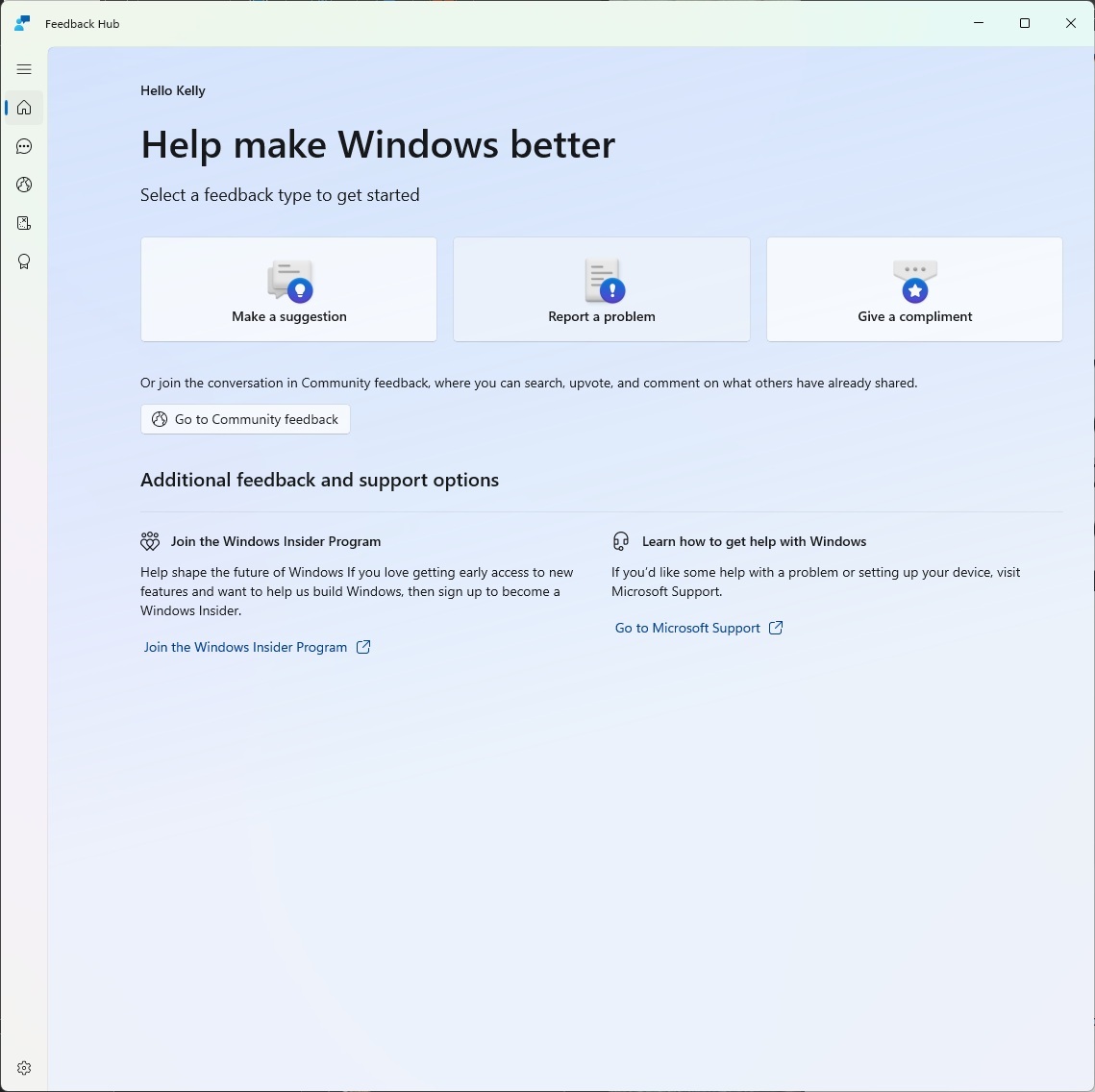
Introducing the new Feedback Hub, bringing a refreshed, modernized experience available as an app update today for Insiders in Dev and Canary. [caption id="attachment_178783" align="alignnone" width="1139"]The new Feedback Hub home page where you can file suggestions, problems or compliments. The new Feedback Hub home page where you can file suggestions, problems or compliments.[/caption] What’s new in Feedback Hub
  • Simpler feedback submission flow: Feedback is now submitted using a single unified template, with the added ability to search categories. The feedback form itself has been modernized enabling for faster iteration and future improvements.
  • Simpler navigation: My Feedback now lives directly in the navigation pane, and Community feedback (formerly All feedback) makes it easier to discover and engage with feedback from others. The Announcements page has been removed to focus more on giving and exploring feedback. You can still find announcements on the Windows Insider Blog.
  • New compliment feedback type: Call out what’s working well.
  • Private or public feedback: Choose whether your feedback is visible to the Insider community.
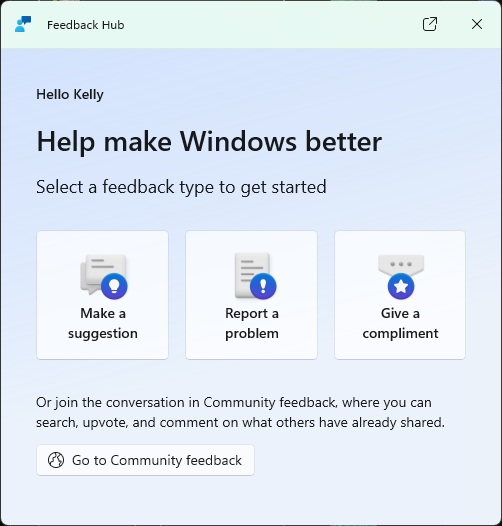
  • New focused feedback experience: a new smaller Feedback Hub surface, making it easier to provide quick, in-the-moment feedback. You can expand to the full Feedback Hub experience by pressing the button in the upper right corner.
[caption id="attachment_178782" align="alignnone" width="502"]The new focused feedback experience. The new focused feedback experience.[/caption]
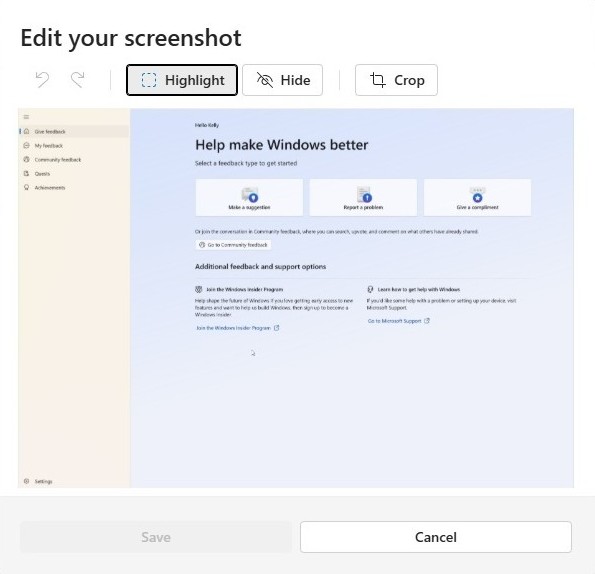
  • Improved screenshot capture and review tooling: making it easier to capture and include visuals when sharing feedback.
[caption id="attachment_178788" align="alignnone" width="595"]Edit your screenshot by clicking on the screenshot to highlight, hide or crop. Edit your screenshot by clicking on the screenshot to highlight, hide or crop.[/caption] Feedback: Your feedback helps shape what comes next, so try out the new experience and share your thoughts in Feedback Hub (WIN + F) under Apps > Feedback Hub.

Reminders for Windows Insiders in the Canary Channel

  • These builds can be unstable and may be released with limited documentation. Join Windows Insider – Get early access to Windows 11 features & updates
  • The builds we release to the Canary Channel represent the latest platform changes early in the development cycle and should not be seen as matched to any specific release of Windows. Features and experiences included in these builds may never get released as we try out different concepts and get feedback. Features may change over time, be removed, or replaced and never get released beyond Windows Insiders. Some of these features and experiences could show up in future Windows releases when they’re ready.
  • Many features in the Canary Channel are rolled out using Control Feature Rollout technology, starting with a subset of Insiders and ramping up over time as we monitor feedback to see how they land before pushing them out to everyone in this channel.
  • The desktop watermark shown at the lower right corner of the desktop is normal for Windows Insider pre-release builds.
  • Some features may show up in the Dev and Beta Channels first before showing up in the Canary Channel.
  • Some features in active development we preview with Windows Insiders may not be fully localized and localization will happen over time as features are finalized. As you see issues with localization in your language, please report those issues to us via Feedback Hub.
  • To get off the Canary Channel, a clean install of Windows 11 will be required.
  • Check out Flight Hub for a complete look at what build is in which Insider channel.
Thanks, Windows Insider Program Team

Source: Announcing Windows 11 Insider Preview Build for Canary Channel 29553.1000
 
Hello Windows Insiders, today we are releasing Windows 11 Insider Preview Build 26220.8138 (KB 5079491) to the Beta Channel. Changes in Beta Channel builds and updates are documented in two buckets: new features, and improvements (including notable fixes) that are being gradually rolled out for Insiders who have turned on the toggle to get the latest updates as they are available (via Settings > Windows Update*) and then new features, and improvements (including notable fixes) rolling out to everyone in the Beta Channel. For more information, see the Reminders section at the bottom of this blog post.

Changes and Improvements gradually being rolled out with toggle on*

[Administrator Protection]

  • After resuming the rollout of Administrator Protection as enabled by IT admins, we are also now rolling out the ability to enable Administrator Protection in Settings under Privacy & security > Windows Security > Account protection and switching the toggle to on. A restart will be required.

[Touchpad]

  • We’re adding a new setting in Settings > Bluetooth & Devices > Touchpad so you can choose how large the right-click zone size is (this is the portion in the bottom-right of your touchpad where pressing a single finger will result in a right-click), between default, small, medium, and large. Note – this setting only appears for touchpads that have a pressable surface for this. Some manufacturers may provide customization for this in their own apps - if you’ve customized your setting using an app like this, a "Custom" entry will be added to the dropdown, which preserves that value.
Feedback: Share your thoughts in Feedback Hub (WIN + F) under Input and Language > Touchpad.

[Task Manager]

We’re making a few improvements to Task Manager:
  • We’re updating Task Manager to provide better insight into NPU usage for PCs that include an NPU. New optional NPU and NPU Engine columns are now available on the Processes, Users, and Details pages. The Details page also adds NPU Dedicated Memory and NPU Shared Memory optional columns to give you deeper visibility into how workloads are using NPU resources. Additionally, if there are neural engines that are part of a GPU, they will now appear on the Performance page, providing a more complete view of AI‑related system activity.
  • We’re also adding a new optional Isolation column to the Processes and Details pages, allowing you to see which apps are running in an AppContainer.
When these changes are available for you, you can add the columns to your view by right clicking one of the column headers in Task Manager and check the option for this. Feedback: Share your thoughts in Feedback Hub (WIN + F) under Desktop Environment > Task Manager.

[Accessibility]

  • Addressed an issue impacting the use of Braille for Insiders in the last few flights.

[Display Language]

  • Addressed an issue resulting in Windows displaying in English for some Insiders rather than their preferred language.

Reminders for Windows Insiders in the Beta Channel

  • Many features are rolled out using Controlled Feature Rollout technology, starting with a subset of Insiders and ramping up over time as we monitor feedback to see how they land before pushing them out to everyone in this channel.
  • The desktop watermark shown at the lower right corner of the desktop is normal for Windows Insider pre-release builds.
  • For Windows Insiders who want to be the first to get features gradually rolled out to you, you can turn ON the toggle to get the latest updates as they are available via Settings > Windows Update*. Over time, we will increase the rollouts of features to everyone with the toggle turned on. Should you keep this toggle off, new features will gradually be rolled out to your PC over time once they are ready.
  • Features and experiences included in these builds may never get released as we try out different concepts and get feedback. Features may change over time, be removed, or replaced and never get released beyond Windows Insiders. Some of these features and experiences could show up in future Windows releases when they’re ready.
  • Some features in active development we preview with Windows Insiders may not be fully localized and localization will happen over time as features are finalized. As you see issues with localization in your language, please report those issues to us via Feedback Hub.
  • Check out Flight Hub for a complete look at what build is in which Insider channel.
Thanks, Windows Insider Program Team

Source: Announcing Windows 11 Insider Preview Build 26220.8138 (Beta Channel)
 
Hello Windows Insiders, today we are releasing Windows 11 Insider Preview Build 26300.8142 (KB 5079492) to the Dev Channel. Changes in Dev Channel builds and updates are documented in two buckets: new features, and improvements (including notable fixes) that are being gradually rolled out for Insiders who have turned on the toggle to get the latest updates as they are available (via Settings > Windows Update*) and then new features, and improvements (including notable fixes) rolling out to everyone in the Dev Channel. For more information, see the Reminders section at the bottom of this blog.

Changes and Improvements gradually being rolled out with toggle on*

[Administrator Protection]

  • After resuming the rollout of Administrator Protection as enabled by IT admins, we are also now rolling out the ability to enable Administrator Protection in Settings under Privacy & security > Windows Security > Account protection and switching the toggle to on. A restart will be required.

[Touchpad]

  • We’re adding a new setting in Settings > Bluetooth & Devices > Touchpad so you can choose how large the right-click zone size is (this is the portion in the bottom-right of your touchpad where pressing a single finger will result in a right-click), between default, small, medium, and large. Note – this setting only appears for touchpads that have a pressable surface for this. Some manufacturers may provide customization for this in their own apps - if you’ve customized your setting using an app like this, a "Custom" entry will be added to the dropdown, which preserves that value.
Feedback: Share your thoughts in Feedback Hub (WIN + F) under Input and Language > Touchpad.

[Task Manager]

We’re making a few improvements to Task Manager:
  • We’re updating Task Manager to provide better insight into NPU usage for PCs that include an NPU. New optional NPU and NPU Engine columns are now available on the Processes, Users, and Details pages. The Details page also adds NPU Dedicated Memory and NPU Shared Memory optional columns to give you deeper visibility into how workloads are using NPU resources. Additionally, if there are neural engines that are part of a GPU, they will now appear on the Performance page, providing a more complete view of AI‑related system activity.
  • We’re also adding a new optional Isolation column to the Processes and Details pages, allowing you to see which apps are running in an AppContainer.
Once these changes are available to you, you can add any of the new columns by right‑clicking a column header in Task Manager and selecting them from the menu. Feedback: Share your thoughts in Feedback Hub (WIN + F) under Desktop Environment > Task Manager.

[Windows Protected Print Mode]

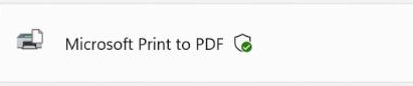
[caption id="attachment_178826" align="alignnone" width="438"]New Windows Protected Print Mode icon. New Windows Protected Print Mode icon.[/caption]

[Accessibility]

  • Addressed an issue impacting the use of Braille for Insiders in the last few flights.

Reminders for Windows Insiders in the Dev Channel

  • Many features are rolled out using Controlled Feature Rollout technology, starting with a subset of Insiders and ramping up over time as we monitor feedback to see how they land before pushing them out to everyone in this channel.
  • The desktop watermark shown at the lower right corner of the desktop is normal for Windows Insider pre-release builds.
  • For Windows Insiders who want to be the first to get features gradually rolled out to you, you can turn ON the toggle to get the latest updates as they are available via Settings > Windows Update*. Over time, we will increase the rollouts of features to everyone with the toggle turned on. Should you keep this toggle off, new features will gradually be rolled out to your PC over time once they are ready.
  • Features and experiences included in these builds may never get released as we try out different concepts and get feedback. Features may change over time, be removed, or replaced and never get released beyond Windows Insiders. Some of these features and experiences could show up in future Windows releases when they’re ready.
  • Some features in active development we preview with Windows Insiders may not be fully localized and localization will happen over time as features are finalized. As you see issues with localization in your language, please report those issues to us via Feedback Hub.
  • Check out Flight Hub for a complete look at what build is in which Insider channel.
Thanks, Windows Insider Program Team

Source: Announcing Windows 11 Insider Preview Build 26300.8142 (Dev Channel)
 
Hello Windows Insiders, today we are releasing Windows 11 Insider Preview Build 28020.1797 to the Canary Channel. (KB 5079490)

What’s new in Canary Build 28020.1797

Changes and Improvements gradually being rolled out with toggle on*

  • This update includes a small set of general improvements and fixes that improve the overall experience for Insiders running this build on their PCs.

Reminders for Windows Insiders in the Canary Channel

  • Many features in the Canary Channel are rolled out using Control Feature Rollout technology, starting with a subset of Insiders and ramping up over time as we monitor feedback to see how they land before pushing them out to everyone in this channel.
  • The desktop watermark shown at the lower right corner of the desktop is normal for Windows Insider pre-release builds.
  • Some features may show up in the Dev and Beta Channels first before showing up in the Canary Channel.
  • For Windows Insiders who want to be the first to get features gradually rolled out to you, you can turn ON the toggle to get the latest updates as they are available via Settings > Windows Update*. Over time, we will increase the rollouts of features to everyone with the toggle turned on. Should you keep this toggle off, new features will gradually be rolled out to your PC over time once they are ready.
  • Some features in active development we preview with Windows Insiders may not be fully localized and localization will happen over time as features are finalized. As you see issues with localization in your language, please report those issues to us via Feedback Hub.
  • To get off the Canary Channel, a clean install of Windows 11 will be required. As a reminder - Insiders can’t switch to a channel that is receiving builds with lower build numbers without doing a clean installation of Windows 11 due to technical setup requirements.
  • Check out Flight Hub for a complete look at what build is in which Insider channel.
Thanks, Windows Insider Program Team

Source: Announcing Windows 11 Insider Preview Build 28020.1797 (Canary Channel)
 
Hello Windows Insiders, today we’re releasing Windows Insider Preview Build 29558.1000 to the Windows 11 Insider Canary Channel on the optional 29500 build series.

What’s new in Canary Build 29558.1000

Changes and Improvements gradually being rolled out with toggle on*

  • This update includes platform changes in moving to a new active development build.

[Command Line (Console Host) Improvements]

The Windows Console is part of the open-source Windows Terminal project, receiving updates from its open-source community. With this release, we are bringing all the changes from the open-source project back into Windows. Most of these updates come from Windows Insiders and community contributors, whose names can be found in the Windows Terminal blog posts on the Windows Command Line Blog. We are bringing these updates to Windows:
  • Optional new Atlas/Direct3D rendering path (UseDx): available behind a registry key (HKCU\Console, DWORD UseDx=1). (GitHub #19848)
  • Regular Expression search: the Find dialog now supports regular expressions. (GitHub #17316)
  • Bold font rendering: the original rendering engine now supports bold fonts. (GitHub #19441)
  • Paste reliability improvement: resolves a longstanding issue where some pasted characters could be dropped when the output code page couldn’t represent them. (GitHub #19511)
  • Accessibility improvements: rewritten legacy MSAA integration and parts of UI Automation support. (GitHub #19344)
  • Snap-on-input behavior: now only enabled by default when VT processing is enabled.
  • More reliable snap on input/output in WSL and PowerShell. (GitHub #19247, #17453)
  • Clipboard enhancements: supports OSC 52 (Manipulate Selection Data) for writing selection data to the clipboard. (GitHub #18949)
  • Graphical content: adds support for Sixel-based images.
  • Alt + Numpad + clipboard text fix: avoids mistranslating Codepage 936 text when generating Alt + Numpad events for clipboard content. (GitHub #17635)
  • Performance: scrolling text performance improvements (up to ~10x in some scenarios). (GitHub #16333)
  • Rectangular selection: fixes rectangular copy via Edit > Mark. (GitHub #16197)
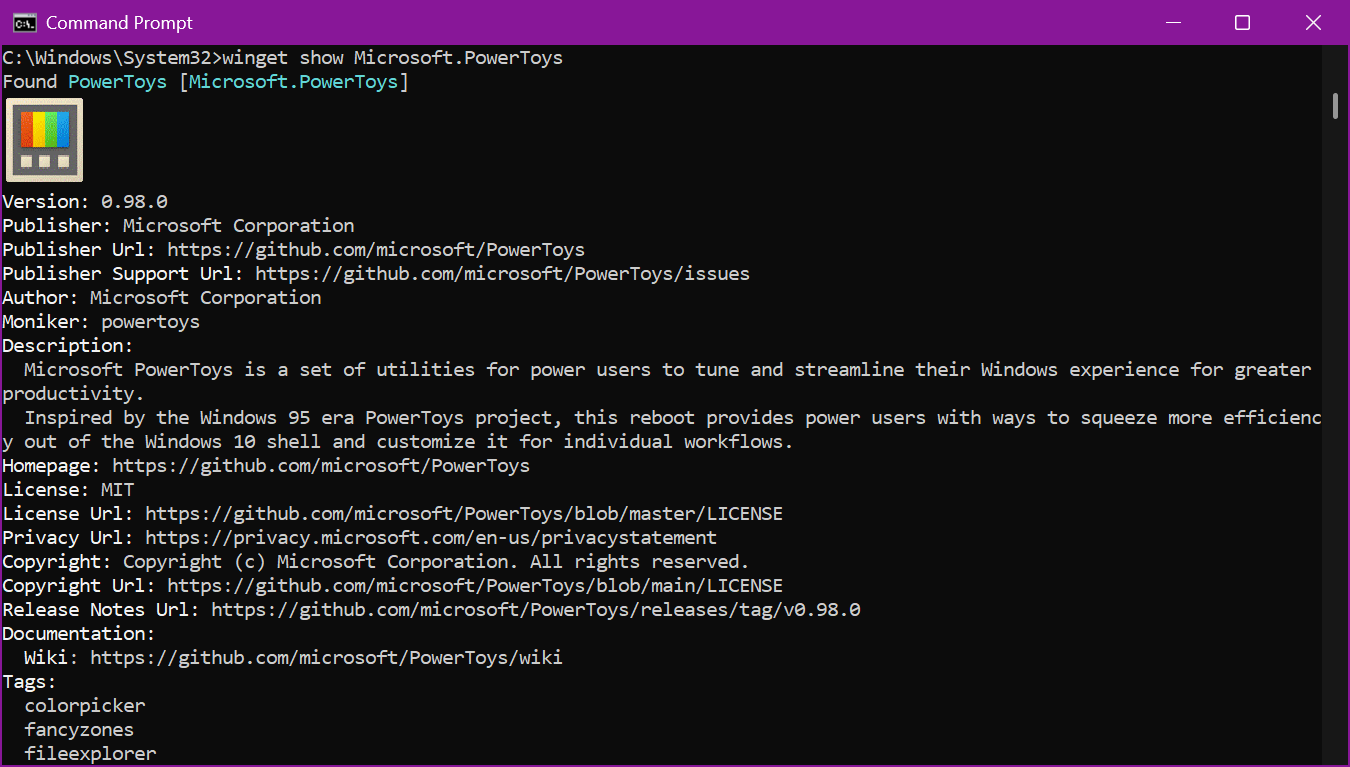
What you’ll see: [caption id="attachment_178835" align="alignnone" width="1350"]The Windows Console can now display inline images, allowing tools like WinGet, for example, to display application icons. The Windows Console can now display inline images, allowing tools like WinGet, for example, to display application icons.[/caption]
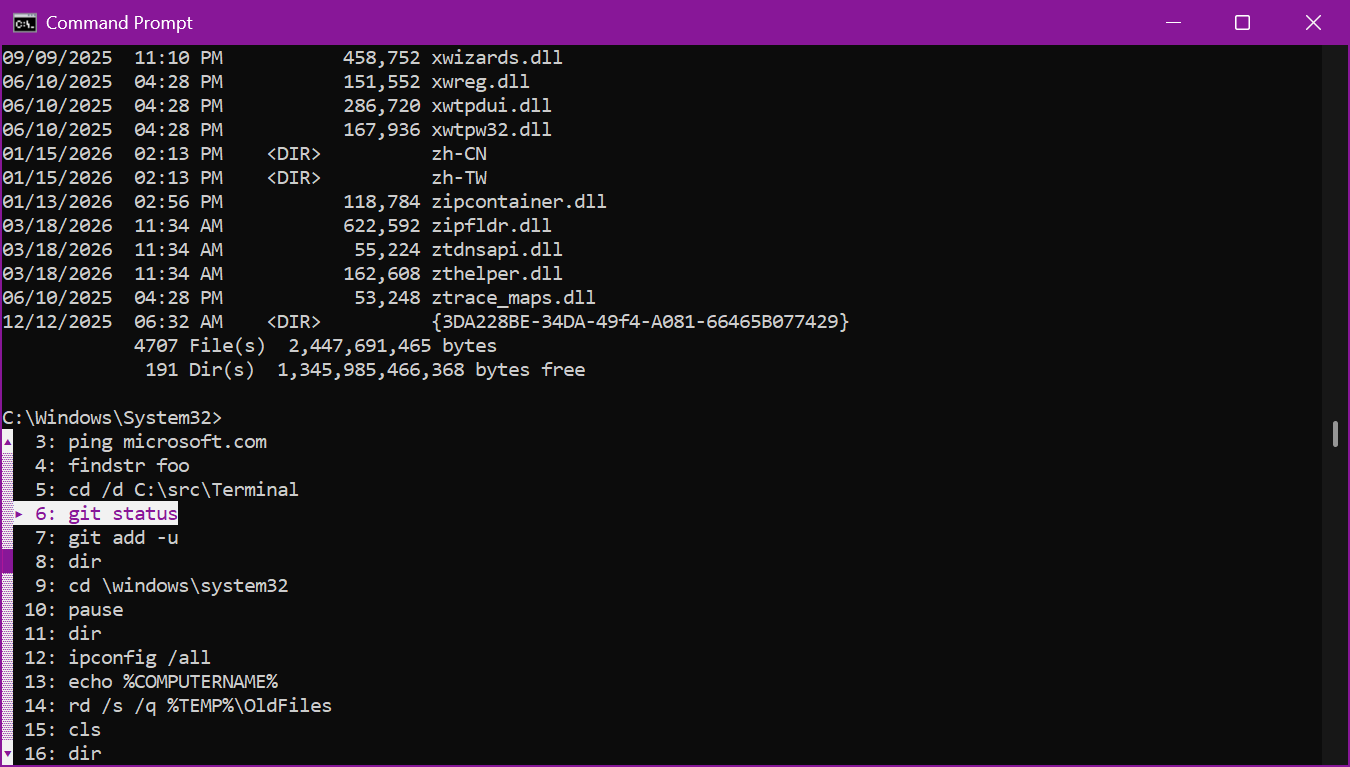
  • We have also changed how the pop-up dialogs look inside the console to improve their compatibility with screen readers, assistive technologies, and other terminal emulators. This includes the F7 history window as well as the F2 and F4 line editing windows.
[caption id="attachment_178834" align="alignnone" width="1350"]New “pop-up” history window view. New “pop-up” history window view.[/caption] FEEDBACK: Please file feedback in Feedback Hub (WIN + F) under Developer Platform > Command Line.

[Authentication]

  • Fixed an authentication error when trying to connect to Azure Virtual Desktop impacting Insiders in the latest Canary flights.

[Settings]

  • Improved performance of configuring power options in Settings > System > Power & Battery.

[Other]

  • Updated chkdsk to now support specifying volumes with spaces if you have the path encased in quotes (for example, chkdsk “C:\My Volume\SD Card”).
  • Removed unexpected error message when opening Group Policy Editor in the previous two flights.

Reminders for Windows Insiders in the Canary Channel

  • These builds can be unstable and may be released with limited documentation. Join Windows Insider – Get early access to Windows 11 features & updates
  • The builds we release to the Canary Channel represent the latest platform changes early in the development cycle and should not be seen as matched to any specific release of Windows. Features and experiences included in these builds may never get released as we try out different concepts and get feedback. Features may change over time, be removed, or replaced and never get released beyond Windows Insiders. Some of these features and experiences could show up in future Windows releases when they’re ready.
  • Many features in the Canary Channel are rolled out using Control Feature Rollout technology, starting with a subset of Insiders and ramping up over time as we monitor feedback to see how they land before pushing them out to everyone in this channel.
  • The desktop watermark shown at the lower right corner of the desktop is normal for Windows Insider pre-release builds.
  • Some features may show up in the Dev and Beta Channels first before showing up in the Canary Channel.
  • For Windows Insiders who want to be the first to get features gradually rolled out to you, you can turn ON the toggle to get the latest updates as they are available via Settings > Windows Update*. Over time, we will increase the rollouts of features to everyone with the toggle turned on. Should you keep this toggle off, new features will gradually be rolled out to your PC over time once they are ready.
  • Some features in active development we preview with Windows Insiders may not be fully localized and localization will happen over time as features are finalized. As you see issues with localization in your language, please report those issues to us via Feedback Hub.
  • To get off the Canary Channel, a clean install of Windows 11 will be required.
  • Check out Flight Hub for a complete look at what build is in which Insider channel.
Thanks, Windows Insider Program Team

Source: Announcing Windows 11 Insider Preview Build for Canary Channel 29558.1000
 
  • Like
Reactions: Sunqfu
Hello Windows Insiders, today we are releasing Windows 11 Insider Preview Build 26220.8148 (KB 5083825) to the Beta Channel. Changes in Beta Channel builds and updates are documented in two buckets: new features, and improvements (including notable fixes) that are being gradually rolled out for Insiders who have turned on the toggle to get the latest updates as they are available (via Settings > Windows Update*) and then new features, and improvements (including notable fixes) rolling out to everyone in the Beta Channel. For more information, see the Reminders section at the bottom of this blog post.

Changes and Improvements gradually being rolled out with toggle on*

[Windows Protected Print Mode]

[caption id="attachment_178850" align="alignnone" width="413"]New Windows Protected Print Mode icon. New Windows Protected Print Mode icon.[/caption]

[Input]

  • Users will be able to feel haptic feedback effects on compatible input devices while performing certain actions, such as aligning objects in PowerPoint, window snapping, resizing, or hovering over the Close button. These haptic effects can be configured in Settings under Bluetooth & devices > Mouse > Haptic signals.

Feedback: Share your thoughts in Feedback Hub (WIN + F) under Input and Language > Mouse.​

[Xbox mode]

  • Xbox full screen experience is now Xbox mode
  • We've added an improved first run experience when entering Xbox mode

Feedback: Share your thoughts in Feedback Hub (WIN + F) under Gaming and Xbox > Gaming Full Screen Experience.​

[Other]

  • Improved performance of launching startup apps after boot (apps which display under Settings > Apps > Startup).
  • Fixed an issue resulting in certain apps not being able to sign in recently, citing an internal connection issue when internet was actually connected.
  • Fixed an underlying crash impacting some Insiders’ ability to print with the latest flights.

Reminders for Windows Insiders in the Beta Channel

  • Updates are based on Windows 11, version 25H2 via an enablement package (Build 26220.8148).
  • Many features are rolled out using Controlled Feature Rollout technology, starting with a subset of Insiders and ramping up over time as we monitor feedback to see how they land before pushing them out to everyone in this channel.
  • The desktop watermark shown at the lower right corner of the desktop is normal for Windows Insider pre-release builds.
  • For Windows Insiders who want to be the first to get features gradually rolled out to you, you can turn ON the toggle to get the latest updates as they are available via Settings > Windows Update*. Over time, we will increase the rollouts of features to everyone with the toggle turned on. Should you keep this toggle off, new features will gradually be rolled out to your PC over time once they are ready.
  • Features and experiences included in these builds may never get released as we try out different concepts and get feedback. Features may change over time, be removed, or replaced and never get released beyond Windows Insiders. Some of these features and experiences could show up in future Windows releases when they’re ready.
  • Some features in active development we preview with Windows Insiders may not be fully localized and localization will happen over time as features are finalized. As you see issues with localization in your language, please report those issues to us via Feedback Hub.
  • Check out Flight Hub for a complete look at what build is in which Insider channel.
Thanks, Windows Insider Program Team

Source: Announcing Windows 11 Insider Preview Build 26220.8148 (Beta Channel)
 
Hello Windows Insiders, today we are releasing Windows 11 Insider Preview Build 26300.8155 (KB 5083822) to the Dev Channel. Changes in Dev Channel builds and updates are documented in two buckets: new features, and improvements (including notable fixes) that are being gradually rolled out for Insiders who have turned on the toggle to get the latest updates as they are available (via Settings > Windows Update*) and then new features, and improvements (including notable fixes) rolling out to everyone in the Dev Channel. For more information, see the Reminders section at the bottom of this blog.

Changes and Improvements gradually being rolled out with toggle on*

[Input]

  • Users will be able to feel haptic feedback effects on compatible input devices while performing certain actions, such as aligning objects in PowerPoint, window snapping, resizing, or hovering over the Close button. These haptic effects can be configured in Settings under Bluetooth & devices > Mouse > Haptic signals.

Feedback: Share your thoughts in Feedback Hub (WIN + F) under Input and Language > Mouse.​

[Xbox mode]

  • Xbox full screen experience is now Xbox mode
  • We've added an improved first run experience when entering Xbox mode

Feedback: Share your thoughts in Feedback Hub (WIN + F) under Gaming and Xbox > Gaming Full Screen Experience.​

[Other]

  • Improved performance of launching startup apps after boot (apps which display under Settings > Apps > Startup).
  • Fixed an issue resulting in certain apps not being able to sign in recently, citing an internal connection issue when internet was actually connected.
  • Fixed an underlying crash impacting some Insiders’ ability to print with the latest flights.

Reminders for Windows Insiders in the Dev Channel

  • Updates are based on Windows 11, version 25H2 via an enablement package (Build 26300.8155).
  • Many features are rolled out using Controlled Feature Rollout technology, starting with a subset of Insiders and ramping up over time as we monitor feedback to see how they land before pushing them out to everyone in this channel.
  • The desktop watermark shown at the lower right corner of the desktop is normal for Windows Insider pre-release builds.
  • For Windows Insiders who want to be the first to get features gradually rolled out to you, you can turn ON the toggle to get the latest updates as they are available via Settings > Windows Update*. Over time, we will increase the rollouts of features to everyone with the toggle turned on. Should you keep this toggle off, new features will gradually be rolled out to your PC over time once they are ready.
  • Features and experiences included in these builds may never get released as we try out different concepts and get feedback. Features may change over time, be removed, or replaced and never get released beyond Windows Insiders. Some of these features and experiences could show up in future Windows releases when they’re ready.
  • Some features in active development we preview with Windows Insiders may not be fully localized and localization will happen over time as features are finalized. As you see issues with localization in your language, please report those issues to us via Feedback Hub.
  • Check out Flight Hub for a complete look at what build is in which Insider channel.
Thanks, Windows Insider Program Team

Source: Announcing Windows 11 Insider Preview Build 26300.8155 (Dev Channel)
 
Hello Windows Insiders, today we’re releasing Windows Insider Preview Build 29560.1000 to the Windows 11 Insider Canary Channel on the optional 29500 build series.

What’s new in Canary Build 29560.1000

Changes and Improvements gradually being rolled out with toggle on*

  • This update includes platform changes in moving to a new active development build.

[General]

  • Fixed an issue causing some Insiders to experience an increase in freezes after the latest flights.
  • Fixed an issue resulting in attached USB devices not working for some Insiders after the latest flight.
  • Improved reliability of Setting Screensaver Settings back to None.

Reminders for Windows Insiders in the Canary Channel

  • These builds can be unstable and may be released with limited documentation. Join Windows Insider – Get early access to Windows 11 features & updates
  • The builds we release to the Canary Channel represent the latest platform changes early in the development cycle and should not be seen as matched to any specific release of Windows. Features and experiences included in these builds may never get released as we try out different concepts and get feedback. Features may change over time, be removed, or replaced and never get released beyond Windows Insiders. Some of these features and experiences could show up in future Windows releases when they’re ready.
  • Many features in the Canary Channel are rolled out using Control Feature Rollout technology, starting with a subset of Insiders and ramping up over time as we monitor feedback to see how they land before pushing them out to everyone in this channel.
  • The desktop watermark shown at the lower right corner of the desktop is normal for Windows Insider pre-release builds.
  • Some features may show up in the Dev and Beta Channels first before showing up in the Canary
  • For Windows Insiders who want to be the first to get features gradually rolled out to you, you can turn ON the toggle to get the latest updates as they are available via Settings > Windows Update*. Over time, we will increase the rollouts of features to everyone with the toggle turned on. Should you keep this toggle off, new features will gradually be rolled out to your PC over time once they are ready.
  • Some features in active development we preview with Windows Insiders may not be fully localized and localization will happen over time as features are finalized. As you see issues with localization in your language, please report those issues to us via Feedback Hub.
  • To get off the Canary Channel, a clean install of Windows 11 will be required.
  • Check out Flight Hub for a complete look at what build is in which Insider channel.
Thanks, Windows Insider Program Team

Source: Announcing Windows 11 Insider Preview Build for Canary Channel 29560.1000
 
Hello Windows Insiders, today we are releasing Windows 11 Insider Preview Build 28020.1803 to the Canary Channel. (KB 5083824)

What’s new in Canary Build 28020.1803

Changes and Improvements gradually being rolled out with toggle on*

  • This update includes a small set of general improvements and fixes that improve the overall experience for Insiders running this build on their PCs.

[Input]

  • Pen settings: we have made refinements to the Pen settings page including small changes to the options for the pen tail button. A new option, “Same as Copilot key”, enables the pen tail button to launch the same app as the Copilot key. Feedback: Share your thoughts in Feedback Hub (WIN + F) under Devices and Drivers > Bluetooth – Keyboards, Mice, and Pens.
  • Improved reliability of configuring fluid dictation option in voice typing (Windows key plus H) settings.

[Settings]

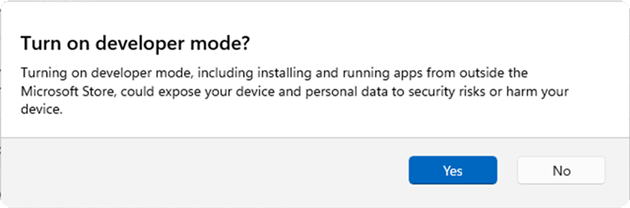
  • The Settings Developer Mode dialog is updating to be visually consistent with the rest of Windows 11 dialogs.
[caption id="attachment_178843" align="alignnone" width="630"]Updated Settings Developer Mode dialog. Updated Settings Developer Mode dialog.[/caption]
Feedback: Share your thoughts in Feedback Hub (WIN + F) under Settings > All other settings.​

[Other]

Reminders for Windows Insiders in the Canary Channel

  • These builds can be unstable and may be released with limited documentation. Join Windows Insider – Get early access to Windows 11 features & updates
  • Many features in the Canary Channel are rolled out using Control Feature Rollout technology, starting with a subset of Insiders and ramping up over time as we monitor feedback to see how they land before pushing them out to everyone in this channel.
  • The desktop watermark shown at the lower right corner of the desktop is normal for Windows Insider pre-release builds.
  • Some features may show up in the Dev and Beta Channels first before showing up in the Canary Channel.
  • For Windows Insiders who want to be the first to get features gradually rolled out to you, you can turn ON the toggle to get the latest updates as they are available via Settings > Windows Update*. Over time, we will increase the rollouts of features to everyone with the toggle turned on. Should you keep this toggle off, new features will gradually be rolled out to your PC over time once they are ready.
  • Some features in active development we preview with Windows Insiders may not be fully localized and localization will happen over time as features are finalized. As you see issues with localization in your language, please report those issues to us via Feedback Hub.
  • To get off the Canary Channel, a clean install of Windows 11 will be required. As a reminder - Insiders can’t switch to a channel that is receiving builds with lower build numbers without doing a clean installation of Windows 11 due to technical setup requirements.
  • Check out Flight Hub for a complete look at what build is in which Insider channel.
Thanks, Windows Insider Program Team

Source: Announcing Windows 11 Insider Preview Build 28020.1803 (Canary Channel)
 
Hello Windows Insiders, today we are releasing Windows 11 Insider Preview Build 26220.8165 (KB 5083635) to the Beta Channel. Changes in Beta Channel builds and updates are documented in two buckets: new features, and improvements (including notable fixes) that are being gradually rolled out for Insiders who have turned on the toggle to get the latest updates as they are available (via Settings > Windows Update*) and then new features, and improvements (including notable fixes) rolling out to everyone in the Beta Channel. For more information, see the Reminders section at the bottom of this blog post.

Changes and Improvements gradually being rolled out with toggle on*

[Storage]

  • We’re increasing the size limit for formatting FAT32 volumes via the command line from 32GB to 2TB.
  • Improved the performance when navigating to see storage on large volumes via Settings > System > Storage > Advanced Storage Settings > Disks & Volumes.
  • Updated Settings > System > Storage, so rather than seeing a UAC prompt immediately when you go to the page, you’ll only see it when going to view temporary files.

[Network]

  • Fixed issue causing Settings > Network & Internet > Data Usage to show large unrealistic values in recent Insider builds.

[Windows Security app]

  • We have recently started to roll out enhancements to the Windows Security app > Device security > Secure Boot experience, which shows green, yellow, and red icon badges as well as new text that reflects your device’s Secure Boot state and certificate status. Microsoft is updating Secure Boot certificates on consumer devices and some business PCs, and you can now check your certificate status with this new feature. This experience is disabled by default on enterprise IT managed devices and servers.

Feedback: Share your thoughts in Feedback Hub (WIN + F) under Apps > Windows Security.​

[Feedback Hub]

The new Feedback Hub, bringing a refreshed, modernized experience, is also now available as an app update today for Insiders in Beta. [caption id="attachment_178787" align="alignnone" width="1139"]The new Feedback Hub home page where you can file suggestions, problems or compliments. The new Feedback Hub home page where you can file suggestions, problems or compliments.[/caption] What’s new in Feedback Hub
  • Simpler feedback submission flow: Feedback is now submitted using a single unified template, with the added ability to search categories. The feedback form itself has been modernized enabling for faster iteration and future improvements.
  • Simpler navigation: My Feedback now lives directly in the navigation pane, and Community feedback (formerly All feedback) makes it easier to discover and engage with feedback from others. The Announcements page has been removed to focus more on giving and exploring feedback. You can still find announcements on the Windows Insider Blog.
  • New compliment feedback type: Call out what’s working well.
  • Private or public feedback: Choose whether your feedback is visible to the Insider community.
  • New focused feedback experience: A new smaller Feedback Hub surface, making it easier to provide quick, in-the-moment feedback. You can expand to the full Feedback Hub experience by pressing the button in the upper right corner.
[caption id="attachment_178782" align="alignnone" width="502"]The new focused feedback experience. The new focused feedback experience.[/caption]
  • Improved screenshot capture and review tooling: Making it easier to capture and include visuals when sharing feedback.
[caption id="attachment_178788" align="alignnone" width="595"]Edit your screenshot by clicking on the screenshot to highlight, hide or crop. Edit your screenshot by clicking on the screenshot to highlight, hide or crop.[/caption]
Feedback: Your feedback helps shape what comes next, so try out the new experience and share your thoughts in Feedback Hub (WIN + F) under Apps > Feedback Hub.​

Reminders for Windows Insiders in the Beta Channel

  • Updates are based on Windows 11, version 25H2 via an enablement package (Build 26220.8165).
  • Many features are rolled out using Controlled Feature Rollout technology, starting with a subset of Insiders and ramping up over time as we monitor feedback to see how they land before pushing them out to everyone in this channel.
  • The desktop watermark shown at the lower right corner of the desktop is normal for Windows Insider pre-release builds.
  • For Windows Insiders who want to be the first to get features gradually rolled out to you, you can turn ON the toggle to get the latest updates as they are available via Settings > Windows Update*. Over time, we will increase the rollouts of features to everyone with the toggle turned on. Should you keep this toggle off, new features will gradually be rolled out to your PC over time once they are ready.
  • Features and experiences included in these builds may never get released as we try out different concepts and get feedback. Features may change over time, be removed, or replaced and never get released beyond Windows Insiders. Some of these features and experiences could show up in future Windows releases when they’re ready.
  • Some features in active development we preview with Windows Insiders may not be fully localized and localization will happen over time as features are finalized. As you see issues with localization in your language, please report those issues to us via Feedback Hub.
  • Check out Flight Hub for a complete look at what build is in which Insider channel.
Thanks, Windows Insider Program Team

Source: Announcing Windows 11 Insider Preview Build 26220.8165 (Beta Channel)
 
Hello Windows Insiders, today we are releasing Windows 11 Insider Preview Build 26300.8170 (KB 5083632) to the Dev Channel. Changes in Dev Channel builds and updates are documented in two buckets: new features, and improvements (including notable fixes) that are being gradually rolled out for Insiders who have turned on the toggle to get the latest updates as they are available (via Settings > Windows Update*) and then new features, and improvements (including notable fixes) rolling out to everyone in the Dev Channel. For more information, see the Reminders section at the bottom of this blog.

Changes and Improvements gradually being rolled out with toggle on*

[Storage]

  • We’re increasing the size limit for formatting FAT32 volumes via the command line from 32GB to 2TB.
  • Improved the performance when navigating to see storage on large volumes via Settings > System > Storage > Advanced Storage Settings > Disks & Volumes.
  • Updated Settings > System > Storage, so rather than seeing a UAC prompt immediately when you go to the page, you’ll only see it when going to view temporary files.

[Network]

  • Fixed issue causing Settings > Network & Internet > Data Usage to show large unrealistic values in recent Insider builds.

[Windows Security app]

  • We have recently started to roll out enhancements to the Windows Security app > Device security > Secure Boot experience, which shows green, yellow, and red icon badges as well as new text that reflects your device’s Secure Boot state and certificate status. Microsoft is updating Secure Boot certificates on consumer devices and some business PCs, and you can now check your certificate status with this new feature. This experience is disabled by default on enterprise IT managed devices and servers.

Feedback: Share your thoughts in Feedback Hub (WIN + F) under Apps > Windows Security.​

[Feedback Hub Improvements]

  • Thanks Windows Insiders who have been sharing such great feedback about the new Feedback Hub version. As some of you may have already noticed, we're currently rolling out version 2.2604.101.0 to Dev and Canary. This includes design refinements based on your feedback, such as:
    • Improved the default window size, and now it will remember window size across session.
    • You can now use the mouse back button to go back between pages.
    • If you were seeing less community feedback than usual, that should be addressed now.
    • Upvote buttons for feedback should display correctly for Insiders using the Chinese display language now, … and more.

Please keep the feedback coming! You can share your thoughts under Feedback Hub (WIN + F) under Apps > Feedback Hub.​

Reminders for Windows Insiders in the Dev Channel

  • Updates are based on Windows 11, version 25H2 via an enablement package (Build 26300.8170).
  • Many features are rolled out using Controlled Feature Rollout technology, starting with a subset of Insiders and ramping up over time as we monitor feedback to see how they land before pushing them out to everyone in this channel.
  • The desktop watermark shown at the lower right corner of the desktop is normal for Windows Insider pre-release builds.
  • For Windows Insiders who want to be the first to get features gradually rolled out to you, you can turn ON the toggle to get the latest updates as they are available via Settings > Windows Update*. Over time, we will increase the rollouts of features to everyone with the toggle turned on. Should you keep this toggle off, new features will gradually be rolled out to your PC over time once they are ready.
  • Features and experiences included in these builds may never get released as we try out different concepts and get feedback. Features may change over time, be removed, or replaced and never get released beyond Windows Insiders. Some of these features and experiences could show up in future Windows releases when they’re ready.
  • Some features in active development we preview with Windows Insiders may not be fully localized and localization will happen over time as features are finalized. As you see issues with localization in your language, please report those issues to us via Feedback Hub.
  • Check out Flight Hub for a complete look at what build is in which Insider channel.
Thanks, Windows Insider Program Team

Source: Announcing Windows 11 Insider Preview Build 26300.8170 (Dev Channel)
 
Hello Windows Insiders, today we’re releasing Windows Insider Preview Build 29565.1000 to the Windows 11 Insider Canary Channel on the optional 29500 build series.

What’s new in Canary Build 29565.1000

Changes and Improvements gradually being rolled out with toggle on*

  • This update includes platform changes in moving to a new active development build.

[General]

  • Improved velocity of Bubbles screensaver for monitors with higher refresh rates.

[Sharing]

  • Based on feedback we’re making some refinements to drag tray, using a smaller peek view to reduce accidental invocation and make it easier to dismiss when interacting near the top of the screen.

[Windows Security app]

  • We have recently started to roll out enhancements to the Windows Security app > Device security > Secure Boot experience, which shows green, yellow, and red icon badges as well as new text that reflects your device’s Secure Boot state and certificate status. Microsoft is updating Secure Boot certificates on consumer devices and some business PCs, and you can now check your certificate status with this new feature. This experience is disabled by default on enterprise IT managed devices and servers.

Feedback: Share your thoughts in Feedback Hub (WIN + F) under Apps > Windows Security.​

[Feedback Hub Improvements]

  • Thanks Windows Insiders who have been sharing such great feedback about the new Feedback Hub version. As some of you may have already noticed, we're currently rolling out version 2.2604.101.0 to Dev and Canary. This includes design refinements based on your feedback, such as:
    • Improved the default window size, and now it will remember window size across session.
    • You can now use the mouse back button to go back between pages.
    • If you were seeing less community feedback than usual, that should be addressed now.
    • Upvote buttons for feedback should display correctly for Insiders using the Chinese display language now, … and more.

Please keep the feedback coming! You can share your thoughts under Feedback Hub (WIN + F) under Apps > Feedback Hub.​

Reminders for Windows Insiders in the Canary Channel

  • These builds can be unstable and may be released with limited documentation. Join Windows Insider – Get early access to Windows 11 features & updates
  • The builds we release to the Canary Channel represent the latest platform changes early in the development cycle and should not be seen as matched to any specific release of Windows. Features and experiences included in these builds may never get released as we try out different concepts and get feedback. Features may change over time, be removed, or replaced and never get released beyond Windows Insiders. Some of these features and experiences could show up in future Windows releases when they’re ready.
  • Many features in the Canary Channel are rolled out using Control Feature Rollout technology, starting with a subset of Insiders and ramping up over time as we monitor feedback to see how they land before pushing them out to everyone in this channel.
  • The desktop watermark shown at the lower right corner of the desktop is normal for Windows Insider pre-release builds.
  • Some features may show up in the Dev and Beta Channels first before showing up in the Canary
  • For Windows Insiders who want to be the first to get features gradually rolled out to you, you can turn ON the toggle to get the latest updates as they are available via Settings > Windows Update*. Over time, we will increase the rollouts of features to everyone with the toggle turned on. Should you keep this toggle off, new features will gradually be rolled out to your PC over time once they are ready.
  • Some features in active development we preview with Windows Insiders may not be fully localized and localization will happen over time as features are finalized. As you see issues with localization in your language, please report those issues to us via Feedback Hub.
  • To get off the Canary Channel, a clean install of Windows 11 will be required.
  • Check out Flight Hub for a complete look at what build is in which Insider channel.
Thanks, Windows Insider Program Team

Source: Announcing Windows 11 Insider Preview Build for Canary Channel 29565.1000
 
Hello Windows Insiders, today we are releasing Windows 11 Insider Preview Build 28020.1812 to the Canary Channel. (KB 5083824)

What’s new in Canary Build 28020.1812

Changes and Improvements gradually being rolled out with toggle on*

  • This update includes a small set of general improvements and fixes that improve the overall experience for Insiders running this build on their PCs.

[Touchpad]

  • We’re adding a new setting in Settings > Bluetooth & Devices > Touchpad so you can choose how large the right-click zone size is (this is the portion in the bottom-right of your touchpad where pressing a single finger will result in a right-click), between default, small, medium, and large. Note – this setting only appears for touchpads that have a pressable surface for this. Some manufacturers may provide customization for this in their own apps – if you’ve customized your setting using an app like this, a “Custom” entry will be added to the dropdown, which preserves that value.

Feedback: Share your thoughts in Feedback Hub (WIN + F) under Input and Language > Touchpad.​

[Sharing]

  • Based on feedback we’re making some refinements to drag tray, using a smaller peek view to reduce accidental invocation and make it easier to dismiss when interacting near the top of the screen.

[Windows Security app]

  • We have recently started to roll out enhancements to the Windows Security app > Device security > Secure Boot experience, which shows green, yellow, and red icon badges as well as new text that reflects your device’s Secure Boot state and certificate status. Microsoft is updating Secure Boot certificates on consumer devices and some business PCs, and you can now check your certificate status with this new feature. This experience is disabled by default on enterprise IT managed devices and servers.

Feedback: Share your thoughts in Feedback Hub (WIN + F) under Apps > Windows Security.​

[Feedback Hub Improvements]

  • Thanks Windows Insiders who have been sharing such great feedback about the new Feedback Hub version. As some of you may have already noticed, we're currently rolling out version 2.2604.101.0 to Dev and Canary. This includes design refinements based on your feedback, such as:
    • Improved the default window size, and now it will remember window size across session.
    • You can now use the mouse back button to go back between pages.
    • If you were seeing less community feedback than usual, that should be addressed now.
    • Upvote buttons for feedback should display correctly for Insiders using the Chinese display language now, … and more.

Please keep the feedback coming! You can share your thoughts under Feedback Hub (WIN + F) under Apps > Feedback Hub.​

Reminders for Windows Insiders in the Canary Channel

  • Many features in the Canary Channel are rolled out using Control Feature Rollout technology, starting with a subset of Insiders and ramping up over time as we monitor feedback to see how they land before pushing them out to everyone in this channel.
  • The desktop watermark shown at the lower right corner of the desktop is normal for Windows Insider pre-release builds.
  • Some features may show up in the Dev and Beta Channels first before showing up in the Canary Channel.
  • For Windows Insiders who want to be the first to get features gradually rolled out to you, you can turn ON the toggle to get the latest updates as they are available via Settings > Windows Update*. Over time, we will increase the rollouts of features to everyone with the toggle turned on. Should you keep this toggle off, new features will gradually be rolled out to your PC over time once they are ready.
  • Some features in active development we preview with Windows Insiders may not be fully localized and localization will happen over time as features are finalized. As you see issues with localization in your language, please report those issues to us via Feedback Hub.
  • To get off the Canary Channel, a clean install of Windows 11 will be required. As a reminder - Insiders can’t switch to a channel that is receiving builds with lower build numbers without doing a clean installation of Windows 11 due to technical setup requirements.
  • Check out Flight Hub for a complete look at what build is in which Insider channel.
Thanks, Windows Insider Program Team

Source: Announcing Windows 11 Insider Preview Build 28020.1812 (Canary Channel)
 
Hello Windows Insiders, today we are releasing Windows 11 Insider Preview Build 26300.8276 (KB 5083726) to the Dev Channel. Changes in Dev Channel builds and updates are documented in two buckets: new features, and improvements (including notable fixes) that are being gradually rolled out for Insiders who have turned on the toggle to get the latest updates as they are available (via Settings > Windows Update*) and then new features, and improvements (including notable fixes) rolling out to everyone in the Dev Channel. For more information, see the Reminders section at the bottom of this blog.

Changes and Improvements gradually being rolled out with toggle on*

[Settings]

  • Based on feedback, we’re providing clarity regarding location options in Settings > Privacy & Security > Location. When Location services is turned off, options like Default location and Allow location override are unavailable because apps and services aren’t receiving location info. To make that clearer, these options will now appear disabled (greyed out) until Location services is turned back on.
  • We have improved the reliability of navigating to Settings > Apps > Installed apps.

[File Explorer]

  • We have updated iconography placement in the File Explorer search box to be more consistent across different PCs.
[caption id="attachment_178893" align="alignnone" width="265"]Old search box. Old search box.[/caption] [caption id="attachment_178891" align="alignnone" width="224"]New search box. New search box.[/caption] [caption id="attachment_178892" align="alignnone" width="225"]Existing search box on a Copilot+ PC. Existing search box on a Copilot+ PC.[/caption]
  • Improved File Explorer reliability.
  • Improved navigation pane usage for Voice Access users.

[Windows Hello]

  • Improved reliability and performance of Windows Hello fingerprint after your PC wakes from sleep.

[Input]

  • Improved performance of opening clipboard history.

[Fonts]

  • We’ve made some font improvements, including updating the Leelawadee UI font family for the Thai, Lao, Khmer, and Lontara scripts to help improve glyph sequencing, positioning, and rendering for these scripts.

Reminders for Windows Insiders in the Dev Channel

  • Updates are based on Windows 11, version 25H2 via an enablement package (Build 26300.8276).
  • Many features are rolled out using Controlled Feature Rollout technology, starting with a subset of Insiders and ramping up over time as we monitor feedback to see how they land before pushing them out to everyone in this channel.
  • The desktop watermark shown at the lower right corner of the desktop is normal for Windows Insider pre-release builds.
  • For Windows Insiders who want to be the first to get features gradually rolled out to you, you can turn ON the toggle to get the latest updates as they are available via Settings > Windows Update*. Over time, we will increase the rollouts of features to everyone with the toggle turned on. Should you keep this toggle off, new features will gradually be rolled out to your PC over time once they are ready.
  • Features and experiences included in these builds may never get released as we try out different concepts and get feedback. Features may change over time, be removed, or replaced and never get released beyond Windows Insiders. Some of these features and experiences could show up in future Windows releases when they’re ready.
  • Some features in active development we preview with Windows Insiders may not be fully localized and localization will happen over time as features are finalized. As you see issues with localization in your language, please report those issues to us via Feedback Hub.
  • Check out Flight Hub for a complete look at what build is in which Insider channel.
Thanks, Windows Insider Program Team

Source: Announcing Windows 11 Insider Preview Build 26300.8276 (Dev Channel)
 
Hello Windows Insiders, today we are releasing Windows 11 Insider Preview Build 26220.8271 (KB 5083728) to the Beta Channel. Changes in Beta Channel builds and updates are documented in two buckets: new features, and improvements (including notable fixes) that are being gradually rolled out for Insiders who have turned on the toggle to get the latest updates as they are available (via Settings > Windows Update*) and then new features, and improvements (including notable fixes) rolling out to everyone in the Beta Channel. For more information, see the Reminders section at the bottom of this blog post.

Changes and Improvements gradually being rolled out with toggle on*

[Settings]

  • Based on feedback, we’re providing clarity regarding location options in Settings > Privacy & Security > Location. When Location services is turned off, options like Default location and Allow location override are unavailable because apps and services aren’t receiving location info. To make that clearer, these options will now appear disabled (greyed out) until Location services is turned back on.
  • We have improved the reliability of navigating to Settings > Apps > Installed apps.

[File Explorer]

  • We have updated iconography placement in the File Explorer search box to be more consistent across different PCs.
[caption id="attachment_178893" align="alignnone" width="265"]Old search box. Old search box.[/caption] [caption id="attachment_178891" align="alignnone" width="224"]New search box. New search box.[/caption] [caption id="attachment_178892" align="alignnone" width="225"]Existing search box on a Copilot+ PC. Existing search box on a Copilot+ PC.[/caption]
  • Improved File Explorer reliability.
  • Improved navigation pane usage for Voice Access users.

[Windows Hello]

  • Improved reliability and performance of Windows Hello fingerprint after your PC wakes from sleep.

[Input]

  • Improved performance of opening clipboard history.

[Fonts]

  • We’ve made some font improvements, including updating the Leelawadee UI font family for the Thai, Lao, Khmer, and Lontara scripts to help improve glyph sequencing, positioning, and rendering for these scripts.

Reminders for Windows Insiders in the Beta Channel

  • Updates are based on Windows 11, version 25H2 via an enablement package (Build 26220.8271).
  • Many features are rolled out using Controlled Feature Rollout technology, starting with a subset of Insiders and ramping up over time as we monitor feedback to see how they land before pushing them out to everyone in this channel.
  • The desktop watermark shown at the lower right corner of the desktop is normal for Windows Insider pre-release builds.
  • For Windows Insiders who want to be the first to get features gradually rolled out to you, you can turn ON the toggle to get the latest updates as they are available via Settings > Windows Update*. Over time, we will increase the rollouts of features to everyone with the toggle turned on. Should you keep this toggle off, new features will gradually be rolled out to your PC over time once they are ready.
  • Features and experiences included in these builds may never get released as we try out different concepts and get feedback. Features may change over time, be removed, or replaced and never get released beyond Windows Insiders. Some of these features and experiences could show up in future Windows releases when they’re ready.
  • Some features in active development we preview with Windows Insiders may not be fully localized and localization will happen over time as features are finalized. As you see issues with localization in your language, please report those issues to us via Feedback Hub.
  • Check out Flight Hub for a complete look at what build is in which Insider channel.
Thanks, Windows Insider Program Team

Source: Announcing Windows 11 Insider Preview Build 26220.8271 (Beta Channel)
 
Hello Windows Insiders, today we’re releasing Windows 11 Builds 26100.8313 and 26200.8313 (KB5083631) to Insiders in the Release Preview Channel on Windows 11, versions 24H2 (Build 26100) and 25H2 (Build 26200). This update is available through two release phases: gradual rollout and normal rollout. A gradual rollout delivers an update in phases, so features reach devices over time instead of all at once, meaning availability varies by device. A normal rollout is the broad release to all eligible devices at the same time, usually when it reaches general availability (GA).

Gradual rollout

Windows 11 PC experiences

This section highlights new features and enhancements for Windows 11 PCs, including AI-powered capabilities, continuous innovation, and performance improvements.
  • [Gaming] New! Xbox mode is now available on Windows 11 PCs, including laptops, desktops, and tablets. Inspired by the Xbox console experience, Xbox mode offers a streamlined, full‑screen interface that puts your games front and center while minimizing background distractions. Xbox mode is designed for those moments when you want to lean back, pick up a controller, and focus on the game. Enter Xbox mode from the Xbox app, Game Bar settings, or by pressing Win + F11. For more information, see Full screen experience expands to more Windows 11 PC form factors
  • [File Explorer]
    • Improves folder view consistency so customized settings (such as sorting files by name or adjusting icon size) now apply across all ways you open a folder. When you open the same folder from another app, such as a web browser, your preferences persist automatically. This improvement is especially helpful in the Downloads folder when Group by date is turned off.
    • Improves the speed and performance of File Explorer launch.1
    • Removes white flash when launching File Explorer in dark mode if File Explorer was set to launch to This PC or when resizing the details pane.
    • New! Adds “preview anyway” button to preview pane in File Explorer for files downloaded from the internet after viewing warning.
    • New! Expands the list of archive formats that can be used in File Explorer to include uu, cpio, xar, and NuGet Packages (nupkg).
    • Improves reliability of relevant explorer.exe processes stopping after closing File Explorer windows.
  • [Input]
    • New! You can feel haptic feedback effects on compatible input devices when performing certain actions, such as aligning objects in PowerPoint, snapping or resizing windows. These haptic signals can be turned on or off in Settings > Bluetooth & devices > Mouse, Touchpad, or Pen > Haptic signals. This experience is supported on Surface Slim Pen 2, ASUS Pen 3.0, and MSI pen 2 with haptic feedback. Support for additional compatible devices, including select mice such as Logitech MX Master 4, might become available as hardware partners release updates.
    • New! Voice typing on the touch keyboard now looks simpler and more intuitive. The updated design removes the full‑screen overlay and shows voice typing animations directly on the dictation key, helping you stay focused without extra visual distractions.
    • New! Adds a new Arabic 101 Legacy keyboard layout which can be added when selecting a keyboard for an Arabic language under Time & Language > Language & Region, for those that would prefer to use the keyboard design prior to recent changes with AltGr.
    • Improves reliability of setting custom tools under Settings > Bluetooth & Devices > Wheel.
    • Improves persistence of Fluid Dictation setting in voice typing.
    • Improves reliability of keyboard navigation for emoji panel (Windows key + Period).
    • Improves reliability of typing when using the ADLaM keyboard.
  • [Sharing] New! Drag Tray is now called Drop Tray, and its settings have moved from Nearby sharing to Settings > System > Multitasking. Drop Tray now uses a smaller peek view, which helps prevent accidental openings and makes it easier to dismiss when you work near the top of the screen.
  • [Introducing Agents on Taskbar] New! Windows is adding a new way to monitor your agents from the taskbar. This experience supports agents across first- and third-party apps, with Researcher in the Microsoft 365 Copilot app as the first adopter. When Researcher works on a report, Windows shows progress on the taskbar so you can check updates at a glance. Hover over the Microsoft 365 Copilot icon to see real-time progress. When the report is ready, Windows notifies you. Select the notification or the icon to return to the app and review and use the results.
  • [Enterprise State Roaming (ESR)] New! ESR can now be managed through Windows Backup for Organizations policies. This makes setup easier for IT administrators. To learn more, see Enterprise State Roaming
  • [Policy-Based Removal of Preinstalled Microsoft Apps] New! This update adds support for a dynamic app removal list to the “Remove Default Microsoft Store packages” policy for Windows Enterprise and Education. Administrators can remove additional MSIX/APPX-packaged apps by specifying their app package family names using Group Policy. The dynamic list is not currently available in Intune Settings Catalog. Validation must be performed using Group Policy or custom OMA-URI. For more information, see Policy-based in-box app removal.
  • [Windows Driver Policy update] New! This update improves Windows security by changing how the Windows kernel trusts third‑party drivers. Default trust for cross‑signed drivers is removed, while drivers from the Windows Hardware Compatibility Program (WHCP) and an allow list of trusted legacy drivers remain allowed. Windows audits driver compatibility for at least 100 hours and three reboots before enabling enforcement. After enforcement, a small number of cross‑signed drivers may be blocked. For more information, see the Windows driver policy documentation and the Advancing Windows driver security blog.
  • [Enhanced security and performance for batch files] New! Administrators and Application Control for Business policy authors now have additional control over how the system processes batch files and Command Prompt (CMD) scripts. Starting with this release, administrators can enable a more secure processing mode for batch files. This mode prevents batch files from changing during execution.

To enable this setting, add the following value to the registry:​

Registry Key: HKEY_LOCAL_MACHINE\Software\Microsoft\Command Processor​

Value name: LockBatchFilesWhenInUse​

Type: DWORD​

Data to be set: 0 (disabled) or 1 (enabled)​

Policy authors can also enable this mode by using the LockBatchFilesWhenInUse application manifest control, as documented in the Application Control for Business manifest schema.​

  • [Microsoft Store] Reduces unexpected errors when downloading and installing apps from the Store, in particular error 0x80070057, 0x80240008, and 0x80073d28.
  • [Fonts] This update includes improvements to the Leelawadee UI font family for the Thai, Lao, Khmer, and Lontara scripts to improve glyph sequencing, positioning, and rendering.
  • [Audio] Improves 3rd party driver compatibility with midisrv.exe.
  • [Taskbar] Improves reliability of loading the system tray area of the taskbar.
  • [Windows Hello]
    • Improves Windows Hello Face reliability.
    • Improves persistence of Windows Hello Fingerprint across upgrades.
  • [Storage]
    • Improves the performance when navigating to see storage on large volumes via Settings > System > Storage > Advanced Storage Settings > Disks & Volumes.
    • Increases the size limit for formatting FAT32 volumes via the command line from 32GB to 2TB.
  • [Delivery Optimization] Improves memory usage, reducing likelihood it will use an unexpectedly large amount of memory.
  • [Display and graphics] Improves persistence and availability of color profile options for supported monitors.
  • [Kiosk mode] Simplifies configuration for allowed packaged apps in kiosks when Microsoft Edge is one of the allowed apps.
  • [General Performance] Improves performance of launching startup apps after boot (apps which display under Settings > Apps > Startup).
  • [General Reliability] This update brings underlying changes to help improve explorer.exe reliability, including on login, when interacting with taskbar flyouts and task view, when unpinning items from File Explorer’s Quick Access, and more.
¹Availability may vary by device and market.

Normal rollout

This non-security update includes quality improvements. The following summary outlines key issues addressed by the KB update after you install it. Also, included are available new features. The bold text within the brackets indicates the item or area of the change.
  • [Secure Boot] With this update, Windows quality updates include additional high confidence device targeting data, increasing coverage of devices eligible to automatically receive new Secure Boot certificates. Devices receive the new certificates only after demonstrating sufficient successful update signals, maintaining a controlled and phased rollout.
  • [Windows Security] This update improves event logging related to CVE‑2024‑30098 by including the name of the affected application. This change makes it easier to identify applications that rely on smart card certificates and may need updates following recent security changes.
Thanks, Windows Insider Program Team

Source: Releasing Windows 11 Builds 26100.8313 and 26200.8313 to the Release Preview Channel
 
Hello Windows Insiders, today we’re releasing Windows Insider Preview Build 29570.1000 to the Windows 11 Insider Canary Channel on the optional 29500 build series.

What’s new in Canary Build 29570.1000

Changes and Improvements gradually being rolled out with toggle on*

  • This update includes platform changes in moving to a new active development build.

[Gaming]

  • Xbox mode is now available on Windows 11 PCs, including laptops, desktops, and tablets. Inspired by the Xbox console experience, Xbox mode offers a streamlined, full‑screen interface that puts your games front and center while minimizing background distractions. Xbox mode is designed for those moments when you want to lean back, pick up a controller, and focus on the game. Enter Xbox mode from the Xbox app, Game Bar settings, or by pressing Win + F11. For more information, see Full screen experience expands to more Windows 11 PC form factors.

Feedback: Share your thoughts in Feedback Hub (WIN + F) under Gaming and Xbox > Xbox Mode.​

[Policy-Based Removal of Preinstalled Microsoft Apps]

  • This update adds support for a dynamic app removal list to the “Remove Default Microsoft Store packages” policy for Windows Enterprise and Education. Administrators can remove additional MSIX/APPX-packaged apps by specifying their app package family names using Group Policy. The dynamic list is not currently available in Intune Settings Catalog. Validation must be performed using Group Policy or custom OMA-URI. For more information, see Policy-based in-box app removal.

Feedback: Share your thoughts in Feedback Hub (WIN + F) under Developer Platform > App Deployment.​

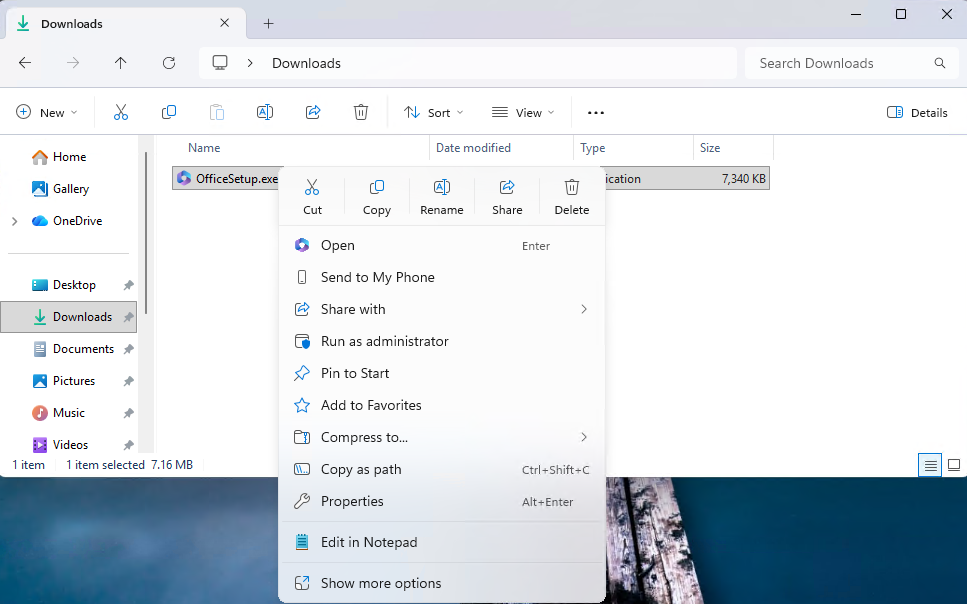
[Context Menu]

  • When right clicking on a .exe, .bat, or .cmd file, the context menu’s “Open” verb will now match the icon associated with the file’s default app.
[caption id="attachment_178900" align="alignnone" width="967"]The context menu’s “Open” verb matches the icon in the default app. The context menu’s “Open” verb matches the icon in the default app.[/caption]
Feedback: Share your thoughts in Feedback Hub (WIN + F) under File Folders and Online Storage > File Explorer.

[Touchpad]

  • We’re adding a new setting in Settings > Bluetooth & Devices > Touchpad so you can choose how large the right-click zone size is (this is the portion in the bottom-right of your touchpad where pressing a single finger will result in a right-click), between default, small, medium, and large. Note – this setting only appears for touchpads that have a pressable surface for this. Some manufacturers may provide customization for this in their own apps – if you’ve customized your setting using an app like this, a “Custom” entry will be added to the dropdown, which preserves that value.

Feedback: Share your thoughts in Feedback Hub (WIN + F) under Input and Language > Touchpad.

[Lock screen]

  • More widget options and support for lock screen widget personalization (previously referred to as “Weather and more”) are rolling out. After initial launch with Windows Insiders in the European Economic Area (EEA), these updates are expanding to all regions. You can add, remove, and rearrange lock screen widgets such as Weather, Watchlist, Sports, Traffic, and more. Any widget that supports the small sizing option can be added. To customize your lock screen widgets, go to Settings > Personalization > Lock screen.

FEEDBACK: Please file feedback in Feedback Hub (WIN + F) under Desktop Environment > Lock screen.

[Input]

  • Pen settings: we have made refinements to the Pen settings page including small changes to the options for the pen tail button. A new option, “Same as Copilot key”, enables the pen tail button to launch the same app as the Copilot key.

Feedback: Share your thoughts in Feedback Hub (WIN + F) under Devices and Drivers > Bluetooth – Keyboards, Mice, and Pens.

Reminders for Windows Insiders in the Canary Channel

  • These builds can be unstable and may be released with limited documentation. Join Windows Insider – Get early access to Windows 11 features & updates
  • The builds we release to the Canary Channel represent the latest platform changes early in the development cycle and should not be seen as matched to any specific release of Windows. Features and experiences included in these builds may never get released as we try out different concepts and get feedback. Features may change over time, be removed, or replaced and never get released beyond Windows Insiders. Some of these features and experiences could show up in future Windows releases when they’re ready.
  • Many features in the Canary Channel are rolled out using Control Feature Rollout technology, starting with a subset of Insiders and ramping up over time as we monitor feedback to see how they land before pushing them out to everyone in this channel.
  • The desktop watermark shown at the lower right corner of the desktop is normal for Windows Insider pre-release builds.
  • Some features may show up in the Dev and Beta Channels first before showing up in the Canary
  • For Windows Insiders who want to be the first to get features gradually rolled out to you, you can turn ON the toggle to get the latest updates as they are available via Settings > Windows Update*. Over time, we will increase the rollouts of features to everyone with the toggle turned on. Should you keep this toggle off, new features will gradually be rolled out to your PC over time once they are ready.
  • Some features in active development we preview with Windows Insiders may not be fully localized and localization will happen over time as features are finalized. As you see issues with localization in your language, please report those issues to us via Feedback Hub.
  • To get off the Canary Channel, a clean install of Windows 11 will be required.
  • Check out Flight Hub for a complete look at what build is in which Insider channel.
Thanks, Windows Insider Program Team

Source: Announcing Windows 11 Insider Preview Build for Canary Channel 29570.1000
 
Hello Windows Insiders, today we are releasing Windows 11 Insider Preview Build 28020.1863 to the Canary Channel. (KB 5083725)

What’s new in Canary Build 28020.1863

Changes and Improvements gradually being rolled out with toggle on*

  • This update includes a small set of general improvements and fixes that improve the overall experience for Insiders running this build on their PCs.

[General]

  • Fixed an issue that prevented some apps from signing in due to a false report of no internet connectivity.

Reminders for Windows Insiders in the Canary Channel

  • Many features in the Canary Channel are rolled out using Control Feature Rollout technology, starting with a subset of Insiders and ramping up over time as we monitor feedback to see how they land before pushing them out to everyone in this channel.
  • The desktop watermark shown at the lower right corner of the desktop is normal for Windows Insider pre-release builds.
  • Some features may show up in the Dev and Beta Channels first before showing up in the Canary Channel.
  • For Windows Insiders who want to be the first to get features gradually rolled out to you, you can turn ON the toggle to get the latest updates as they are available via Settings > Windows Update*. Over time, we will increase the rollouts of features to everyone with the toggle turned on. Should you keep this toggle off, new features will gradually be rolled out to your PC over time once they are ready.
  • Some features in active development we preview with Windows Insiders may not be fully localized and localization will happen over time as features are finalized. As you see issues with localization in your language, please report those issues to us via Feedback Hub.
  • To get off the Canary Channel, a clean install of Windows 11 will be required. As a reminder - Insiders can’t switch to a channel that is receiving builds with lower build numbers without doing a clean installation of Windows 11 due to technical setup requirements.
  • Check out Flight Hub for a complete look at what build is in which Insider channel.
Thanks, Windows Insider Program Team

Source: Announcing Windows 11 Insider Preview Build 28020.1863 (Canary Channel)
 
Microsoft is testing changes for Windows 11 that will make it easier to customize the Start menu easier and to position the taskbar better for your needs. The company is rolling out them out to Windows Insiders in the Experimental channel starting today and over the coming week.

If you hate how big and bloated the Windows 11 Start menu has gotten, this test will give you the option between Small and Large versions of the menu. Simply choose the size you want from the Start menu settings, and your pick will stay consistent across displays. Windows Latest previously found that Windows 11's Start menu became almost twice as big after an update that came out in November last year. Microsoft told the publication that it was aware of it and was looking into the publication's feedback.

In addition, the Insiders release will give you access to section-level toggles – Pinned, Recommended, and All — so you can show or hide parts of the menu to simplify your experience. You can see a Start menu with just your pinned apps, for instance, if you switch off Recommended and All. These toggles will be rolling out over the coming weeks. You'll also get access to a separate control for file recommendations, which will let you disable them in Start menu alone and not in other places, as well as the option to hide your name and profile picture in Start to protect your privacy if you're sharing your screen or streaming.

Microsoft will also give you the power to position your taskbar on any edge of the screen, whether it's top, bottom, left or right. You can even choose the icon alignment, with top-aligned and centered being the choices when the taskbar is on the left or right edge. If you put the taskbar on the top or bottom edge, you can choose between left-aligned and centered icons.

To be part of Microsoft's Windows Insider program, you'll have to register with your Microsoft account. Insiders get to preview the latest Windows builds the company is testing, and they'll be able to send their feedback to the company to improve its experimental features before their wider rollout.
Read More: Microsoft lets Insiders choose their Windows 11 Start menu size - Engadget
 
Microsoft has rolled out new Windows 11 Insider Preview builds on June 8 for both the Beta and Experimental channels. The update introduces a new 26H1 build train and allows users to extend Windows Update pauses as many times as needed. Several bugs have also been addressed in this release.

Microsoft is rolling out a new build number series for Windows 11 version 26H1. Insiders in the Experimental (26H1) channel will now receive builds in the 28100 series, while a new Beta (26H1) channel based on the 28000 series is also launching.

Insiders can switch between the Beta (26H1) and Experimental (26H1) channels through Settings, Windows Update, Windows Insider Program, and by selecting the experience.

This switch does not require a clean reinstall of Windows and is handled as an in-place upgrade. Microsoft has noted that Windows 11 26H1 is a targeted release for specific silicon, including Qualcomm Snapdragon X2 Series devices.

Most Insiders are advised to stay on the default Windows core version in the Advanced options, rather than specifically selecting 26H1.
 

You may also like...