Advice Request Any real IDM alternative in 2022?

Please provide comments and solutions that are helpful to the author of this topic.
Just bought a lifetime license for IDM last night. Have been using crack all these while

After trying

Ant Download Manager
Neat Download Manager
Xtreme Download Manager

I still say IDM is the best. Ant comes 2nd. I was downloading a movie last night with Ant and Xtreme Download Managers and it's in HLS format. After downloading my SMPlayer cannot play it. Even Windows movie players also cannot open the file

This morning I download the same movie with IDM and sure enough it can be played using SMPlayer.
 
Neat download manager combines file parts :(
I downloaded a 4GB windows ISO and it combined after downloading

Just bought a lifetime license for IDM last night. Have been using crack all these while

After trying

Ant Download Manager
Neat Download Manager
Xtreme Download Manager

I still say IDM is the best. Ant comes 2nd. I was downloading a movie last night with Ant and Xtreme Download Managers and it's in HLS format. After downloading my SMPlayer cannot play it. Even Windows movie players also cannot open the file

This morning I download the same movie with IDM and sure enough it can be played using SMPlayer.

This is a technique called segmented downloading which is a used to split a large file into several parts then joining it.
The joining part can sometimes be the cause of the corrupted data although this was an issue mostly in the past.

Some file-hosting sites will limit bandwidth per a connection eg. 10mb/s so if you make 5 connections you can download the same file at 50mb/s

You could disable this option if you don't want your files joined. It could also be IDM has a better rejoining technique.

If you have a "fast" internet connection then you probably should not be using the segmented download option for better data integrity.
 
This is a technique called segmented downloading which is a used to split a large file into several parts then joining it.
The joining part can sometimes be the cause of the corrupted data although this was an issue mostly in the past.

Some file-hosting sites will limit bandwidth per a connection eg. 10mb/s so if you make 5 connections you can download the same file at 50mb/s

You could disable this option if you don't want your files joined. It could also be IDM has a better rejoining technique.

If you have a "fast" internet connection then you probably should not be using the segmented download option for better data integrity.
eagleget also creates multiple connections but it allocates some space in the disk and do not combine parts after the download
 
I wonder how it looks in practice. Small size is a plus
I would love to install it, but today I installed Ant Downloader Manager.
I will keep it on the disk, maybe a day like this will install it
 
  • Like
Reactions: Nevi
FileCentipede is a nifty download manager with a plenty of features *although you need to add browser extension manually, and there is no 32bit version


1648331693487.png
 
XDM it's open source and real alternative to idm
Seconding this. XDM is a great free option that is extremely similar to IDM. I was an IDM user in the past, then switched to Eagleget which was better than IDM in its time, and ever since it's discontinued and taken down, I switched to XDM - Xtreme Download Manager which has all the bells and whistles to be a great alternative to IDM.
 
T
FileCentipede is a nifty download manager with a plenty of features *although you need to add browser extension manually, and there is no 32bit version


Thanks for this recommendation. This looks like a really good alternative. I'll test it out for a few days. I've been using XDM for a couple of years, and probably its time to test some others. Its great to see the developer recommending other alternatives at the bottom of the page if users didn't like his product!

Make sure to manually install the browser extension to get the best of it's abilities.

I have a question though, what is the catalog feature in FileCentipede? Are they custom queues like what we have in IDM, XDM, Ninja etc? It doesn't seem to be working for me.
 
Last edited:
Last edited by a moderator:
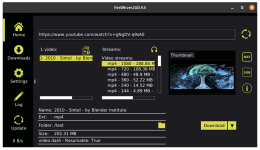
Try FireDM, it's open source and a cool Download Manager.
Link to download page of the program:
View attachment 265286
i've try it and this is the best one, can easily download soundcloud playlist :coffee:
 
  • Like
Reactions: ForgottenSeer 94633
What do you mean? 🤔
Apart from a common queue for all files added for download, certain download managers provide the ability to create multiple queues, where you can sort your files into different named queues (e.g. fitness videos, software's, yoga videos, Adele songs etc) and you can download each of these queue's separately or schedule them to download at a specific time. This is the multiple queue feature in download managers.
 
Apart from a common queue for all files added for download, certain download managers provide the ability to create multiple queues, where you can sort your files into different named queues (e.g. fitness videos, software's, yoga videos, Adele songs etc) and you can download each of these queue's separately or schedule them to download at a specific time. This is the multiple queue feature in download managers.
Even if it exist in this DM, I don't know where it can be configured. Never used those. 😅
Thx for the info.
 
Try FireDM, it's open source and a cool Download Manager.
Link to download page of the program:

View attachment 265286
It is a good app but wished it had a browser extension.
 
I'm still using XDM because it can capture videos from many sites and has browser addons.

For downloading even while the PC is off, I use Jdownloader installed in a container in OMV, in an Raspberry Pi device. The download links are sent through their addon installed in the browser.