

The MalwareTips app
Your community, one tap away.
Open MalwareTips from your Home Screen or desktop. Follow discussions, find answers and pick up where you left off.
- Home Screen access
- Optional push alerts
- Your community
You're ready to explore.Explore what's new
Installation instructions
iPhone & iPad
- Open MalwareTips in Safari and tap Share. You may need to open the Page Menu first.
- Choose Add to Home Screen. If it is not listed, use Edit Actions to add it.
- Keep Open as Web App enabled if shown, then tap Add.
Android
- Open MalwareTips in Chrome or another browser that supports app installation.
- Open the browser menu and look for Install app, Install and create shortcut, or Add to Home screen.
- Choose Install and confirm. Wording varies by browser.
Desktop
- Chrome: use the install icon in the address bar, or the menu under Cast, save and share.
- Edge: open the menu, then More tools, Apps and Install this site as an app.
- Safari on Mac: choose Share or File, then Add to Dock. Firefox on Windows: look for the web apps button in the address bar.
If you cannot find an install option, update your browser or use its bookmark option to keep MalwareTips close.
Keep up with your conversations
After installation, open the app and sign in. Enable push notifications in Preferences if you want alerts. On iPhone and iPad, push requires a Home Screen web app and iOS or iPadOS 16.4 or later.
Sign in to manage notificationsInstallation is optional. Your notification settings stay under your control.
You are using an out of date browser. It may not display this or other websites correctly.
You should upgrade or use an alternative browser.
You should upgrade or use an alternative browser.
Advice Request Any real-time software that uses non-traditional ways to find malware?
Share practical recommendations that address the author's needs.
F
ForgottenSeer 89360
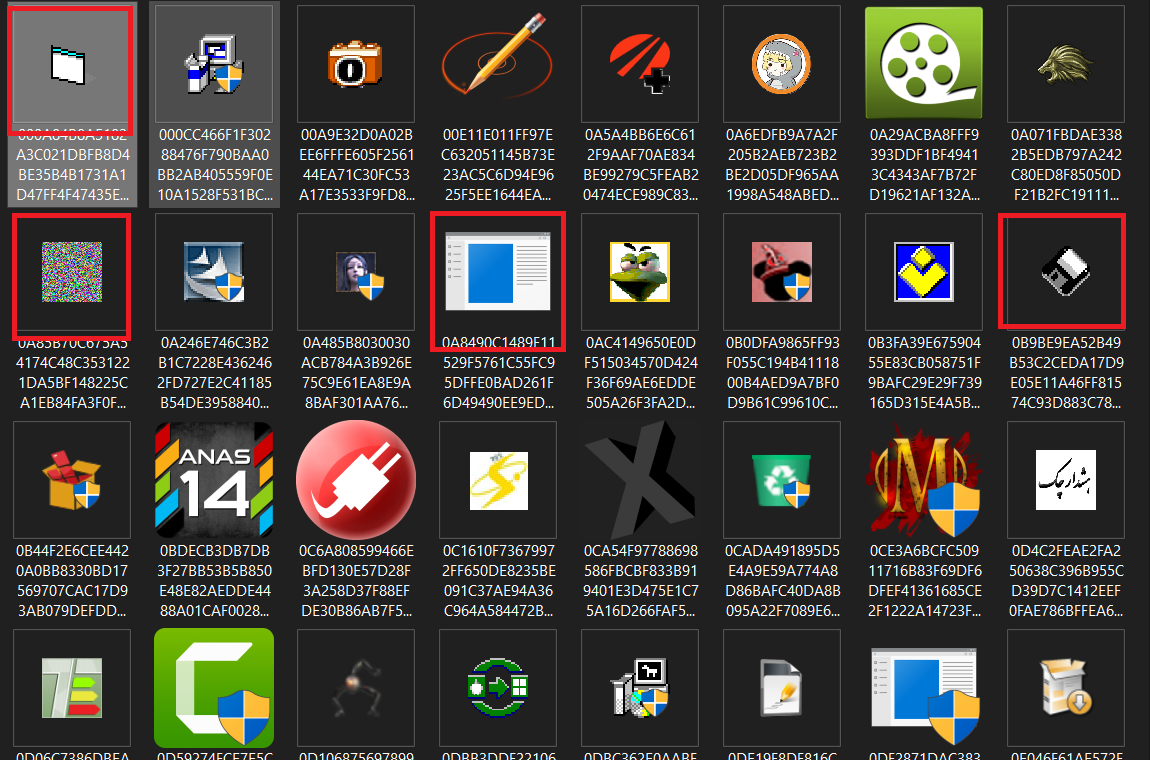
I am extracting the archive at the moment and browsing the folder "Clean". With my intuition as a malware hunter, I can tell you much of the stuff there is far away from "clean". Anyway, just out of curiosity, I'll do a scan with F-Secure.
The files I've highlighted are very suspicious before I've started any analysis.
F-Secure results:
Folder "Clean" that is not so clean: 248 detections
Folder "Malware": 943 detections
Folder "PUP": 1048 detections
The files I've highlighted are very suspicious before I've started any analysis.
F-Secure results:
Folder "Clean" that is not so clean: 248 detections
Folder "Malware": 943 detections
Folder "PUP": 1048 detections
| Folder Name | Total Files Before Scan | Total Files After Scan | Detection rate in % |
| Clean | 2202 | 1954 | 11.26 |
| Malware | 1049 | 106 | 89.89 |
| PUP | 1065 | 17 | 98.40 |
Last edited by a moderator:

Thank you guys for testing, the result are extremely interesting for a lot of reasons. To make a very long story short, these samples were sent to me all in one folder, and the well-known vendor had me analyze the entire folder with VoodooAi and to send the results back to them. It was not until the other night when I found the samples that I wrote a little code that sorted the files into the three folders, based on the results they returned to me. I have not manually inspected any of the files at all, but as I was saying, I trust their verdicts.
I should also mention that the vendor and I disagreed on one point for sure. The vendor believed that cracks, keygens, trainers, etc. should only be considered malware if they exhibit malicious behaviors on the actual endpoint. I personally believed, and still believe today that if a file contains any malicious code, it cannot be considered Safe, simply because we have no idea what else it might contain. So that would explain why there will probably be some greyware in the Clean samples. Who knows, we might even find a bunch of malware in the clean samples, and vice-versa .
.
Either way, as McMcbrad previously mentioned, the results are going to be fuzzy at best, along with malware detection in general. It is scary to me that in this day and age new, non-whitelisted code is executing all over the world as people are carelessly browsing the web and checking email, especially with highly variable and inconsistent malware results.
And we wonder why cybercrime and malware infections increase year after year. Malware infections are no different from human virus infections... If everyone did their part and made it a point to not be so careless, we could make the malcoder’s “job” difficult enough that we might actually see a drop in malware infections. We are on a very dangerous path, as illustrated by the breaches that continue to occur on a daily basis.
I should also mention that the vendor and I disagreed on one point for sure. The vendor believed that cracks, keygens, trainers, etc. should only be considered malware if they exhibit malicious behaviors on the actual endpoint. I personally believed, and still believe today that if a file contains any malicious code, it cannot be considered Safe, simply because we have no idea what else it might contain. So that would explain why there will probably be some greyware in the Clean samples. Who knows, we might even find a bunch of malware in the clean samples, and vice-versa
.Either way, as McMcbrad previously mentioned, the results are going to be fuzzy at best, along with malware detection in general. It is scary to me that in this day and age new, non-whitelisted code is executing all over the world as people are carelessly browsing the web and checking email, especially with highly variable and inconsistent malware results.
And we wonder why cybercrime and malware infections increase year after year. Malware infections are no different from human virus infections... If everyone did their part and made it a point to not be so careless, we could make the malcoder’s “job” difficult enough that we might actually see a drop in malware infections. We are on a very dangerous path, as illustrated by the breaches that continue to occur on a daily basis.
F
ForgottenSeer 89360
AVG Internet Security Detection Results:
Disclaimer: These are only scan results and do not show the effectiveness of other components, such as IDP, CyberCapture or Web Blocker.
All samples are not pre-analysed and false positives, as well as false negatives are not guaranteed to be real.
I found a game in folder "Malware": VT 1/72 VirusTotal
Due to this reason I've reduced malware number from 1050 to 1049.
| Folder Name | Total Files Before Scan | Total Files After Scan | Detection Rate in % |
| Clean | 2202 | 1825 | 17.12 |
| Malware | 1049 | 38 | 96.37 |
| PUP | 1065 | 29 | 97.27 |
Disclaimer: These are only scan results and do not show the effectiveness of other components, such as IDP, CyberCapture or Web Blocker.
All samples are not pre-analysed and false positives, as well as false negatives are not guaranteed to be real.
I found a game in folder "Malware": VT 1/72 VirusTotal
Due to this reason I've reduced malware number from 1050 to 1049.
Last edited by a moderator:

I tried to test Windows Defender's detection rate but it was taking too long and also the UI crashed every time I clicked Protection history which is a known bug. I also made the mistake of extracting it into my HDD instead of SSD. I waited more than 2 hours and only 20% threats were removed by that time so it would have taken 6-7 hours more maybe. Lol. Couldn't afford to wait that long. Anyway, scanning and deleting over 4000 malwares all at a time is not ideal in any universe so I'll not blame WD too much for taking time.
Last edited:
F
ForgottenSeer 85179
This is fixable:I tried to test Windows Defender's detection rate but it was taking too long and also the UI crashed every time I clicked Protection history which is a known bug
- Launch the command prompt via Safe Mode
- Enter the following command in the prompt:
- del "C:\ProgramData\Microsoft\Windows Defender\Scans\mpenginedb.db"
- reboot
For me that fix the UI crash
Source:

Windows Defender Schutzverlauf löschen funktioniert nicht
Hallo., Möchte gerne auf meinem Rechner (W10/Version1909-18363.628) im Defender den Schutzverlauf der Übersichtlichkeit halber löschen. Alle Tipps aus dem Netz (u.a. Deskmodder) über Powershell oder den Eintrag unter C:\ProgramData\Microsoft\Windows Defender\Scans\History\Service löschen...
There's another easier way. Disable Tamper Protection then delete everything inside this folder "C:\ProgramData\Microsoft\Windows Defender\Scans\History\Service" and then enable Tamper Protection again.This is fixable:
The db file will be regenerated at the next start.
- Launch the command prompt via Safe Mode
- Enter the following command in the prompt:
- del "C:\ProgramData\Microsoft\Windows Defender\Scans\mpenginedb.db"
- reboot
For me that fix the UI crash
Source:
Windows Defender Schutzverlauf löschen funktioniert nicht
Hallo., Möchte gerne auf meinem Rechner (W10/Version1909-18363.628) im Defender den Schutzverlauf der Übersichtlichkeit halber löschen. Alle Tipps aus dem Netz (u.a. Deskmodder) über Powershell oder den Eintrag unter C:\ProgramData\Microsoft\Windows Defender\Scans\History\Service löschen...www.computerbase.de
Anyway, this bug has been known for a long time. I'm disappointed that it hasn't been fixed yet. The UI needs some change. The Protection History UI management is awful.
I agree with the vendor. I think it's reasonable to classify cracks which do nothing malicious, as safe, or as is sometimes the case, identify them as a cracks. I do however understand that antiviruses often identify cracks as malware due to their heuristics, rather than intentionally identifying cracks with signatures.The vendor believed that cracks, keygens, trainers, etc. should only be considered malware if they exhibit malicious behaviors on the actual endpoint. I personally believed, and still believe today that if a file contains any malicious code, it cannot be considered Safe, simply because we have no idea what else it might contain.
I've tried downloading from your Google Drive link, but I had issues downloading yesterday and as of now Google has temporarily suspended downloading due to the number of times its been downloaded. Anyway, I'll try again later.
F
ForgottenSeer 89360
These large packs are a bit overwhelming for both testers and antiviruses. That’s why in my opinion, it’s better to do a test with 30-40 samples, that you’ve analysed and know are actively working, scan them quickly, and execute the rest.There's another easier way. Disable Tamper Protection then delete everything inside this folder "C:\ProgramData\Microsoft\Windows Defender\Scans\History\Service" and then enable Tamper Protection again.
Anyway, this bug has been known for a long time. I'm disappointed that it hasn't been fixed yet. The UI needs some change. The Protection History UI management is awful.
Yeah, it would be extremely interesting how WD does with these samples... especially the PUP samples with PUP detection ON vs OFF. But it will probably be a chore though with WD, it is not the easiest to test. I might fire up a VM and work on it a little each day. We should have the results by ChristmasI tried to test Windows Defender's detection rate but it was taking too long and also the UI crashed every time I clicked Protection history which is a known bug. I also made the mistake of extracting it into my HDD instead of SSD. I waited more than 2 hours and only 20% threats were removed by that time so it would have taken 6-7 hours more maybe. Lol. Couldn't afford to wait that long. Anyway, scanning and deleting over 4000 malwares all at a time is not ideal in any universe so I'll not blame WD too much for taking time.
.
Yeah, I can certainly see both sides.I agree with the vendor. I think it's reasonable to classify cracks which do nothing malicious, as safe, or as is sometimes the case, identify them as a cracks. I do however understand that antiviruses often identify cracks as malware due to their heuristics, rather than intentionally identifying cracks with signatures.
I've tried downloading from your Google Drive link, but I had issues downloading yesterday and as of now Google has temporarily suspended downloading due to the number of times its been downloaded. Anyway, I'll try again later.
Thank you for letting me know... I checked it and tried to reshare it but it looks like we just have to wait 24 hours before they make it available again.
Yeah, malware testing is not as easy as it looks. And when youtube testers download massive email attacks to test, and do not remove the duplicates or check to see if each file is in fact real malware then the results may not be all that accurate. Supposedly these samples are highly vetted and classified correctly which is one reason they are interesting.These large packs are a bit overwhelming for both testers and antiviruses. That’s why in my opinion, it’s better to do a test with 30-40 samples, that you’ve analysed and know are actively working, scan them quickly, and execute the rest.

Hi Guys! One thing that could be noticed on a quick perusal of the files contained in the Malware directory is that all of the files are exe's. As there are just oodles of malicious files that exist in other formats this should be kept in mind for anyone testing.
Product X may be the Cat's Meow against PE32 malware, but may be wretched against vbs worms.
Product X may be the Cat's Meow against PE32 malware, but may be wretched against vbs worms.
F
ForgottenSeer 89360
Thanks!Hi Guys! One thing that could be noticed on a quick perusal of the files contained in the Malware directory is that all of the files are exe's. As there are just oodles of malicious files that exist in other formats this should be kept in mind for anyone testing.
Product X may be the Cat's Meow against PE32 malware, but may be wretched against vbs worms.
That's why I've made scripts, java malware and PowerShell code standard on all my tests

Very true, and I hear that WV does quite well with non PE32 malware. But this sample set was created to test ML/Ai efficacy, so it only contains exe binaries. Finding tens of thousands non PE32 malware to build training data sets has always proved to be challenging, which is probably why most ML/Ai products focus on PE32 malware. If you happen to have a good source for non PE32 malware I would love to know about it!Hi Guys! One thing that could be noticed on a quick perusal of the files contained in the Malware directory is that all of the files are exe's. As there are just oodles of malicious files that exist in other formats this should be kept in mind for anyone testing.
Product X may be the Cat's Meow against PE32 malware, but may be wretched against vbs worms.
F
ForgottenSeer 89360
I author it myself sometimes, when I’m lazy I use any.run and hybrid analysis. Non-pe malware is centred around 2 concepts: concealed downloading and concealed dropping. It’s not too rich in functionality, but the form varies. With one obfuscator you can create thousands of forms that can be used to train ML, but they are easiest to block in real-time.Very true, and I hear that WV does quite well with non PE32 malware. But this sample set was created to test ML/Ai efficacy, so it only contains exe binaries. Finding tens of thousands non PE32 malware to build training data sets has always proved to be challenging, which is probably why most ML/Ai products focus on PE32 malware. If you happen to have a good source for non PE32 malware I would love to know about it!
Java is an exception.
Last edited by a moderator:
Hmmm, very interesting. What obfuscator do you recommend? I would love to play around with this. My initial thought is that is that it would not produce a diverse enough (or even realistic / effective) training data set, but I would like to play around with it out of curiosity.I author it myself sometimes, when I’m lazy I use any.run and hybrid analysis. Non-pe malware is centred around 2 concepts: concealed downloading and concealed dropping. It’s not too rich in functionality, but the form varies. With one obfuscator you can create thousands of forms that can be used to train ML, but they are easiest to block in real-time.
Java is an exception.
Scripts and fileless malware in general are odd compared to PE32. I have read from various sources that ROUGHLY 33% of all PE32 files are malicious.

Whereas both malious and Safe scripts are far less common, and the ratio of malicious scripts to Safe scripts that an end user will encounter is likely higher. In other words, I believe the best practice is to auto allow the obviously safe scripts (high file rep, spawned from a Safe process, etc.), and block the rest, especially if they are located in a common malware hiding spot.
Recently browsing
Members who viewed this thread in the last 5 minutes

