APIVoid Browser Protection

@tsunami @Moonhorse

Will you put reporting false positives feature within the extension?

I need to think about it, because the extension is designed to harden the browser by applying specific blocking rules to reduce the attack surface.

False positives mainly depend on the user's browsing habits. For example, if you enable the "Block suspicious TLDs" option and need to visit a ".top" domain (rare?), you can:

  • Click "Exclude domain" to add it to the whitelist if you plan to visit it frequently.
  • Click "Proceed anyway" if you only intend to visit it once or very occasionally.

Both options imply that you trust and recognize the domain.

If you install the extension for family members or friends, depending on their browsing habits, they may (or may not) encounter some legitimate websites being blocked.

For typical browsing, it is generally rare to visit websites that use risky TLDs or that are blocked by the extension.

That said, I will think about this option.

Any plans adding this extension & script stop to edge ''store''

A version for Edge is scheduled for the next weeks, will update once ready.

 
We've released a new version v2.6:

Changelog:

Updated list of internal rules
Correctly show the blocked URL in specific cases
Minor bug fixes
 
Just wanted to share this interesting case:

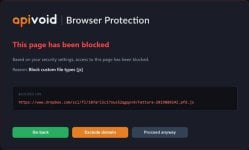
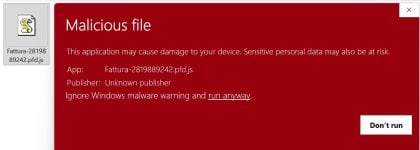
A business using APIVoid Browser Protection reported that it blocked the download of a fake invoice disguised as a JavaScript (.js) file. The incident started with an email received while they were genuinely expecting an invoice. Thinking they were downloading a PDF, they clicked the link, which instead attempted to deliver the malicious .js file.

They shared the email with us, and here's a quick analysis:

arrow-image.png


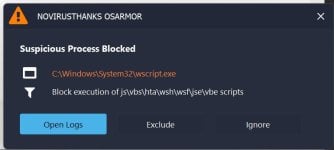
As additional test, I also tried to run the fake invoice .js file with OSArmor (Basic Profile) running in the system:

osa-test3.png
 
Last edited:
fwiw~ as test: Block custom file types - Add > js
1038.jpg
File: Fattura-2819889242.pfd.js
File size: 3.23 MB (3,385,086 bytes)
MD5 checksum: 61F07213F2E54C54EC379714FD211C73
SHA1 checksum: D7A2361877B9CD1F4B6EF56F59FB7ADEC72CC945
SHA256 checksum: B11EF9F11C9BB6228582F38A61F4C04DC7160939D8C5B7EE4E467FFDE6317F02
Date/Time: 6/23/2026
1035.jpg
1036.jpg
1037.jpg
Date/Time: 2026-06-23
Action: Process Blocked
OSArmor Version: 2.0.6.0
Process: [14056]C:\Windows\System32\wscript.exe
Process Size: 180 KB (184,320 bytes)
Process MD5 Hash: AE1263D94A636F3B23119F57C1EFA985
Parent: [4148]C:\Windows\explorer.exe
Parent Process Size: 3.17 MB (3,327,776 bytes)
Rule: BlockJsScripts
Rule Name: Block execution of js\vbs\hta\wsh\wsf\jse\vbe scripts
Command Line: "C:\Windows\System32\WScript.exe" "C:\WebIncoming\Fattura-2819889242.pfd.js"
SiriusLLM
### Analysis Summary
The provided JavaScript file, `Fattura-2819889242.pfd.js`, exhibits several indicators of malicious behavior. The script is heavily obfuscated, contains encoded data, and utilizes ActiveX objects, which are commonly associated with malicious activities. The script's primary functionality appears to involve decoding and executing embedded content.

### Detailed Analysis
1. **Obfuscation and Encoding**: The script is obfuscated, with functions and variables encoded using XOR operations with specific keys. This level of obfuscation is a strong indicator of malicious intent, as it complicates analysis and suggests an attempt to evade detection.

2. **ActiveXObject Usage**: The script creates an `ActiveXObject`, which is a sign of potential malicious activity. ActiveX controls can be used to execute arbitrary code on a Windows system, and their use is often associated with malware.

3. **Decoding and Execution**: The script decodes embedded data using a custom function `sc(bytes, key)` and then executes the decoded content. This behavior is typical of malware that downloads or executes additional payloads.

4. **File System and Registry Interaction**: The script interacts with the file system and registry, as indicated by the use of `FileSystemObject` and other registry-related operations. This could be used for various malicious purposes, including data exfiltration or persistence.

5. **Complex and Encoded Data**: The script contains a large amount of encoded data, which upon decoding, may reveal further malicious code or configuration. The complexity and size of the encoded data suggest a sophisticated obfuscation technique.

6. **Lack of Digital Signature**: The file is not digitally signed, which, while not conclusive evidence of malice, is consistent with the behavior of many malicious scripts.

### Classification
- **Malware Type**: The script's behavior aligns with characteristics of a downloader or dropper, potentially belonging to a broader category of malware.
- **Malware Name**: Given the obfuscation techniques, ActiveX usage, and decoding/execution behavior, a suitable detection name could be `Downloader.Obfuscated`.

### Final Verdict
Malware type: Downloader
Malware name: Downloader.Obfuscated
Final verdict: Malicious with 95% confidence.
 
Last edited:
We've released a new version v2.8:

v2.8 - 03 Jul 2026

Improved performance
Improved retrieval of the blocked URL

v2.7 - 23 Jun 2026

Updated list of internal rules

@simmerskool @bjm_

The file type "js" is automatically blocked from v2.7 with the option: "Block dangerous file downloads"

I forgot to post here that we released v2.7.
 
We've released a new version v2.8:


@simmerskool @bjm_

The file type "js" is automatically blocked from v2.7 with the option: "Block dangerous file downloads"

I forgot to post here that we released v2.7.
Thank you for your work. I understand you also released SafaShield for iOS. Is there an equivalent for Android, or is anything planned for Android? Gemini says certain browsers may support the desktop version, but I figured it's best to hear it from the horse's mouth.

If APIVoid Browser Protection warns me against visiting a suspicious site (e.g. Reddit.com), and I visit the site anyway or add it to exclusions, does the dangerous file types blocking still apply, or does APIVoid drop all defenses for that site?
 
  • Like
Reactions: Gandalf_The_Grey
@ebocious

No plans yet for Android, but we'll see more about this in the next months.

does the dangerous file types blocking still apply, or does APIVoid drop all defenses for that site?

If you click "Proceed anyway" or "Exclude domain" on a blocked website (such as example.com), the website will be excluded from all blocking rules, including "Block download of suspicious file types.". This should generally be used only for known or trusted websites.

The difference between the two options is that "Proceed anyway" excludes the website from the blocking rules only for the current browser session, once you close and reopen the browser, the website will be blocked again. The "Exclude domain" adds the website to the Exclusions list, and in this case, the website will remain excluded from the blocking rules across future browser sessions until you remove it from the Exclusions list.
 
@ebocious

No plans yet for Android, but we'll see more about this in the next months.


If you click "Proceed anyway" or "Exclude domain" on a blocked website (such as example.com), the website will be excluded from all blocking rules, including "Block download of suspicious file types.". This should generally be used only for known or trusted websites.

The difference between the two options is that "Proceed anyway" excludes the website from the blocking rules only for the current browser session, once you close and reopen the browser, the website will be blocked again. The "Exclude domain" adds the website to the Exclusions list, and in this case, the website will remain excluded from the blocking rules across future browser sessions until you remove it from the Exclusions list.
I was afraid of that. I hope I don't encounter any first-party exploits on Reddit, then.
 
Last edited:
  • Like
Reactions: Jan Willy
Does safety only depends of a browserextension?
Not on my own devices. But it's a concern, nonetheless.

P.S.: I still very much appreciate APIVoid Browser Protection. It complements Quad9 and uBO/uBOL (my first lines of defense), and is definitely a step up from what I had before without slowing the browser.
 
Last edited:

You may also like...