Question App security on Android

Android & WearOS
3 Replies 1,268 Views
Help answer the author's question with clear explanations and useful steps.

Atatrah

Level 1
Verified
Well-known
Hello.
I have Xiaomi device and i installed security Application and Ad block .
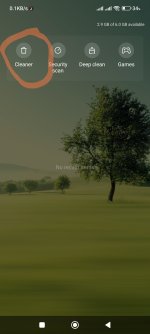
I notice when i press "cleaner" button "built in device ' to clean and boost , its also close and disable the security App .
I used Avira , Kaspersky, avast , avg , bitdefender , all of them the same problem

Picture attached
 

Attachments

  • Screenshot_2024-03-14-20-01-18-323-edit_com.mi.android.globallauncher.jpg
    Screenshot_2024-03-14-20-01-18-323-edit_com.mi.android.globallauncher.jpg
    723.4 KB · Views: 266
You have to place them in accessibility and grand them auto start rights. Excluded them then from the cleaner. I have PocoX6 Pro 12Gb /512GB version and works perfectly like this
I added them in accessibility
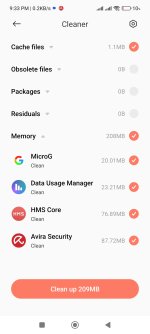
There is no option to add exception for memory scan , just for cashe . And avira appear in memory not cashe like the attached picture.
The only option is to disable memory scan for all apps
I have poco x3 nfc
 

Attachments

  • Screenshot_2024-03-14-21-33-53-314_com.miui.cleaner.jpg
    Screenshot_2024-03-14-21-33-53-314_com.miui.cleaner.jpg
    250.7 KB · Views: 204
I added them in accessibility
There is no option to add exception for memory scan , just for cashe . And avira appear in memory not cashe like the attached picture.
The only option is to disable memory scan for all apps
I have poco x3 nfc
You have to place them in accessibility and grand them auto start rights. Excluded them then from the cleaner. I have PocoX6 Pro 12Gb /512GB version and works perfectly like this


I found the solution.
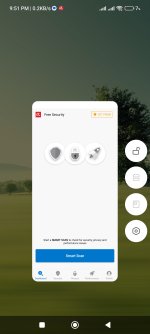
You need to press on lock button like this
Make sure you activate this ، because the cleaner close the app from running after clean

.Screenshot_2024-03-14-21-51-56-861_com.mi.android.globallauncher.jpg
 
Last edited by a moderator:

Recently browsing

Members who viewed this thread in the last 5 minutes

Back
Top