Software Review AppGuard (Demonstration and Reviews)

Reviews reflect the reviewer's setup and methods. Check the evidence and limitations.
Thread details
Content created by
Shadowra

Shadowra

Level 42
Verified
Top Poster
Content Creator
Malware Tester
Well-known
High Reputation
Forum Veteran
Hello and welcome to the AppGuard demo and test!
This software is not an antivirus, but its protection function is interesting.

It is an "Anti-exe" software, in other words, it will stop any suspicious launch (which is made by a malware or by you).
The software is easy to use, there is only one interface!
Settings are available to fine-tune the software.

On the other hand, what I like less, it blocks... EVERYTHING... really EVERYTHING!
Very effective against malware attacks, signed programs, it blocks them too!
I would have liked it to allow signed programs and block the rest (this can be remedied by switching it to medium mode, but you lose protection).

@Andrew3000 request

 
...
It is an "Anti-exe" software, in other words, it will stop any suspicious launch (which is made by a malware or by you).
...

In this test, AppGuard did fight EXE files, so it looked like anti-exe. But technically, AppGuard is the SRP solution. For example, if the anti-exe wants to block VBScript files (*.vbs) the wscript.exe has to be blocked and this will block all scripts in any location. The SRP solution can block/restrict *.vbs files in the User Space, but allow them in the Windows folder and any folder that is not in the User Space.
 
It is nice to see some Appguard coverage again. There is a few members here that have bypassed AG and I won't mention any names. One bypass was a person creating malware that used one of the approved certificates. I am not sure what the other person used except maybe a unguarded Windows folder. There used to be a unofficial Appguard thread over at Wilders. https://www.wilderssecurity.com/search/68924380/?q=appguard&o=relevance
I wanted to mention a section in the settings to allow certain programs. It is located in advanced settings for Power Applications if you so choose. You can also add Guarded Apps if you choose.
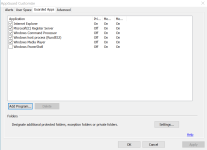
I have shared my usespace config before but will again. Fist I uncheck powershell in Guarded Apps. See screen shot.
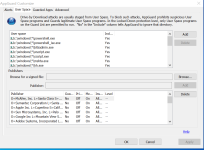
Then I add a bunch of stuff to userspace = YES. Again see screen shot. I also added to this post the extra stuff I add to Userspace.
I am looking forward to more Appguard discussion. I still use the old lifetime paid version and can see why so litte interest, since the new Solo version is expensive. You can also delete all the trusted Certs if you are affraid of someone using those against you.
c:\Windows\*\bitsadmin.exe
c:\Windows\*\powershell.exe
c:\Windows\*\powershell_ise.exe
c:\Windows\*\wscript.exe
c:\Windows\*\cscript.exe
c:\Windows\*\mshta.exe
c:\Windows\*\hh.exe
c:\Windows\*\wmic.exe
c:\Windows\*\scrcons.exe
 

Attachments

  • Screenshot 2022-02-16 135012.png
    Screenshot 2022-02-16 135012.png
    30.3 KB · Views: 457
  • Screenshot 2022-02-16 135619.png
    Screenshot 2022-02-16 135619.png
    69.8 KB · Views: 456
Last edited by a moderator:
It is nice to see some Appguard coverage again. There is a few members here that have bypassed AG and I won't mention any names. One bypass was a person creating malware that used one of the approved certificates. I am not sure what the other person used except maybe a unguarded Windows folder. There used to be a unofficial Appguard thread over at Wilders. https://www.wilderssecurity.com/search/68924380/?q=appguard&o=relevance
I wanted to mention a section in the settings to allow certain programs. It is located in advanced settings for Power Applications if you so choose. You can also add Guarded Apps if you choose.
I have shared my usespace config before but will again. Fist I uncheck powershell in Guarded Apps. See screen shot.
Then I add a bunch of stuff to userspace = YES. Again see screen shot. I also added to this post the extra stuff I add to Userspace.
I am looking forward to more Appguard discussion. I still use the old lifetime paid version and can see why so litte interest, since the new Solo version is expensive. You can also delete all the trusted Certs if you are affraid of someone using those against you.
Are you still using version 4? I have a lifetime license for it, my go to setup for a couple years was Appguard, Emsisoft and MBAE.
 
It is nice to see some Appguard coverage again. There is a few members here that have bypassed AG and I won't mention any names. One bypass was a person creating malware that used one of the approved certificates. I am not sure what the other person used except maybe a unguarded Windows folder. There used to be a unofficial Appguard thread over at Wilders. https://www.wilderssecurity.com/search/68924380/?q=appguard&o=relevance

I am not aware of anyone who really bypassed AppGuard with enhanced settings. One of the persons you have mentioned was actually me. But, I bypassed only the default settings. I sent the working POC to the AppGuard staff. I saw a "bypass" (shown in a video clip), but it was not a full bypass. Although the attacker could perform some spying (If I correctly recall), the malicious actions could not survive restarting the system.
Could you help me to find another bypass "malware that used one of the approved certificates"?

Edit.
I remember that I reported this bypass to MT, but it seems that this post (and thread) was removed.:unsure:
 
I don't like this kind of program at all. blocking everything is not protecting. It would be a more successful program if it detected and blocked trusted programs.
AppGuard does not block everything and it does not block signed programs trusted by AppGuard. Anyway, this is the SRP solution (based on its own driver), so it is far more restrictive compared to popular security solutions.
 

Recently browsing

Members who viewed this thread in the last 5 minutes

Back
Top