

Just an update. Just tested the new xdata ransomware. Appguard stopped it cold.
You are using an out of date browser. It may not display this or other websites correctly.
You should upgrade or use an alternative browser.
You should upgrade or use an alternative browser.
D
Deleted member 178
Thread author
normally you should be able to uninstall AG without disabling self protection.
D
Deleted member 178
Thread author
This was purchased and I have entered my license details. It activated successfully.
Ok so I can't uninstall AppGuard. I have checked "Stop self protection" and tried putting the slider to the "Off" mode and also tried stopping the service but every time I try to uninstall I get (even when logged in as my admin account):
I thought it may by AppLocker blocking something but it's not this as the logs are clear. Also tried making myself a Superuser but this didn't help.
Help please
are you on SUA?

Ok so I managed to uninstall but not using the "Programs & Features". I had to rerun the AppGuard installer and it then proceeded with the uninstall. I then rebooted and reinstalled and rebooted again but I am still getting the same errors when changing the slider. I've tried "Restore all settings to default" but even that errors with the same error I posted earlier. I uninstalled using my admin account but have only tried changing the slider with my SUA account.
I have set AppLocker to audit mode so it doesn't interfere. Nothings getting blocked in Event Viewer.
Ideas? Not sure what to try next. I don't have any other security products running except WFC but I have disabled my firewall temporarily while troubleshooting this.
I have set AppLocker to audit mode so it doesn't interfere. Nothings getting blocked in Event Viewer.
Ideas? Not sure what to try next. I don't have any other security products running except WFC but I have disabled my firewall temporarily while troubleshooting this.

You could try using Sysinternals' Process Monitor, with a filter that includes only the AppGuard processes. Then look for any file and registry blocks when you change the slider.Ok so I managed to uninstall but not using the "Programs & Features". I had to rerun the AppGuard installer and it then proceeded with the uninstall. I then rebooted and reinstalled and rebooted again but I am still getting the same errors when changing the slider. I've tried "Restore all settings to default" but even that errors with the same error I posted earlier. I uninstalled using my admin account but have only tried changing the slider with my SUA account.
I have set AppLocker to audit mode so it doesn't interfere. Nothings getting blocked in Event Viewer.
Ideas? Not sure what to try next. I don't have any other security products running except WFC but I have disabled my firewall temporarily while troubleshooting this.
D
Deleted member 178
Thread author
oh i had this one too, i thought it was my system...good to know...i will tell @Lockdown about it.Ok so I managed to uninstall but not using the "Programs & Features". I had to rerun the AppGuard installer and it then proceeded with the uninstall.
does AG is barebone or did you makes some changes in it?I then rebooted and reinstalled and rebooted again but I am still getting the same errors when changing the slider. I've tried "Restore all settings to default" but even that errors with the same error I posted earlier. I uninstalled using my admin account but have only tried changing the slider with my SUA account.
SUA shouldn't have influence on AG.
I recall someone having that issue, but can't remember the fix...@Lockdown will surely know.
oh i had this one too, i thought it was my system...good to know...i will tell @Lockdown about it.
does AG is barebone or did you makes some changes in it?
SUA shouldn't have influence on AG.
I recall someone having that issue, but can't remember the fix...@Lockdown will surely know.
I literally installed it, all defaults, not a single change and after reading your post about lock down mode I got this error when trying to enable it. Very odd, Hopefully @Lockdown can help (oh now I get his username lol).
@ParaXY , just by chance, do you have some partitions or folders named with special characters (other than letters and numbers )?
I'd say no:
Oh just saw you mentioned folders too. I have some folders like this on my D: drive:
# Paid - CCleaner
Last edited:
I have completely disabled AppLocker so this is not causing the issue.
Oddily, even after getting the AppGuard error when changing the slider (or other settings) it still enables lock down mode (I think?). I have the padlock AppGuard icon in system try.
Or not (?):
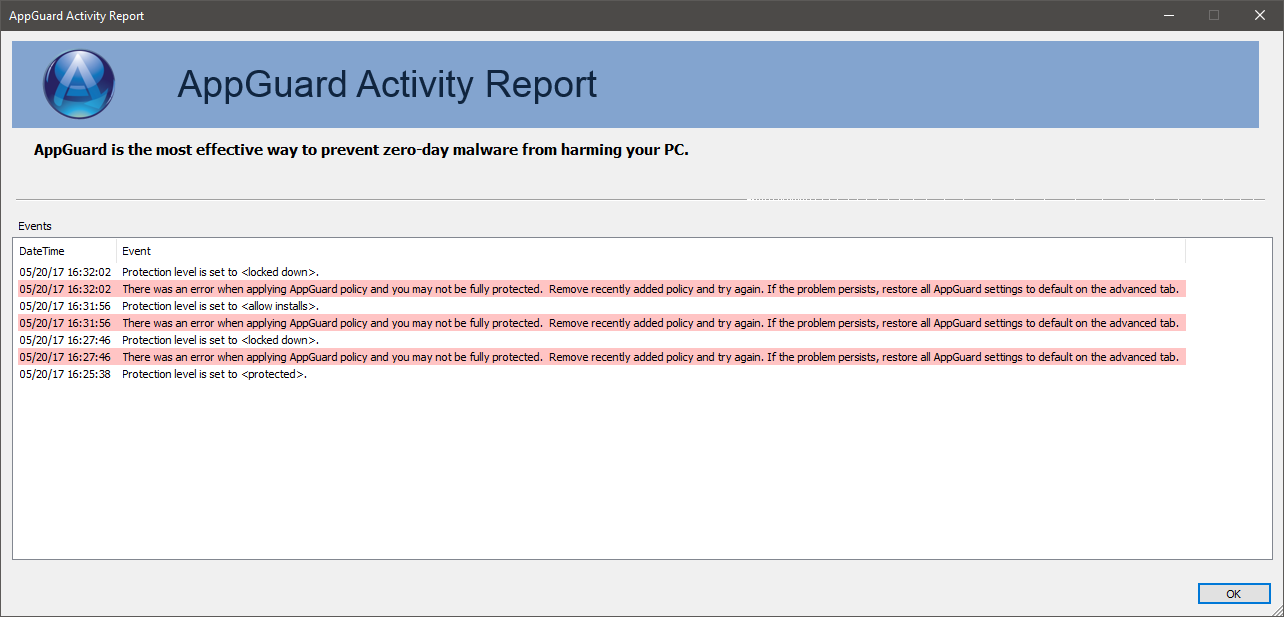
Oddily, even after getting the AppGuard error when changing the slider (or other settings) it still enables lock down mode (I think?). I have the padlock AppGuard icon in system try.
Or not (?):
D
Deleted member 178
Thread author
remove the special characters to see, because AG doesn't support paths with them.Oh just saw you mentioned folders too. I have some folders like this on my D: drive:
# Paid - CCleaner
D
Deleted member 178
Thread author
D
Deleted member 178
Thread author
Didn't make a difference. Would a "-" cause an issue? Like:
TO READ - KINDLE
Guess I should ask, what is considered a special character for AppGuard?
try without the " - "
D
Deleted member 178
Thread author
D
Deleted member 178
Thread author
i see nothing wrong, you didn't add partitions or folders in user-space tab right?
None!
You may also like...
-
 On Sale! Microsoft 365 Family + McAfee Total Protection | 5 Devices | EUR16.05
- Started by Brownie2019
- Replies: 5
-
 App Review iDefender Free (Presentation & Reviews)
- Started by Shadowra
- Replies: 14
-
New Update ExpressVPN with its Lightway Turbo and Surfshark with 100Gbps servers
- Started by HarborFront
- Replies: 6
-
App Review AppGuard vs CyberLock
- Started by Shadowra
- Replies: 71
-
