Open MalwareTips in Safari and tap Share. You may need to open the Page Menu first.
Choose Add to Home Screen. If it is not listed, use Edit Actions to add it.
Keep Open as Web App enabled if shown, then tap Add.
Android
Open MalwareTips in Chrome or another browser that supports app installation.
Open the browser menu and look for Install app, Install and create shortcut, or Add to Home screen.
Choose Install and confirm. Wording varies by browser.
Desktop
Chrome: use the install icon in the address bar, or the menu under Cast, save and share.
Edge: open the menu, then More tools, Apps and Install this site as an app.
Safari on Mac: choose Share or File, then Add to Dock. Firefox on Windows: look for the web apps button in the address bar.
If you cannot find an install option, update your browser or use its bookmark option to keep MalwareTips close.
Keep up with your conversations
After installation, open the app and sign in. Enable push notifications in Preferences if you want alerts. On iPhone and iPad, push requires a Home Screen web app and iOS or iPadOS 16.4 or later.
The default settings of AdGuard for Windows are designed to provide good protection out-of-the-box. However, you can customize them according to your needs. For advanced users, there are many settings to tweak, but for most users, the default settings should suffice.
should be fine with the defaults, but i always change some settings for myself
- filterlists : i enable adguards url tracking protection as on default settings its not enabled
- stealth mode: i tend to use maximium protection + block etags
- dns : i always choose my favorite dns and use either dnscrypt or doh ( when using doh, i always enable encrypted hello client from advanced settings)
Based on my personal user experience,
To avoid slow downs while browsing, you should never add too much additional filters by Adguard nor from 3rd party maintainers.
Better don't play around with most of advanced settings which are partially described/explained here: Advanced (low-level) Settings guide | AdGuard Knowledge Base
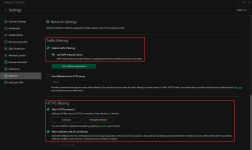
Of course, you need that enabled otherwise Adguard doesn't work to scan and hide/remove ads on all websites with HTTPS.
Traffic Filtering is mainly for the ability to filter traffic systemwide on Windows and even for other supported 3rd-party apps.
Of course, you need that enabled otherwise Adguard doesn't work to scan and hide/remove ads on all websites with HTTPS.
Traffic Filtering is mainly for the ability to filter traffic systemwide on Windows and even for other supported 3rd-party apps.