
Troubleshoot Avast blocking applications from starting since update

Atlas147

Level 30
Thread author
Verified
Honorary Member
Top Poster
Content Creator
Well-known
Forum Veteran
Jul 28, 2014
1,989
8,250
2,889
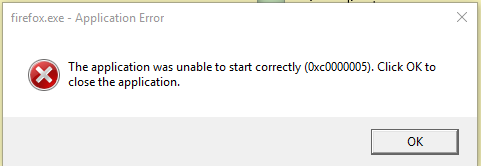
This dialog box comes up whenever Avast shields are all activated but not when I down all the shields.

Already posted in their forums, but I just wanted to see if anyone here is experiencing the same issue?
upload_2017-2-11_17-36-56.png
 
since installing this new version of Avast, I noticed that my daily backup jobs in macrium reflect have not been running...

Go to the Macrium folder and execute the processes (update). It's to check if Hardened Mode is blocking the Macrium update process before the active desktop. If it is, you will get a Hardened Mode alert upon execution. It's just a check to eliminate Hardened Mode as a suspect.
 
Upvote 0
Go to the Macrium folder and execute the processes (update). It's to check if Hardened Mode is blocking the Macrium update process before the active desktop. If it is, you will get a Hardened Mode alert upon execution. It's just a check to eliminate Hardened Mode as a suspect.
thanks
I can run all my backup jobs manually, I already trained hardened mode for that.
It's the automatic run that is the issue
 
  • Like
Reactions: Evjl's Rain
Upvote 0
has anybody got to the bottom of this issue of program blocking?
What happens if you put the HIPS down one level -- does that fix it? I noticed in the previous version that setting the HIPS too high would prevent my backups from running.

I would give it a try but I don't have AVAST installed right now on my main machine...
 
  • Like
Reactions: Evjl's Rain
Upvote 0
has anybody got to the bottom of this issue of program blocking?
What happens if you put the HIPS down one level -- does that fix it? I noticed in the previous version that setting the HIPS too high would prevent my backups from running.

I would give it a try but I don't have AVAST installed right now on my main machine...
avast 2017 has removed HIPS option, replaced by Behavior Shield
I have no problem with random program blocking or at least it blocks with a notification.

you can whitelist your backup programs as there is no point for avast to monitor or scan them => which may slow down the process and potentially cause some unknown problems
 
Upvote 0