Serious Discussion AVG free antivirus potential conflict

Avast/AVG's Firewall is often a bit too aggressive. Something went wrong I guess after you switched to ask mode.
Setting firewall to ask modeusually cause issues with most AV products.
It's better to put certain critical exe to ask/block mode instead. For example, powershell.exe, curl.exe, and more since they can be used by malware.
The same mode work flawlessly with simplewall and Windows firewall control; shame on Avast-AVG 😏


Why do other AVs write their signatures where?
What is better that K or other AVs do than B when it comes to SSDs?
K and Avast does not create a backup copy of whole definitions with each definitions udpate as B do.
B do that to revert to the previous version in case update has issues and definitions are corrupted; this good for B, but not for my SSD 🙄
 
Last edited by a moderator:
Very interesting this. I didn't know that.
However in my opinion Avast Free has great protection overall and is light on PC resources.
Avast-AVG free has the advantage of more complete suite by including firewall and controlled folder access (ransomware protection) with less intrusive https scanning compared to K and B; however, its behavioral protection is less polished compared to K and B.
You will not find a perfect solution; each one is a mix of plus and minus
 
If you mainly use browsers, concentrate on strengthen your browsers instead of changing your AV, MD more than sufficient for home users these days, and our expert @Shadowra's tests prove that, here is a comparison of the free AVs:
 
If you mainly use browsers, concentrate on strengthen your browsers instead of changing your AV, MD more than sufficient for home users these days, and our expert @Shadowra's tests prove that, here is a comparison of the free AVs:
I do trust MD; just as other products with more useful features are available, why not using, especially if will not impact the performance negatively.
 
Past week avast and AVG tested with the same glitches and my favorite online game sometimes freezes and problems connecting, thats a no go for me.
I have no problems with BD free, only it has become very heavy ... but with 16GB Ram and a ssd i don't feel to much slowdown.
I use Bitdefender Plus with a laptop of more than 15 years with SSD and 4GB of RAM and I do not notice any major slowdown. I do not use it for gaming obviously but in normal use (internet, office, etc ...) I do not notice any slowdown.
I can't understand why many are "scared" when they see a higher RAM usage compared to other AVs.
@Nunzio_77 is correct. AVs adapt to use system resources efficiently. When I had 8GB RAM using MS Defender on this laptop, my average RAM usage was ~ 40% with 2 browsers running. Since I upgraded to 16GB RAM I see exactly the same overall, average numbers. Antivirus will adapt and use what it finds to be optimal.

The important question really is "Is performance affected by (insert name) antivirus?"

As to the glitches that OP encountered, I'm with @Oldie1950: the offending program is immediately removed and replaced with one that is problem-free.
 
@Nunzio_77 is correct. AVs adapt to use system resources efficiently. When I had 8GB RAM using MS Defender on this laptop, my average RAM usage was ~ 40% with 2 browsers running. Since I upgraded to 16GB RAM I see exactly the same overall, average numbers. Antivirus will adapt and use what it finds to be optimal.

The important question really is "Is performance affected by (insert name) antivirus?"
I agree because in my opinion a PC is slowed down if the CPU usage is high, and I only notice this when Bitdefender runs a scan/clean/remove malware or during the signature update (which lasts 1 or 2 minutes max on my PC). But even on these occasions my PC does not "suffer much" despite having an old Intel Core Duo 2.
So in my opinion seeing the RAM used by the Bitdefender process that reaches even 300 MB or 400 MB (on some PCs not mine) creates anxiety and you think that the PC is slowing down when in reality it still has a few GB of RAM available...
 
  • Like
Reactions: Sorrento
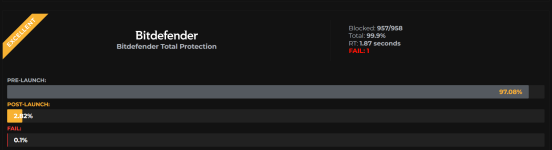
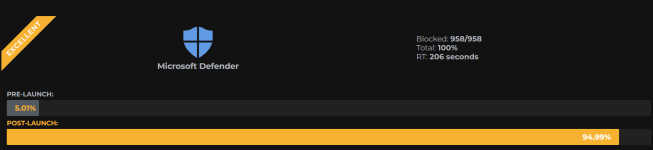
Look at the results of this test:


Look at the intervention time to stop a malicious action on the PC. The intervention time is also essential so that no fundamental damage is done to the PC.

So the use of RAM certainly makes the intervention of an AV faster in case it recognizes an anomalous behavior on the system or finds a correspondence in the signatures.
 
Look at the results of this test:


Look at the intervention time to stop a malicious action on the PC. The intervention time is also essential so that no fundamental damage is done to the PC.

So the use of RAM certainly makes the intervention of an AV faster in case it recognizes an anomalous behavior on the system or finds a correspondence in the signatures.
Faster but missing; even the slow MD did better.
Reminds me of the tortoise and the hare story.


2025-05-12_17-15-16.png
2025-05-12_17-15-56.png
 
Last edited by a moderator:
  • Wow
Reactions: Sorrento
I agree because in my opinion a PC is slowed down if the CPU usage is high, and I only notice this when Bitdefender runs a scan/clean/remove malware or during the signature update (which lasts 1 or 2 minutes max on my PC). But even on these occasions my PC does not "suffer much" despite having an old Intel Core Duo 2.
So in my opinion seeing the RAM used by the Bitdefender process that reaches even 300 MB or 400 MB (on some PCs not mine) creates anxiety and you think that the PC is slowing down when in reality it still has a few GB of RAM available...

Latest version of Bitdefender​

  • The latest version of Bitdefender security solutions for Windows is 27.0.50.256, released on May 13, 2025.
Product Update Changelog
  • Integrated new version of Safepay
  • Integrated SecurePass browser extension version 1.1.17 into Safepay
  • Fixed login issues on RBC Bank when using Safepay
  • Fixed issue where Advanced Threat Defense affected read/write performance
  • Bitdefender can now be installed alongside other security solutions
 
Last edited by a moderator:

Latest version of Bitdefender​

  • The latest version of Bitdefender security solutions for Windows is 27.0.50.256, released on May 13, 2025.
Product Update Changelog

  • Integrated new version of Safepay
  • Integrated SecurePass browser extension version 1.1.17 into Safepay
  • Fixed login issues on RBC Bank when using Safepay
  • Fixed issue where Advanced Threat Defense affected read/write performance
  • Bitdefender can now be installed alongside other security solutions
"Bitdefender can now be installed alongside other security solutions" is luring to exit K after disabling its autostart and install B 🙃
 
  • Like
Reactions: Sorrento