

The MalwareTips app
Your community, one tap away.
Open MalwareTips from your Home Screen or desktop. Follow discussions, find answers and pick up where you left off.
- Home Screen access
- Optional push alerts
- Your community
You're ready to explore.Explore what's new
Installation instructions
iPhone & iPad
- Open MalwareTips in Safari and tap Share. You may need to open the Page Menu first.
- Choose Add to Home Screen. If it is not listed, use Edit Actions to add it.
- Keep Open as Web App enabled if shown, then tap Add.
Android
- Open MalwareTips in Chrome or another browser that supports app installation.
- Open the browser menu and look for Install app, Install and create shortcut, or Add to Home screen.
- Choose Install and confirm. Wording varies by browser.
Desktop
- Chrome: use the install icon in the address bar, or the menu under Cast, save and share.
- Edge: open the menu, then More tools, Apps and Install this site as an app.
- Safari on Mac: choose Share or File, then Add to Dock. Firefox on Windows: look for the web apps button in the address bar.
If you cannot find an install option, update your browser or use its bookmark option to keep MalwareTips close.
Keep up with your conversations
After installation, open the app and sign in. Enable push notifications in Preferences if you want alerts. On iPhone and iPad, push requires a Home Screen web app and iOS or iPadOS 16.4 or later.
Sign in to manage notificationsInstallation is optional. Your notification settings stay under your control.
You are using an out of date browser. It may not display this or other websites correctly.
You should upgrade or use an alternative browser.
You should upgrade or use an alternative browser.
Advice Request Best extensions for rank sites?
-
 Thread starter
Chri.Mi
Thread starter
Chri.Mi
- Start date
- 8 Replies
- 2,711 Views
Share practical recommendations that address the author's needs.

I'm using Netcraft currently.
Bitdefender Trafficlight - TrafficLight | Chrome Web Store
Web of Trust - WOT Web of Trust, Website Reputation Ratings | Chrome Web Store
Norton Safe Search - Norton Safe Search | Chrome Web Store
McAfee Web Advisor - McAfee® WebAdvisor | Microsoft Edge Addons
Avast Online Security - Avast Online Security | Chrome Web Store
AVG Online Security - AVG Online Security | Chrome Web Store
Avira SafeSearch Plus - Avira SafeSearch Plus | Chrome Web Store
Emsisoft Browser Security - Emsisoft Browser Security | Chrome Web Store
Malwarebytes Browser Security - Malwarebytes Browser Guard | Chrome Web Store
Dr. Web Link Checker - Dr.Web Link Checker | Chrome Web Store
** Not in any particular order **
Web of Trust - WOT Web of Trust, Website Reputation Ratings | Chrome Web Store
Norton Safe Search - Norton Safe Search | Chrome Web Store
McAfee Web Advisor - McAfee® WebAdvisor | Microsoft Edge Addons
Avast Online Security - Avast Online Security | Chrome Web Store
AVG Online Security - AVG Online Security | Chrome Web Store
Avira SafeSearch Plus - Avira SafeSearch Plus | Chrome Web Store
Emsisoft Browser Security - Emsisoft Browser Security | Chrome Web Store
Malwarebytes Browser Security - Malwarebytes Browser Guard | Chrome Web Store
Dr. Web Link Checker - Dr.Web Link Checker | Chrome Web Store
** Not in any particular order **

any preference?Bitdefender Trafficlight - TrafficLight | Chrome Web Store
Web of Trust - WOT Web of Trust, Website Reputation Ratings | Chrome Web Store
Norton Safe Search - Norton Safe Search | Chrome Web Store
McAfee Web Advisor - McAfee® WebAdvisor | Microsoft Edge Addons
Avast Online Security - Avast Online Security | Chrome Web Store
AVG Online Security - AVG Online Security | Chrome Web Store
Avira SafeSearch Plus - Avira SafeSearch Plus | Chrome Web Store
Emsisoft Browser Security - Emsisoft Browser Security | Chrome Web Store
Malwarebytes Browser Security - Malwarebytes Browser Guard | Chrome Web Store
Dr. Web Link Checker - Dr.Web Link Checker | Chrome Web Store
** Not in any particular order **

Bitdefender has an option to check search results, similar to McAfee. I prefer BD since it works with any search engine, unlike McAfee, but I don't use it.any preference?


Setup PCPC setup
One thing to note, if you are worried about privacy, is that the only two I'm aware of that don't send full plain text urls back home (just like smartscreen) are Emsisoft and Malwarebytes. If you trust the company and/or prefer the trade off for security over privacy Bitdefender is probably the way to go, but you have many options. Malwarebytes performs similarly, but slows browsing down more and is more prone to false positives.
No preferences.any preference?
For example: Visiting a dubious site. Site is 'harmless to view'.
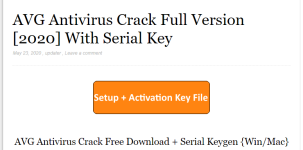
Until you go click-happy mode.
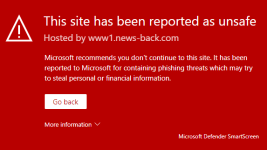
Recently browsing
Members who viewed this thread in the last 5 minutes


