Best free and light antivirus?

  • Thread starter Thread starter Deleted Member 333v73x
  • Start date Start date
D

Deleted Member 333v73x

Thread author
Hello everyone, I am quite annoyed with Avast because of the issues I have been facing and WD is just not enough for me, struggling to think of good light and free AVs, can you please make a list of some good ones please? Thank you in advance :)

P.S: Don't want a BETA AV or untrustworthy.
 
Last edited by a moderator:
The word free is bound to have some limitation in one way or another. How about the thoughts of trying BD free version. I have MSE/WD and MBAM free and still didn't get infected. I use Kaspersky rescue disk 10 if suspected of infection.
 
Panda Free Antivirus (cloud AV, one of the lightest AVs in my opinion)
Avira Free Antivirus
360 Total Security (multi-engine cloud AV)
Bitdefender Antivirus Free Edition


P.S. Regarding CIS or CFW installation:
Open the installer (cis_installer.exe / cfw_installer.exe / cav_installer.exe) with an archive program like 7-zip then navigate to cfw_installer.exe\cis\download\installs\xml_binaries\cis\ and then extra either cis_setup_x64.msi (if you have a 64bit system) or cis_setup_x86.msi (if you have a 32bit system)
Please note that this seems to extract the cis installer regardless of which product you downloaded, so for example if you downloaded Comodo Firewall then using the method above it will extract the installer for Comodo Internet Security.
After that is done then just run the extracted installer.
If you want Comodo Firewall (i.e without Comodo AV) then you can do the above then use control panel to change the installation and remove Comodo Antivirus.
SOURCE: Windows 10 TP no longer allows CIS 8.2 to be installed - Install / Setup / Configuration Help - CIS
 
My vote goes for Qihoo 360 TS, low system impact, strong cloud protection (if you wish, accompanied by Avira + BD engine for offline protection, taking more RAM), system cleaning tool (no need to use it, but implemented @ Total Security), quite often updated with new features and bug fixes. Fast reaction on new threats, polite and fast customer service. Nice and clear UI.
 
My vote goes for Qihoo 360 TS, low system impact, strong cloud protection (if you wish, accompanied by Avira + BD engine for offline protection, taking more RAM), system cleaning tool (no need to use it, but implemented @ Total Security), quite often updated with new features and bug fixes. Fast reaction on new threats, polite and fast customer service. Nice and clear UI.
What is resource usage and if I did choose one it would be 360 Essentials, no need for cleanup :)

Will WD automatically disable itself?
 
Last edited by a moderator:
What is resource usage and if I did choose one it would be 360 Essentials, no need for cleanup :)
Hi @Anti-Malware Reviewer, yes, 360 TSE is "just" AV, but keep in mind that Qihoo treats that one quite shabby, refer to the version history compared to TS. That's why I made the move to 360 Total Security.

Version History | 360 Total Security Essential

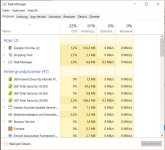
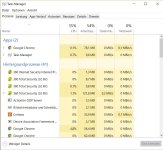
Attached is my RAM usage, next to no difference with Avira + BD activated (Cloud only is activated since yesterday, there have been some system restarts between - shutdown or Windows Update). Had a screenshot floating around here, can't find it, RAM usage all engines ~200 MB. Give me a second for a restart.

Seems to decrease with all engines enabled, but logging in felt to be a few seconds longer o_O
 

Attachments

  • Qihoo Cloud only.JPG
    Qihoo Cloud only.JPG
    95.5 KB · Views: 948
  • Qihoo All Engines.JPG
    Qihoo All Engines.JPG
    94.3 KB · Views: 962
Last edited:
360 looks good but Avira is decent also... what is the resource usage for Avira?

CIS will now run, what is the resource usage of that and will it block malicious websites in MS Edge?
 
Last edited by a moderator: